WC to eBay Item CompatibilityWC to eBay Item Compatibility
Buy Now
Base Plugin Docs
View Demo
  • Getting Started

    • Introduction
    • Installation
  • Setup & Configuration

    • Configuration
  • Workflow

    • Customer Frontend
  • Extensions

    • WooCommerce eBay Connector
    • eBay Item Compatibility for WooCommerce
    • WCFM Marketplace Shopify Connector
    • WooCommerce Shopify Connector
    • WooCommerce Marketplace Shopify Connector
    • WooCommerce Icecat Extension
    • WooCommerce QuickBook Connector
Buy Now
Base Plugin Docs
View Demo
  • Getting Started

    • Introduction
    • Installation
  • Setup & Configuration

    • Configuration
  • Workflow

    • Customer Frontend
  • Extensions

    • WooCommerce eBay Connector
    • eBay Item Compatibility for WooCommerce
    • WCFM Marketplace Shopify Connector
    • WooCommerce Shopify Connector
    • WooCommerce Marketplace Shopify Connector
    • WooCommerce Icecat Extension
    • WooCommerce QuickBook Connector
  • Getting Started

    • Introduction
    • Installation
  • Setup & Configuration

    • Configuration
  • Workflow

    • Customer Frontend

Installation

The user will get a zip file that needs to be uploaded in the Add New menu option in the WordPress admin panel.

So, for this login to WordPress Admin Panel and in the Dashboard hover your mouse over the Plugins menu option and select the Add New option.

Add New

After this, the user will see an option on the top of the page that is Upload Plugin, click the option to upload the zip file.

Upload Plugin

On clicking the Upload Plugin option, the user will see a Choose File button. Thus, click on the button to browse for the zip file as per the image below.

Choose File

After browsing the file, click on the Install Now button so as to install the plugin as per the snapshot.
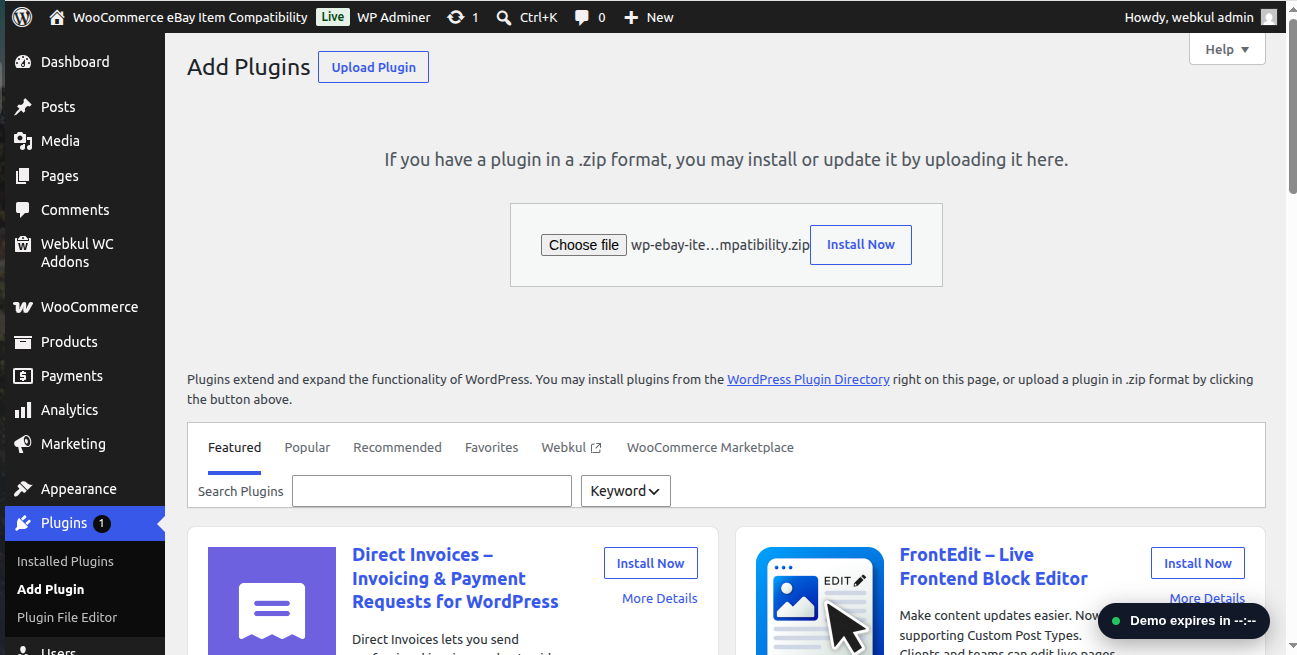
Install Now

Once the user installs the plugin, a message “Plugin installed successfully” displays and an Activate Plugin is visible to activate the plugin.

So, the user needs to click on the Activate Plugin button to activate the plugin.

Activate Plugin

Note

Check out how to Activate the WooCommerce Plugin through the purchase code and get updates on Webkul Modules directly on the Plugins page.

Prev
Introduction
Next
Configuration