
Coupon Barcodes & Vouchers
Generate and print physical coupon vouchers with barcodes that store cashiers or customers can scan at checkout terminals to apply WooCommerce discount rules instantly.
1. How Coupon Barcodes Work
WooCommerce coupons are code-based discounts. By representing these coupon codes as scannable barcodes (e.g., Code 39 or QR codes), you can distribute physical discount cards, promotional flyer stickers, or catalog vouchers.
When scanned at a retail checkout register or online cart inputs, the system reads the barcode code string and applies the discount rules dynamically.
2. Printing Coupon Vouchers
To print coupon labels or stickers:
- Go to Marketing > Coupons in your WordPress dashboard.
- Select the coupon rules you want to generate physical stickers for.
- Click the checkbox next to the coupons.
- From the Bulk Actions dropdown, select Print Coupon Labels and click Apply.
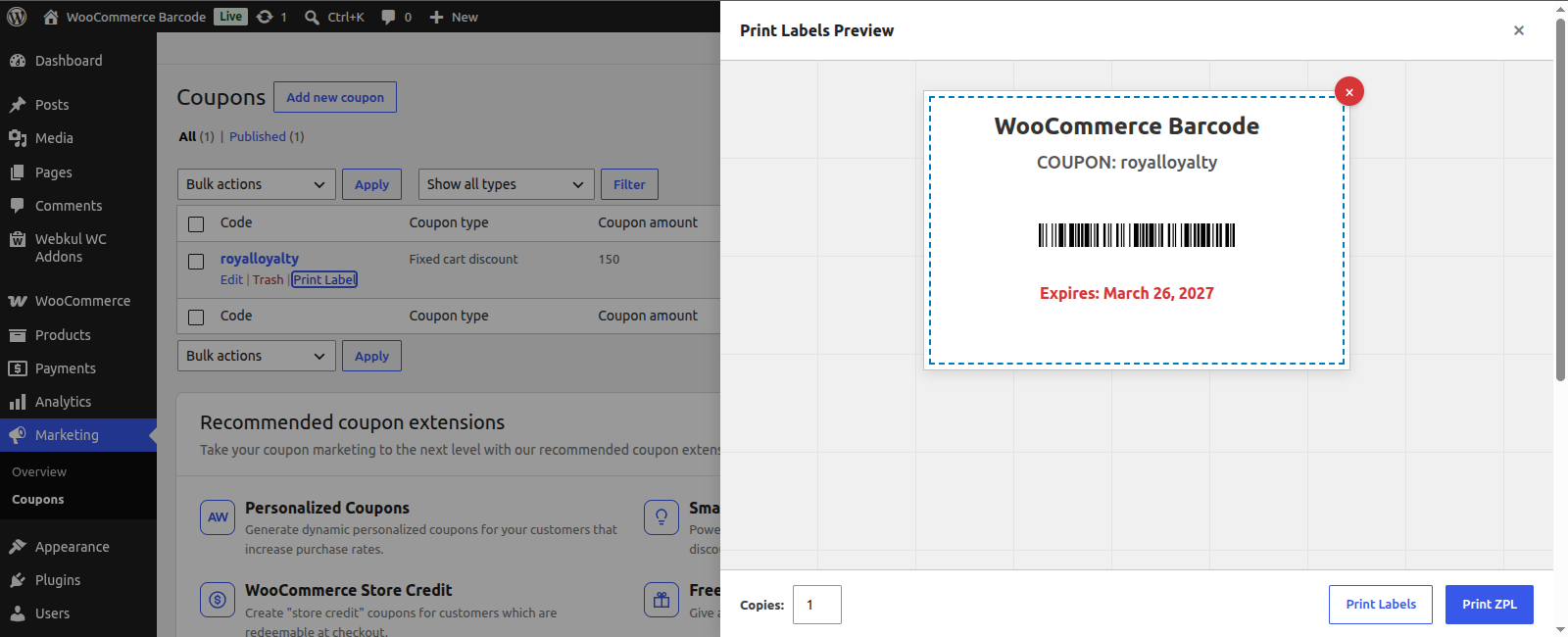
- In the printing popup:
- Select a layout template tailored for coupons (e.g., displaying the Discount Amount, Expiry Date, and Barcode).
- Specify the number of voucher stickers to print.
- Send the payload to the print server to print coupon tags in bulk.
3. Cart Checkout Application
Apply discounts instantly at POS lanes or online checkouts:
- In-Store Checkout: When a shopper presents a physical coupon sticker, the cashier clicks the coupon input field on the cashier register interface (or POS dashboard).
- Scan Code: The cashier scans the coupon barcode with a handheld barcode reader.
- Automated Application: The coupon code (e.g.,
SUMMER2026) is immediately populated, and the WooCommerce cart updates with the corresponding discount amount.
4. Designing Coupon Layouts
Use the interactive label creator to build beautiful vouchers:
- Coupon Value Block: Automatically pulls discount parameters (e.g.,
20% Offor$10 Flat Rate). - Expiry Date: Displays the date when the coupon expires.
- Store Branding: Add your brand logo image block to make the coupon look premium and professional.
[!TIP] Promotional Campaigns: Generate unique coupon codes for newsletter signups. Use the bulk printer to print flyers, and scan them at store entrances to track the offline conversion rates of your digital marketing campaigns.