
WooCommerce eBay ConnectorWooCommerce eBay Connector
Buy Now
View Demo
  • WooCommerce eBay Connector

    • Introduction
    • Features
    • Installation
    • eBay Account Setup
    • Configuration
    • Product Listing
    • Order Management
    • Category Mapping
    • eBay Account Setup
  • Help

    • FAQs
    • Support
    • eBay Item Compatibility for WooCommerce
Buy Now
View Demo
  • WooCommerce eBay Connector

    • Introduction
    • Features
    • Installation
    • eBay Account Setup
    • Configuration
    • Product Listing
    • Order Management
    • Category Mapping
    • eBay Account Setup
  • Help

    • FAQs
    • Support
    • eBay Item Compatibility for WooCommerce
  • Getting Started

    • Introduction – WooCommerce eBay Connector
    • Features – WooCommerce eBay Connector
    • Installation – WooCommerce eBay Connector
  • Configuration

    • eBay Account Setup – WooCommerce eBay Connector
    • Configuration – WooCommerce eBay Connector
    • Category Mapping – WooCommerce eBay Connector
  • Operations

    • Product Listing – WooCommerce eBay Connector
    • How to Export Products to eBay Store
    • Order Management – WooCommerce eBay Connector
  • Help & Support

    • FAQs – WooCommerce eBay Connector
    • Support – WooCommerce eBay Connector

Order Management – WooCommerce eBay Connector

This guide explains how to import eBay orders into your WooCommerce store.


Import Orders from eBay

The admin can import orders from the eBay store to the WooCommerce store.

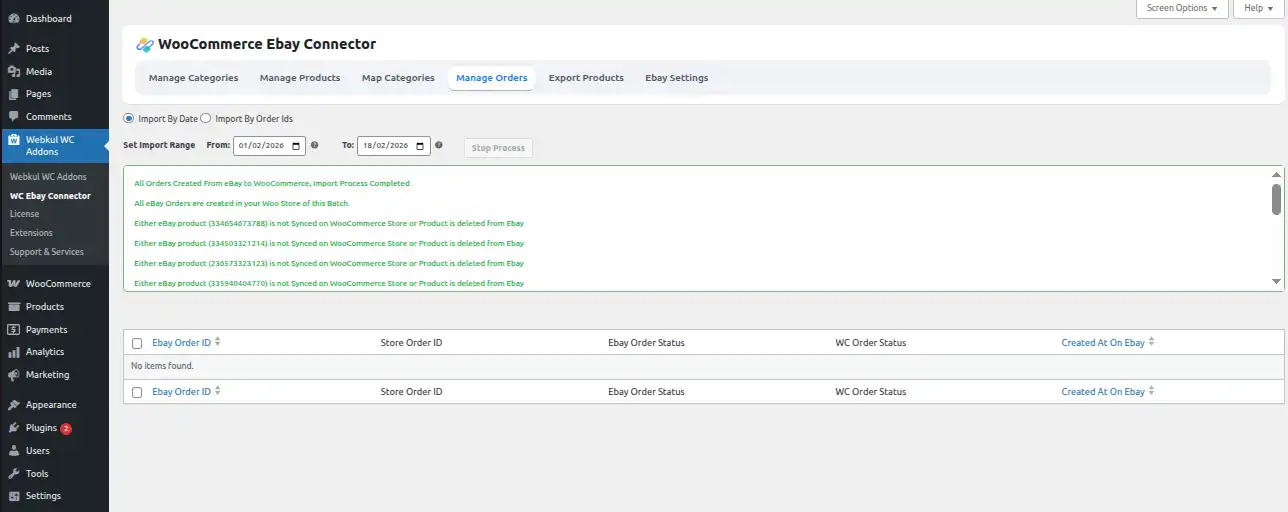
Navigate to WC eBay Connector → Manage Orders to see the import tab.
screenshots

Steps to Import Orders

  1. Click Import Orders from eBay.
  2. Select Start Time From and Start Time To to define the date range.
  3. Click the Start button to import the orders.

The orders will be imported from eBay into your WooCommerce store.


Order Source Tracking

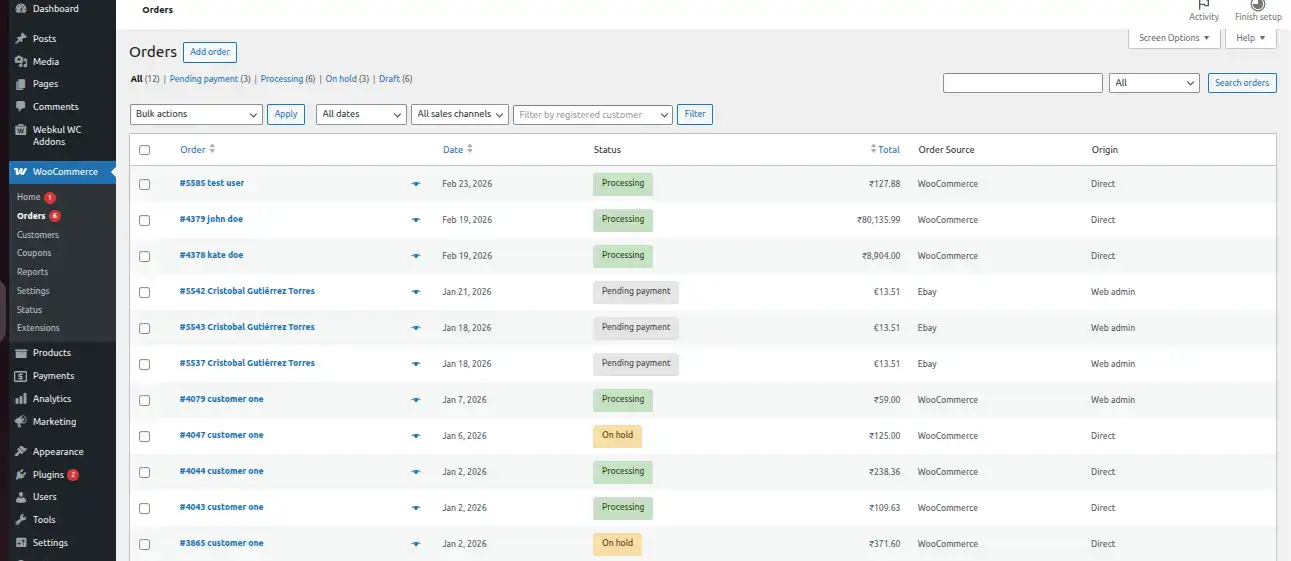
The WooCommerce Orders list shows an Order Source column to identify if orders come from WooCommerce or eBay, helping admins track orders efficiently.
screenshots


Auto Order Import

You can configure automatic order import in the plugin settings:

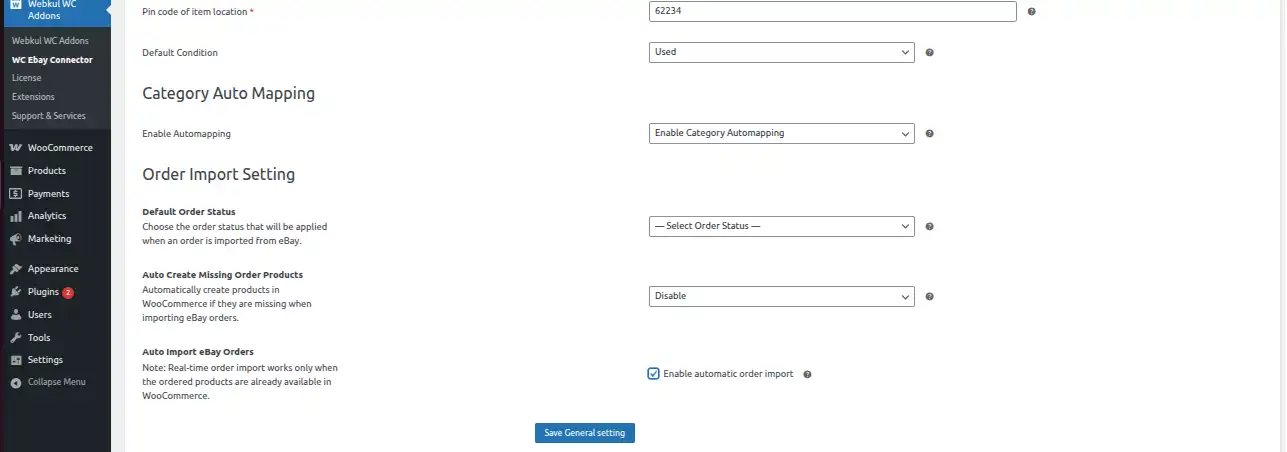
  • Navigate to WC eBay Connector → eBay Settings → General Settings
  • Enable Auto Order Import
  • The auto import executes every 10 minutes and retrieves orders placed within the last 15 minutes
screenshots

Note: All products must be imported for real-time order import to work correctly.


Order Status

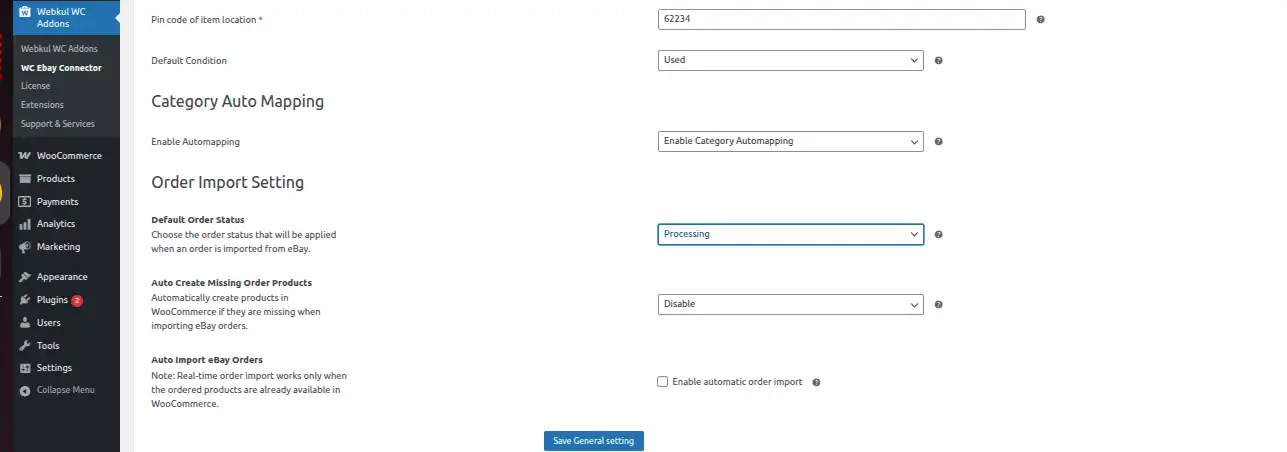
You can set the default order status for orders imported from eBay:

  • Navigate to eBay Settings → General Settings
  • Set eBay Imported Order Status to your preferred default status
screenshots


Last Updated: 2/26/26, 7:32 PM
Prev
How to Export Products to eBay Store