
Node.js Socket Server & Security Setup
Physical Globalpay credit/debit card terminals communicate over low-latency TCP socket channels. To enable instant data transmission between the cashier's web browser interface and physical hardware, the plugin mounts a dedicated WebSocket bridge script into the native WooCommerce Point of Sale Node Server.
Accessing Node Server Configuration
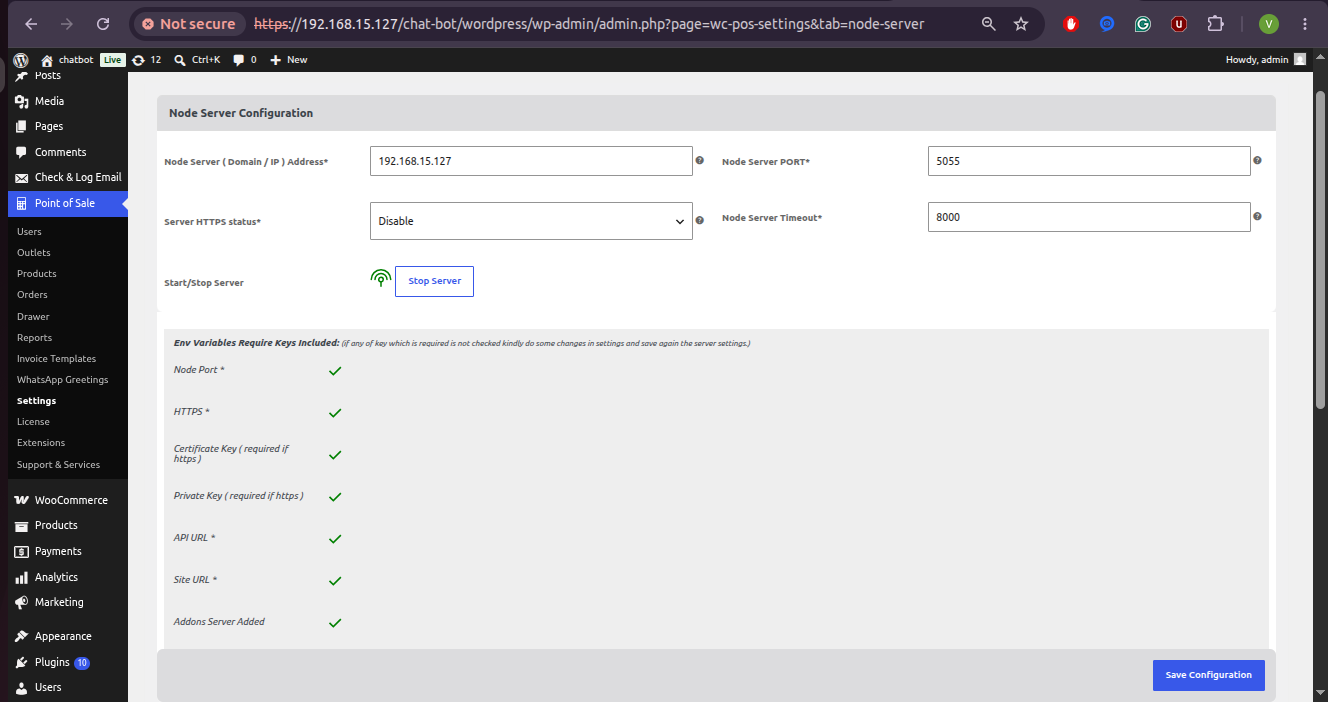
Navigate to Point of Sale → Settings → Node Server in your WordPress administration sidebar.
Configuration Settings
Core Server Settings
- Node Server (Domain / IP) Address: The domain name or IP address (e.g.
192.168.15.127) of the server hosting the socket application. - Node Server PORT: The port number allocated for socket bridge listening (e.g.
5055or8081). - Server HTTPS Status: Select Enable or Disable SSL/TLS encryption.
Important: If your WordPress site uses HTTPS (
https://), you MUST set Server HTTPS Status to Enable and provide valid SSL certificate keys to prevent browser mixed-content security blocks. - Node Server Timeout: Connection retry timeout in milliseconds (e.g.
8000ms). - Start/Stop Server Action: Quick action control button (Start Server / Stop Server) to launch or stop the Node server application directly from WordPress.
SSL Certificates Setup (for HTTPS Stores)
When HTTPS is enabled, scroll down to the Node Server SSL Keys (If Https) section:
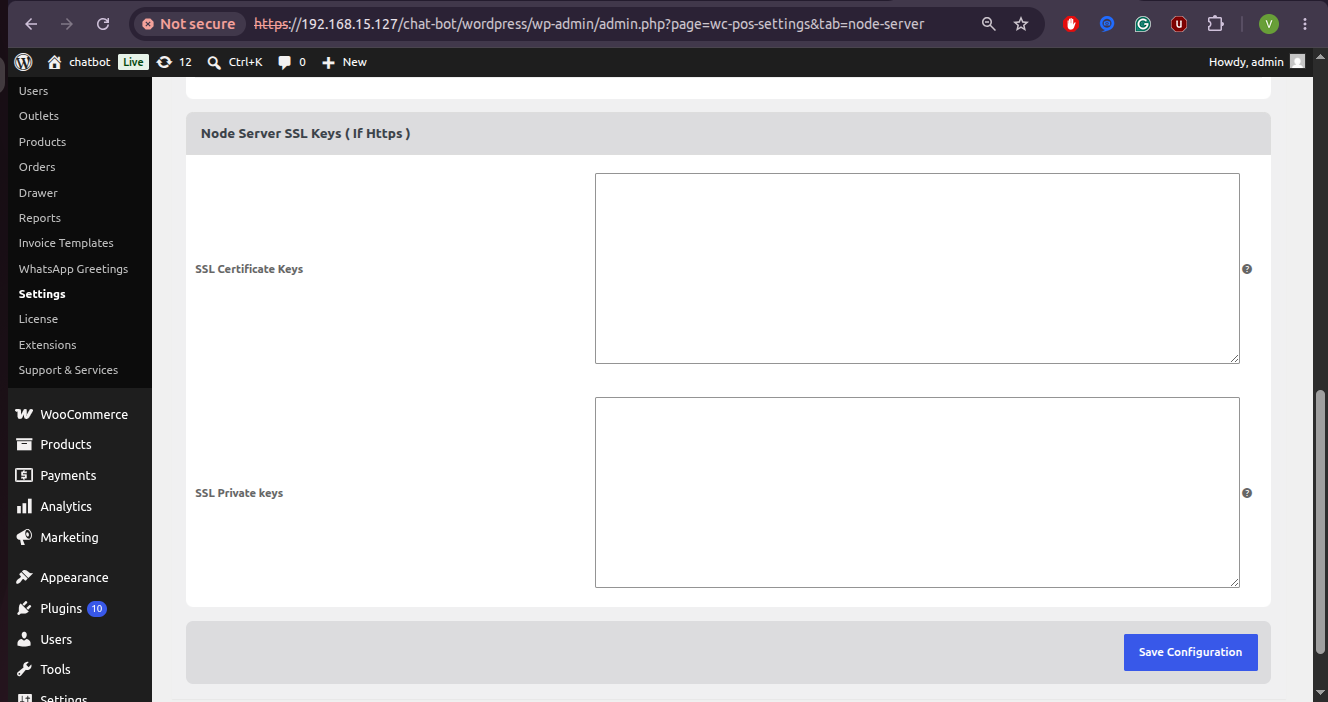
- SSL Certificate Keys: Paste the raw PEM-encoded certificate content (
-----BEGIN CERTIFICATE-----...). - SSL Private Keys: Paste the raw PEM-encoded private key content (
-----BEGIN PRIVATE KEY-----...).
Environment Health Checklist
The Node Server configuration screen provides real-time health validation checkmarks (✓) confirming environment readiness:
| Indicator | Description | Readiness |
|---|---|---|
| Node Port | Validates port assignment availability | ✓ |
| HTTPS | Confirms SSL protocol state configuration | ✓ |
| Certificate Key | Validates SSL public certificate format and file path | ✓ |
| Private Key | Validates SSL private key format and file path | ✓ |
| API URL | Verifies WordPress REST API endpoint routing | ✓ |
| Site URL | Confirms primary store domain URI configuration | ✓ |
| Addons Server Added | Confirms Globalpay socket bridge extension registration | ✓ |
Socket Server Room Isolation & Event Protocol
The Node socket bridge (server/src/index.js) maintains isolated socket rooms for cashier sessions to prevent cross-talk between multiple store outlets:
// Room Name Generation
POS Room:    POS:wkposGlobalPayterminal-{email}-{id}
Mobile Room: MOBILE:wkposGlobalPayterminal-{email}-{id}
Event Protocol Reference
| Event Name | Direction | Description |
|---|---|---|
createGlobalPayPayment | POS → Terminal | Transmits checkout payment payload (baseAmount, invoiceNbr, Order ID) to terminal. |
getMobileGlobalPayPayment | Terminal → POS | Transmits transaction outcome callback (approval/decline) to POS cashier. |
isGlobalPayPOSConnected | Terminal → POS | Polls POS cashier session connection status. |
isGlobalPayConnected | POS → Terminal | Polls payment terminal connection status. |
unexpectedDisconnect | Server → Both | Notifies both clients of unexpected network disconnections and cleans up socket registries. |
Multi-Layer Authentication & Security
1. Bearer JWT Token Verification
- Cashier sessions issue a cryptographically signed Bearer JWT token stored in user cookies.
- Socket connection requests verify tokens against
WKWCPOS_Jwt_Auth::get_instance()->verify_token($token). - Requests lacking a valid token are rejected with an
Invalid authorization tokenexception.
2. Role-Based Access Control
- Restricts REST API endpoints (
/wp-json/pos/v1/...) and socket channel binding strictly to users withPoint of Sale CashierorAdministratorroles.
3. Nonce CSRF Protection
- Critical AJAX actions and state modifications enforce WordPress Nonce verification.