
Category Mapping
Connect your WooCommerce product categories to UnoPim categories. Per-channel, searchable on both sides.
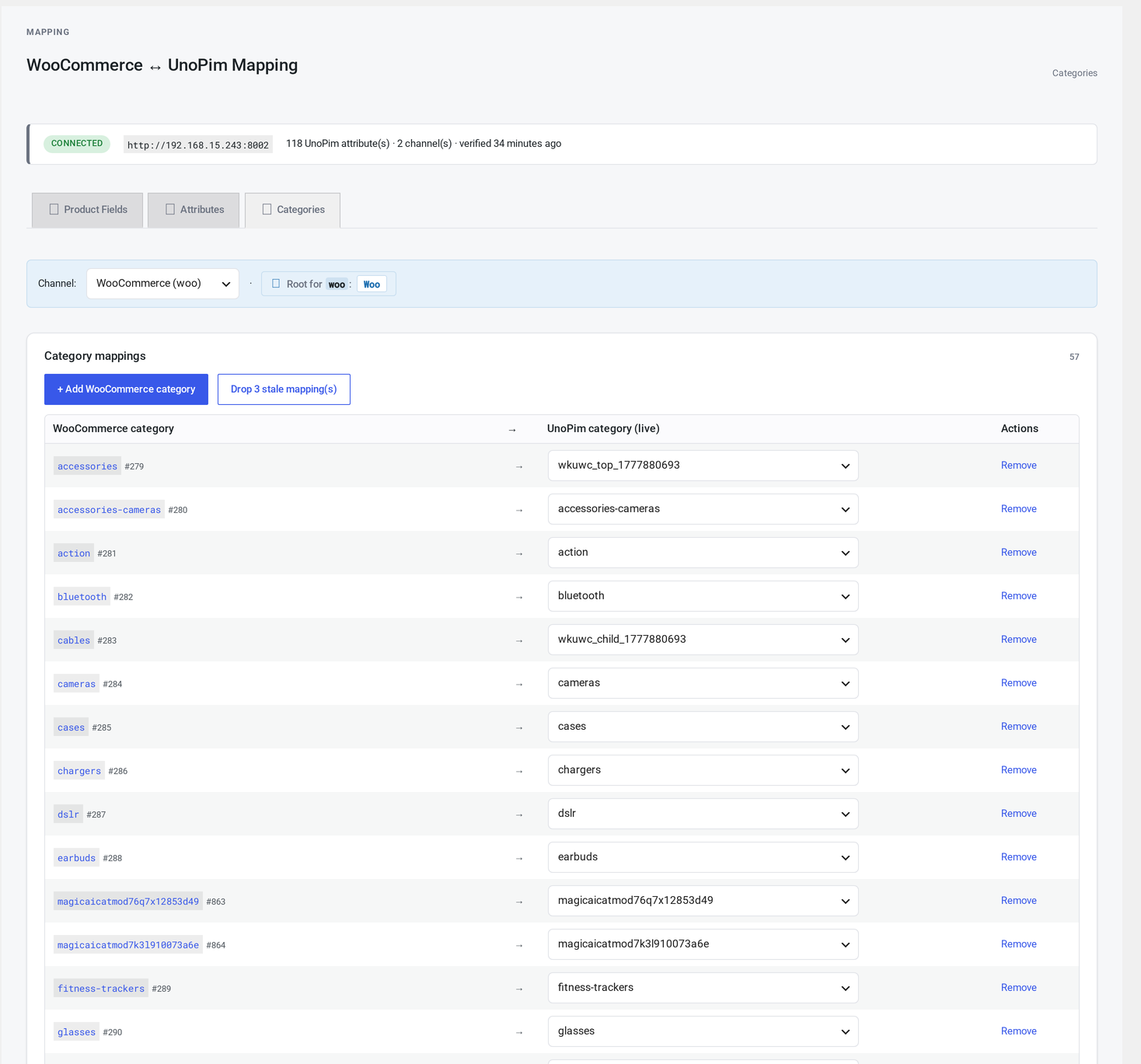
Where it lives
WordPress admin → UnoPim Configuration → Field Mapping → Categories.
Why categories are scoped per channel (not per language)
Different channels often expose different category trees:
webshows the full consumer tree.b2bshows a wholesale-only tree.mobileshows a curated subset.
Categories aren't translated separately in UnoPim — translations are labels under the same category code. So per-channel scope is enough; the language just picks the label at render time.
At a glance
┌─────────────────────────────────────────────────────────────┐
│  Channel: [web ▼]                                           │
│                                                             │
│  ┌──────────────────────────────────┬──────────────────────┐│
│  │ WooCommerce category             │ UnoPim category      ││
│  ├──────────────────────────────────┼──────────────────────┤│
│  │ Apparel                          │ apparel              ││
│  │   T-Shirts                       │ apparel-tshirts      ││
│  │   Hats                           │ apparel-hats         ││
│  │ Electronics                      │ electronics          ││
│  │   Phones                         │ (unmapped)           ││
│  └──────────────────────────────────┴──────────────────────┘│
│                                                             │
│  Save mapping     Clear     Refresh targets                 │
└─────────────────────────────────────────────────────────────┘
The left column shows your WooCommerce category tree (indented by depth). The right column is a live UnoPim category picker.
Editing a row
- Click a UnoPim cell.
- Type three or more characters. Matching UnoPim categories appear.
- Pick a match.
To unmap a category, click the cell and pick the empty option.
What happens to unmapped categories
On pull (UnoPim → WooCommerce)
If a UnoPim category has no mapping, the connector creates a new WooCommerce category automatically. The new category's name comes from the UnoPim category's label in the active language; its slug comes from the UnoPim code.
The new mapping is saved automatically — you can review and adjust it later from this page.
On push (WooCommerce → UnoPim)
If a product is in a WooCommerce category that has no UnoPim mapping, that category is silently dropped from the data sent to UnoPim. The product still pushes, but without that category.
The Logs page records this as an info entry with reason unmapped category. To fix it, come back to this page and map the category.
Save
Click Save mapping.
Refresh targets
Click Refresh targets to re-pull the UnoPim category list.
Use this after:
- Adding categories in UnoPim
- Renaming categories
- Reorganising the UnoPim category tree
Per-channel separation
Each channel has its own mapping. Switching the channel dropdown:
- Saves any pending changes (with a confirm)
- Loads the new channel's mapping
- Repaints the rows
There's no built-in helper to copy a mapping between channels — you'll need to set them up by hand.
Drop stale mappings
A maintenance action: drops mappings that point at a UnoPim category code that no longer exists.
Useful when a UnoPim category was deleted but the WooCommerce category was kept (or vice versa).
How categories work end-to-end
Pull from UnoPim
- The connector reads UnoPim's category list for the active channel.
- For each category:
- If a mapping exists, the matching WooCommerce category is updated (name from the active language, slug from the code, parent from the UnoPim parent if mapped).
- If no mapping exists, a new WooCommerce category is created and a fresh mapping is saved.
- The Logs page records each step.
Push to WooCommerce
When a product is pushed to UnoPim:
- The connector reads the product's WooCommerce categories.
- For each one, it looks up the matching UnoPim category code.
- The codes go into the
categoriesfield of the data sent to UnoPim.
UnoPim deduplicates and stores. If the product was previously in a category not included in this push, UnoPim removes the link.
Troubleshooting
| Symptom | Cause | Fix |
|---|---|---|
| Pull created a duplicate category | A new UnoPim category clashes with an existing WooCommerce category slug | Manually merge or rename one |
| A category appears in WooCommerce but isn't in UnoPim | It's a WooCommerce-only category that was never pulled | Either map it (so push includes it) or leave it unmapped |
| The UnoPim list is incomplete in the picker | The category tree is large enough to hit the search limit | Type more specific search terms |
| Saved mapping doesn't appear after refresh | Browser cache | Hard-reload the page (Ctrl+Shift+R) |
| Push log says "unmapped category" | A WooCommerce category has no UnoPim mapping | Add the mapping here |
The connector also exposes hooks for developers who need to extend it.