
Scheduled Jobs
Where you define recurring sync work that doesn't fit into the per-channel sync interval. The Sync page is for one-off triggers; this page is for ongoing, named, repeatable jobs.
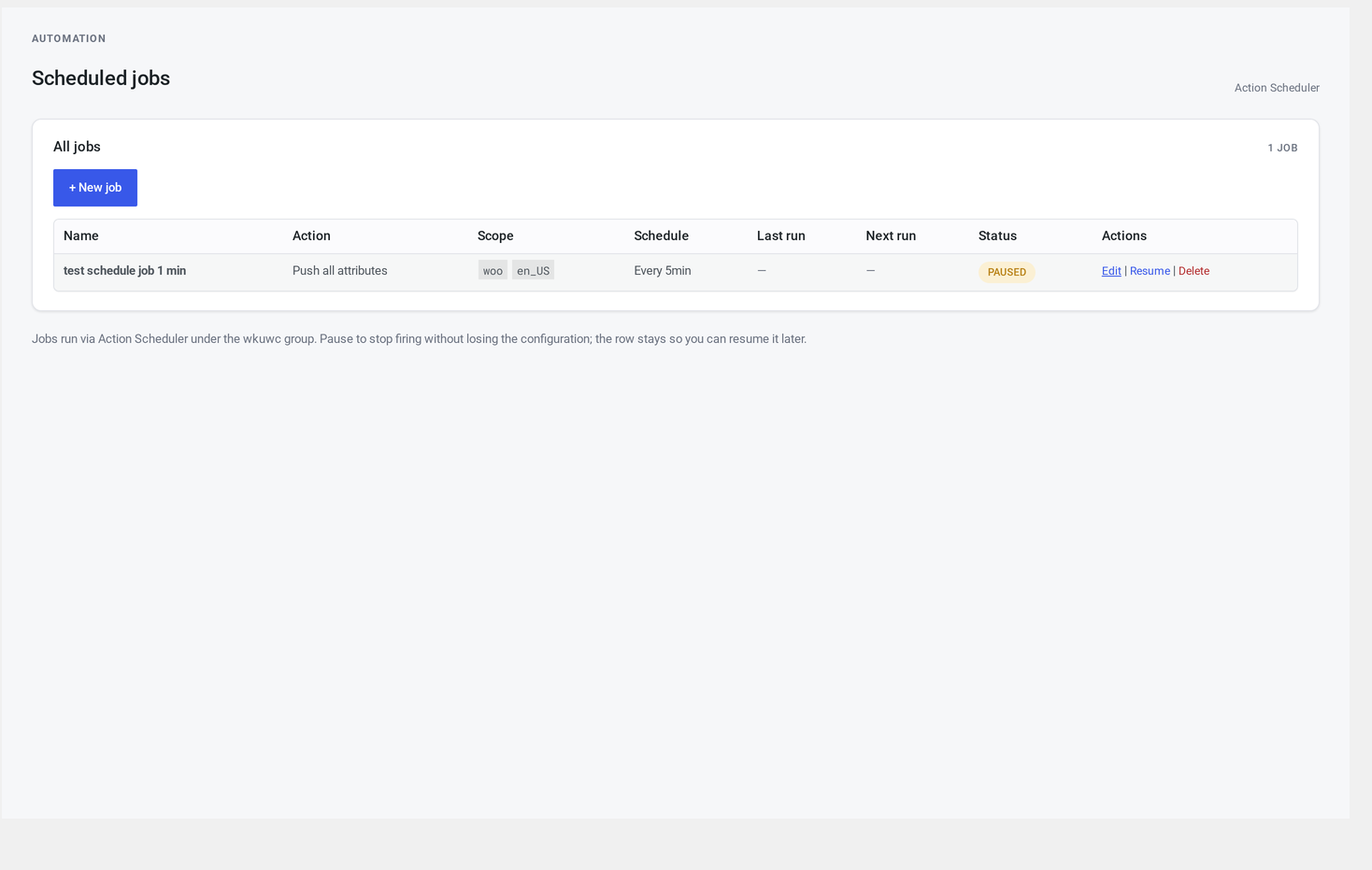
Where it lives
WordPress admin → UnoPim Configuration → Scheduled Jobs.
Available to administrators and shop managers.
When to use this versus the per-channel sync interval
| Use case | Where to set it |
|---|---|
"Pull updates from web every 15 minutes" | Channels & Stores → set the sync interval for web |
| "Push all products from site 2 to UnoPim every night at 2am" | Scheduled Jobs → create a daily job |
"Pull just attributes from mobile, every hour" | Scheduled Jobs → create an attribute pull job |
| "Pull categories from every channel, twice daily" | Scheduled Jobs → one job per channel |
The per-channel sync interval handles the common "pull what changed" case. The Jobs page handles narrower or specifically-scoped recurring needs.
At a glance
┌─────────────────────────────────────────────────────────────────┐
│  + New job                                                      │
├─────┬───────────────────────┬────────┬────────┬──────┬─────────┤
│ ID  │ Name                  │ Scope  │ Sched. │ Run? │ Actions │
├─────┼───────────────────────┼────────┼────────┼──────┼─────────┤
│ 12  │ Push all products     │ web    │ daily  │ ▶    │ ✏ ⏸ 🗑 │
│ 13  │ Pull attributes       │ mobile │ hourly │ ▶    │ ✏ ⏸ 🗑 │
│ 14  │ Pull associations     │ b2b    │ 2x/day │ ⏸    │ ✏ ▶ 🗑 │
└─────┴───────────────────────┴────────┴────────┴──────┴─────────┘
Each row shows the last run, the next scheduled run, and the last status. Click a row to expand the recent log entries for that job.
Job fields
The + New job / edit form has five fields:
| Field | Required | Notes |
|---|---|---|
| Name | yes | A human-readable label. Helpful in the audit trail. |
| Action | yes | What to run |
| Scope channel | optional | Defaults to "all enabled channels" |
| Scope language | optional | Defaults to the channel's first language |
| Schedule | yes | How often to run |
Action options
| Value | What it does |
|---|---|
| Pull full | A full UnoPim → WooCommerce sync |
| Pull single entity | Pull just one type (channels, languages, currencies, families, attributes, attribute options, categories, products, variants, associations, reference entities, tags) |
| Push all products | Bulk push every WooCommerce product |
| Push all categories | Bulk push every WooCommerce category |
| Push all attributes | Bulk push every WooCommerce attribute |
Schedule options
Same dropdown as Channels & Stores:
- Disabled (creates the job but doesn't schedule — useful for paused jobs)
- Every 5 / 15 / 30 minutes
- Hourly
- Twice daily
- Daily
Save
Click Save job. The job is stored and the recurring schedule is set up.
Saving an existing job updates the schedule cleanly — the old recurring entry is cancelled and a new one is queued.
Pause, resume, delete
Pause
Click the pause icon. The job stays visible but no longer fires.
Resume
Click the play icon. The job resumes on its next scheduled tick.
Delete
Click the bin icon. A confirm dialog appears. The job is removed and its schedule cancelled.
Last run and status
Each row shows:
- Last run — timestamp of the most recent fire
- Status — one of: success, error, partial (some succeeded, some failed), running, paused
- Next run — when the next tick is due
Click the row to expand the last 10 log entries scoped to that job.
Common configurations
Nightly bulk push for an isolated channel
Name:        Nightly push (b2b)
Action:      Push all products
Channel:     b2b
Language:    en_US
Schedule:    Daily
When to use: B2B catalogue rarely changes; one nightly push is enough.
Frequent attribute-only pull on a fast channel
Name:        Mobile attribute refresh
Action:      Pull single entity → attribute
Channel:     mobile
Schedule:    Every 15 minutes
When to use: attributes change often, but products are stable. Pulls only the attributes — fast.
Migration sweep
Name:        One-shot migration
Action:      Pull full
Channel:     (all)
Schedule:    Disabled
When to use: a job you want named and bookmarked but only fired manually.
Troubleshooting
| Symptom | Cause | Fix |
|---|---|---|
| Job created but never fires | WordPress cron isn't running | See Troubleshooting → Cron not firing |
| Last status: error | The underlying pull or push failed | Click the row to see the per-entity log |
| Resuming doesn't re-queue | The background queue is full | Wait a few minutes, or check whether scheduled syncs in general are running |
| Job runs twice in a row | An old recurring entry wasn't cancelled cleanly | Delete the job and recreate it |
| Edit doesn't save | Your account doesn't have the right permissions | Sign in as an administrator or shop manager |
The connector also exposes hooks for developers who need to extend it.