
Logs
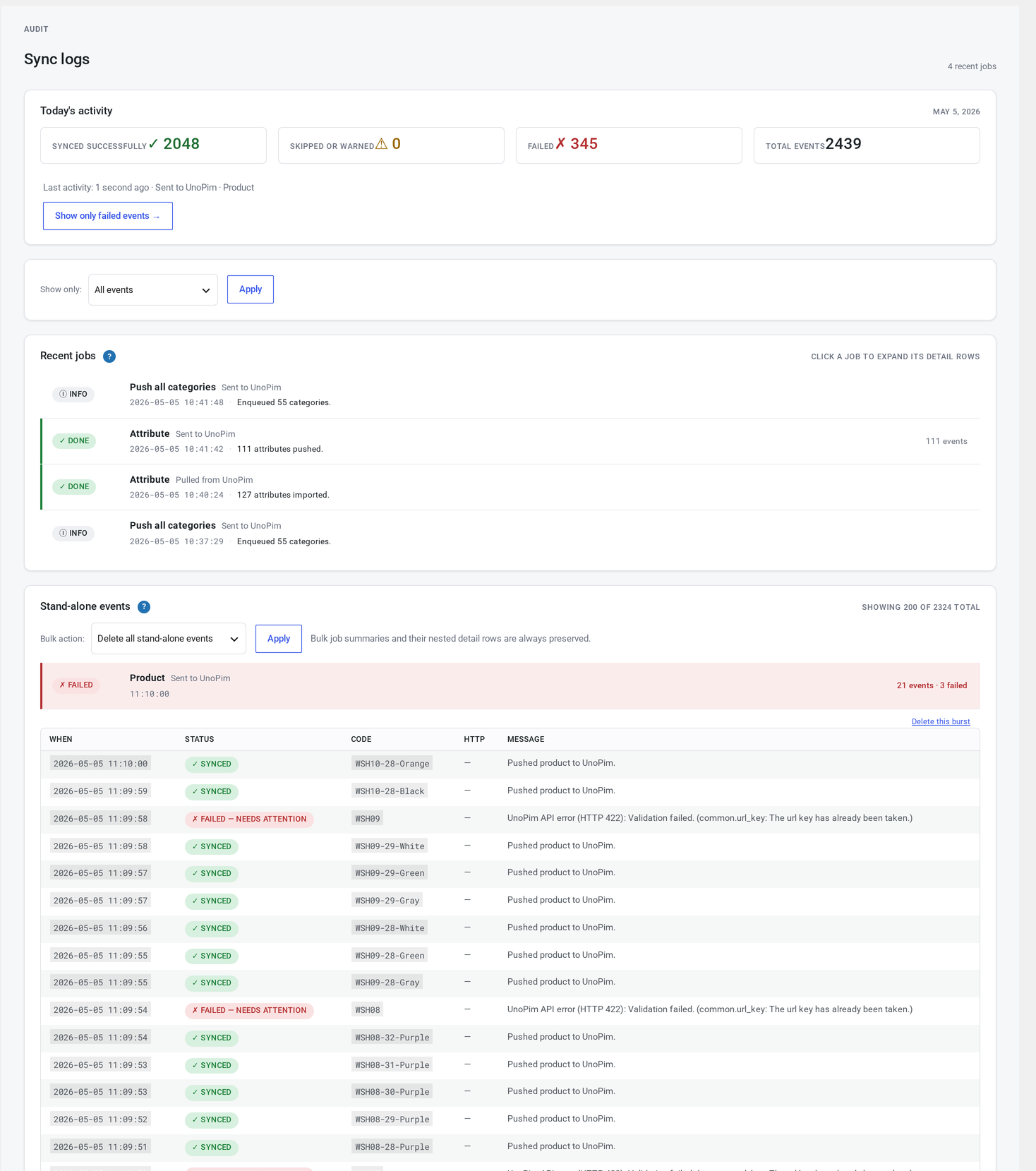
Every sync operation writes a row to the connector's audit table. The Logs page is the operator-facing window into that table — paginated, filterable, flushable.
Where it lives
WordPress admin → UnoPim Configuration → Logs.
Available to administrators and shop managers.
At a glance
┌─────────────────────────────────────────────────────────────┐
│  Filter: [ All ▼ ] [ All entities ▼ ] [ All channels ▼ ]   │
│          [ Apply ]    Showing 142 rows of 4,801             │
├──────┬──────────┬─────────┬─────────┬──────┬───────────────┤
│ Time │ Status   │ Op      │ Entity  │ Dir  │ Message       │
├──────┼──────────┼─────────┼─────────┼──────┼───────────────┤
│ ...  │ success  │ pull    │ product │ →WC  │ updated SKU.. │
│ ...  │ error    │ push    │ product │ →UNO │ HTTP 422 ...  │
│ ...  │ info     │ push    │ product │ →UNO │ echo suppress │
│ ...  │ info     │ pull    │ product │ →WC  │ dry-run...    │
└──────┴──────────┴─────────┴─────────┴──────┴───────────────┘
Click any row to expand it. You'll see:
- The full message
- A short excerpt of the data sent or received
- Any HTTP code (if applicable)
- How long the operation took
- The channel, language and site context
Filters
Top of the page. All combine.
| Filter | Options |
|---|---|
| Status | all / success / error / warn / info |
| Entity | all / product / category / attribute / family / channel / language / currency / variant / association / reference / image / etc. |
| Direction | all / pull / push / not applicable |
| Channel | all / per channel |
| Language | all / per language |
| Burst | A handy bundle of common filters (latest 100, errors only, older than 7 days, today's pushes, today's pulls) |
The Burst filter is a shortcut bundling several criteria — useful for the "show me what just broke" workflow without setting four filters by hand.
Status meanings
| Status | What it means |
|---|---|
| success | The operation completed and the change was written |
| error | The operation failed — check the message and HTTP code |
| warn | A non-fatal issue — the entity might be partly synced |
| info | Informational — dry-run output, cooldown skips, or other no-op events |
Errors are red. Warnings are yellow.
Operations
| Operation | When it fires |
|---|---|
| pull | UnoPim → WooCommerce write |
| push | WooCommerce → UnoPim write |
| delete | Delete handler invoked (either direction) |
| api | Raw API call (auth, non-entity-bound) |
| cron | Scheduled-tick start/end markers |
| migration | Schema migration step |
| cleanup | Daily log retention purge |
Direction
| Value | Meaning |
|---|---|
| pull | UnoPim → WooCommerce |
| push | WooCommerce → UnoPim |
| not applicable | Cron orchestration entries |
A row in detail
Clicking a row expands it. Example for a successful product pull:
Time:        2026-05-05 14:32:01
Status:      success
Operation:   pull
Entity:      product (WC-PRODUCT-001)
Direction:   pull (UnoPim → WC)
Channel:     web
Language:    en_US
Site:        1
HTTP:        200
Duration:    142 ms
Message:     Pulled 28 attributes; 4 categories applied; 1 image queued.
Example for a push that failed:
Time:        2026-05-05 14:32:14
Status:      error
Operation:   push
Entity:      product (WC-PRODUCT-002)
Direction:   push (WC → UnoPim)
HTTP:        422
Duration:    307 ms
Message:     UnoPim rejected the data: attribute "sale_price" is not in this product's family.
Flush controls
Bottom of the page: Flush logs with a scope dropdown.
| Scope | What it removes |
|---|---|
| Older than 30 days | The default — the same as the daily auto-cleanup |
| Older than 7 days | More aggressive cleanup |
| Errors only | Just clear errors, keeping success rows for audit |
| Current filter | Flush whatever the active filter shows |
| All | Empty the entire log table |
Confirm dialog. The flush itself is logged as an info entry in the freshly-cleaned table.
Daily auto-cleanup
The connector trims log rows older than 30 days every day, automatically. Your audit table never grows unbounded under normal use.
Common debugging patterns
"Why didn't my product sync?"
- Set the filter to entity = product and status = error or info.
- Find the row matching your SKU.
- Read the message and the data excerpt.
Common causes:
- Cooldown — the product was pushed within the cooldown window after a recent pull
- Skipped by a custom rule — your developer has added a rule that blocked it
- HTTP 422 — a mapping issue (wrong attribute or family)
- Unmapped category — a category mapping is missing
- Missing family — the product has no family and no fallback set
"Why is push slow?"
- Filter direction = push, sort by duration descending.
- Outlier rows reveal the slow operations — usually image uploads or large variants.
- If push is consistently slow, consider turning off image push for that channel, or check UnoPim server capacity.
"Did the scheduled tick fire?"
- Filter operation = cron.
- Look for entries around the expected time.
- If they're missing, scheduled syncs aren't firing — see Troubleshooting → Cron not firing.
Two log layers
The connector also writes a coarse summary line to WooCommerce's standard log under WooCommerce → Status → Logs.
| Log | When to use |
|---|---|
| This page | Per-entity drill-down. Filterable, searchable, filterable by status. |
| WooCommerce log | A one-line-per-operation timeline you can grep through |
Troubleshooting
| Symptom | Cause | Fix |
|---|---|---|
| Logs page is empty | No sync has happened yet, or retention purged everything | Trigger a manual sync |
| No new rows after a click | The background queue isn't draining | See Troubleshooting → Cron not firing |
| Rows truncated mid-message | The table view truncates long messages — they're kept in full in the database | Click the row to see the full message |
| Pagination wrong | Filter changed without applying | Click Apply explicitly |
| Flush did nothing | Your account doesn't have the right permissions | Sign in as an administrator or shop manager |
The connector also exposes hooks for developers who need to extend it.