
API Settings Tab
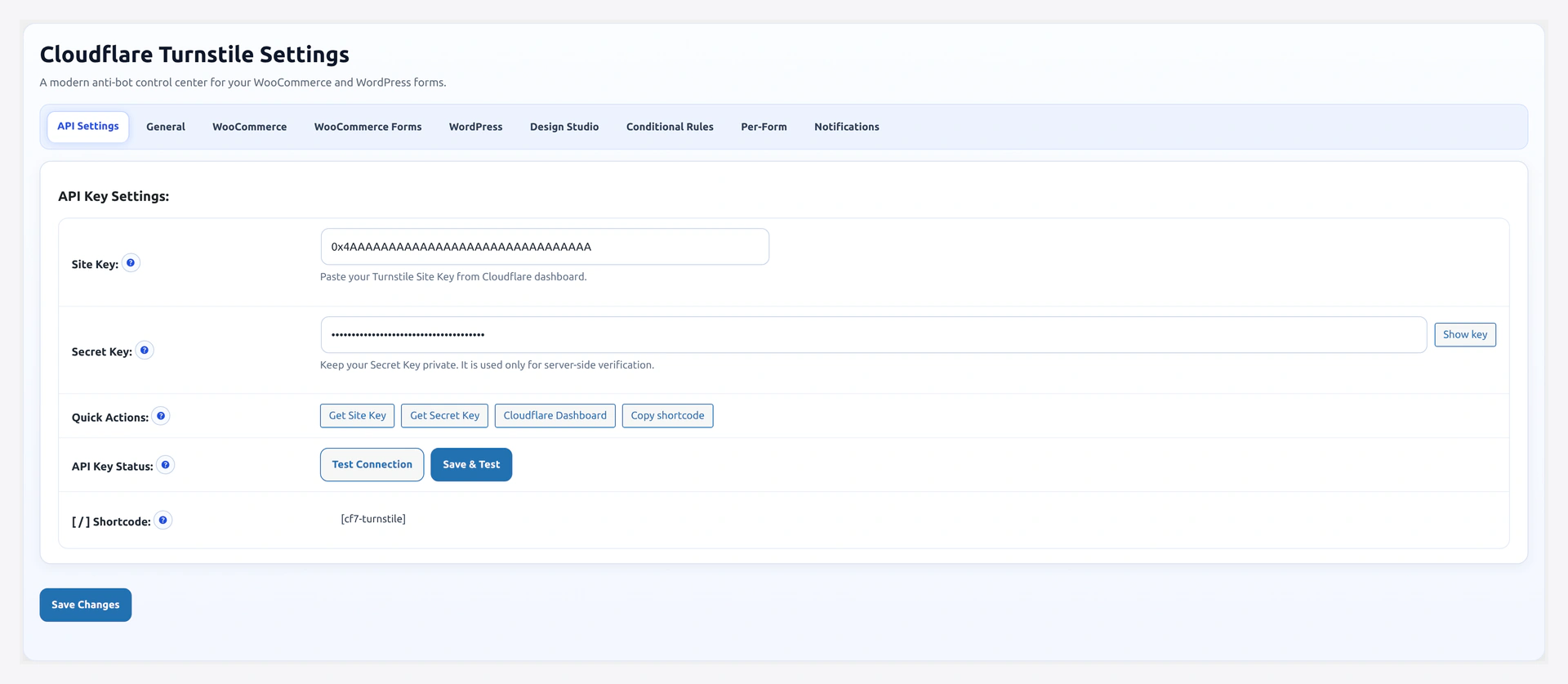
The first tab you land on. Without valid keys here, nothing else works.
URL: wp-admin/admin.php?page=wkcft-settings&tab=wkcft_api
Fields
Site Key
- Option key:
wkcft_site_key - Type: Text
- Source: Cloudflare dashboard → Turnstile → your widget → Site Key
- Format: Starts with
0x4AAA..., ~25 characters - Safe to share? Yes — this key is visible in the page source on every visitor's browser
Paste from Cloudflare, click Save Changes.
Secret Key
- Option key:
wkcft_secret_key - Type: Password (with show/hide eye icon)
- Source: Cloudflare dashboard → Turnstile → your widget → Secret Key
- Format: Starts with
0x4AAA..., ~35 characters - Safe to share? No — this key sits on your server only and must not leak into frontend code
Never commit the Secret Key to git
If your theme or custom plugin ever needs the Secret Key, read it from get_option('wkcft_secret_key') at runtime. Never hard-code it and never commit it to version control.
Action Buttons
Test Connection
Click to run a live end-to-end check:
- Plugin renders a test Turnstile widget using your Site Key
- Solves the widget in-browser to get a token
- Sends that token + Secret Key to
challenges.cloudflare.com/turnstile/v0/siteverify - Shows a green "API keys are valid" OR a red error with explanation
Any test failure will match one of the Cloudflare error codes listed below.
Save & Test
Same as Save Changes + Test Connection in one click. Use this after pasting fresh keys.
Get Keys
Opens the Cloudflare Turnstile dashboard in a new tab. See Get Turnstile Keys for the step-by-step guide.
Copy Shortcode
Copies [wkcft-turnstile] to your clipboard so you can paste it on any page, post, or custom widget.
Live Widget Preview
Below the key fields, you see a live Cloudflare Turnstile widget rendered with your saved Site Key.
- If the widget appears and you can interact with it — Site Key is valid
- If you see "Invalid sitekey" — your key is wrong OR the hostname is not in your Cloudflare widget config
- If you see nothing — the script did not load (check browser console, check caching plugin)
Cloudflare Error Codes (Reference)
When Test Connection fails, you see one of these codes:
| Code | Meaning | Fix |
|---|---|---|
missing-input-secret | Secret Key field is empty | Paste Secret Key, save |
invalid-input-secret | Secret Key is wrong | Re-copy from Cloudflare |
missing-input-response | No token was sent | Widget did not render — check Site Key |
invalid-input-response | Token is malformed or expired | Clear caching plugin, test again |
bad-request | Malformed verify request | Rarely seen — file a support ticket |
timeout-or-duplicate | Token reused or timed out | Tokens expire in 5 min. Cached pages cause this — flush cache |
Full error code table: Troubleshooting.
Caching Plugin Warning
If you have WP Rocket, LiteSpeed Cache, W3 Total Cache, or Autoptimize active, the tab shows a yellow notice:
Caching plugin detected. After you change Turnstile settings, flush that plugin's cache so visitors get the new widget config.
One-click flush shortcuts appear under the notice when the plugin is detected.
Which Widget Modes Work
Any of Cloudflare's three widget modes works with the plugin:
| Cloudflare Mode | What Users See | Use This If |
|---|---|---|
| Managed | Mostly invisible. Interactive challenge only for suspicious visitors | Default — recommended |
| Non-interactive | Always invisible | You want 100% friction-free UX |
| Invisible | Always runs a challenge in the background | You want max protection without a visible widget |
You configure this inside Cloudflare, not inside the plugin.
Rotating Your Secret Key
If your Secret Key leaks:
- Cloudflare dashboard → Turnstile → your widget → Rotate secret key
- Copy the new Secret Key
- Paste into this tab → Secret Key field → Save Changes
- Click Test Connection to verify the new key works
There is no downtime — tokens issued under the old key finish processing, new ones use the new key.
Frequently Asked
Q: Do I need the Enterprise plan for Turnstile? No. Turnstile is free forever on every plan, including the Free plan.
Q: Can I use the same keys on multiple sites? Yes — add all hostnames to the same Cloudflare widget. Or create one widget per site for cleaner analytics on Cloudflare's side.
Q: What if I need to change hosts (e.g., migrate to a new domain)? Add the new domain to your Cloudflare widget's Hostname Management. Old domain keeps working until you remove it.
Q: Is the Site Key safe to put in a public repo? Yes. It is meant to be public. Only the Secret Key is sensitive.
Related Pages
- Get Turnstile Keys — How to create keys from scratch
- General Settings — Tab 2: theme, load mode, etc.
- Troubleshooting — Fixes for key-related errors