
Turnstile CAPTCHA For WooCommerceTurnstile CAPTCHA For WooCommerce
Buy Now
View Demo
  • Getting Started

    • Introduction
    • Quick Start
    • Features
    • Installation
    • First-Time Setup
    • Get Turnstile Keys
    • Onboarding Wizard
  • Settings

    • Settings Overview
    • API Settings
    • General
    • Design Studio
    • Conditional Rules
    • Per-Form Config
    • Notifications
  • Supported Forms

    • All Supported Forms
    • WooCommerce Forms
    • WordPress Forms
    • Third-Party Form Plugins
    • Checkout Blocks
    • Shortcode
  • Protection & Monitoring

    • Analytics Dashboard
    • Rate Limiting
    • Recovery URL
    • Email Digest
    • Webhooks
  • Developer

    • REST API
    • Filters & Hooks
    • Site Health
  • Compare

    • vs reCAPTCHA
    • vs hCaptcha
  • Help

    • Troubleshooting
    • FAQ
    • Glossary
Support
Buy Now
View Demo
  • Getting Started

    • Introduction
    • Quick Start
    • Features
    • Installation
    • First-Time Setup
    • Get Turnstile Keys
    • Onboarding Wizard
  • Settings

    • Settings Overview
    • API Settings
    • General
    • Design Studio
    • Conditional Rules
    • Per-Form Config
    • Notifications
  • Supported Forms

    • All Supported Forms
    • WooCommerce Forms
    • WordPress Forms
    • Third-Party Form Plugins
    • Checkout Blocks
    • Shortcode
  • Protection & Monitoring

    • Analytics Dashboard
    • Rate Limiting
    • Recovery URL
    • Email Digest
    • Webhooks
  • Developer

    • REST API
    • Filters & Hooks
    • Site Health
  • Compare

    • vs reCAPTCHA
    • vs hCaptcha
  • Help

    • Troubleshooting
    • FAQ
    • Glossary
Support
  • Getting Started

    • Introduction
    • Quick Start — Turnstile Live in 5 Minutes
    • Features — Everything the Plugin Can Do
    • Installation — Full Setup Guide
    • First-Time Setup
    • Get Turnstile Keys from Cloudflare
    • Onboarding Wizard
  • Settings

    • Settings Overview — All 9 Tabs
    • API Settings Tab
    • General Settings Tab
    • Design Studio Tab
    • Conditional Rules Tab
    • Per-Form Config Tab
    • Notifications Tab
  • Supported Forms

    • All Supported Forms
    • WooCommerce Forms
    • WordPress Forms
    • Third-Party Form Plugins
    • Checkout Blocks Integration
    • Shortcode — Drop the Widget Anywhere
  • Protection & Monitoring

    • Analytics Dashboard
    • Rate Limiting — Auto-Lockout for Abusive IPs
    • Recovery URL — Unlock a Stuck IP
    • Email Digest
    • Webhooks — Real-Time Alerts on Bot Spikes
  • Developer

    • REST API
    • Filters & Hooks
    • Site Health Integration
  • Compare

    • Turnstile vs Google reCAPTCHA
    • Turnstile vs hCaptcha
  • Help

    • Troubleshooting
    • Frequently Asked Questions
    • Glossary

Notifications Tab

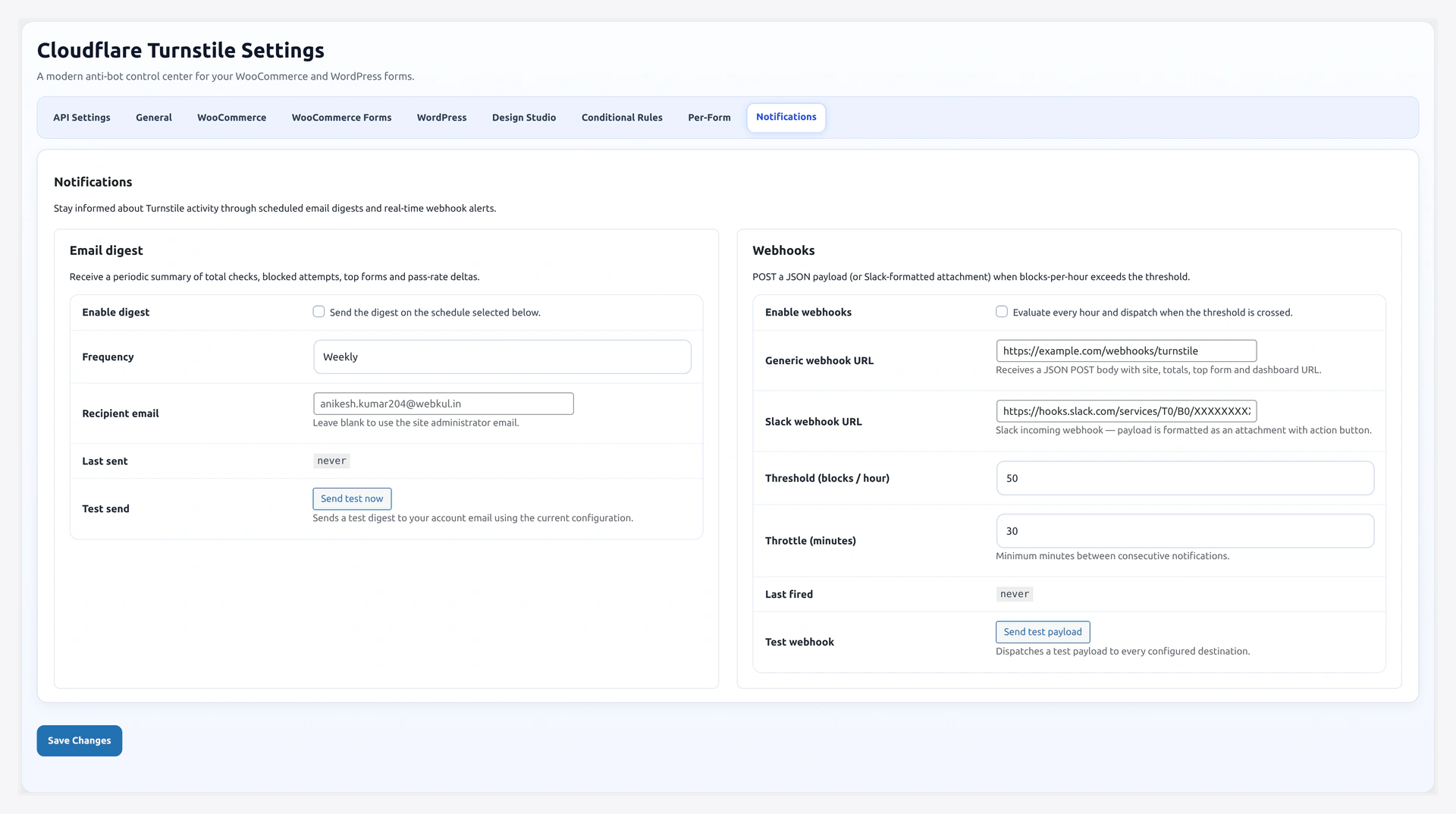
Notifications tab — weekly email digest and webhook alerts

Two ways to stay informed without opening the dashboard: email digests on a schedule, and webhook alerts when traffic gets suspicious.

URL: wp-admin/admin.php?page=wkcft-settings&tab=wkcft_notifications

Two Sections

FeaturePurposeDetail Page
Email DigestPeriodic summary to your inboxEmail Digest
WebhooksReal-time alert when block rate spikesWebhooks

Quick Settings

Email Digest

FieldKeyDefault
Enabledenabled (inside wkcft_email_digest)no
Frequencyfrequencyweekly
Recipient Emailrecipient_emailempty

Click Send Test Digest to fire a sample email to the recipient right away.

Webhooks

FieldKeyDefault
Enabledenabled (inside wkcft_notifications)no
Webhook URLwebhook_urlempty
Slack Webhook URLslack_webhook_urlempty
Threshold per hourthreshold_per_hour50
Throttle (minutes)throttle_minutes30

Click Send Test Webhook to fire a sample payload to the configured endpoint.

Why Use Both

  • Email Digest tells you "how is the plugin doing overall" — slow-changing metrics, trends, top forms
  • Webhooks tell you "something is happening right now" — attack spikes, sudden form abuse

Most stores enable both — email digest weekly, webhook for real-time.

Where Data Comes From

Both features read from the wp_wkcft_log table populated by the Logger.

MetricHow It Is Computed
Total checksCOUNT(*) in date range
Pass / Failpassed column (0 or 1)
Top formsGROUP BY form ORDER BY COUNT DESC LIMIT 5
Top IPsGROUP BY ip WHERE passed=0 ORDER BY COUNT DESC LIMIT 5
Blocks per hourCOUNT(*) WHERE passed=0 AND created_at > NOW() - 1 HOUR

Cron Schedules

Both features run on WP-Cron.

HookRecurrenceFires
wkcft_send_digestdaily / wkcft_weekly / wkcft_monthlyCompiles + sends email digest
wkcft_check_notificationshourlyEvaluates webhook trigger conditions

WP-Cron needs traffic

WP-Cron only fires when someone visits the site. On low-traffic sites, set up a real system cron to hit wp-cron.php every 5 minutes. See WP-Cron setup in Troubleshooting.

Privacy Note

  • Emails send aggregated counts only — no individual form submissions, no user data
  • Webhook payload includes blocked IPs (raw) and top forms (slug only)

Related Pages

  • Email Digest — Full email digest configuration
  • Webhooks — Full webhook configuration
  • Analytics — Same data, viewed in-dashboard
Prev
Per-Form Config Tab