
Third-Party Form Plugins
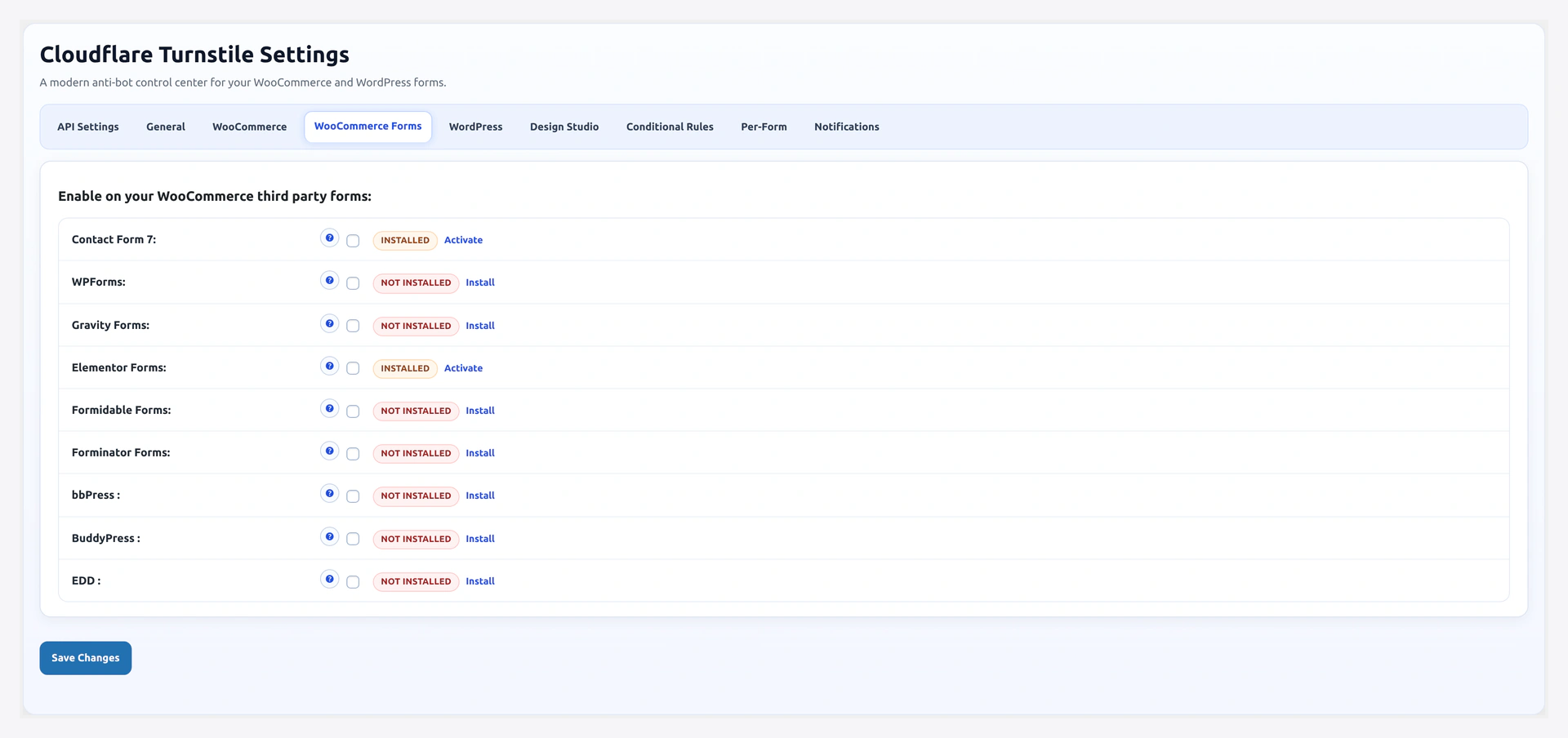
Turnstile integrates with every major WordPress form and membership plugin. Enable each with a single checkbox.
Settings tab: wp-admin/admin.php?page=wkcft-settings&tab=wkcft_woocommerce_form
Supported Plugins
| Plugin | Enable Option | Plugin Class Detected |
|---|---|---|
| Contact Form 7 | wkcft_cf7 | WPCF7 |
| WPForms | wkcft_wpforms | WPForms or wpforms() function |
| Gravity Forms | wkcft_gravityforms | GFCommon |
| Elementor Pro Forms | wkcft_elementor | ElementorPro |
| Formidable Forms | wkcft_formidable | FrmAppHelper |
| Forminator | wkcft_forminator | Forminator |
| bbPress | wkcft_bbpress | bbPress |
| BuddyPress | wkcft_buddypress | BuddyPress |
| Easy Digital Downloads | wkcft_edd | Easy_Digital_Downloads |
| WooCommerce Subscriptions | wkcft_subscriptions | WC_Subscriptions |
Status Badges
Each row shows a badge telling you whether the plugin is present:
| Badge | Meaning | Checkbox |
|---|---|---|
| Active (green) | Plugin installed + activated | Enabled |
| Installed (yellow) | Plugin present but not active | Disabled — click Activate |
| Not installed (gray) | Plugin not present | Disabled — click Install |
Contact Form 7
- Enable: Tick
Contact Form 7on the tab - Method: Plugin uses the
[cf7-turnstile]shortcode - Placement: Add the shortcode to any CF7 form at the position you want the widget
Example CF7 form:
<label>Your name *
  [text* your-name] </label>

<label>Your email *
  [email* your-email] </label>

[cf7-turnstile]

[submit "Send"]
Validation runs server-side via CF7's custom validation API. If the token fails, CF7 shows your configured error message and keeps the form data.
WPForms
- Enable: Tick
WPFormson the tab - Auto-injection: Widget auto-injects above the submit button on every WPForms form
Works with: WPForms Lite (free) and WPForms Pro.
No shortcode needed — the plugin hooks into wpforms_frontend_output and injects the widget automatically.
Skip Specific WPForms
If you want to exempt one specific form (e.g., an internal support form), use the filter:
add_filter('wkcft_conditions_should_skip', function($skip, $context) {
    if ($context === 'wpforms' && isset($_POST['wpforms']['id']) && $_POST['wpforms']['id'] == 42) {
        return true;
    }
    return $skip;
}, 10, 2);
Gravity Forms
- Enable: Tick
Gravity Formson the tab - Auto-injection: Widget appears on every Gravity form
Plugin hooks into gform_submit_button filter.
Skip a Specific Gravity Form
Use the same filter pattern as WPForms, checking $_POST['gform_submit'] for the form ID.
Elementor Pro Forms
- Enable: Tick
Elementoron the tab - Requires: Elementor Pro (free Elementor does not include Forms)
- Auto-injection: Widget added before the submit button on every Elementor Pro form
Formidable Forms
- Enable: Tick
Formidable Formson the tab - Auto-injection: Widget injected before the submit on all Formidable forms
Plugin hooks into frm_after_submit_button.
Forminator
- Enable: Tick
Forminatoron the tab - Auto-injection: Widget added to every Forminator form
Forminator fires AJAX submits — the plugin validates on forminator_custom_form_after_handle_submit.
bbPress
- Enable: Tick
bbPresson the tab - Protected: Topic creation, reply, user registration, forum signup
- Auto-injection: Widget appears on each bbPress form
BuddyPress
- Enable: Tick
BuddyPresson the tab - Protected: Signup page, contact forms, group signup
- Auto-injection: Widget appears on BuddyPress registration forms
Easy Digital Downloads (EDD)
- Enable: Tick
Easy Digital Downloadson the tab - Protected: Checkout, login, register, lost password on the EDD /checkout/ page
- Auto-injection: Widget appears before payment method selection
WooCommerce Subscriptions
- Enable: Tick
WooCommerce Subscriptionson the tab - Protected: Subscription renewal payment pages, subscription management forms
Enable Steps (Same Pattern for Every Plugin)
- Install + activate the third-party plugin
- WooCommerce → Turnstile Settings → WooCommerce Forms tab
- Badge should read Active
- Tick the plugin's checkbox
- Save Changes
- Flush caching plugin
- Test a form in the third-party plugin
Field Reference
| Plugin | Option Key | Default |
|---|---|---|
| Contact Form 7 | wkcft_cf7 | no |
| WPForms | wkcft_wpforms | no |
| Gravity Forms | wkcft_gravityforms | no |
| Elementor | wkcft_elementor | no |
| Formidable | wkcft_formidable | no |
| Forminator | wkcft_forminator | no |
| bbPress | wkcft_bbpress | no |
| BuddyPress | wkcft_buddypress | no |
| EDD | wkcft_edd | no |
| WC Subscriptions | wkcft_subscriptions | no |
Interaction With Conditional Rules
All rules on Conditional Rules apply to third-party forms too. You can:
- Skip CAPTCHA on a specific CF7 form via the filter
- Whitelist IPs — works for every form type
- Skip logged-in — applies globally including forums and downloads
Troubleshooting
| Problem | Fix |
|---|---|
| Widget shows on CF7 but form still submits without it | You forgot to add [cf7-turnstile] shortcode to that form |
| WPForms widget appears twice | The caching plugin served a stale page. Flush cache, hard refresh |
| Gravity Forms "invalid token" | Replay protection — you reloaded the cached form. Clear caching plugin |
| Elementor widget missing | You are using free Elementor. Pro is required |
| bbPress widget breaks layout | Add CSS in your theme: .bbp-form .wkcft-turnstile { margin: 10px 0 } |
| EDD checkout widget in wrong spot | Add CSS overrides in your theme targeting .wkcft-turnstile to reposition |
Related Pages
- Supported Forms — Full list with slugs
- Shortcode — For any form not listed here
- Conditional Rules — Skip rules per context
- Filters & Hooks — Code-level customization