
Per-Form Config Tab
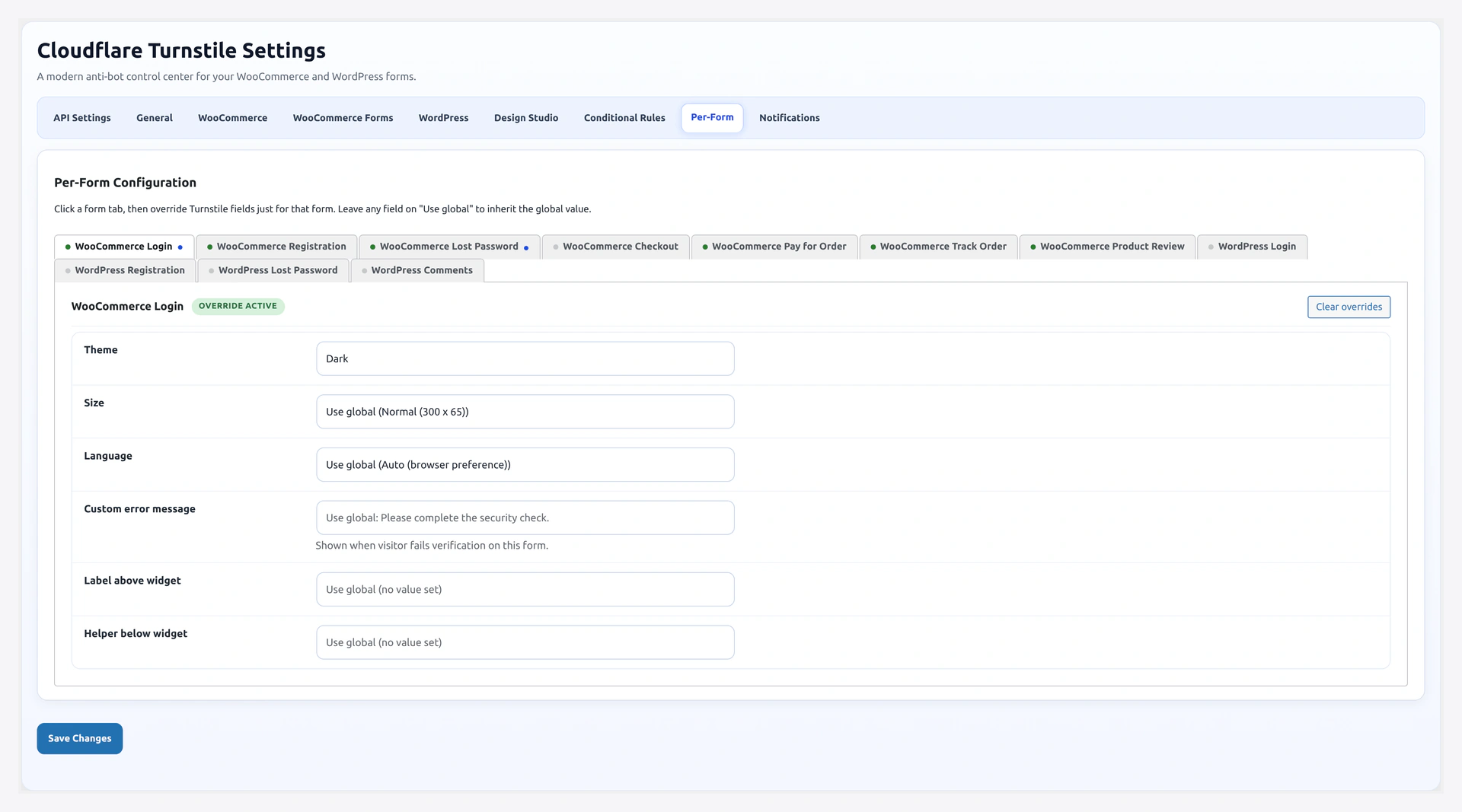
Every protected form can have its own theme, size, language, error message, and label text. Useful when your checkout design is different from your login design, or when you want a friendlier copy on one form vs another.
URL: wp-admin/admin.php?page=wkcft-settings&tab=wkcft_per_form_config
Option key: wkcft_per_form_config (nested array, keyed by form slug)
How It Works
- You set global values on General Settings and Design Studio
- On this tab you can override any of those globals per form
- If a form has no per-form entry, it uses the global value
- Empty fields always fall back to global
Supported Forms
WooCommerce
| Form Slug | Form |
|---|---|
login | WooCommerce Login |
register | WooCommerce Registration |
password_reset | WooCommerce Lost Password |
checkout | WooCommerce Checkout (classic + Blocks) |
pay_order | Pay for Order |
track_order | Track Order |
product_review | Product Review |
WordPress
| Form Slug | Form |
|---|---|
wp_login | WP Login |
wp_register | WP Registration |
wp_lost_password | WP Lost Password |
wp_comment | WP Comments |
Fields Per Form
For each form, these fields are available. All are optional — leave blank to inherit global.
| Field | Key | Type | What It Overrides |
|---|---|---|---|
| Theme | theme | select | General Settings → Theme |
| Size | size | select | Design Studio → Size |
| Language | language | select | Design Studio → Language |
| Error Message | error_message | text | General Settings → Error Message |
| Label Text | label_text | text (120 chars) | Design Studio → Label Text |
| Helper Text | helper_text | text (200 chars) | Design Studio → Helper Text |
UI Layout
The tab renders as a tabbed/accordion interface — one card per supported form.
Each form card shows:
- Form name and current enabled/disabled state
- Active override badge (if any fields are set for this form)
- Collapsible body with the 6 fields
- Reset this form button (clears overrides for only this form)
Examples
Dark Checkout, Light Login
If your checkout page uses a dark theme but login is light:
checkout form:
- Theme:
dark - Size: leave blank (use global)
- Language: leave blank
login form: all blank (uses global light)
Different Languages Per Form
Storefront is mostly English, but the B2B login form is in French:
wp_login form:
- Language:
fr - Error Message:
Veuillez compléter la vérification de sécurité.
Other forms: use global auto / default error
Extra Copy on the Checkout Widget
To build extra trust on the high-stakes form:
checkout form:
- Label Text:
🔒 Secure checkout protected by Cloudflare - Helper Text:
No puzzles. No tracking. Just bot protection.
Compact Widget on Comments
Comment forms are tight columns.
wp_comment form:
- Size:
compact
Stored Structure
The option wkcft_per_form_config is a nested array:
[
  'login' => [
    'theme' => 'dark',
    'size' => '',
    'language' => '',
    'error_message' => 'Custom error',
    'label_text' => '',
    'helper_text' => '',
  ],
  'checkout' => [
    'theme' => 'dark',
    'label_text' => 'Secure checkout',
    ...
  ],
  // any form with no overrides is simply absent
]
Empty strings always mean "use global".
Reading a Form's Merged Config in Code
If you are building a custom handler, use the utility class:
$config = WKCFT_Per_Form_Config::wkcft_get_entry('checkout');
// $config is the merged (override + defaults) array for the 'checkout' form
Reset Overrides
Each form card has its own Reset this form button. It clears that one form's overrides — every field falls back to global.
A top-level Reset all per-form overrides button on the tab clears every form at once.
Recipes
"Minimal Friction" Checkout Bundle
Bypass CAPTCHA for logged-in shoppers + dark theme + trust label for anonymous buyers.
- Conditional Rules tab:
- Skip logged-in: on
- Per-Form Config →
checkoutcard:- Theme:
dark - Label Text:
Secure checkout protected by Cloudflare - Helper Text:
Your card data is encrypted end-to-end.
- Theme:
Multi-Language Site
If your site serves English + Spanish users.
Per-Form Config:
checkout→ Language:eslogin→ Language:en
Or use auto on Design Studio and let Cloudflare pick by Accept-Language.
Test One Form First
Roll out CAPTCHA on just the login form with a warmer message.
login card:
- Error Message:
Almost there! Please complete the check and try again. - Label Text:
Quick security check
Related Pages
- General Settings — Global defaults this overrides
- Design Studio — Global styling this overrides
- Supported Forms — Every form and its slug
- Shortcode — Per-instance overrides via shortcode attributes