
Settings Overview — All 9 Tabs
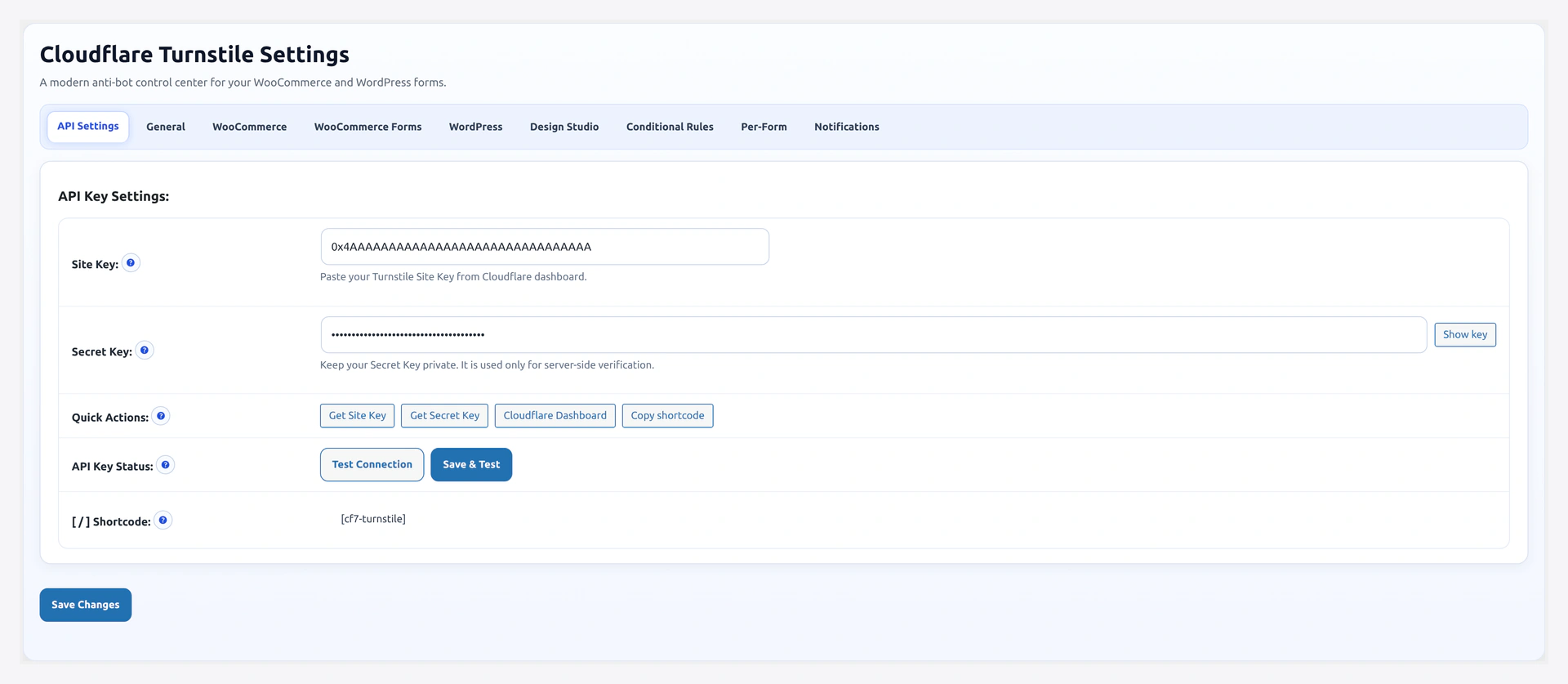
The main settings page lives at WooCommerce → Turnstile Settings (URL slug wkcft-settings). It is organized into 9 tabs. This page gives you the big picture. Each tab has its own deep-dive page.
The 9 Tabs
| # | Tab | What It Controls | Detail Page |
|---|---|---|---|
| 1 | API Settings | Site Key + Secret Key | API Settings |
| 2 | General | Theme, appearance mode, load mode, warn-only | General |
| 3 | WooCommerce | Native WC form toggles + checkout position | WooCommerce Forms |
| 4 | WooCommerce Forms | Third-party plugin toggles (CF7, WPForms, Gravity, etc.) | Third-Party Forms |
| 5 | WordPress | WP core form toggles (login, register, comments) | WordPress Forms |
| 6 | Design Studio | Widget colors, borders, shadows, labels with live preview | Design Studio |
| 7 | Conditional Rules | IP/country lists, skip logged-in, after-N-failures, rate-limit | Conditional Rules |
| 8 | Per-Form | Per-form overrides (theme, size, language, error, labels) | Per-Form Config |
| 9 | Notifications | Email digest + webhooks for activity alerts | Notifications |
Settings URL Shortcuts
Open a specific tab directly:
wp-admin/admin.php?page=wkcft-settings&tab=wkcft_api
wp-admin/admin.php?page=wkcft-settings&tab=wkcft_general
wp-admin/admin.php?page=wkcft-settings&tab=wkcft_woocommerce
wp-admin/admin.php?page=wkcft-settings&tab=wkcft_woocommerce_form
wp-admin/admin.php?page=wkcft-settings&tab=wkcft_wordpress
wp-admin/admin.php?page=wkcft-settings&tab=wkcft_design_studio
wp-admin/admin.php?page=wkcft-settings&tab=wkcft_conditions
wp-admin/admin.php?page=wkcft-settings&tab=wkcft_per_form_config
wp-admin/admin.php?page=wkcft-settings&tab=wkcft_notifications
Capability Required
Every tab requires manage_woocommerce. Default roles that have it: Administrator, Shop Manager.
Where Settings Are Stored
All tabs write to WordPress options. You can view/edit them via Settings → Options on a dev site or via WP-CLI:
# Read any option
wp option get wkcft_site_key
wp option get wkcft_theme
wp option get wkcft_conditions --format=json

# Write an option
wp option update wkcft_theme dark
Full option-key map per tab is on each tab's detail page.
Save Behavior
- Each tab has its own Save Changes button
- Saving one tab does not affect unsaved changes on another tab (switching tabs with unsaved changes shows a "you have unsaved changes" warning)
- No reload needed — settings apply on the very next page load
Header Banner
At the top of every tab you see one of these banners:
| Banner | Meaning | Fix |
|---|---|---|
| "Setup complete — Turnstile is active" (green) | Keys valid, 1+ forms enabled | Nothing — you are live |
| "Add your API keys to begin" (yellow) | Site Key or Secret Key missing | Paste them on API Settings |
| "Enable at least one form" (yellow) | Keys OK but no forms ticked | Pick forms on WooCommerce / WordPress / WooCommerce Forms tab |
| "Caching plugin detected — flush cache after changes" (blue) | WP Rocket / LiteSpeed / W3TC / Autoptimize active | Purge that plugin's cache any time you change settings |
Quick-Action Buttons
Next to the page title on every tab:
| Button | What It Does |
|---|---|
| Get Keys | Opens the Cloudflare Turnstile dashboard in a new tab |
| Copy Shortcode | Copies [wkcft-turnstile] to your clipboard |
| Open Analytics | Jumps to the analytics page |
| View Demo | Opens the live demo site |
Starter Config Templates
If you are unsure what to configure, pick a template on the API Settings tab:
| Template | Best For |
|---|---|
| Minimum protection | WC login + register + lost password only. No checkout friction |
| Full protection | Every WC form + every WP form. Recommended default |
| Membership site | WC + bbPress + BuddyPress + EDD |
| Multi-form store | WC + CF7 + WPForms + Gravity Forms |
| Bot attack mode | Full protection + rate-limit at 3 failures + webhook on spike |
Templates are a one-click preset — they just fill in the tabs for you. You can edit anything afterward.
Related Pages
- Quick Start — Get live fast
- First-Time Setup — Manual walkthrough of every tab
- Features — Everything the plugin can do