
Order Data Reference
The companion to the Product Data Reference — what an order actually carries when it moves between the two stores.
Importing: Shopify to WooCommerce
Which Shopify orders are eligible
The connector asks Shopify only for orders with status:open. Archived and cancelled Shopify orders are never offered for import.
An order is also only created if every one of its line items can be matched to a product already imported into WooCommerce. If even one line cannot be matched, the whole order is skipped and reported as:
Order not Created due to product unavailabilty so please import products.
This is deliberate — a partially imported order would misstate the total.
Order-level fields
| Shopify field | Becomes in WooCommerce |
|---|---|
name (e.g. #1022) | Stored as the Shopify order number, shown on the line items and in the admin column |
id | Stored as the Shopify order ID |
currencyCode | Order currency |
totalPriceSet | Order total |
totalShippingPriceSet | Shipping total |
totalDiscountsSet | Discount total |
taxLines | Added as fee lines carrying the tax title and amount |
shippingLines | Added as shipping lines with method title, cost and tax |
paymentGatewayNames | Payment method |
note | Added as an order note |
createdAt | Date created |
updatedAt | Date modified |
| Order status | Not taken from Shopify — see below |
Addresses
Billing and shipping are copied field for field: first name, last name, company, phone, address line 1, address line 2, city, state/province, postcode, country and the customer's email.
Line items
| Shopify field | Becomes in WooCommerce |
|---|---|
variant.price | Line total and subtotal |
quantity | Quantity |
taxLines | Line tax |
product.id / variant.id | Matched to the imported WooCommerce product or variation |
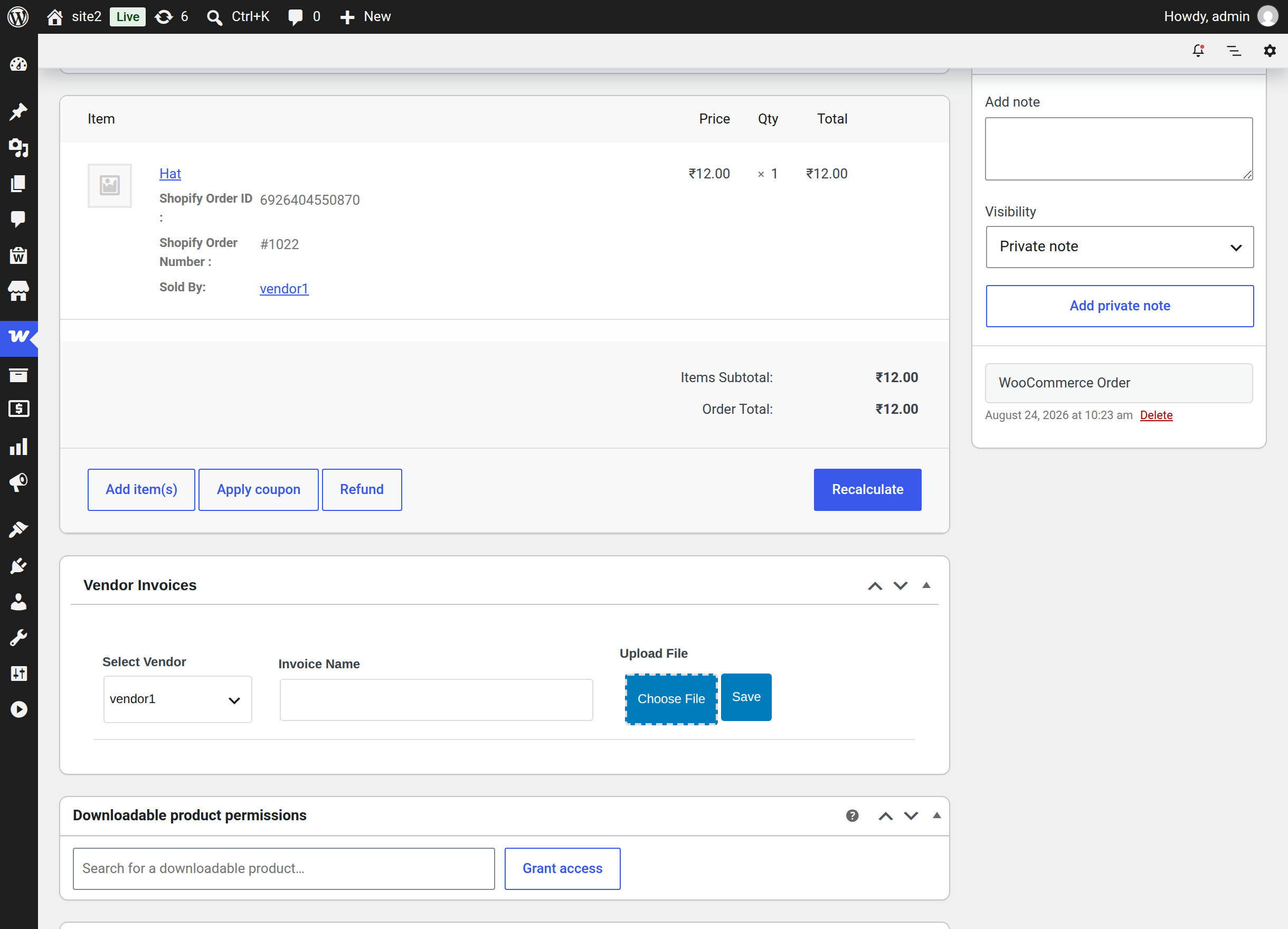
Each line item also carries two visible meta values, so the origin is obvious from the order screen: Shopify Order ID and Shopify Order Number.
The order status
Imported orders do not inherit the Shopify status. They are all created with the single status chosen in Import Orders As on the Settings tab.
That is a deliberate simplification: it lets a seller drop every imported order into one queue — usually Processing or Completed — instead of trying to reconcile two status vocabularies.
Marketplace seller mapping
After the order is created, the connector attaches it to the correct marketplace seller and writes it into the Marketplace order tables, so it appears in the seller's Order History, counts toward their totals, and shows Sold By on the line item.
Exporting: WooCommerce to Shopify
Which WooCommerce orders are eligible
Three conditions, all required:
- The order has not already been exported to this Shopify account.
- Every line item is linked to this Shopify account — either because the product was imported from Shopify or because it was exported to it. The connector checks the import mapping first and falls back to the export mapping. If neither exists the row shows Products Not Exported and the export is refused.
- For an automatic export, the order's status matches the Shopify Export Order setting (or that setting is All).
What is sent
| WooCommerce field | Sent to Shopify |
|---|---|
| Line items | lineItems — variant ID, quantity, unit price and currency |
| Line item name | variantTitle |
| Billing address | billingAddress |
| Shipping address | shippingAddress — falls back to the billing address when the order has none |
| Billing email | email |
| Order currency | currency |
| Tax totals | taxLines — only when Export Order Tax is Include Tax Cost |
| Shipping method and cost | shippingLines, with shipping tax — only when Export Order Shipping is Include Shipping Cost |
| Coupons | discountCode — only when Export Order Discount is Include Discount |
| Order status | financialStatus and fulfillmentStatus — see below |
Unit price is calculated as the line subtotal divided by quantity, so an order-level discount applied to a line is reflected in the per-unit figure sent to Shopify.
Coupons
Percentage coupons are sent as a Shopify percentage discount code; every other coupon type is sent as a fixed-amount discount code. In both cases the WooCommerce coupon code travels with it, so the discount is identifiable in Shopify.
Financial and fulfilment status
| WooCommerce order status | Sent to Shopify |
|---|---|
| Completed | financialStatus: PAID and fulfillmentStatus: FULFILLED |
| Anything else | financialStatus: PENDING |
Stock behaviour
Orders are created on Shopify with the inventory behaviour decrement obeying policy — Shopify reduces stock, but respects each product's own oversell setting. An exported order will not push a Shopify product below zero unless that product is configured to allow it.
Two markers on every exported order
Every order the connector creates on Shopify carries:
- an order note reading
WooCommerce Order; and - a custom attribute named
Webkul Marketplace Admin Commission, holding the marketplace commission calculated for that order.
That second one is genuinely useful at reconciliation time — the Shopify order itself records what the marketplace took, so the seller does not have to cross-reference two systems to work out their net.
Fulfilment: Shopify back to WooCommerce
When the seller fulfils an order in Shopify, the ORDERS_FULFILLED webhook sends the fulfilment back. The connector matches each fulfilled Shopify line item to the WooCommerce order line and writes three meta values onto it:
| Written onto the order line | From the Shopify fulfilment |
|---|---|
| Tracking Company | tracking_company |
| Tracking Number | tracking_number |
| Tracking URL | tracking_url |
These are written only when Shopify supplied at least one of the three. The values appear on the WooCommerce order, where the buyer can see them.
This works for orders the connector knows about — imported orders, and orders it exported. It does not depend on the auto-sync direction; see Webhooks and Auto-Sync.
Related pages
- Importing Orders — running the import
- Exporting Orders — running the export, manually and automatically
- Settings — the shipping, tax and discount switches
- Product Data Reference — the same treatment for products