
Analytics Dashboard
The Sync Performance Dashboard shows the health of product and order synchronization for a store — success rates, failure trends, and every error with a suggested fix — so you can spot problems without digging through logs.
Open the store workspace and select Analytics at the bottom of the left-hand navigation panel.
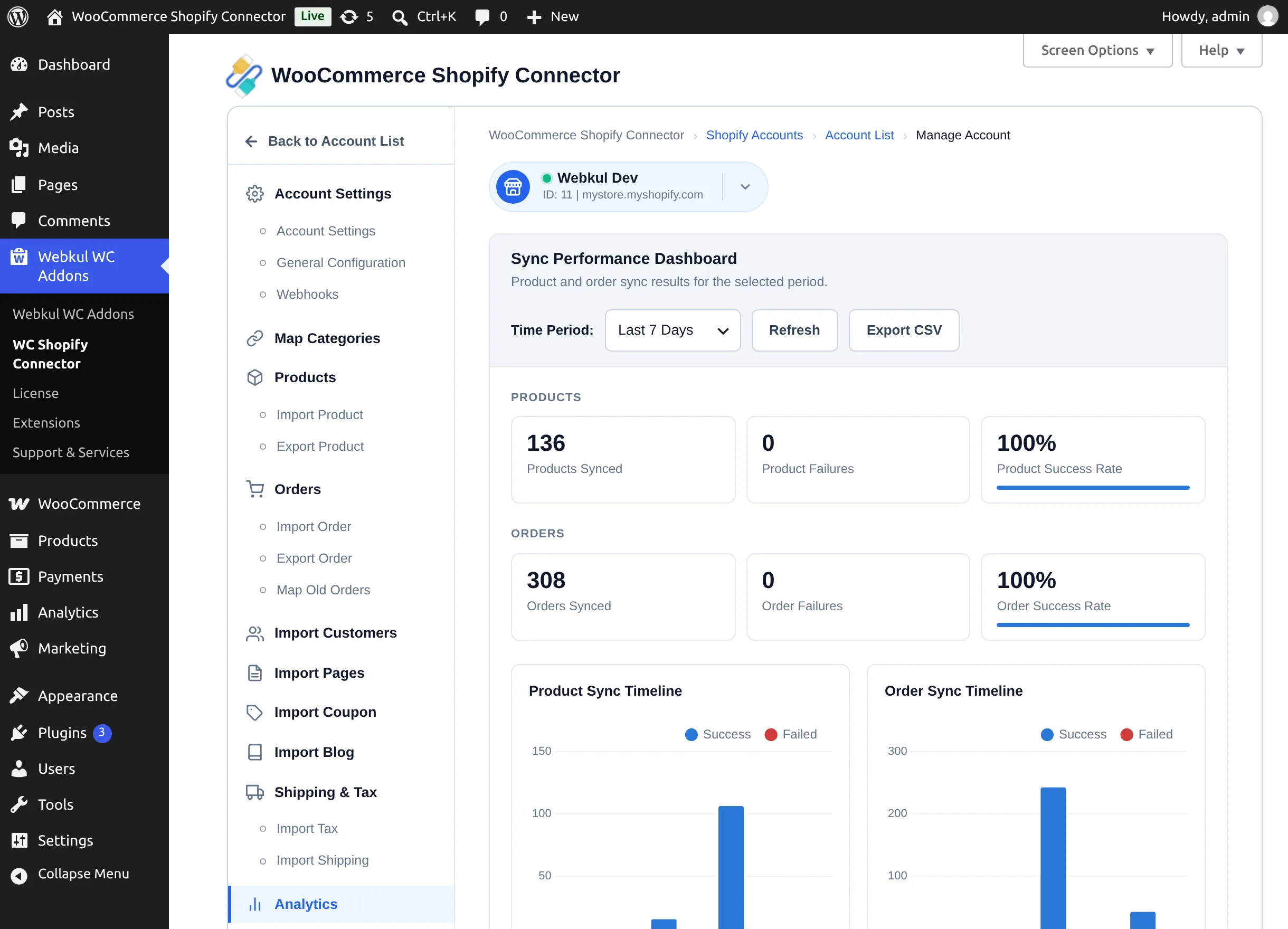
Reading the dashboard
Time period. The Time Period selector offers Last 24 Hours, Last 7 Days (default), and Last 30 Days. All cards, charts, and the error table update to the chosen window. Refresh reloads the data without changing the period.
Summary cards. Six cards summarize the period: Products Synced, Product Failures, Product Success Rate, Orders Synced, Order Failures, Order Success Rate. Failure cards are highlighted when the count is non-zero.
Timeline charts. The Product Sync Timeline and Order Sync Timeline bar charts show daily Success vs Failed counts. Hover a bar for exact numbers.
Charts need internet access
The charts are rendered with a library loaded from a public CDN. On an offline/air-gapped admin the charts won't draw, but the summary cards and error table still work.
Top Sync Errors. The error table lists each distinct error code seen in the period with its Count, Last Seen time, and a Suggested Fix — for example:
| Error code | Suggested fix |
|---|---|
PRODUCT_IMPORT_ERROR | Check Shopify API credentials and product visibility. |
PRODUCT_IMPORT_BLOCKED | Another product sync was already running. Retry after it completes. |
PRODUCT_EXPORT_ERROR | Verify Shopify location settings, product data, and API credentials. |
API_RATE_LIMIT | Shopify API rate limit hit. Reduce sync frequency or use bulk API. |
ORDER_EXPORT_ERROR | Check order data and Shopify credentials, then retry the export. |
When the period is clean, the table shows "No errors in this period."
Exporting a report
Select Export CSV to download shopify-sync-report-<date>.csv — every sync event in the selected period, with its type, direction, status, entity, error code, error detail, and timestamp. Note that the CSV covers sync events across all connected stores for the period.
Daily email digest
Once a day (around 07:00 site time), the connector emails a Daily Shopify Sync Report to the site's admin email address. It summarizes the last 24 hours — products and orders synced, failed, and pending — and lists the top errors. If there were no failures, it says so. There is no setting for this digest in the admin; it runs automatically while the plugin is active.
Data retention
Sync events older than 90 days are pruned automatically each week, keeping the dashboard fast.