
Importing Orders
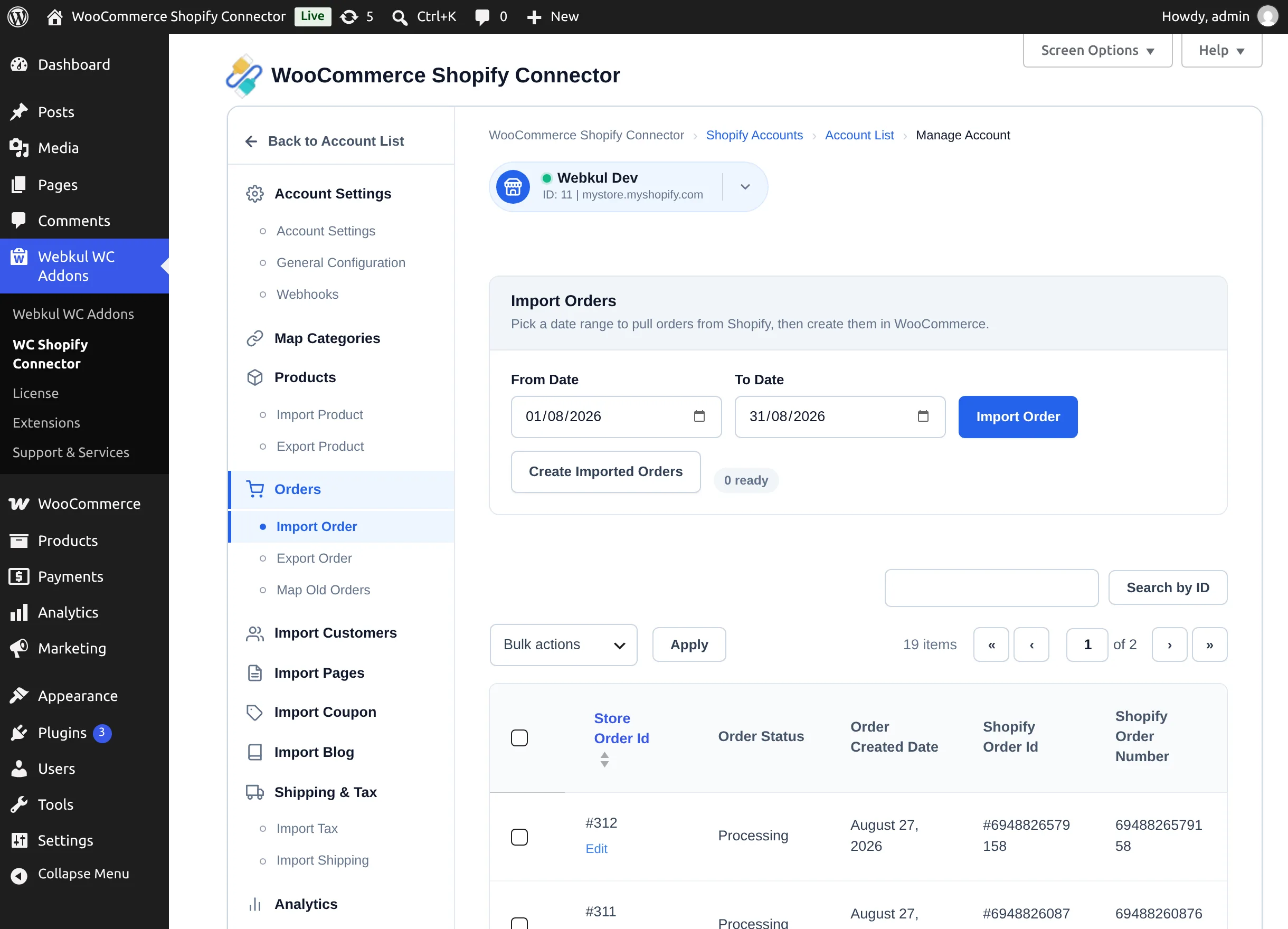
Order import brings Shopify orders into WooCommerce so fulfillment, reporting, and customer history live in one place. Like products, it is a two-phase flow: Import Order stages the data, Create Imported Orders builds the WooCommerce orders.
Open the store workspace and go to Orders → Import Order.
Before you start
In General Configuration, set:
- Import Orders As — the WooCommerce status given to imported orders.
- Import Orders Re-Send Email — leave on Disable (default) so customers are not emailed again by WooCommerce for orders they already placed on Shopify.
Import and create
- Optionally set From Date and To Date to restrict the import window.
- Select Import Order. Orders are staged and listed with Store Order Id, Order Status, Order Created Date, Shopify Order Id, Shopify Order Number.
- Select Create Imported Orders to build the WooCommerce orders. If nothing is staged the button reads "Orders are not available for create".
During creation, the connector:
- Applies your chosen order status.
- Attaches the ordered products (import the products first — orders whose products are missing are reported: "not Created due to product unavailability so please import products.").
- Creates any missing tax rates automatically so totals match.
- Marks the order as a Shopify order internally, so it won't be re-exported back to Shopify.
Orders without a customer email are skipped with "not Created due to email not available."
Automatic order import
With webhooks generated and Auto Import Order set to Enable, new Shopify orders arrive in WooCommerce automatically within moments of being placed — no manual import needed.
Managing imported orders
- Edit on a row opens the order in WooCommerce's order editor.
- Bulk actions → Delete removes staged/imported records from the connector's list (the WooCommerce order itself is managed from WooCommerce → Orders).
- Search by ID filters the table.
Next step
Send WooCommerce orders to Shopify: Exporting Orders.