
Export Orders
Exporting sends WooCommerce orders to Shopify, so orders placed on your marketplace also appear in the vendor's Shopify admin.
Open Manage Account → Orders → Export Order.
What the list shows
| Column | Meaning |
|---|---|
| Order ID | The WooCommerce order number |
| Gross Sales | The order total |
| Date | When the order was placed |
| Shopify Order ID | The order's ID on Shopify, or N/A if it has not been exported |
| Export Status | A tick once exported, a cross before |
| View | Opens the order |
Only orders containing this vendor's products appear. Search by Search By Order Id to find one.
Exporting an order
- Tick the orders you want to send.
- Choose Export under Bulk actions.
- Select Apply.
While it runs you will see Exporting Order and Your Orders are now being Exporting…
When it finishes, the row updates: Export Status becomes a tick and the Shopify Order ID is filled in with the ID Shopify assigned.
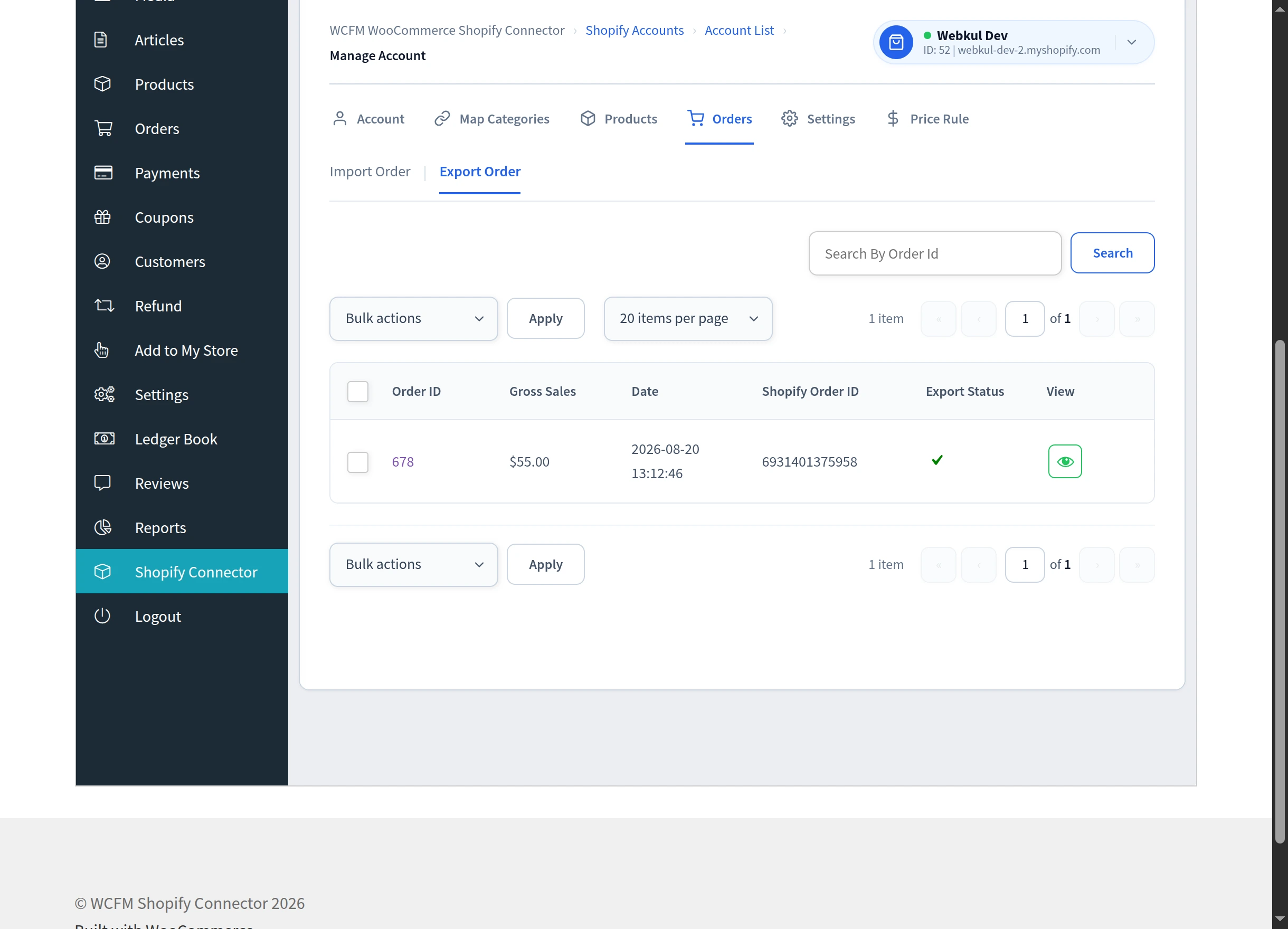
Export is a bulk action. There is no per-row export button — tick the order and use Bulk actions → Export → Apply. The only control on the row itself is View.
Exporting automatically
Rather than exporting by hand, you can have orders sent to Shopify as they are placed. This is set in General Settings under Shopify Export Order:
- Manual — nothing is exported automatically; you use the bulk action above.
- Realtime — every new order is exported as soon as it is placed.
- A specific order status — orders are exported when they reach that status, for example Processing.
Choosing a status is usually the most practical option: it avoids sending orders that are cancelled or never paid.
What gets sent
Three settings control the money on an exported order, all in General Settings:
| Setting | Options |
|---|---|
| Export Order Shipping | Include or Exclude Shipping Cost |
| Export Order Tax | Include or Exclude Tax Cost |
| Export Order Discount | Include or Exclude Discount |
Set these to match how your Shopify store accounts for orders, so totals reconcile on both sides.
If an order does not export
- Confirm the store still shows Connected on the account list.
- Check the order actually contains this vendor's products.
- If you expected it to export automatically, check Shopify Export Order is not set to Manual, and that the order has reached the status you selected.
Next steps
- General Settings — set automatic export and what is included
- Real-Time Sync — how live synchronisation works