
Smart Alerts
Alerts notify you via email when an important store metric crosses a threshold — for example, when refund rate spikes above 5%, or when stock for any product drops below 10 units. The plugin evaluates alerts automatically after every sync.
URL: /wp-admin/admin.php?page=wkpbic-alerts
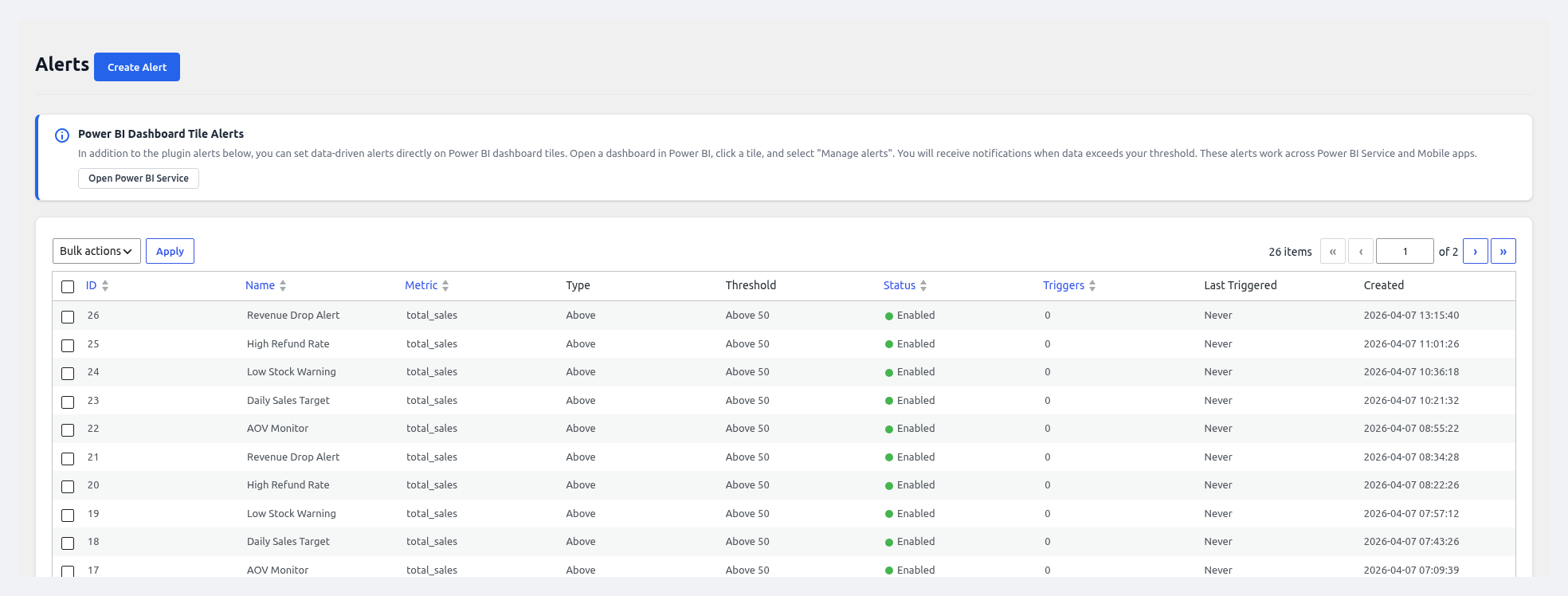 Alerts page — create threshold alerts for sales, orders, AOV, refunds, and stock.
Supported Metrics
| Metric | Description |
|---|---|
| Total Sales | Sum of order totals over a window |
| Order Count | Number of orders in a window |
| Average Order Value (AOV) | Sales ÷ Orders |
| Refund Rate | Refunds ÷ Orders × 100 |
| Low Stock Count | Number of products below the WC low-stock threshold |
| Profile Completion | Fires on success or failure of any Load Profile |
| Sync Failure | Fires when a scheduled sync fails |
Condition Types
| Condition | Example |
|---|---|
| Above | Sales > $10,000 |
| Below | Orders < 50 |
| Between | AOV between $40 and $80 |
| Outside Range | AOV outside $40–$80 |
| Equals | Order Count = 0 (dead store alert) |
Creating an Alert
Click + Create Alert on the Alerts page.
Fill in the form:
Field Description Name Friendly label, e.g. "High Refund Rate Warning" Metric One of the supported metrics Time Window Last hour / Last 24 hours / Last 7 days / Last 30 days Condition Above / Below / Between / Outside Range / Equals Threshold Value(s) The numeric comparison Recipients Comma-separated emails (defaults to the Alert Email in General Settings) Email Subject Custom subject line Email Body Custom body with placeholders like {metric},{value},{threshold},{timestamp}Enabled Toggle Active/inactive Cooldown Minimum minutes between repeat emails to avoid spam Click Save.
(Optional) Click Test — the plugin sends a sample email and shows the currently calculated value for the metric.
How Alerts are Evaluated
- After every scheduled or manual sync, the plugin runs a cron job
wkpbic_check_alerts. - For each enabled alert, it calculates the current metric value over the configured window.
- If the condition matches, an email is sent (respecting the cooldown) and an entry is written to Logs → Alert History.
- You can force evaluation manually via WP-CLI:
wp cron event run wkpbic_check_alerts
Alerts Grid
| Column | Description |
|---|---|
| Name | Friendly label |
| Metric | The tracked metric |
| Condition | Human summary (e.g. "Refund Rate > 5%") |
| Last Triggered | When the alert last fired |
| Status | ✅ OK / Triggered / Disabled |
| Actions | Edit, Test, Enable/Disable, Delete |
Alert History
Every fire is recorded in Logs with:
- Timestamp
- Metric name
- Calculated value
- Threshold
- Recipients
- Email delivery status
Example — Refund Rate Alert
- Name: "Refund Rate > 5%"
- Metric: Refund Rate
- Window: Last 7 days
- Condition: Above
- Threshold: 5
- Recipients:
[email protected] - Cooldown: 360 minutes (6 hours)
The plugin will now email your ops team at most once every 6 hours whenever the 7-day refund rate exceeds 5%.
Disabling an Alert Temporarily
Rather than deleting the alert, toggle Enabled → Off. The configuration is preserved; you can re-enable it at any time.