
QuickBooks Financial Reports
The Reports tab (tab=reports) embeds Intuit QuickBooks Online's executive reporting suite directly inside your WordPress admin. Introduced in v4.0.0, merchants and accountants can review live Profit & Loss, Balance Sheet, Cash Flow, Item Sales, Customer Sales, and Accounts Receivable Aging without logging into QuickBooks or sharing Intuit login credentials.
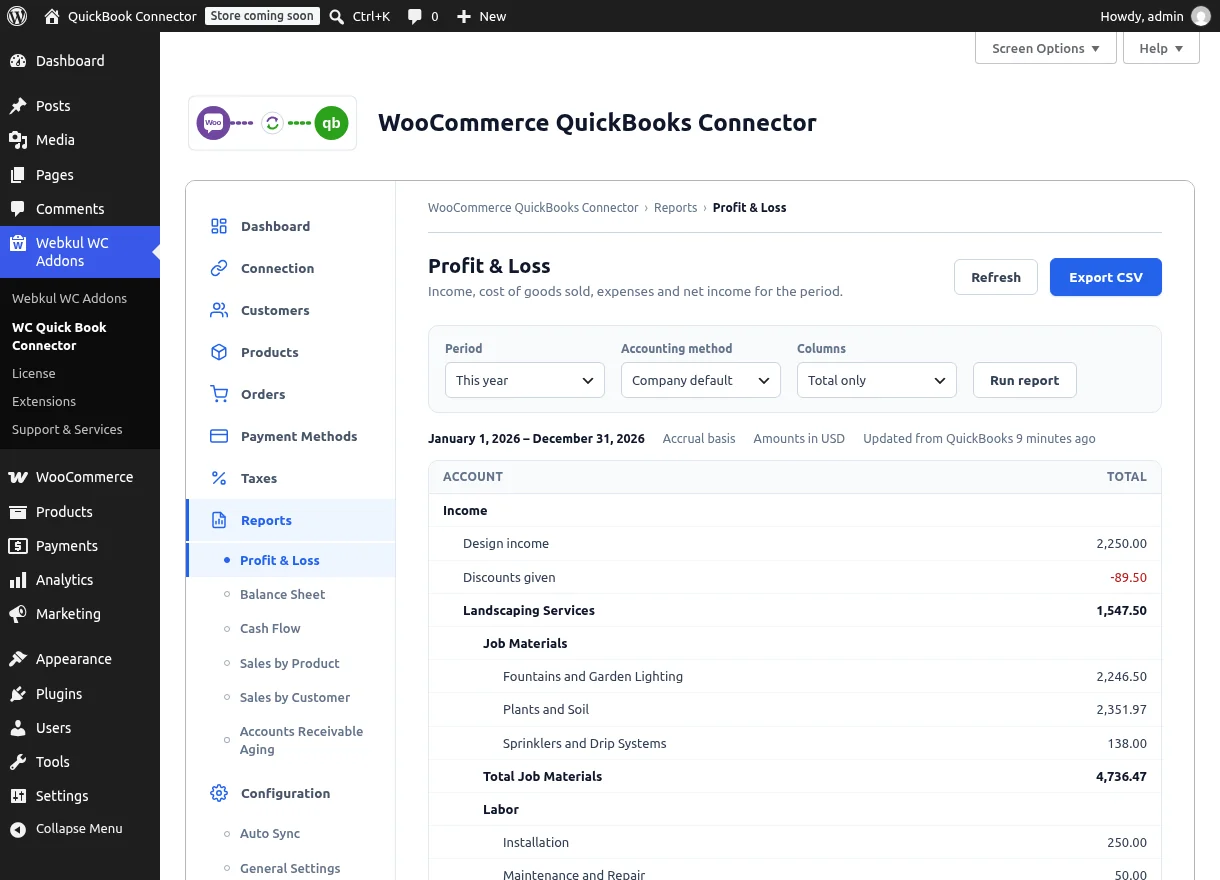
6 Embedded Core Financial Reports
The connector provides 6 distinct executive reports rendered directly via Intuit's official Reports API:
1. Profit & Loss (Income Statement)
Summary of revenue, Cost of Goods Sold (COGS), operating expenses, and net operating income across any custom accounting date range.
Cash & Accrual Supported2. Balance Sheet
Financial position of your business at any specific date, balancing Total Assets against Total Liabilities and Owner's Equity.
As-of Date Filter3. Statement of Cash Flows
Tracks cash inflows and outflows generated from operating activities, investing activities, and financing activities.
Operating Cash Insight4. Sales by Product / Service
Itemized sales volume, gross revenue, average selling price, and percentage of overall store sales per WooCommerce SKU.
SKU Level Drilldown5. Sales by Customer Summary
Total lifetime or periodic revenue generated per customer, highlighting top wholesale buyers and VIP retail accounts.
Customer Contribution6. A/R Aging Summary
Breakdown of unpaid invoices categorized into 1-30, 31-60, 61-90, and 91+ day aging buckets for swift collection management.
Aging BucketsInteractive Controls & Accounting Filters
Each report includes intuitive accounting toolbars:
- Date Period Selector: Quick presets for Today, This Week, This Month, This Quarter, This Year to Date (YTD), Last Fiscal Year, or Custom Date Range.
- Accounting Method Toggle: Instant switch between Cash Basis (recognizes income when cash is received) and Accrual Basis (recognizes income when invoices are generated).
- Class & Department Filter: Filter financial statements by specific store branches, sales channels, or product categories configured in Export Order Settings.
1-Click CSV & Excel Spreadsheet Export
Need to share financial reports with external CPAs, tax consultants, or investors? Click the Export to CSV button at the top-right of any active report to download a clean, structured spreadsheet formatted for Microsoft Excel, Google Sheets, or Apple Numbers.
Next step: Explore Sync Monitor & Activity Logs →