
Auctions for WooCommerceAuctions for WooCommerce
Buy Now
View Demo
  • Getting Started

    • Introduction
    • Quick Start
    • Features
    • Installation
    • First-Time Setup
    • Onboarding Tour
  • Admin Guide

    • Admin Overview
    • Dashboard
    • All Auctions
    • Add / Edit Auction
    • Bids
    • Reports
    • Events
    • Wallet
    • Disputes
    • Blocked Users
    • Fraud Detection
    • Tools (Import / Export)
    • Settings
    • Design Studio
    • Pending Review
    • Audit Log
  • Auction Mechanics

    • Auction Types
    • Bidding Engine
    • Anti-Sniping
    • Bid Increments
    • Reserve & Buy Now
    • Auto-Relist
    • Watchlist
  • Customer Experience

    • Customer Overview
    • My Auctions
    • My Wallet
    • Withdrawal
    • Single Auction Page
    • Notifications
  • Wallet & Payments

    • Wallet System
    • Auto-Charge
    • Stripe Connect
    • Monetization Fees
  • Multi-Vendor & Integrations

    • Multi-Vendor Compatibility
    • Twilio SMS
    • Firebase Push
    • Two-Factor Auth
    • Captcha
    • Social Login
    • Subscription Gate
    • Elementor & Gutenberg
  • Premium Features

    • Smart Features
    • Psychology Triggers
    • Gamification
    • Fraud Detection
    • Compliance
    • Social Sharing
    • Email Notifications
  • Developer

    • REST API
    • Hooks & Filters
    • JS Events
    • Database Schema
    • Shortcodes
    • Options Reference
    • WP-CLI
  • Help

    • Troubleshooting
    • FAQ
    • Glossary
    • Changelog
Support
Buy Now
View Demo
  • Getting Started

    • Introduction
    • Quick Start
    • Features
    • Installation
    • First-Time Setup
    • Onboarding Tour
  • Admin Guide

    • Admin Overview
    • Dashboard
    • All Auctions
    • Add / Edit Auction
    • Bids
    • Reports
    • Events
    • Wallet
    • Disputes
    • Blocked Users
    • Fraud Detection
    • Tools (Import / Export)
    • Settings
    • Design Studio
    • Pending Review
    • Audit Log
  • Auction Mechanics

    • Auction Types
    • Bidding Engine
    • Anti-Sniping
    • Bid Increments
    • Reserve & Buy Now
    • Auto-Relist
    • Watchlist
  • Customer Experience

    • Customer Overview
    • My Auctions
    • My Wallet
    • Withdrawal
    • Single Auction Page
    • Notifications
  • Wallet & Payments

    • Wallet System
    • Auto-Charge
    • Stripe Connect
    • Monetization Fees
  • Multi-Vendor & Integrations

    • Multi-Vendor Compatibility
    • Twilio SMS
    • Firebase Push
    • Two-Factor Auth
    • Captcha
    • Social Login
    • Subscription Gate
    • Elementor & Gutenberg
  • Premium Features

    • Smart Features
    • Psychology Triggers
    • Gamification
    • Fraud Detection
    • Compliance
    • Social Sharing
    • Email Notifications
  • Developer

    • REST API
    • Hooks & Filters
    • JS Events
    • Database Schema
    • Shortcodes
    • Options Reference
    • WP-CLI
  • Help

    • Troubleshooting
    • FAQ
    • Glossary
    • Changelog
Support
  • Getting Started

    • Introduction
    • Quick Start
    • Feature Catalog
    • Installation
    • First-Time Setup
    • Onboarding Tour
  • Admin Guide

    • Admin Overview
    • Dashboard
    • All Auctions
    • Add / Edit Auction
    • Bids
    • Reports
    • Events
    • Wallet (Admin)
    • Disputes
    • Blocked Users
    • Fraud Detection
    • Tools
    • Settings
    • Design Studio
    • Pending Review
    • Audit Log
  • Auction Mechanics

    • Auction Types
    • Bidding Engine
    • Anti-Sniping (Soft Close)
    • Bid Increments
    • Reserve & Buy Now
    • Auto-Relist
    • Watchlist
  • Customer Experience

    • Customer Experience Overview
    • My Auctions
    • My Wallet
    • Withdrawal
    • Single Auction Page
    • Customer Notifications
  • Wallet & Payments

    • Wallet System
    • Wallet Auto-Charge
    • Stripe Connect
    • Monetization
  • Multi-Vendor & Integrations

    • Multi-Vendor Compatibility
    • Twilio SMS
    • Firebase (Push Notifications)
    • Two-Factor Authentication
    • Captcha
    • Social Login
    • Subscription Gate
    • Elementor & Gutenberg
  • Premium Features

    • Smart Features
    • Psychology Triggers
    • Gamification
    • Fraud Detection
    • Compliance
    • Social Sharing
    • Email Notifications
  • Developer

    • REST API
    • Hooks & Filters
    • JavaScript Events
    • Database Schema
    • Shortcodes
    • Options Reference
    • WP-CLI
  • Help

    • Troubleshooting
    • FAQ
    • Glossary
    • Changelog

All Auctions

Auctions → All Auctions — ?page=wkafw-auctions

The single source of truth for every auction in the database. List, filter, bulk-act, drill in.
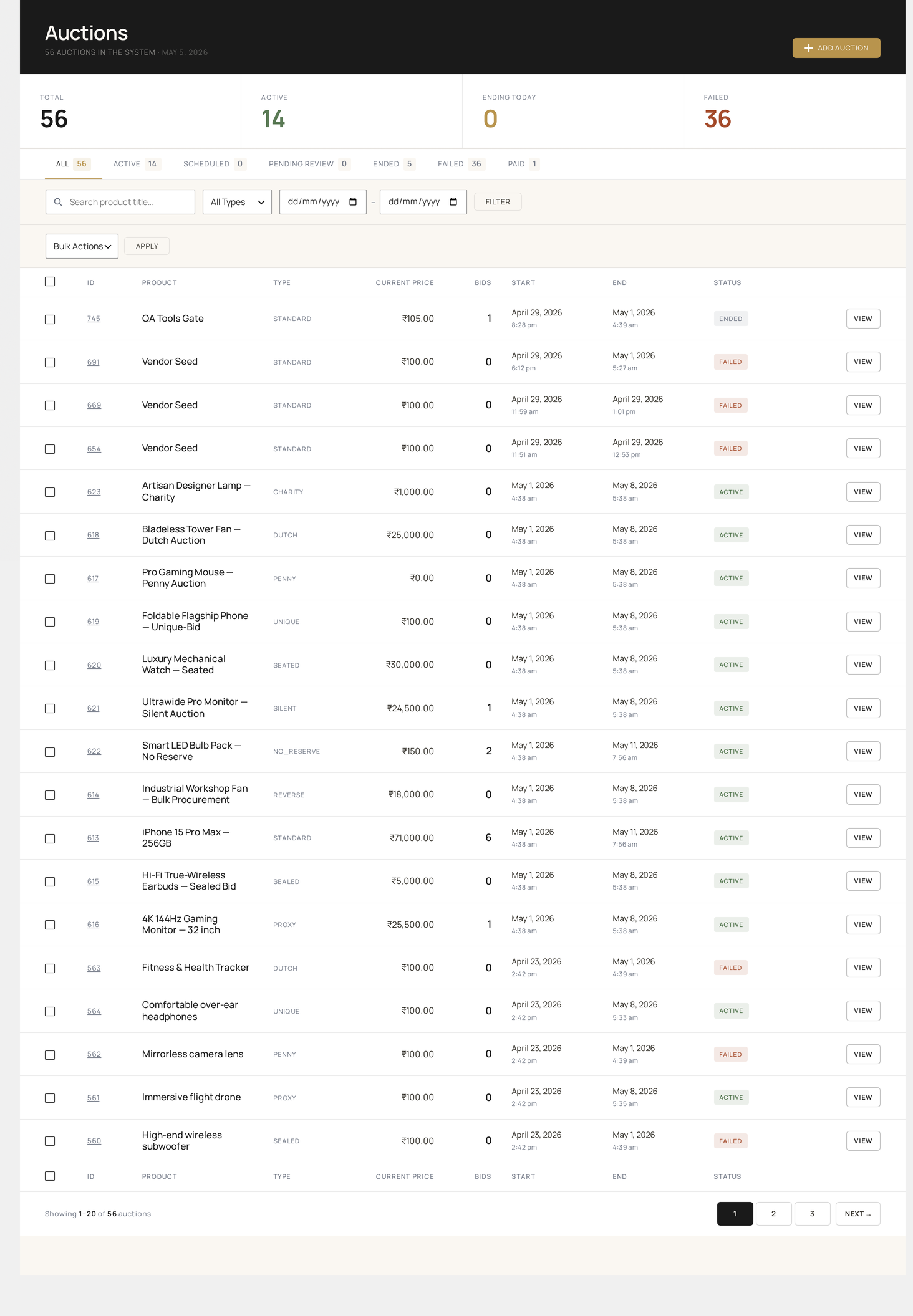
All Auctions — full list with status, type, current price, bids, time left and bulk-action toolbar

Page layout

  • Filter bar — status, type, date range, vendor (if multi-vendor), search
  • Bulk action drop-down — start, pause, end, extend, cancel, delete, duplicate
  • Auction table — paginated, sortable
  • Pagination — bottom

Columns

ColumnSourceSortable
IDwkafw_auctions.idyes
Imagelinked product featured imageno
Titlelinked product titleyes
Typeauction_type (Standard / Reverse / etc.)yes
Statusstatus (color-coded badge)yes
Current Pricecurrent_priceyes
Bidsbid_count (linked to filtered Bids page)yes
Reservemet / not met / not setno
Startstart_dateyes
Endend_date (with countdown if active)yes
VendorThe vendor user this auction belongs toyes
Actionsedit / view / duplicate / deleteno

Click a column header to sort. Click again to flip direction. The sort state is preserved in the URL so you can bookmark it.

Filters

Status filter

Six chips at the top: All, Active, Scheduled, Ended, Paid, Failed, Paused, Cancelled. Counts shown next to each.

Type filter

Dropdown listing every enabled auction type.

Date range

Picker for start-date or end-date range. Useful for "auctions ending this week" reports.

Vendor filter

Only appears when a multi-vendor plugin is detected. See Multi-Vendor.

Search

Searches by:

  • Auction ID (#123)
  • Linked product title
  • Product SKU
  • Vendor name (multi-vendor)

Bulk actions

Select rows via the leftmost checkbox column, choose an action, click Apply.

ActionWhat it doesReversible?
StartFlips scheduled lots to active immediately, ignoring start_datePause / Cancel
PauseStops accepting bids (status → paused); end timer keeps tickingStart
ExtendAdds N seconds to end_date (prompts for N)Edit auction
EndFinalizes immediately; runs the end-of-auction lifecycleRe-list
CancelMarks cancelled, no winner, no orderRestore from trash
DeleteSoft-deletes the auction rowTrash → Restore (30 days)
DuplicateClones the auction (linked to a duplicate product)Just delete the dupe

End vs Cancel

End assigns the current high bidder as winner and starts the payment flow. Cancel voids the auction with no winner. Use Cancel for fraudulent auctions, End for early closes when you want the current winner to pay.

Per-row actions

Hover a row to reveal:

  • Edit — opens Add / Edit Auction
  • View bids — jumps to Bids filtered to this auction
  • View on storefront — opens the public auction page
  • Duplicate — one-click clone
  • Delete — soft-delete

URL parameters

The page state is fully encoded in the URL:

?page=wkafw-auctions
  &status=active             # filter by status
  &type=proxy                # filter by auction type
  &search=vintage            # title / SKU / vendor search
  &orderby=end_date          # sort column
  &order=ASC                 # ASC or DESC
  &paged=2                   # page number

Bookmark a filtered view (e.g. "All ending today") to revisit it instantly.

Performance

The table is paginated server-side — typically 20 rows per page. Even on databases with 100k+ auctions, loads in well under a second thanks to indexes on status, start_date, end_date, and product_id.

Where the row data is written

FieldUpdated by
Current price / bid countEvery bid placed
StatusLifecycle background jobs, plus manual admin actions
End dateAdmin extend, plus the auto-extend triggered by anti-snipe
Total extensionsThe anti-snipe handler each time it fires

Common workflows

"Find all active auctions ending in the next hour"

  1. Status filter → Active
  2. Sort by End ascending
  3. Read the top rows

"End all paused auctions"

  1. Status filter → Paused
  2. Header checkbox → select all on page
  3. Bulk action → End → Apply

"Find this week's failed auctions"

  1. Status filter → Failed
  2. Date range → start of week → today
  3. Export via Reports for a CSV

"Duplicate an auction for next week"

  1. Find the original via search
  2. Hover → Duplicate
  3. Open the new copy → edit start / end dates → publish
Prev
Dashboard
Next
Add / Edit Auction