
Bids
Auctions → Bids — ?page=wkafw-bids
Every bid ever placed, with full forensics — IP, user agent, timestamp, manual vs proxy origin, current status. The table is the source-of-truth for moderation and dispute investigation.
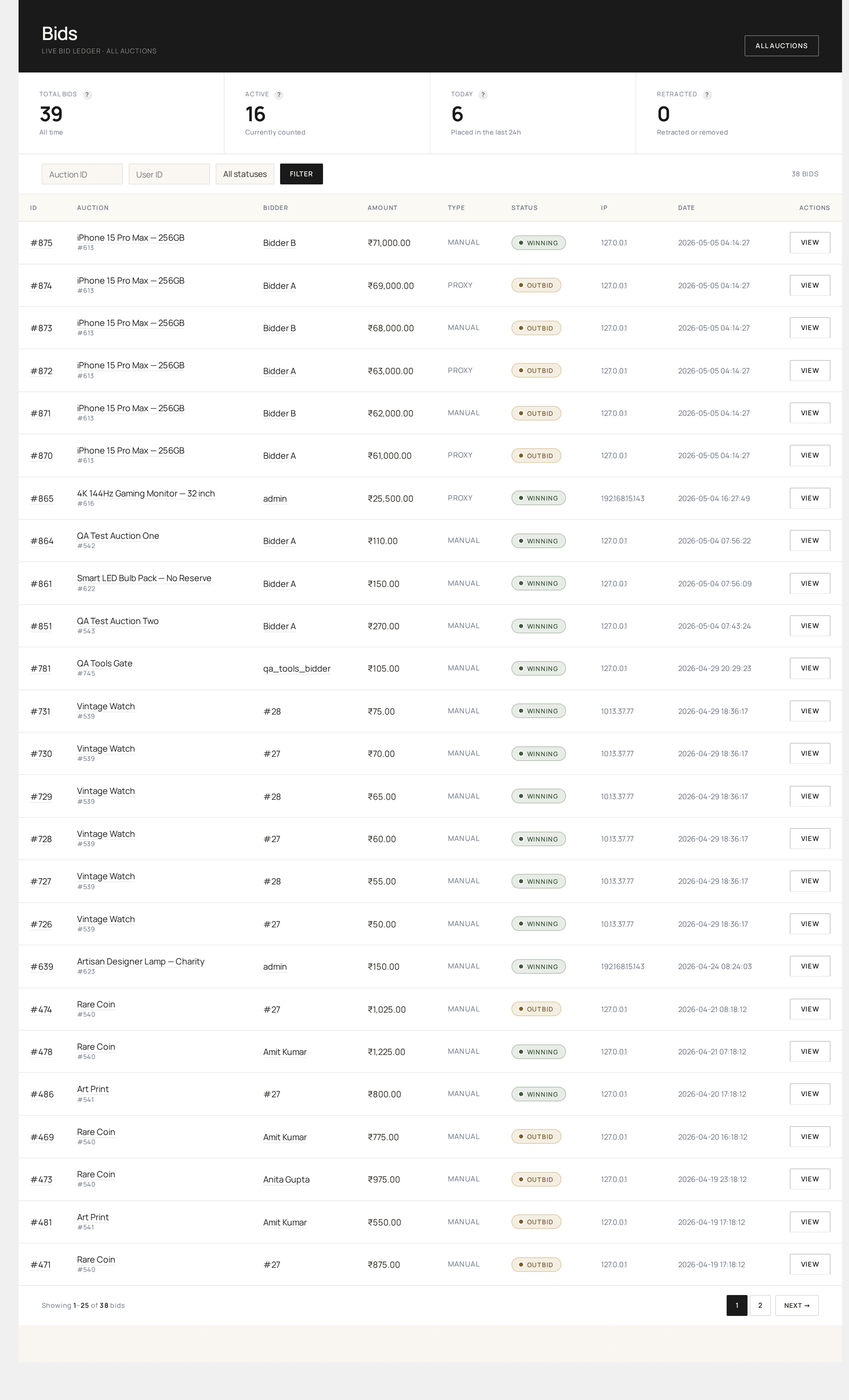
Columns
| Column | Source | Sortable |
|---|---|---|
| ID | wkafw_bids.id | yes |
| Auction | auction_id (linked to All Auctions row) | yes |
| Bidder | user_id → user display name | yes |
| Amount | bid_amount (currency-formatted) | yes |
| Type | bid_type (manual / proxy / absentee / auto) | yes |
| IP | ip_address | no |
| User Agent | user_agent (truncated) | no |
| Anonymous | is_anonymous (yes/no) | no |
| Status | status (active / retracted / fraudulent / outbid) | yes |
| Placed | created_at | yes |
| Actions | retract / mark fraudulent / delete | no |
Filters
- Auction — autocomplete by ID or product title
- Bidder — autocomplete by user
- Status — active / retracted / fraudulent / outbid
- Type — manual / proxy / absentee
- Date range — placed-between picker
- IP — exact match (useful for fraud chases)
Per-row actions
| Action | What it does |
|---|---|
| Retract | Flips status to retracted; bid is excluded from leaderboard re-calc |
| Mark fraudulent | Status → fraudulent; user is candidate for Blocked Users |
| Delete | Hard-removes the row (admin only) — recalculates auction's current_price |
| View user profile | WP user edit page |
| Filter by IP | Re-loads the table filtered to this IP |
Deleting a bid
Deleting recalculates current_price and bid_count on the parent auction. If the deleted bid was the current high, the auction reverts to the next-highest. The audit log keeps the original event — deleted bids are visible there.
Bulk actions
Select rows → action → Apply.
| Action | Effect |
|---|---|
| Mark all fraudulent | Useful when you've identified a bot run by IP |
| Delete | Hard-delete; only use for confirmed bot/spam |
| Retract | Soft-status flip |
When was the bid placed?
The created_at column is in UTC in the database, displayed in your WordPress timezone (Settings → General). Anti-snipe / lifecycle workers always compare in UTC — display drift between admins in different timezones is purely a display thing.
Manual vs Proxy vs Absentee
bid_type | Origin |
|---|---|
manual | Bidder clicked Place Bid on the auction page |
proxy | System auto-incremented from a stored max-bid (proxy / auto-bidding) |
absentee | Pre-bid placed before auction started; converted to proxy when auction opened |
auto | Cron-placed bid (rare; e.g. silent-auction settle) |
Auction types & bidding modes →
Forensic checks
The Bids table is your first stop when investigating:
| Suspicion | Check |
|---|---|
| Sniping bot | Filter by IP; look for many bids from same IP across many auctions |
| Shilling (seller bidding own auction) | Sort by user → check seller-IDs |
| Bidder collusion | Filter by IP range; look for coordinated last-second bids |
| Anti-snipe abuse | Filter by created_at near auction end_date |
For automated detection, see Fraud Detection.
Export
Click Export → CSV at the top right. The export includes every column above plus a few internals (audit chain hash, request fingerprint). Big exports run in the background.
Common workflows
"Investigate a disputed win"
- Filter by Auction = disputed auction ID
- Sort by Placed descending
- Inspect the last 5 bids — check for IP collisions, user-agent oddities, or proxy floods
"Block a bot user"
- Filter by Bidder = the bot account
- Bulk select → Mark fraudulent
- Add the user to Blocked Users
- Optionally add the IP to a Fraud Detection rule
"Find all bids from one IP"
- Filter by IP = the IP
- Export CSV for legal / dispute log
How bids are written
For the full behind-the-scenes walkthrough — validation, row-locking, audit-chain append, and the fan-out to email / push / SMS / marketing — see the Bidding Engine page.