
Customer Experience Overview
What a logged-in customer sees and can do — front-end pages, my-account endpoints, notifications.
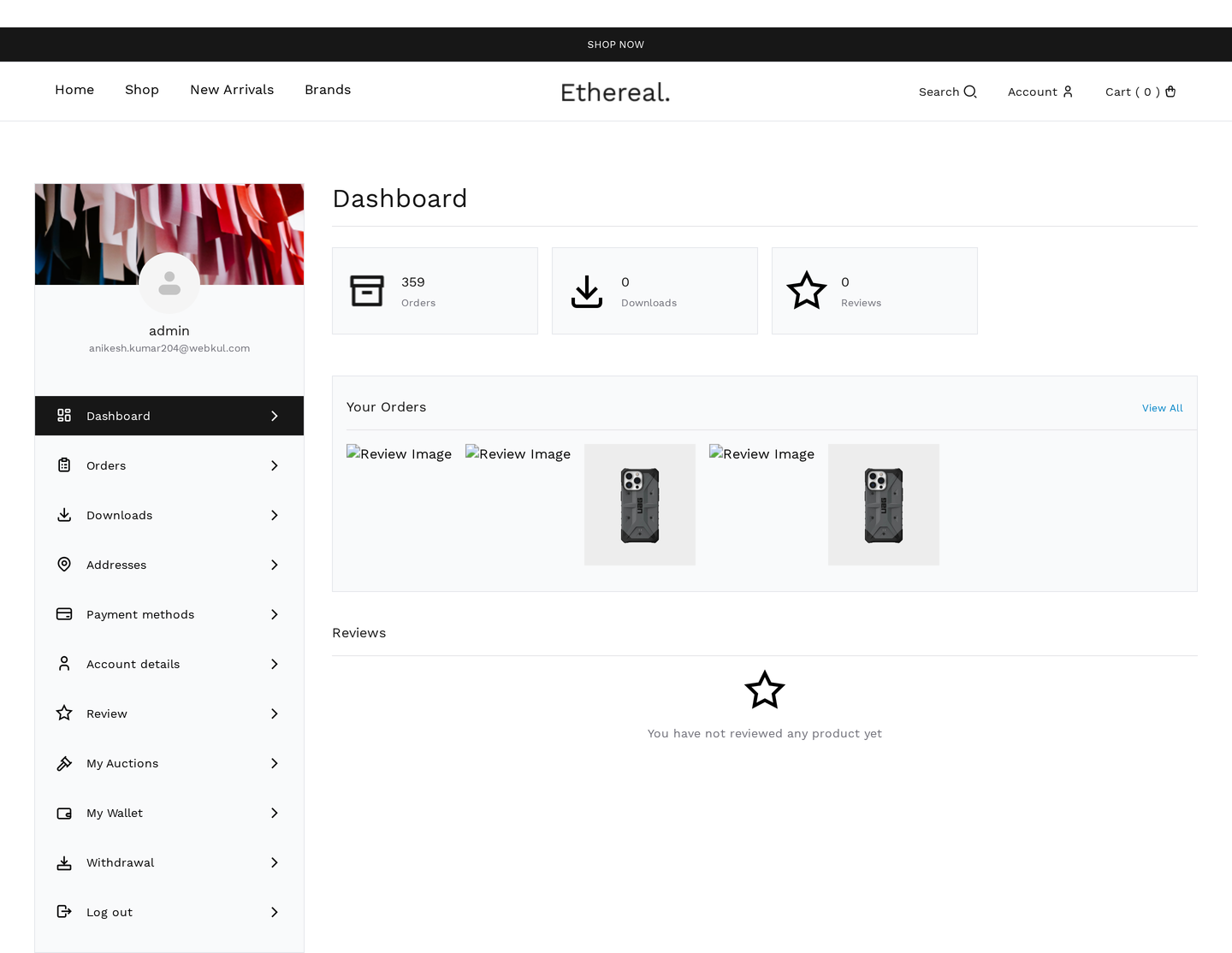
My Account additions
The plugin adds three new endpoints to My Account:
| Endpoint | URL | Purpose |
|---|---|---|
| My Auctions | /my-account/my-auctions/ | Active bids, won, lost, watchlist |
| My Wallet | /my-account/my_wallet/ | Top up, transfer, view ledger |
| Withdrawal | /my-account/wkwc_withdrawal/ | Request payout |
Plus features integrated into existing tabs:
| Existing tab | Auction-related additions |
|---|---|
| Dashboard | Active auction summary widget |
| Orders | Order types include auction wins, BIN, wallet top-ups |
| Account details | KYC documents (when Compliance is enabled) |
Single auction page
The customer-facing page for any auction lives at the linked product's permalink:
/product/{slug}/ (or your storefront's product permalink structure)
Components:
| Component | Reference |
|---|---|
| Bid form | Place / proxy / quick-bid buttons |
| Countdown timer | Live, color-coded |
| Auction badge | Live / Ending Soon / Hot |
| Bid history | Inline or accordion |
| Watchers count | Public count |
| Reserve indicator | Met / Not Met |
| Buy Now button | Optional |
| Image gallery | Zoom / lightbox |
| Shipping estimator | By postcode |
| Comparison | Add to compare |
Single auction page reference →
Shop / archive
Auctions appear in the regular shop with a custom badge in the corner:
| Badge | When |
|---|---|
| Live | Status = active |
| Ending Soon | Within wkafw_urgency_threshold_minutes of close |
| New | Created within last 24 hrs |
| Hot | More than wkafw_hot_auction_threshold bids in last hour |
Filtering by auction type, end date, or price range is available via:
- WooCommerce's standard product filters
- The
[wkafw_auctions]shortcode (custom listing pages) - Gutenberg auction widgets
Saved searches
Customers can save search criteria and get email alerts when matching auctions list.
| Setting | Default |
|---|---|
| Max saved searches per user | 10 |
| Notification frequency | Daily digest |
| Match check interval | Hourly cron |
To save a search: on any filtered shop page, click Save search → name → confirm.
Manage at My Account → Saved Searches.
Favorites / Wishlist
Separate from Watchlist — favorites are a personal list, not auction-activity-linked.
| Feature | Watchlist | Favorites |
|---|---|---|
| Adds activity emails | Yes | No |
| Counts toward "watching" psychology | Yes | No |
| Auto-removes after auction ends | Yes (7 days) | No |
| Bulk operations | Yes | Yes |
| Public count | Yes (per auction) | No |
Favorites are heart-icon marked. Manage at My Account → Favorites.
Comparison
Compare up to 3 auctions side-by-side.
- On any auction, click Add to compare
- Repeat for up to 2 more lots
- Click the floating compare bar → opens
/compare/ - Side-by-side table of: image, title, current price, time left, condition, seller, bid count, watchers, BIN price, bid history snapshot
Useful for buyers deciding between similar lots.
Messaging
Buyer ↔ seller direct messages on individual auctions.
| Surface | Where |
|---|---|
| Auction page | "Contact seller" button → modal |
| Stored in | wkafw_messages table |
| Notifications | Email + in-app badge on My Account |
| Threading | Per-auction conversation thread |
Pre-bid only
By default, messaging is closed once the user has placed a bid (prevents back-channel collusion). Configurable via wkafw_messaging_post_bid_enabled.
Print auction details
A printer-friendly view of an auction is available at /auction/{id}/print/. Used for:
- Estate sale catalogs
- Live event paddles / programs
- Buyer take-home receipts
Notifications
| Channel | Configured at | Reference |
|---|---|---|
| WooCommerce → Settings → Emails | Notifications | |
| In-app toast | Per-auction polling | (always on) |
Customers manage email preferences at My Account → Notification preferences.
Mobile experience
The plugin's customer surfaces are fully responsive:
- Bid form collapses to single-column on mobile
- Countdown stays prominent
- Touch-friendly buttons (min 44×44 px tap targets)
- Mobile-first poll cadence (slightly slower to save battery)
Accessibility
- Semantic HTML throughout
- ARIA labels on interactive controls
- Keyboard navigation supported (Tab through bid form)
- Screen-reader announcements on bid placement
- High-contrast mode auto-detected
Templates to override
Customer-facing surfaces can be re-templated by copying to your-theme/auctions-for-woocommerce/:
| Template | Used on |
|---|---|
single-product/bid-form.php | Bid form |
single-product/countdown.php | Countdown timer |
single-product/auction-info.php | Auction details box |
single-product/bid-history.php | Bid history |
single-product/auction-badge.php | Single page badge |
single-product/penny-auction.php | Penny auction UI |
single-product/shipping-estimate.php | Shipping calc |
archive/auction-badge.php | Shop / archive badge |
comparison.php | Compare page |
leaderboard.php | Leaderboard widget |
Customer documentation
Pages users can read directly: