
Disputes
Auctions → Disputes — ?page=wkafw-disputes
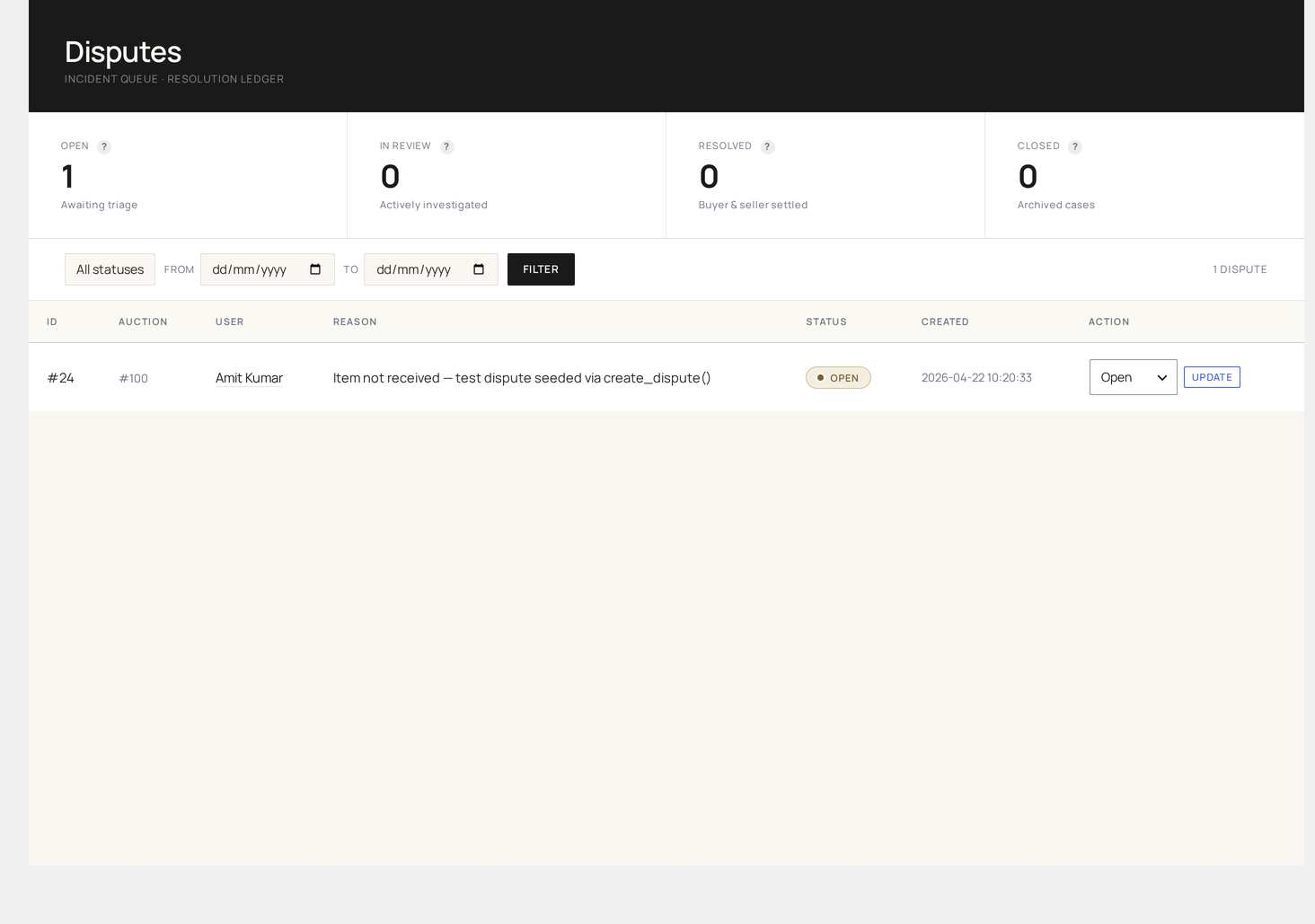
Buyer-raised disputes against auction wins. Track them through resolution; export as CSV for legal / customer support handoff.
What a dispute is
A row in wkafw_disputes (schema) — created when a customer flags a problem with a won auction (item not received, item not as described, refund request, etc.).
| Field | Source |
|---|---|
auction_id | The disputed auction |
user_id | The buyer raising the dispute |
reason | Free-text customer-supplied reason |
status | open / investigating / resolved / closed |
resolution | Admin's resolution note |
created_at / updated_at | timestamps |
How disputes are filed
A buyer files a dispute from one of three places:
| Surface | How |
|---|---|
| Order page (storefront) | "Dispute this order" link on completed auction orders |
| My Auctions tab | "Report problem" button on Won tab |
| Direct URL | /my-account/dispute/{order_id}/ (form) |
Filing rules:
- Must be the auction winner
- Order must be in
completedorprocessingstate - Within
wkafw_dispute_windowdays (default 30)
Page layout
| Section | Purpose |
|---|---|
| Status filter chips | Open / Investigating / Resolved / Closed (with counts) |
| Search | by auction ID, buyer email, order ID |
| Table | all disputes, paginated |
| Per-row drawer | full reason + resolution editor |
Status workflow
open  →  investigating  →  resolved
                              ↓
                            closed
| Status | Meaning |
|---|---|
| Open | Just filed, no admin action yet |
| Investigating | Admin acknowledged, contacting parties |
| Resolved | Outcome decided (refund / ship-replacement / no-action) |
| Closed | All actions taken, dispute archived |
Resolution actions
When resolving a dispute, admin picks one or more:
| Action | Effect |
|---|---|
| Full refund | Refund the order via WC; credit wallet if wallet-paid |
| Partial refund | Custom amount; writes a partial WC refund |
| Replacement shipped | No money moves; status closes when buyer confirms |
| No action | Dispute denied; close with note |
| Block buyer | Add to Blocked Users |
| Block seller | Suspend seller / freeze auctions |
The resolution note becomes part of the dispute record and is emailed to the buyer.
Per-row drawer
Click a dispute row to expand:
- Full conversation — buyer's reason, admin notes (private + buyer-visible)
- Order context — items, total, payment method, shipping
- Bid trail — every bid on the auction (cross-reference for fraud)
- Buyer's history — past disputes, total spend
- Seller's history — past disputes against this seller
Bulk actions
| Action | Effect |
|---|---|
| Mark investigating | Bulk-acknowledge new disputes |
| Close all resolved | Archive after final state |
| Export selected | CSV |
CSV export
Click Export → CSV at the top right. The export includes the buyer's reason, resolution, status, and all timestamps. Use it for:
- Legal escalations
- PayPal chargeback evidence
- Internal CS handoff
- Quarterly dispute-rate reporting
For the full export endpoint, see Tools.
SLA tracking
The page shows a time-since-filed column. Configurable warning thresholds:
| Threshold | Default |
|---|---|
| Yellow warning | 24 hours |
| Red warning | 72 hours |
Bulk-filter by "Open > 72 hrs" for SLA breach review.
Notifications
| Trigger | Recipient | Email class |
|---|---|---|
| Dispute filed | Admin (notification) | (system notice, no template) |
| Status → investigating | Buyer | (auto-reply) |
| Resolution set | Buyer | resolution email with note |
Customer-facing notifications can be branded via Design Studio.
Reporting
Reports → Disputes shows:
- Dispute rate (disputes / completed orders)
- Average resolution time
- Top sellers by dispute count (potential fraud signal)
- Top buyers by dispute count (potential fraud signal)
- Common reason categories
Common workflows
"Triage today's new disputes"
- Status filter → Open
- Sort by Created ascending
- Open each → mark Investigating if action will take >1 day, otherwise resolve immediately
"Close out the SLA-breached backlog"
- Sort by Created ascending
- Resolve each in turn
- Bulk-close once status is
resolved
"Quarterly dispute report for management"
- Date range → last quarter
- Export → CSV
- Pivot in your tool of choice