
Auctions for WooCommerceAuctions for WooCommerce
Buy Now
View Demo
  • Getting Started

    • Introduction
    • Quick Start
    • Features
    • Installation
    • First-Time Setup
    • Onboarding Tour
  • Admin Guide

    • Admin Overview
    • Dashboard
    • All Auctions
    • Add / Edit Auction
    • Bids
    • Reports
    • Events
    • Wallet
    • Disputes
    • Blocked Users
    • Fraud Detection
    • Tools (Import / Export)
    • Settings
    • Design Studio
    • Pending Review
    • Audit Log
  • Auction Mechanics

    • Auction Types
    • Bidding Engine
    • Anti-Sniping
    • Bid Increments
    • Reserve & Buy Now
    • Auto-Relist
    • Watchlist
  • Customer Experience

    • Customer Overview
    • My Auctions
    • My Wallet
    • Withdrawal
    • Single Auction Page
    • Notifications
  • Wallet & Payments

    • Wallet System
    • Auto-Charge
    • Stripe Connect
    • Monetization Fees
  • Multi-Vendor & Integrations

    • Multi-Vendor Compatibility
    • Twilio SMS
    • Firebase Push
    • Two-Factor Auth
    • Captcha
    • Social Login
    • Subscription Gate
    • Elementor & Gutenberg
  • Premium Features

    • Smart Features
    • Psychology Triggers
    • Gamification
    • Fraud Detection
    • Compliance
    • Social Sharing
    • Email Notifications
  • Developer

    • REST API
    • Hooks & Filters
    • JS Events
    • Database Schema
    • Shortcodes
    • Options Reference
    • WP-CLI
  • Help

    • Troubleshooting
    • FAQ
    • Glossary
    • Changelog
Support
Buy Now
View Demo
  • Getting Started

    • Introduction
    • Quick Start
    • Features
    • Installation
    • First-Time Setup
    • Onboarding Tour
  • Admin Guide

    • Admin Overview
    • Dashboard
    • All Auctions
    • Add / Edit Auction
    • Bids
    • Reports
    • Events
    • Wallet
    • Disputes
    • Blocked Users
    • Fraud Detection
    • Tools (Import / Export)
    • Settings
    • Design Studio
    • Pending Review
    • Audit Log
  • Auction Mechanics

    • Auction Types
    • Bidding Engine
    • Anti-Sniping
    • Bid Increments
    • Reserve & Buy Now
    • Auto-Relist
    • Watchlist
  • Customer Experience

    • Customer Overview
    • My Auctions
    • My Wallet
    • Withdrawal
    • Single Auction Page
    • Notifications
  • Wallet & Payments

    • Wallet System
    • Auto-Charge
    • Stripe Connect
    • Monetization Fees
  • Multi-Vendor & Integrations

    • Multi-Vendor Compatibility
    • Twilio SMS
    • Firebase Push
    • Two-Factor Auth
    • Captcha
    • Social Login
    • Subscription Gate
    • Elementor & Gutenberg
  • Premium Features

    • Smart Features
    • Psychology Triggers
    • Gamification
    • Fraud Detection
    • Compliance
    • Social Sharing
    • Email Notifications
  • Developer

    • REST API
    • Hooks & Filters
    • JS Events
    • Database Schema
    • Shortcodes
    • Options Reference
    • WP-CLI
  • Help

    • Troubleshooting
    • FAQ
    • Glossary
    • Changelog
Support
  • Getting Started

    • Introduction
    • Quick Start
    • Feature Catalog
    • Installation
    • First-Time Setup
    • Onboarding Tour
  • Admin Guide

    • Admin Overview
    • Dashboard
    • All Auctions
    • Add / Edit Auction
    • Bids
    • Reports
    • Events
    • Wallet (Admin)
    • Disputes
    • Blocked Users
    • Fraud Detection
    • Tools
    • Settings
    • Design Studio
    • Pending Review
    • Audit Log
  • Auction Mechanics

    • Auction Types
    • Bidding Engine
    • Anti-Sniping (Soft Close)
    • Bid Increments
    • Reserve & Buy Now
    • Auto-Relist
    • Watchlist
  • Customer Experience

    • Customer Experience Overview
    • My Auctions
    • My Wallet
    • Withdrawal
    • Single Auction Page
    • Customer Notifications
  • Wallet & Payments

    • Wallet System
    • Wallet Auto-Charge
    • Stripe Connect
    • Monetization
  • Multi-Vendor & Integrations

    • Multi-Vendor Compatibility
    • Twilio SMS
    • Firebase (Push Notifications)
    • Two-Factor Authentication
    • Captcha
    • Social Login
    • Subscription Gate
    • Elementor & Gutenberg
  • Premium Features

    • Smart Features
    • Psychology Triggers
    • Gamification
    • Fraud Detection
    • Compliance
    • Social Sharing
    • Email Notifications
  • Developer

    • REST API
    • Hooks & Filters
    • JavaScript Events
    • Database Schema
    • Shortcodes
    • Options Reference
    • WP-CLI
  • Help

    • Troubleshooting
    • FAQ
    • Glossary
    • Changelog

Dashboard

WooCommerce → Webkul Addons → Auctions Dashboard — ?page=wkafw-dashboard

The dashboard answers "how is my auction site doing right now?" in one screen — KPIs, charts, and a live feed of recent activity. Built on Chart.js, fully HPOS-aware, queries your real data with prepared statements.
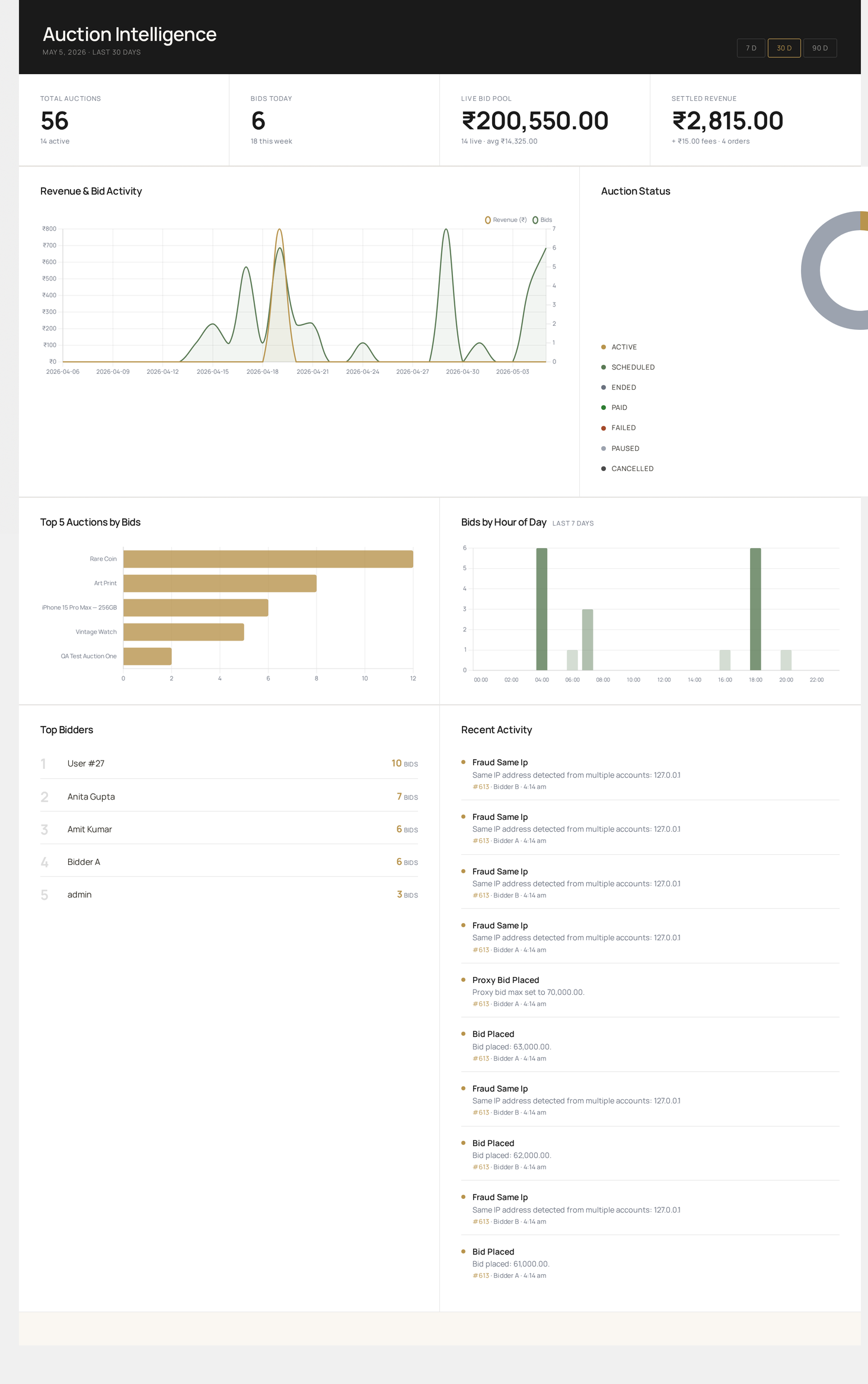
Auctions Dashboard — KPI cards, revenue & bid trend, status donut, top lots, hourly bid heatmap, top bidders and live activity feed

Date range

Top-right of the hero strip: 7 D / 30 D / 90 D buttons. The selected range filters every chart and the bids-per-day series, but not the KPI cards — those use whole-database totals where stated.

The active range is encoded in the URL (?range=30) so bookmarks remember it.

KPI row

Four metric cards across the top.

CardNumeratorNote
Total AuctionsAll-time count, all statusesSub-line shows current active count
Bids TodayBids placed since 00:00 (site TZ)Sub-line shows last-7-day count
Live Bid PoolΣ current_price for active + scheduled onlySub-line: live lot count + average price
Settled RevenuePlatform revenue from completed auction-flagged ordersSub-line: linked-order count + fees

Settled vs Total revenue

Settled Revenue is winner-paid auctions only. Total Revenue (in the sub-line as + X fees) adds platform fees and listing fees. The two can diverge when you collect non-winner fees (listing, featured boost, late penalty).

Chart row 1 — trends

Revenue & Bid Activity (dual-axis line)

  • Gold line — daily revenue (left axis, currency)
  • Emerald line — daily bid count (right axis, integer)

Hover any point to see exact values for that day.

Auction Status (donut)

Counts of every auction by status — active, scheduled, ended, paid, failed, paused, cancelled. Custom legend on the right shows count per slice.

Chart row 2 — distribution

Top 5 Auctions by Bids (horizontal bar)

The five most-contested lots in the date range, by bid count. Long titles are truncated with ….

Bids by Hour of Day (bar — last 7 days)

24-hour bar chart. Bar opacity scales with traffic — heaviest hours appear darkest. Useful for picking auction end times.

Bottom row — leaderboards

Top Bidders

The 5 most-active users in the range. Click a row to drill into their bid history (planned).

Recent Activity

The latest 10 entries from wkafw_auction_logs. Each entry shows:

  • Action — humanized log type (e.g. Bid Placed, Auction Started, Reserve Met)
  • Details — log payload (truncated)
  • Auction link — auction ID hyperlinked to All Auctions filtered to that ID
  • User — bidder's display name or "System" for cron events
  • Time — formatted per WordPress time settings

What it does NOT show

  • Real-time bid stream — see Audit Log for that
  • Per-vendor revenue split — see Reports
  • Failed-payment / overdue lots — see Reports → Payment Status

Performance

Every dashboard query is bounded — counts run over indexed columns, charts use only the selected date window, top-N tables are capped at 5 rows, recent activity at 10. On a database with 100k auctions and 1M bids the page loads in under 800 ms. If you want it even faster, page-cache the dashboard — auctions don't need real-time data on the admin overview.

Troubleshooting

SymptomFix
All KPIs read 0New install — create a test auction and place a bid
Charts don't loadCheck the browser console for chart-library errors; ensure no ad-blocker is blocking them
Settled Revenue differs from WooCommerce reportsAuction revenue only counts orders that came from a winning auction bid
"No activity recorded yet" persistsCron isn't running — see Troubleshooting
Prev
Admin Overview
Next
All Auctions