
Auctions for WooCommerceAuctions for WooCommerce
Buy Now
View Demo
  • Getting Started

    • Introduction
    • Quick Start
    • Features
    • Installation
    • First-Time Setup
    • Onboarding Tour
  • Admin Guide

    • Admin Overview
    • Dashboard
    • All Auctions
    • Add / Edit Auction
    • Bids
    • Reports
    • Events
    • Wallet
    • Disputes
    • Blocked Users
    • Fraud Detection
    • Tools (Import / Export)
    • Settings
    • Design Studio
    • Pending Review
    • Audit Log
  • Auction Mechanics

    • Auction Types
    • Bidding Engine
    • Anti-Sniping
    • Bid Increments
    • Reserve & Buy Now
    • Auto-Relist
    • Watchlist
  • Customer Experience

    • Customer Overview
    • My Auctions
    • My Wallet
    • Withdrawal
    • Single Auction Page
    • Notifications
  • Wallet & Payments

    • Wallet System
    • Auto-Charge
    • Stripe Connect
    • Monetization Fees
  • Multi-Vendor & Integrations

    • Multi-Vendor Compatibility
    • Twilio SMS
    • Firebase Push
    • Two-Factor Auth
    • Captcha
    • Social Login
    • Subscription Gate
    • Elementor & Gutenberg
  • Premium Features

    • Smart Features
    • Psychology Triggers
    • Gamification
    • Fraud Detection
    • Compliance
    • Social Sharing
    • Email Notifications
  • Developer

    • REST API
    • Hooks & Filters
    • JS Events
    • Database Schema
    • Shortcodes
    • Options Reference
    • WP-CLI
  • Help

    • Troubleshooting
    • FAQ
    • Glossary
    • Changelog
Support
Buy Now
View Demo
  • Getting Started

    • Introduction
    • Quick Start
    • Features
    • Installation
    • First-Time Setup
    • Onboarding Tour
  • Admin Guide

    • Admin Overview
    • Dashboard
    • All Auctions
    • Add / Edit Auction
    • Bids
    • Reports
    • Events
    • Wallet
    • Disputes
    • Blocked Users
    • Fraud Detection
    • Tools (Import / Export)
    • Settings
    • Design Studio
    • Pending Review
    • Audit Log
  • Auction Mechanics

    • Auction Types
    • Bidding Engine
    • Anti-Sniping
    • Bid Increments
    • Reserve & Buy Now
    • Auto-Relist
    • Watchlist
  • Customer Experience

    • Customer Overview
    • My Auctions
    • My Wallet
    • Withdrawal
    • Single Auction Page
    • Notifications
  • Wallet & Payments

    • Wallet System
    • Auto-Charge
    • Stripe Connect
    • Monetization Fees
  • Multi-Vendor & Integrations

    • Multi-Vendor Compatibility
    • Twilio SMS
    • Firebase Push
    • Two-Factor Auth
    • Captcha
    • Social Login
    • Subscription Gate
    • Elementor & Gutenberg
  • Premium Features

    • Smart Features
    • Psychology Triggers
    • Gamification
    • Fraud Detection
    • Compliance
    • Social Sharing
    • Email Notifications
  • Developer

    • REST API
    • Hooks & Filters
    • JS Events
    • Database Schema
    • Shortcodes
    • Options Reference
    • WP-CLI
  • Help

    • Troubleshooting
    • FAQ
    • Glossary
    • Changelog
Support
  • Getting Started

    • Introduction
    • Quick Start
    • Feature Catalog
    • Installation
    • First-Time Setup
    • Onboarding Tour
  • Admin Guide

    • Admin Overview
    • Dashboard
    • All Auctions
    • Add / Edit Auction
    • Bids
    • Reports
    • Events
    • Wallet (Admin)
    • Disputes
    • Blocked Users
    • Fraud Detection
    • Tools
    • Settings
    • Design Studio
    • Pending Review
    • Audit Log
  • Auction Mechanics

    • Auction Types
    • Bidding Engine
    • Anti-Sniping (Soft Close)
    • Bid Increments
    • Reserve & Buy Now
    • Auto-Relist
    • Watchlist
  • Customer Experience

    • Customer Experience Overview
    • My Auctions
    • My Wallet
    • Withdrawal
    • Single Auction Page
    • Customer Notifications
  • Wallet & Payments

    • Wallet System
    • Wallet Auto-Charge
    • Stripe Connect
    • Monetization
  • Multi-Vendor & Integrations

    • Multi-Vendor Compatibility
    • Twilio SMS
    • Firebase (Push Notifications)
    • Two-Factor Authentication
    • Captcha
    • Social Login
    • Subscription Gate
    • Elementor & Gutenberg
  • Premium Features

    • Smart Features
    • Psychology Triggers
    • Gamification
    • Fraud Detection
    • Compliance
    • Social Sharing
    • Email Notifications
  • Developer

    • REST API
    • Hooks & Filters
    • JavaScript Events
    • Database Schema
    • Shortcodes
    • Options Reference
    • WP-CLI
  • Help

    • Troubleshooting
    • FAQ
    • Glossary
    • Changelog

Anti-Sniping (Soft Close)

Prevents last-second bids from stealing auctions by automatically extending the auction window when a bid lands in the final N seconds.
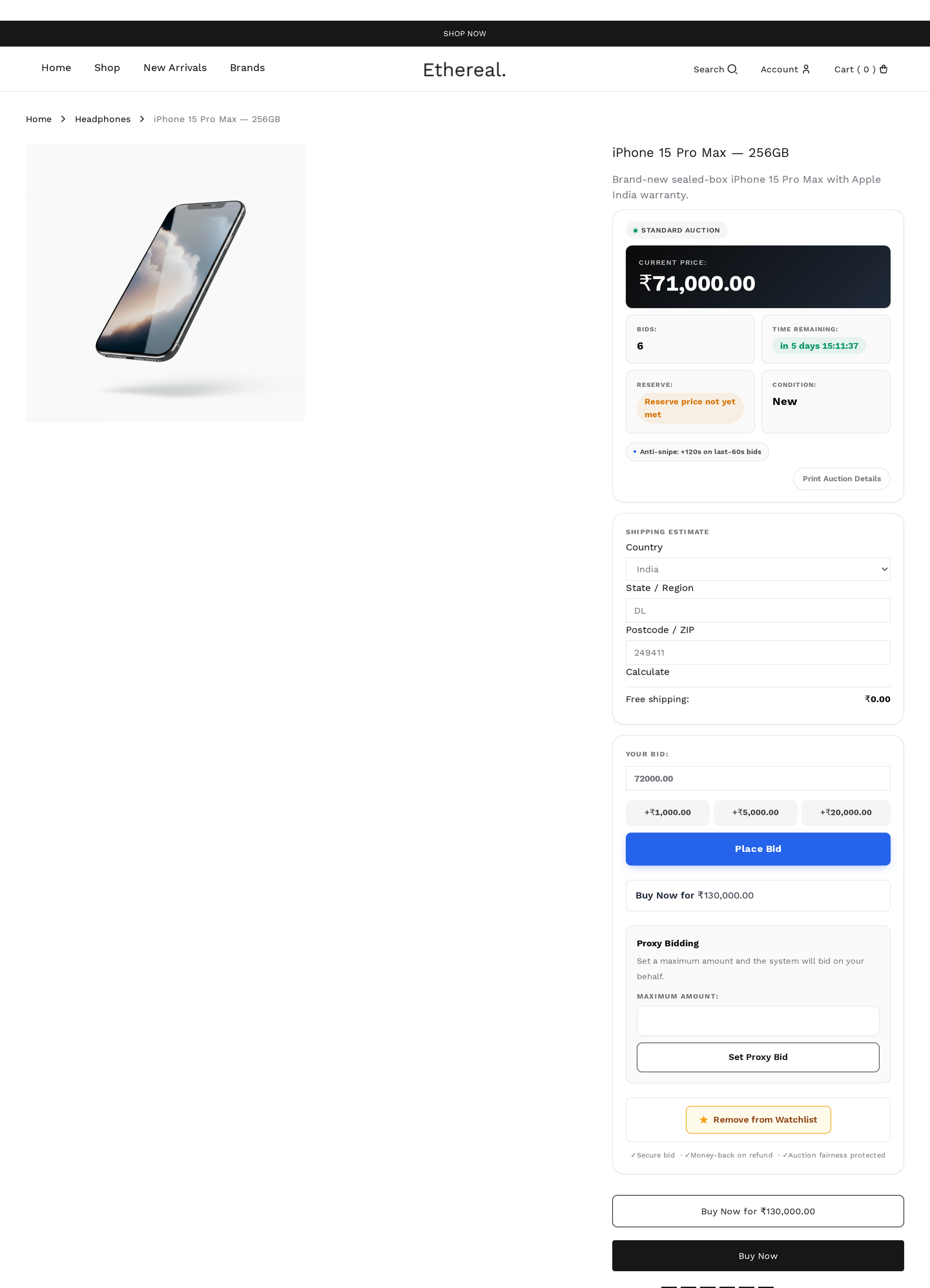
Single auction page — note the "Anti-snipe: +120 s on last-60 s bids" disclosure shown directly under the bid form

How it works

Configure two values per auction:

FieldDefaultEffect
Anti-snipe window60 sTrigger zone — last N seconds of the auction
Anti-snipe extension120 sAdd N seconds when triggered

When a bid lands inside the window, the engine extends end_date by the extension amount and increments total_extensions. The auction continues until bidding stops outside the window for the full extension period.

Original end: 18:00:00
Window:        60 s
Extension:    120 s

Bid at 17:59:30  →  end = 18:01:30   (extended)
Bid at 18:00:30  →  end = 18:02:30   (extended again)
No bid 18:01–18:02:30  →  ends at 18:02:30  (final)

Per-auction or global

WhereEffect
Per-auction fields (Add Auction → Schedule)Highest priority
Global defaults (wkafw_snipe_window, wkafw_snipe_extension)Used when auction fields are 0

Max-extension cap

To prevent runaway auctions:

FieldDefaultEffect
Max extension cap0 (unlimited)Total cumulative extension cap (in seconds)

When total_extensions × extension ≥ max_extension, anti-snipe stops triggering — final bids no longer push the end date.

For a typical 1-hour auction:

CapBehavior
0Unlimited (default — auction can run forever)
1800 (30 min)Max 30 min beyond original end
3600 (1 hr)Max 1 hr — typical "soft cap"

When anti-snipe does NOT apply

Auction typeReason
SealedBids hidden — no "last seconds" anyone can target
PennyFormat already extends per-bid
DutchFirst-accept wins — no "last second" concept

Bidder UX

When anti-snipe triggers, the front-end:

  1. Updates the countdown to the new end_date
  2. Shows a banner: "Auction extended +120s due to last-second bid"
  3. Plays a sound (if wkafw_sounds_default = yes)
  4. Re-rendres bid form with current state

The previous high bidder receives an Outbid email immediately.

Configuration recommendations

Auction valueWindowExtensionCap
Low (< $50)30 s60 s600 (10 min)
Mid ($50–$500)60 s120 s1800 (30 min)
High (> $500)120 s300 s3600 (1 hr)
No-cap luxury300 s600 s0 (unlimited)

Higher-stakes auctions deserve longer windows + extensions to prevent serious bidders from getting sniped by automation.

Anti-snipe and proxy bidding

Proxy auto-bids interact with anti-snipe naturally:

  • Late manual bid → triggers extension
  • Proxy bid auto-fires to defend → may also trigger another extension
  • Continues until proxy max is hit OR no new bids land in the extended window

The total auction duration can grow significantly if proxy maxes are high. Use the max extension cap to bound this.

Trigger logic

Pseudocode:

Reporting

Reports → Auction details show:

  • Total extensions per auction
  • Average extension count by auction type
  • Auctions hitting the max cap
  • Median final-bid timing (sniping pattern)

Edge cases

ScenarioBehavior
Bid lands at exactly end_date - windowTriggers (inclusive boundary)
Bid lands at end_date + 0.001 (past end)Rejected — auction ended
Cap reached, bid still placedBid accepted, no further extension
Anti-snipe disabled (window = 0)Hard-end at original end_date
Server clock driftUse UTC; sync NTP — drift causes false triggers

Common questions

"Can I disable anti-snipe per auction?"

Set the window to 0. The trigger condition (seconds_left ≤ 0) is never true, so no extension fires.

"My auction extended 50 times — that's too much."

Set a max_extension cap. After cumulative extensions hit the cap, anti-snipe stops triggering and the auction can hard-end.

"I want fairer-than-anti-snipe — every bid extends by 5 minutes."

Set window equal to extension (e.g. both 300). Every bid in the last 5 minutes adds 5 minutes. Standard practice for live-stream auctions.

Prev
Bidding Engine
Next
Bid Increments