
Auctions for WooCommerceAuctions for WooCommerce
Buy Now
View Demo
  • Getting Started

    • Introduction
    • Quick Start
    • Features
    • Installation
    • First-Time Setup
    • Onboarding Tour
  • Admin Guide

    • Admin Overview
    • Dashboard
    • All Auctions
    • Add / Edit Auction
    • Bids
    • Reports
    • Events
    • Wallet
    • Disputes
    • Blocked Users
    • Fraud Detection
    • Tools (Import / Export)
    • Settings
    • Design Studio
    • Pending Review
    • Audit Log
  • Auction Mechanics

    • Auction Types
    • Bidding Engine
    • Anti-Sniping
    • Bid Increments
    • Reserve & Buy Now
    • Auto-Relist
    • Watchlist
  • Customer Experience

    • Customer Overview
    • My Auctions
    • My Wallet
    • Withdrawal
    • Single Auction Page
    • Notifications
  • Wallet & Payments

    • Wallet System
    • Auto-Charge
    • Stripe Connect
    • Monetization Fees
  • Multi-Vendor & Integrations

    • Multi-Vendor Compatibility
    • Twilio SMS
    • Firebase Push
    • Two-Factor Auth
    • Captcha
    • Social Login
    • Subscription Gate
    • Elementor & Gutenberg
  • Premium Features

    • Smart Features
    • Psychology Triggers
    • Gamification
    • Fraud Detection
    • Compliance
    • Social Sharing
    • Email Notifications
  • Developer

    • REST API
    • Hooks & Filters
    • JS Events
    • Database Schema
    • Shortcodes
    • Options Reference
    • WP-CLI
  • Help

    • Troubleshooting
    • FAQ
    • Glossary
    • Changelog
Support
Buy Now
View Demo
  • Getting Started

    • Introduction
    • Quick Start
    • Features
    • Installation
    • First-Time Setup
    • Onboarding Tour
  • Admin Guide

    • Admin Overview
    • Dashboard
    • All Auctions
    • Add / Edit Auction
    • Bids
    • Reports
    • Events
    • Wallet
    • Disputes
    • Blocked Users
    • Fraud Detection
    • Tools (Import / Export)
    • Settings
    • Design Studio
    • Pending Review
    • Audit Log
  • Auction Mechanics

    • Auction Types
    • Bidding Engine
    • Anti-Sniping
    • Bid Increments
    • Reserve & Buy Now
    • Auto-Relist
    • Watchlist
  • Customer Experience

    • Customer Overview
    • My Auctions
    • My Wallet
    • Withdrawal
    • Single Auction Page
    • Notifications
  • Wallet & Payments

    • Wallet System
    • Auto-Charge
    • Stripe Connect
    • Monetization Fees
  • Multi-Vendor & Integrations

    • Multi-Vendor Compatibility
    • Twilio SMS
    • Firebase Push
    • Two-Factor Auth
    • Captcha
    • Social Login
    • Subscription Gate
    • Elementor & Gutenberg
  • Premium Features

    • Smart Features
    • Psychology Triggers
    • Gamification
    • Fraud Detection
    • Compliance
    • Social Sharing
    • Email Notifications
  • Developer

    • REST API
    • Hooks & Filters
    • JS Events
    • Database Schema
    • Shortcodes
    • Options Reference
    • WP-CLI
  • Help

    • Troubleshooting
    • FAQ
    • Glossary
    • Changelog
Support
  • Getting Started

    • Introduction
    • Quick Start
    • Feature Catalog
    • Installation
    • First-Time Setup
    • Onboarding Tour
  • Admin Guide

    • Admin Overview
    • Dashboard
    • All Auctions
    • Add / Edit Auction
    • Bids
    • Reports
    • Events
    • Wallet (Admin)
    • Disputes
    • Blocked Users
    • Fraud Detection
    • Tools
    • Settings
    • Design Studio
    • Pending Review
    • Audit Log
  • Auction Mechanics

    • Auction Types
    • Bidding Engine
    • Anti-Sniping (Soft Close)
    • Bid Increments
    • Reserve & Buy Now
    • Auto-Relist
    • Watchlist
  • Customer Experience

    • Customer Experience Overview
    • My Auctions
    • My Wallet
    • Withdrawal
    • Single Auction Page
    • Customer Notifications
  • Wallet & Payments

    • Wallet System
    • Wallet Auto-Charge
    • Stripe Connect
    • Monetization
  • Multi-Vendor & Integrations

    • Multi-Vendor Compatibility
    • Twilio SMS
    • Firebase (Push Notifications)
    • Two-Factor Authentication
    • Captcha
    • Social Login
    • Subscription Gate
    • Elementor & Gutenberg
  • Premium Features

    • Smart Features
    • Psychology Triggers
    • Gamification
    • Fraud Detection
    • Compliance
    • Social Sharing
    • Email Notifications
  • Developer

    • REST API
    • Hooks & Filters
    • JavaScript Events
    • Database Schema
    • Shortcodes
    • Options Reference
    • WP-CLI
  • Help

    • Troubleshooting
    • FAQ
    • Glossary
    • Changelog

Events

Auctions → Events — ?page=wkafw-events

Group multiple auctions into a single themed event — auction-day rentals, charity galas, estate sales, lot bundles. Each event has a public landing page with the lots, schedule, and registration.
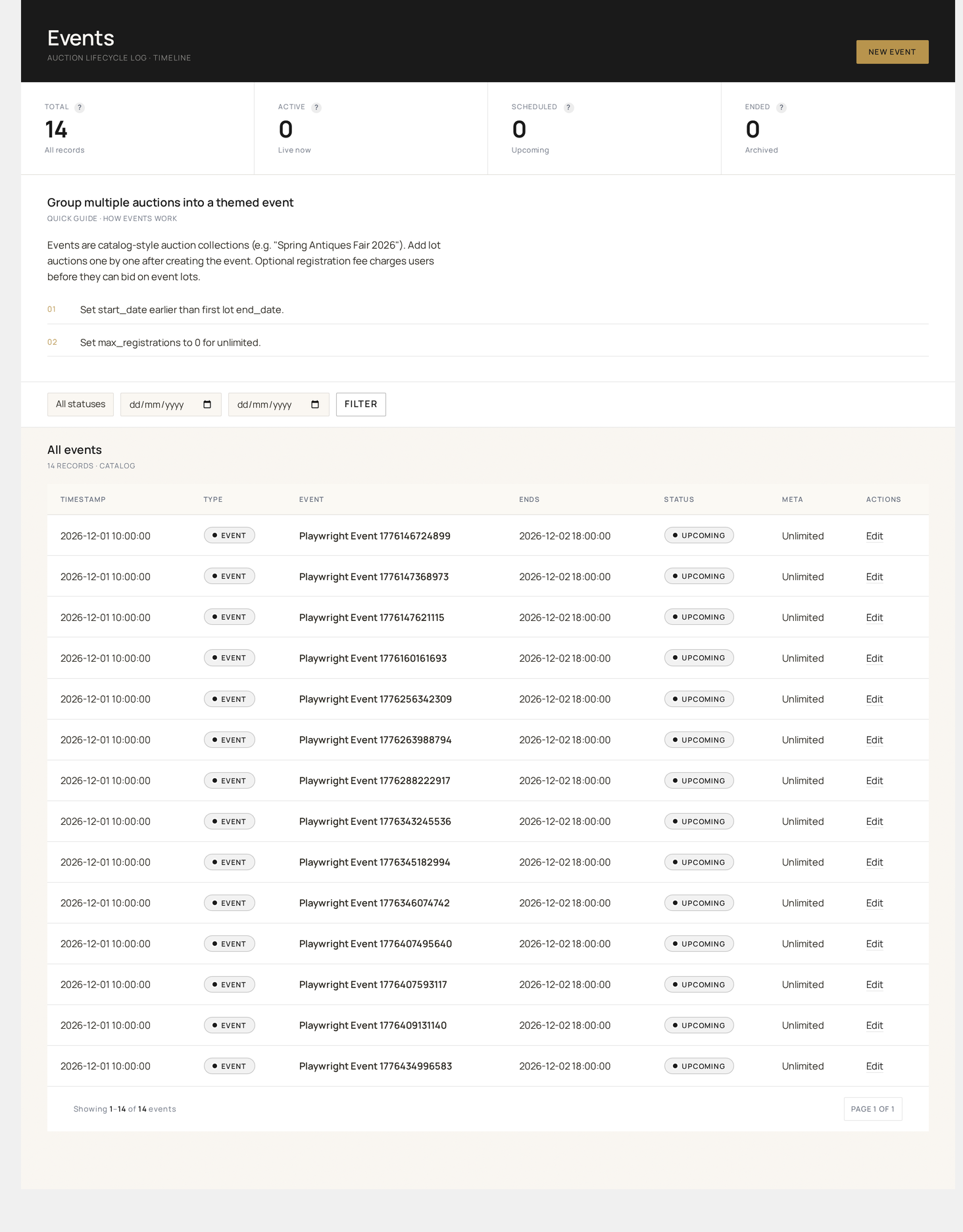
Events — themed bundles of auctions with their own landing page, schedule and registration

What an event is

An event is a container that links:

  • A start / end window (the event runs from X to Y)
  • A list of lots (individual auctions, in lot-number order)
  • An optional registration fee (per-bidder or per-paddle)
  • A max-registrations cap (paddle availability for seated events)
  • A public landing page at /wkafw-event/{slug}/

Lots inside an event are still regular auctions — they appear in All Auctions and follow normal lifecycle. The event just orchestrates them.

Database

TablePurpose
wkafw_eventsEvent metadata (name, slug, dates, fee, status)
wkafw_event_lotsMany-to-many between events and auctions, with lot_number
wkafw_event_registrationsBidders registered for the event

Schema →

Event lifecycle

StatusMeaning
upcomingFuture-dated, accepting registrations
liveWithin event window, lots actively running
endedPast end-date, all lots closed
cancelledManually cancelled; refunds (if registration fee) auto-issued

Status transitions happen automatically through the plugin's scheduled background jobs at the configured times.

Creating an event

Events → Add New opens a form:

  1. Name — display name (e.g. "Spring Estate Sale 2026")
  2. Slug — auto-generated; appears in the URL
  3. Description — rich-text intro for the landing page
  4. Start date / time + End date / time
  5. Registration fee — 0 for free, otherwise charged at registration
  6. Max registrations — 0 for unlimited, otherwise paddle cap
  7. Add lots — search-and-add existing auctions; assign lot numbers

Click Publish to make the landing page live.

Adding lots

Two ways to attach an auction to an event:

MethodWhere
From the event formSearch-add by auction ID or product title
From the auction formPick an event from a dropdown when creating / editing

Lot numbers are arbitrary integers. Re-order by dragging in the event form.

Public landing page

The event renders at /wkafw-event/{slug}/ using the template templates/event-landing.php.

Default sections:

  • Event hero (name, dates, description)
  • Lot grid (numbered, with countdown per lot)
  • Registration button (if fee > 0 or max-registrations set)
  • Schedule (lots auto-sorted by start time)

Override the template by copying it to your-theme/auctions-for-woocommerce/event-landing.php.

Registration

If registration_fee > 0 or max_registrations > 0, the landing page shows a Register button:

  1. User clicks → adds the registration fee to cart
  2. On checkout completion, a row is written to wkafw_event_registrations
  3. Once registered, they can bid on event lots
  4. If max_registrations is reached, the button disables

For free events, no Register button — bidders just bid on lots normally.

Seated events (paddles)

For Seated auctions, the event registration flow assigns each registrant a unique paddle number (wkafw_auction_seats.seat_number). Paddles persist across the event so bidders keep the same number on every lot.

Bulk operations

ActionEffect
Start nowForce-flip an upcoming event to live
End nowClose all live lots immediately
CancelRefund all registrations, mark cancelled
DuplicateClone the event (without lots) for next time

Reporting

Reports → By Event (filter) shows:

  • Lots sold / failed
  • Total revenue
  • Registration revenue
  • Bidder count
  • Average winning bid

Use cases

Use caseSetup
Charity galaCharity-type lots, paid registration, donor wall enabled
Estate sale50–200 lots, free registration, sequential start times
Online-only auction dayStandard lots, free registration, all lots end same day
Live in-person auctionSeated-type lots, paddle registration, real-time admin start/end
VIP preview weekSingle-event with sealed lots ending 7 days later
Prev
Reports
Next
Wallet (Admin)