
Auctions for WooCommerceAuctions for WooCommerce
Buy Now
View Demo
  • Getting Started

    • Introduction
    • Quick Start
    • Features
    • Installation
    • First-Time Setup
    • Onboarding Tour
  • Admin Guide

    • Admin Overview
    • Dashboard
    • All Auctions
    • Add / Edit Auction
    • Bids
    • Reports
    • Events
    • Wallet
    • Disputes
    • Blocked Users
    • Fraud Detection
    • Tools (Import / Export)
    • Settings
    • Design Studio
    • Pending Review
    • Audit Log
  • Auction Mechanics

    • Auction Types
    • Bidding Engine
    • Anti-Sniping
    • Bid Increments
    • Reserve & Buy Now
    • Auto-Relist
    • Watchlist
  • Customer Experience

    • Customer Overview
    • My Auctions
    • My Wallet
    • Withdrawal
    • Single Auction Page
    • Notifications
  • Wallet & Payments

    • Wallet System
    • Auto-Charge
    • Stripe Connect
    • Monetization Fees
  • Multi-Vendor & Integrations

    • Multi-Vendor Compatibility
    • Twilio SMS
    • Firebase Push
    • Two-Factor Auth
    • Captcha
    • Social Login
    • Subscription Gate
    • Elementor & Gutenberg
  • Premium Features

    • Smart Features
    • Psychology Triggers
    • Gamification
    • Fraud Detection
    • Compliance
    • Social Sharing
    • Email Notifications
  • Developer

    • REST API
    • Hooks & Filters
    • JS Events
    • Database Schema
    • Shortcodes
    • Options Reference
    • WP-CLI
  • Help

    • Troubleshooting
    • FAQ
    • Glossary
    • Changelog
Support
Buy Now
View Demo
  • Getting Started

    • Introduction
    • Quick Start
    • Features
    • Installation
    • First-Time Setup
    • Onboarding Tour
  • Admin Guide

    • Admin Overview
    • Dashboard
    • All Auctions
    • Add / Edit Auction
    • Bids
    • Reports
    • Events
    • Wallet
    • Disputes
    • Blocked Users
    • Fraud Detection
    • Tools (Import / Export)
    • Settings
    • Design Studio
    • Pending Review
    • Audit Log
  • Auction Mechanics

    • Auction Types
    • Bidding Engine
    • Anti-Sniping
    • Bid Increments
    • Reserve & Buy Now
    • Auto-Relist
    • Watchlist
  • Customer Experience

    • Customer Overview
    • My Auctions
    • My Wallet
    • Withdrawal
    • Single Auction Page
    • Notifications
  • Wallet & Payments

    • Wallet System
    • Auto-Charge
    • Stripe Connect
    • Monetization Fees
  • Multi-Vendor & Integrations

    • Multi-Vendor Compatibility
    • Twilio SMS
    • Firebase Push
    • Two-Factor Auth
    • Captcha
    • Social Login
    • Subscription Gate
    • Elementor & Gutenberg
  • Premium Features

    • Smart Features
    • Psychology Triggers
    • Gamification
    • Fraud Detection
    • Compliance
    • Social Sharing
    • Email Notifications
  • Developer

    • REST API
    • Hooks & Filters
    • JS Events
    • Database Schema
    • Shortcodes
    • Options Reference
    • WP-CLI
  • Help

    • Troubleshooting
    • FAQ
    • Glossary
    • Changelog
Support
  • Getting Started

    • Introduction
    • Quick Start
    • Feature Catalog
    • Installation
    • First-Time Setup
    • Onboarding Tour
  • Admin Guide

    • Admin Overview
    • Dashboard
    • All Auctions
    • Add / Edit Auction
    • Bids
    • Reports
    • Events
    • Wallet (Admin)
    • Disputes
    • Blocked Users
    • Fraud Detection
    • Tools
    • Settings
    • Design Studio
    • Pending Review
    • Audit Log
  • Auction Mechanics

    • Auction Types
    • Bidding Engine
    • Anti-Sniping (Soft Close)
    • Bid Increments
    • Reserve & Buy Now
    • Auto-Relist
    • Watchlist
  • Customer Experience

    • Customer Experience Overview
    • My Auctions
    • My Wallet
    • Withdrawal
    • Single Auction Page
    • Customer Notifications
  • Wallet & Payments

    • Wallet System
    • Wallet Auto-Charge
    • Stripe Connect
    • Monetization
  • Multi-Vendor & Integrations

    • Multi-Vendor Compatibility
    • Twilio SMS
    • Firebase (Push Notifications)
    • Two-Factor Authentication
    • Captcha
    • Social Login
    • Subscription Gate
    • Elementor & Gutenberg
  • Premium Features

    • Smart Features
    • Psychology Triggers
    • Gamification
    • Fraud Detection
    • Compliance
    • Social Sharing
    • Email Notifications
  • Developer

    • REST API
    • Hooks & Filters
    • JavaScript Events
    • Database Schema
    • Shortcodes
    • Options Reference
    • WP-CLI
  • Help

    • Troubleshooting
    • FAQ
    • Glossary
    • Changelog

First-Time Setup

A 10-minute checklist that takes a fresh install to a production-ready auction site.
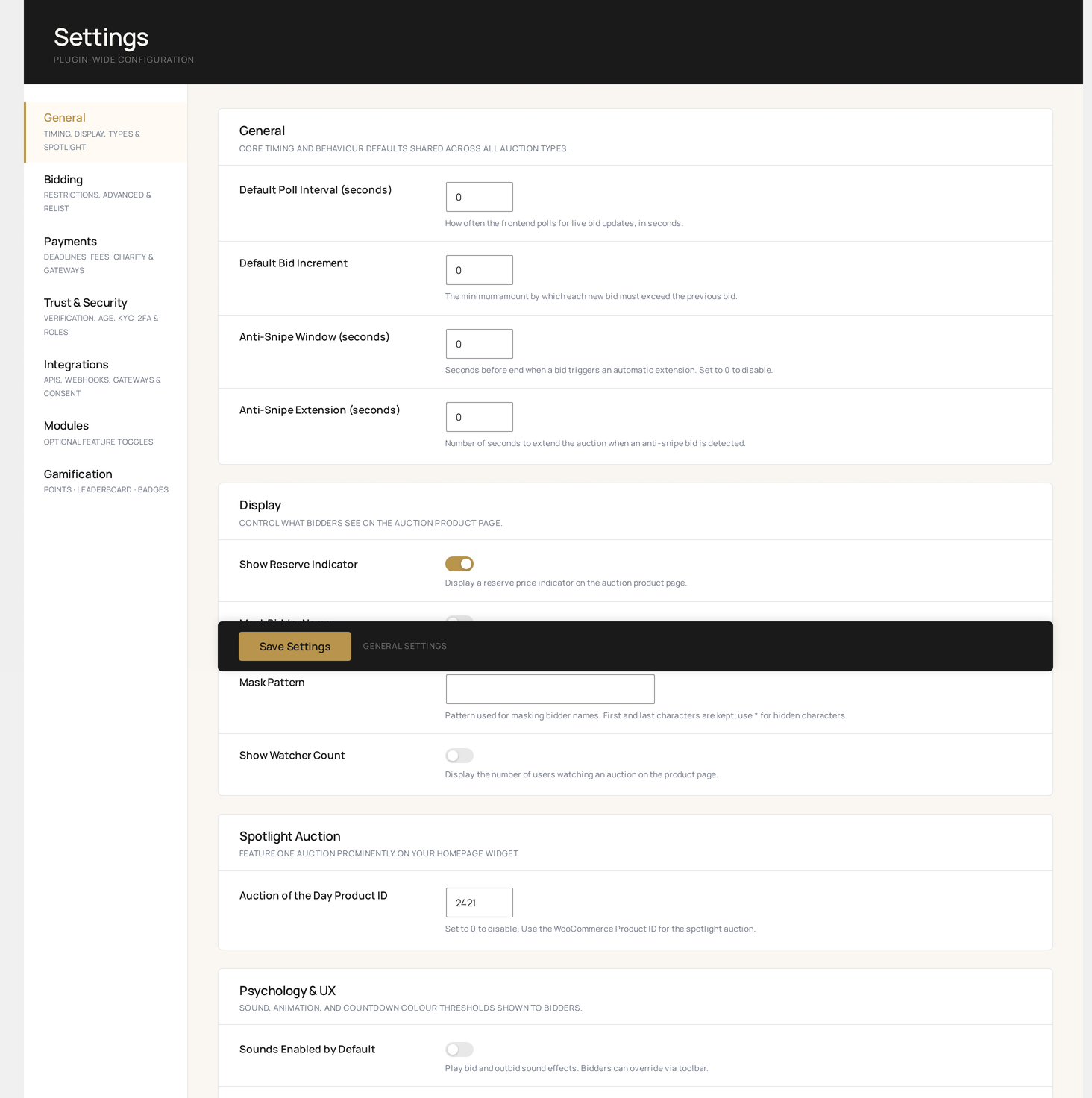
Settings → General — the first screen you'll touch in this checklist, with the full tab strip on the left

① General settings (3 minutes)

Auctions → Settings → General

SettingRecommendedWhy
Default poll interval30 secondsBalances live-feel and server load
Anti-snipe window60 secondsTriggers extension if bid lands in last minute
Anti-snipe extension120 secondsAdds 2 minutes when triggered
Max extension cap0 (unlimited) or 3600 (1 hour)Stop runaway auctions
Bid confirmationYesPrevents fat-finger mistakes
Outbid alertsYesDrives re-engagement

Settings reference →

② Currency & locale (1 minute)

These come from WooCommerce. Confirm:

  • WooCommerce → Settings → General → Currency is correct
  • WooCommerce → Settings → General → Currency position / thousand / decimal match your locale

The auction plugin reads these for every price display, email, CSV export, and PDF receipt.

③ Email notifications (2 minutes)

WooCommerce → Settings → Emails

Scroll past the WooCommerce defaults — the 21 auction-specific emails are listed below them. At minimum, enable:

  • Bid placed — confirms the bid to the bidder
  • Outbid — drives re-engagement
  • Auction won — triggers payment
  • Auction ending soon — drives final bids
  • Payment reminder — reduces non-paying winners

Notifications reference →

④ Auction types (1 minute)

Auctions → Settings → Auction Types

Enable only the formats you'll offer. Each enabled type adds a choice in the Add Auction → Auction Type dropdown.

For most stores, start with: Standard, Proxy, Reverse, Sealed. Enable Penny, Dutch, or Charity when you have a specific use-case.

⑤ Wallet (optional, 2 minutes)

If you want customers to pre-fund a wallet:

  1. Auctions → Wallet → Settings
  2. Enable wallet
  3. Pick a Top-up product (or click Auto-create to spin up a hidden WooCommerce product)
  4. Set min / max top-up amounts
  5. Enable Withdrawal if you'll allow payouts

Wallet system →

⑥ Multi-vendor (if applicable)

If you run a marketplace and have WCFM, Dokan, WC Vendors, or YITH Multi-Vendor active, the auction plugin auto-detects it and surfaces a one-time admin notice.

Multi-vendor compatibility →

No further setup is required — vendors will see auction creation inside their existing vendor dashboard.

⑦ Design Studio (1 minute)

Auctions → Design Studio

The Design Studio gives you a live iframe preview while you tweak:

  • Bid form layout & colors
  • Countdown timer color stops (yellow → orange → red)
  • Auction badge style (Live / Ending Soon / New)
  • Confetti on win

Tweak until it matches your storefront, then Save.

Design Studio →

⑧ Compliance & legal (recommended)

Auctions → Settings → Compliance

If you're auctioning anything restricted:

  • Age verification — set min age (default 18), pick categories
  • Terms of service — require bidders to accept on first bid
  • KYC threshold — require ID verification above bid amount
  • Cookie consent — pick provider (or use built-in)

Compliance →

⑨ Test the full lifecycle (1 minute)

The fastest way to verify everything works:

  1. Auctions → Add Auction — create a test auction with a 5-minute end window
  2. Open an incognito window, log in as a customer, place a bid
  3. Watch the bid appear in Auctions → Bids
  4. Watch the email arrive in your test inbox
  5. After end time, confirm:
    • Auction status flips to ended or paid
    • Winner email goes out
    • Order is created and linked

If anything fails, see Troubleshooting.

⑩ Production hardening

Before opening to real customers:

ActionWhy
Force HTTPS site-wideBid forms transmit identifiers — required by wkafw_require_ssl
Configure CaptchaStops bot-bidding on public auctions
Set up Two-Factor for adminProtects auction-creation account
Enable Fraud Detection rate limitCaps bids per minute per user
Enable Audit Log retention90-day hash-chain ledger of every bid
Schedule daily DB backupAuction data is irreplaceable

You're done

  • New here? Read Admin Overview →
  • Want a guided tour? Try the Onboarding tour →
Prev
Installation
Next
Onboarding Tour