
Auctions for WooCommerceAuctions for WooCommerce
Buy Now
View Demo
  • Getting Started

    • Introduction
    • Quick Start
    • Features
    • Installation
    • First-Time Setup
    • Onboarding Tour
  • Admin Guide

    • Admin Overview
    • Dashboard
    • All Auctions
    • Add / Edit Auction
    • Bids
    • Reports
    • Events
    • Wallet
    • Disputes
    • Blocked Users
    • Fraud Detection
    • Tools (Import / Export)
    • Settings
    • Design Studio
    • Pending Review
    • Audit Log
  • Auction Mechanics

    • Auction Types
    • Bidding Engine
    • Anti-Sniping
    • Bid Increments
    • Reserve & Buy Now
    • Auto-Relist
    • Watchlist
  • Customer Experience

    • Customer Overview
    • My Auctions
    • My Wallet
    • Withdrawal
    • Single Auction Page
    • Notifications
  • Wallet & Payments

    • Wallet System
    • Auto-Charge
    • Stripe Connect
    • Monetization Fees
  • Multi-Vendor & Integrations

    • Multi-Vendor Compatibility
    • Twilio SMS
    • Firebase Push
    • Two-Factor Auth
    • Captcha
    • Social Login
    • Subscription Gate
    • Elementor & Gutenberg
  • Premium Features

    • Smart Features
    • Psychology Triggers
    • Gamification
    • Fraud Detection
    • Compliance
    • Social Sharing
    • Email Notifications
  • Developer

    • REST API
    • Hooks & Filters
    • JS Events
    • Database Schema
    • Shortcodes
    • Options Reference
    • WP-CLI
  • Help

    • Troubleshooting
    • FAQ
    • Glossary
    • Changelog
Support
Buy Now
View Demo
  • Getting Started

    • Introduction
    • Quick Start
    • Features
    • Installation
    • First-Time Setup
    • Onboarding Tour
  • Admin Guide

    • Admin Overview
    • Dashboard
    • All Auctions
    • Add / Edit Auction
    • Bids
    • Reports
    • Events
    • Wallet
    • Disputes
    • Blocked Users
    • Fraud Detection
    • Tools (Import / Export)
    • Settings
    • Design Studio
    • Pending Review
    • Audit Log
  • Auction Mechanics

    • Auction Types
    • Bidding Engine
    • Anti-Sniping
    • Bid Increments
    • Reserve & Buy Now
    • Auto-Relist
    • Watchlist
  • Customer Experience

    • Customer Overview
    • My Auctions
    • My Wallet
    • Withdrawal
    • Single Auction Page
    • Notifications
  • Wallet & Payments

    • Wallet System
    • Auto-Charge
    • Stripe Connect
    • Monetization Fees
  • Multi-Vendor & Integrations

    • Multi-Vendor Compatibility
    • Twilio SMS
    • Firebase Push
    • Two-Factor Auth
    • Captcha
    • Social Login
    • Subscription Gate
    • Elementor & Gutenberg
  • Premium Features

    • Smart Features
    • Psychology Triggers
    • Gamification
    • Fraud Detection
    • Compliance
    • Social Sharing
    • Email Notifications
  • Developer

    • REST API
    • Hooks & Filters
    • JS Events
    • Database Schema
    • Shortcodes
    • Options Reference
    • WP-CLI
  • Help

    • Troubleshooting
    • FAQ
    • Glossary
    • Changelog
Support
  • Getting Started

    • Introduction
    • Quick Start
    • Feature Catalog
    • Installation
    • First-Time Setup
    • Onboarding Tour
  • Admin Guide

    • Admin Overview
    • Dashboard
    • All Auctions
    • Add / Edit Auction
    • Bids
    • Reports
    • Events
    • Wallet (Admin)
    • Disputes
    • Blocked Users
    • Fraud Detection
    • Tools
    • Settings
    • Design Studio
    • Pending Review
    • Audit Log
  • Auction Mechanics

    • Auction Types
    • Bidding Engine
    • Anti-Sniping (Soft Close)
    • Bid Increments
    • Reserve & Buy Now
    • Auto-Relist
    • Watchlist
  • Customer Experience

    • Customer Experience Overview
    • My Auctions
    • My Wallet
    • Withdrawal
    • Single Auction Page
    • Customer Notifications
  • Wallet & Payments

    • Wallet System
    • Wallet Auto-Charge
    • Stripe Connect
    • Monetization
  • Multi-Vendor & Integrations

    • Multi-Vendor Compatibility
    • Twilio SMS
    • Firebase (Push Notifications)
    • Two-Factor Authentication
    • Captcha
    • Social Login
    • Subscription Gate
    • Elementor & Gutenberg
  • Premium Features

    • Smart Features
    • Psychology Triggers
    • Gamification
    • Fraud Detection
    • Compliance
    • Social Sharing
    • Email Notifications
  • Developer

    • REST API
    • Hooks & Filters
    • JavaScript Events
    • Database Schema
    • Shortcodes
    • Options Reference
    • WP-CLI
  • Help

    • Troubleshooting
    • FAQ
    • Glossary
    • Changelog

Blocked Users

Auctions → Blocked Users — ?page=wkafw-users

A bidding ban list. Users on this list cannot place bids, register for events, or pay with their wallet. Existing bids stay in the database but are flagged.
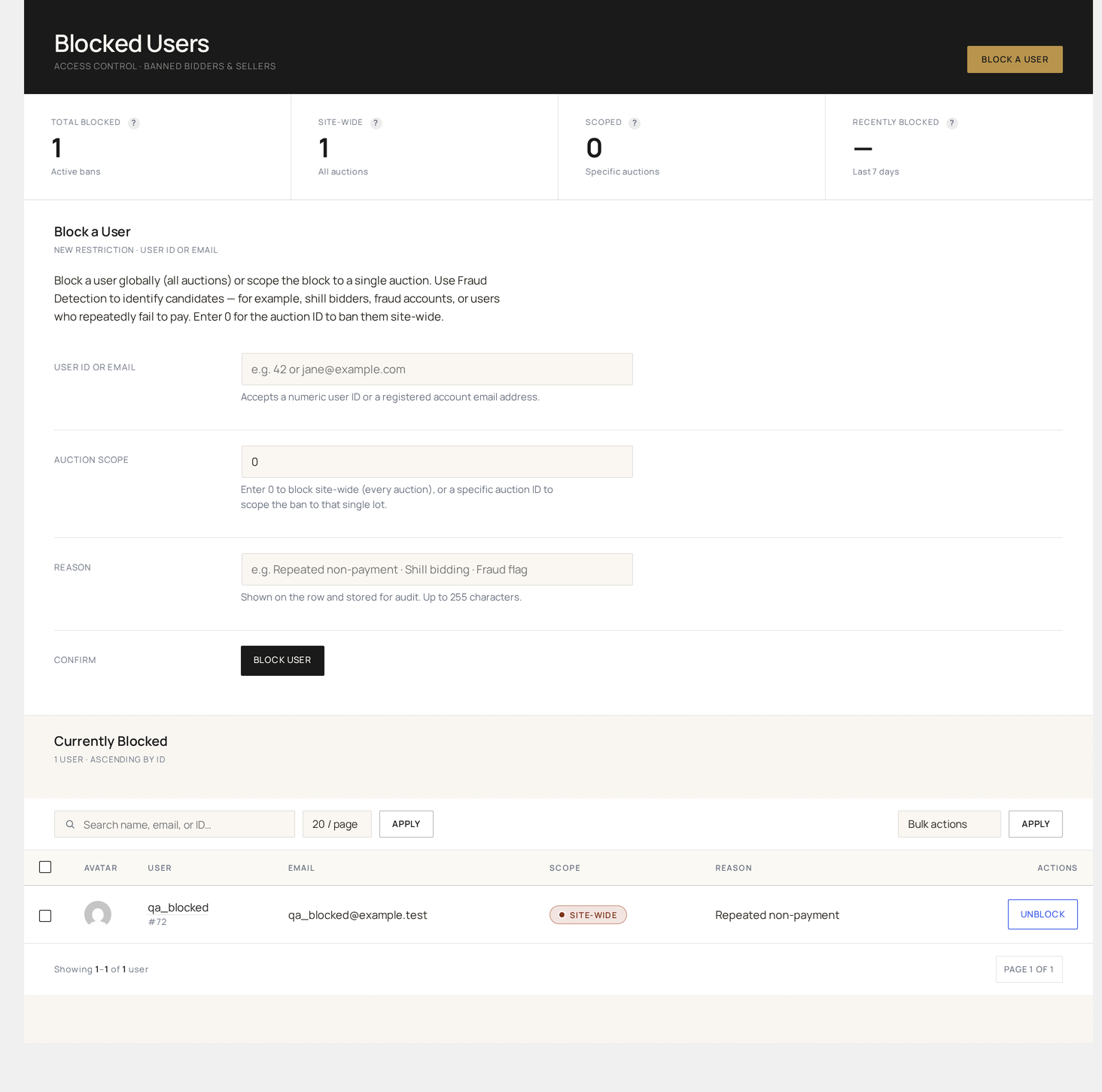
Blocked Users — the bidding ban list with user, reason, blocked-at and unblock action

What gets blocked

A blocked user:

ActionEffect
Place bidBid form rejects with "Account suspended" error
Watch / favouriteAllowed (so admins can track)
Register for eventRejected at checkout
Receive auction emailsSuppressed (configurable)
Use walletTop-up + transfer disabled; existing balance held
WithdrawRejected; admin must approve manually

The block does not affect:

  • Past won auctions and orders (those still complete)
  • WP login (use a separate plugin to ban login)
  • Storefront browsing (read-only access remains)

Page layout

ColumnSource
User IDWP user ID
Namedisplay_name
Emailuser_email
Reasonadmin-supplied note
Blocked byadmin who placed the block
Blocked attimestamp
Expiresoptional unblock date (null = permanent)
Actionsview profile / unblock

Filter by reason, expiry status, or search.

Adding a user to the list

Three ways:

MethodWhere
ManualThis page → Add User → search → reason → Save
From BidsBids → row → Block bidder
From DisputesDisputes → resolution → Block buyer
From FraudFraud Detection → flagged user → Block

When adding, you can set:

  • Reason — required free-text
  • Expiry — optional date; defaults to permanent
  • Notify user — send a courtesy email explaining the block

Auto-blocking

Fraud Detection can auto-block users when rules trigger:

TriggerDefault block
wkafw_bid_rate_limit exceeded N times1-day temp block
Repeated chargebacksPermanent
Failed KYC after 3 attemptsPending-review block (manual unblock)
Multiple disputes per monthManual review

Configure thresholds in Fraud Detection.

Unblocking

ActionEffect
Unblock (per-row)Removes from list; user can bid again immediately
Bulk unblockSelect rows → Apply
Auto-expireRows with an expiry date auto-clear at midnight UTC

Unblock writes a row to the Audit Log and emails the user.

Bulk actions

ActionEffect
UnblockLift the block
ExtendPush expiry by N days
Make permanentRemove expiry
Export CSVSelected rows

Per-page count

Configurable via wkafw_blocked_users_per_page option (default 20). Override in Auctions → Settings → General.

Privacy

Blocked-user records contain personal data — manage them per your privacy policy. The plugin's GDPR exporter (under WP Tools → Export Personal Data) includes block records keyed to the user's email.

Common workflows

"Block a confirmed bot"

  1. From Bids, filter by suspect IP or pattern
  2. Identify the user
  3. Block with reason "Bot activity — IP correlation"
  4. Add the IP to a Fraud Detection rule

"Temporary cool-down for a hot-headed bidder"

  1. Add User → search
  2. Reason: "Disruptive bid retraction pattern"
  3. Expires: 7 days from now
  4. Notify user: yes

"Annual block-list cleanup"

  1. Filter: expired temp blocks
  2. Bulk select → Unblock (auto-expiry usually handles this, but a manual sweep catches edge cases)
Prev
Disputes
Next
Fraud Detection