
Auctions for WooCommerceAuctions for WooCommerce
Buy Now
View Demo
  • Getting Started

    • Introduction
    • Quick Start
    • Features
    • Installation
    • First-Time Setup
    • Onboarding Tour
  • Admin Guide

    • Admin Overview
    • Dashboard
    • All Auctions
    • Add / Edit Auction
    • Bids
    • Reports
    • Events
    • Wallet
    • Disputes
    • Blocked Users
    • Fraud Detection
    • Tools (Import / Export)
    • Settings
    • Design Studio
    • Pending Review
    • Audit Log
  • Auction Mechanics

    • Auction Types
    • Bidding Engine
    • Anti-Sniping
    • Bid Increments
    • Reserve & Buy Now
    • Auto-Relist
    • Watchlist
  • Customer Experience

    • Customer Overview
    • My Auctions
    • My Wallet
    • Withdrawal
    • Single Auction Page
    • Notifications
  • Wallet & Payments

    • Wallet System
    • Auto-Charge
    • Stripe Connect
    • Monetization Fees
  • Multi-Vendor & Integrations

    • Multi-Vendor Compatibility
    • Twilio SMS
    • Firebase Push
    • Two-Factor Auth
    • Captcha
    • Social Login
    • Subscription Gate
    • Elementor & Gutenberg
  • Premium Features

    • Smart Features
    • Psychology Triggers
    • Gamification
    • Fraud Detection
    • Compliance
    • Social Sharing
    • Email Notifications
  • Developer

    • REST API
    • Hooks & Filters
    • JS Events
    • Database Schema
    • Shortcodes
    • Options Reference
    • WP-CLI
  • Help

    • Troubleshooting
    • FAQ
    • Glossary
    • Changelog
Support
Buy Now
View Demo
  • Getting Started

    • Introduction
    • Quick Start
    • Features
    • Installation
    • First-Time Setup
    • Onboarding Tour
  • Admin Guide

    • Admin Overview
    • Dashboard
    • All Auctions
    • Add / Edit Auction
    • Bids
    • Reports
    • Events
    • Wallet
    • Disputes
    • Blocked Users
    • Fraud Detection
    • Tools (Import / Export)
    • Settings
    • Design Studio
    • Pending Review
    • Audit Log
  • Auction Mechanics

    • Auction Types
    • Bidding Engine
    • Anti-Sniping
    • Bid Increments
    • Reserve & Buy Now
    • Auto-Relist
    • Watchlist
  • Customer Experience

    • Customer Overview
    • My Auctions
    • My Wallet
    • Withdrawal
    • Single Auction Page
    • Notifications
  • Wallet & Payments

    • Wallet System
    • Auto-Charge
    • Stripe Connect
    • Monetization Fees
  • Multi-Vendor & Integrations

    • Multi-Vendor Compatibility
    • Twilio SMS
    • Firebase Push
    • Two-Factor Auth
    • Captcha
    • Social Login
    • Subscription Gate
    • Elementor & Gutenberg
  • Premium Features

    • Smart Features
    • Psychology Triggers
    • Gamification
    • Fraud Detection
    • Compliance
    • Social Sharing
    • Email Notifications
  • Developer

    • REST API
    • Hooks & Filters
    • JS Events
    • Database Schema
    • Shortcodes
    • Options Reference
    • WP-CLI
  • Help

    • Troubleshooting
    • FAQ
    • Glossary
    • Changelog
Support
  • Getting Started

    • Introduction
    • Quick Start
    • Feature Catalog
    • Installation
    • First-Time Setup
    • Onboarding Tour
  • Admin Guide

    • Admin Overview
    • Dashboard
    • All Auctions
    • Add / Edit Auction
    • Bids
    • Reports
    • Events
    • Wallet (Admin)
    • Disputes
    • Blocked Users
    • Fraud Detection
    • Tools
    • Settings
    • Design Studio
    • Pending Review
    • Audit Log
  • Auction Mechanics

    • Auction Types
    • Bidding Engine
    • Anti-Sniping (Soft Close)
    • Bid Increments
    • Reserve & Buy Now
    • Auto-Relist
    • Watchlist
  • Customer Experience

    • Customer Experience Overview
    • My Auctions
    • My Wallet
    • Withdrawal
    • Single Auction Page
    • Customer Notifications
  • Wallet & Payments

    • Wallet System
    • Wallet Auto-Charge
    • Stripe Connect
    • Monetization
  • Multi-Vendor & Integrations

    • Multi-Vendor Compatibility
    • Twilio SMS
    • Firebase (Push Notifications)
    • Two-Factor Authentication
    • Captcha
    • Social Login
    • Subscription Gate
    • Elementor & Gutenberg
  • Premium Features

    • Smart Features
    • Psychology Triggers
    • Gamification
    • Fraud Detection
    • Compliance
    • Social Sharing
    • Email Notifications
  • Developer

    • REST API
    • Hooks & Filters
    • JavaScript Events
    • Database Schema
    • Shortcodes
    • Options Reference
    • WP-CLI
  • Help

    • Troubleshooting
    • FAQ
    • Glossary
    • Changelog

Wallet Auto-Charge

Automatically debit a winning bidder's wallet when their auction closes — no checkout flow needed.
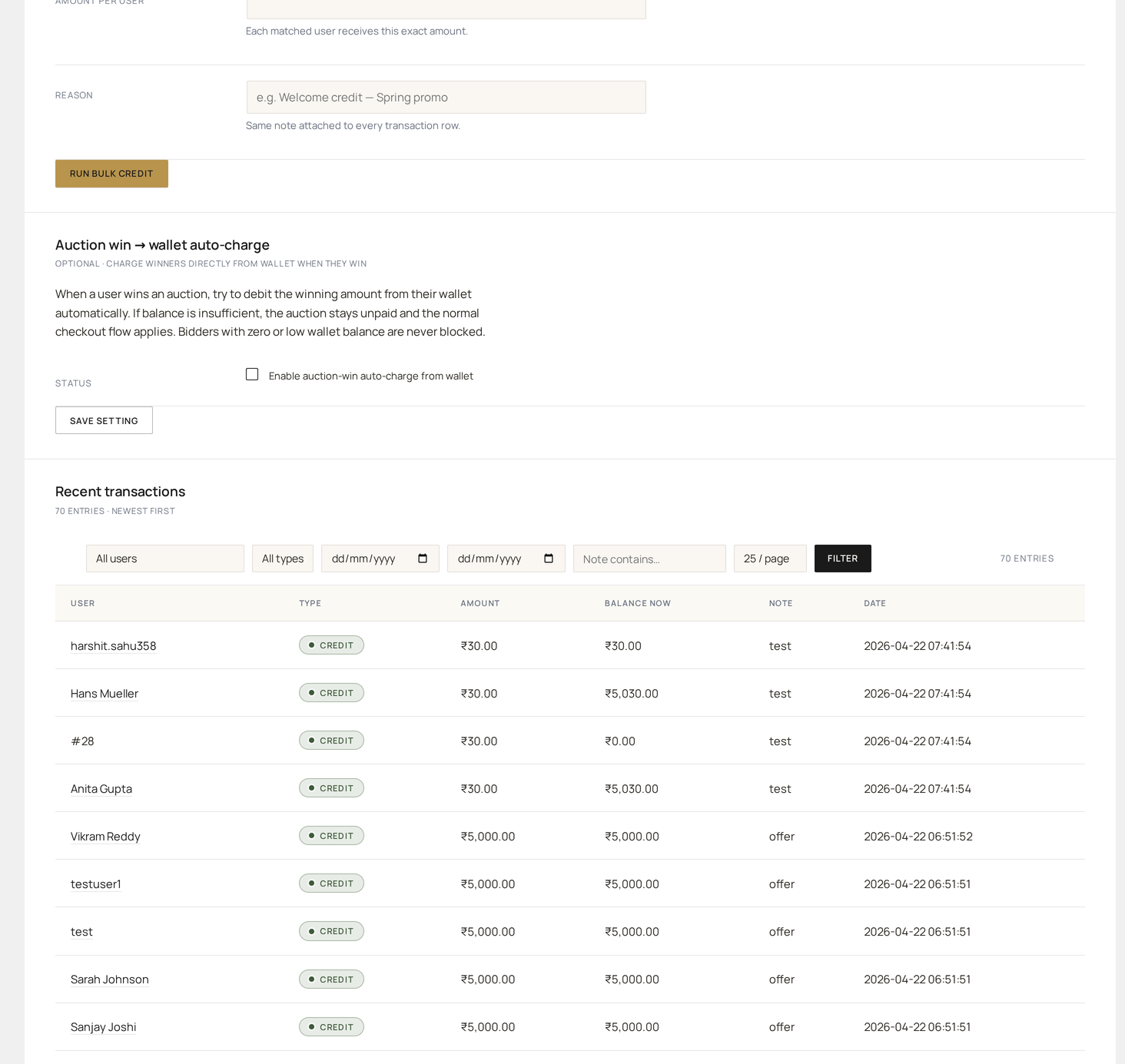
Admin Wallet — per-user balances and ledger; auto-charge debits land here when an auction closes

What it does

When an auction closes with a winner and auto-charge winner is on:

  1. The plugin reads the winner's wallet balance.
  2. If the balance covers the winning bid, it debits the wallet for the bid amount.
  3. A WooCommerce order is created automatically and marked complete.
  4. The auction status flips directly to paid.
  5. The customer receives an "Auction won (wallet-paid)" email.

If the balance is short, the system falls back to the regular "Auction won, please pay" flow.

Why use it

BenefitDetail
Zero-friction winCustomer doesn't have to do anything to claim their lot
Higher conversionNo "winner ghosted" cycle — paid the moment they won
Faster fulfilmentOrder is complete immediately; warehouse can ship same-day
Reduced supportNo "I won but can't pay" tickets

Best for stores with engaged repeat customers who maintain a wallet balance.

Configure

Auctions → Settings → Payments → Auto-charge winner — toggle on.

Once enabled it applies to every auction site-wide. A per-auction override is available on the Add / Edit Auction form.

Insufficient balance

If the winner's balance is below the winning bid, you have three behaviours to choose from:

BehaviourWhen to use it
Charge what's available, request restWallet is debited up to the available balance; the remainder becomes an unpaid order
Fall back to checkout (default)Standard "Auction won, please pay" email goes out for the full amount
Auto-relist immediatelySkip checkout entirely and trigger auto-relist right away

Order details

The auto-created order has:

FieldValue
StatusCompleted
Payment methodWallet
CurrencyYour site currency
Line items1 × auction product at the winning bid amount
CustomerThe winner
Billing / shippingFrom the customer's profile

The order appears in the customer's regular My Account → Orders list.

Refunds

If the auction is cancelled or disputed after auto-charge:

  1. Admin clicks Refund to wallet on the order.
  2. The original debit is reversed with a fresh credit row in the ledger.
  3. The customer receives a "Wallet refunded" email.

The original debit row is preserved for traceability — refunds are written as an offset, never as a delete.

Notifications

TriggerEmail
Auto-charge succeeded"Congratulations — auction won (paid from wallet)"
Auto-charge failed (low balance)Standard "Auction won — please pay"
Refund issued"Wallet refunded for auction #N"

Reporting

Reports → Payment status tracks:

  • Auto-charge success rate (% of wins paid via wallet)
  • Auto-charge failure rate (% with insufficient balance)
  • Average wallet balance among winners (predictor of auto-charge success)

Use cases

"Frequent-bidder rewards"

Encourage customers to maintain a wallet balance:

  • Free top-up bonus (e.g. add $20 → get $25)
  • Discount on auction fees when paying from wallet
  • Loyalty points for wallet-paid wins

Combined with auto-charge, this creates a tight engagement loop: customer tops up → wins auctions → tops up again.

"B2B / vendor marketplace"

Auctioning to known business buyers:

  • Pre-funded wallets with credit terms
  • Auto-charge ensures bid commitments are fulfilled
  • Disputes are rare since business buyers are vetted

"Charity event"

Auto-charge ensures donations are collected immediately:

  • Reduces post-event collection workload
  • Tax receipts can be issued instantly (since payment is confirmed)
  • Higher net donations (no "we'll pay later" friction)

Charity auctions →

Edge cases

ScenarioBehaviour
Winner deleted before closeAuto-charge skipped; auction marked failed
Wallet disabled site-wideAuto-charge disabled implicitly
Winner is admin / system userSkipped (admins can't auto-charge themselves)
Multi-currency mismatchSkipped; falls back to manual checkout
Concurrent auction winsSequential — the first win locks the wallet, the second checks the remaining balance

Common questions

"What if the user wants to use a different payment method?"

By default, auto-charge runs unconditionally when the balance is sufficient. To allow opt-out, surface a per-auction toggle ("Pay manually instead of auto-charging").

"Can I auto-charge to a saved card instead of wallet?"

That requires a different mechanism — see Stripe Connect for card-on-file auto-charge.

"What about taxes / shipping?"

Auto-charge debits the winning bid amount only. Taxes and shipping are handled by the auto-created order using your standard WooCommerce tax and shipping configuration. If shipping needs customer input, the order may be created as pending instead of complete.

Prev
Wallet System
Next
Stripe Connect