
Auctions for WooCommerceAuctions for WooCommerce
Buy Now
View Demo
  • Getting Started

    • Introduction
    • Quick Start
    • Features
    • Installation
    • First-Time Setup
    • Onboarding Tour
  • Admin Guide

    • Admin Overview
    • Dashboard
    • All Auctions
    • Add / Edit Auction
    • Bids
    • Reports
    • Events
    • Wallet
    • Disputes
    • Blocked Users
    • Fraud Detection
    • Tools (Import / Export)
    • Settings
    • Design Studio
    • Pending Review
    • Audit Log
  • Auction Mechanics

    • Auction Types
    • Bidding Engine
    • Anti-Sniping
    • Bid Increments
    • Reserve & Buy Now
    • Auto-Relist
    • Watchlist
  • Customer Experience

    • Customer Overview
    • My Auctions
    • My Wallet
    • Withdrawal
    • Single Auction Page
    • Notifications
  • Wallet & Payments

    • Wallet System
    • Auto-Charge
    • Stripe Connect
    • Monetization Fees
  • Multi-Vendor & Integrations

    • Multi-Vendor Compatibility
    • Twilio SMS
    • Firebase Push
    • Two-Factor Auth
    • Captcha
    • Social Login
    • Subscription Gate
    • Elementor & Gutenberg
  • Premium Features

    • Smart Features
    • Psychology Triggers
    • Gamification
    • Fraud Detection
    • Compliance
    • Social Sharing
    • Email Notifications
  • Developer

    • REST API
    • Hooks & Filters
    • JS Events
    • Database Schema
    • Shortcodes
    • Options Reference
    • WP-CLI
  • Help

    • Troubleshooting
    • FAQ
    • Glossary
    • Changelog
Support
Buy Now
View Demo
  • Getting Started

    • Introduction
    • Quick Start
    • Features
    • Installation
    • First-Time Setup
    • Onboarding Tour
  • Admin Guide

    • Admin Overview
    • Dashboard
    • All Auctions
    • Add / Edit Auction
    • Bids
    • Reports
    • Events
    • Wallet
    • Disputes
    • Blocked Users
    • Fraud Detection
    • Tools (Import / Export)
    • Settings
    • Design Studio
    • Pending Review
    • Audit Log
  • Auction Mechanics

    • Auction Types
    • Bidding Engine
    • Anti-Sniping
    • Bid Increments
    • Reserve & Buy Now
    • Auto-Relist
    • Watchlist
  • Customer Experience

    • Customer Overview
    • My Auctions
    • My Wallet
    • Withdrawal
    • Single Auction Page
    • Notifications
  • Wallet & Payments

    • Wallet System
    • Auto-Charge
    • Stripe Connect
    • Monetization Fees
  • Multi-Vendor & Integrations

    • Multi-Vendor Compatibility
    • Twilio SMS
    • Firebase Push
    • Two-Factor Auth
    • Captcha
    • Social Login
    • Subscription Gate
    • Elementor & Gutenberg
  • Premium Features

    • Smart Features
    • Psychology Triggers
    • Gamification
    • Fraud Detection
    • Compliance
    • Social Sharing
    • Email Notifications
  • Developer

    • REST API
    • Hooks & Filters
    • JS Events
    • Database Schema
    • Shortcodes
    • Options Reference
    • WP-CLI
  • Help

    • Troubleshooting
    • FAQ
    • Glossary
    • Changelog
Support
  • Getting Started

    • Introduction
    • Quick Start
    • Feature Catalog
    • Installation
    • First-Time Setup
    • Onboarding Tour
  • Admin Guide

    • Admin Overview
    • Dashboard
    • All Auctions
    • Add / Edit Auction
    • Bids
    • Reports
    • Events
    • Wallet (Admin)
    • Disputes
    • Blocked Users
    • Fraud Detection
    • Tools
    • Settings
    • Design Studio
    • Pending Review
    • Audit Log
  • Auction Mechanics

    • Auction Types
    • Bidding Engine
    • Anti-Sniping (Soft Close)
    • Bid Increments
    • Reserve & Buy Now
    • Auto-Relist
    • Watchlist
  • Customer Experience

    • Customer Experience Overview
    • My Auctions
    • My Wallet
    • Withdrawal
    • Single Auction Page
    • Customer Notifications
  • Wallet & Payments

    • Wallet System
    • Wallet Auto-Charge
    • Stripe Connect
    • Monetization
  • Multi-Vendor & Integrations

    • Multi-Vendor Compatibility
    • Twilio SMS
    • Firebase (Push Notifications)
    • Two-Factor Authentication
    • Captcha
    • Social Login
    • Subscription Gate
    • Elementor & Gutenberg
  • Premium Features

    • Smart Features
    • Psychology Triggers
    • Gamification
    • Fraud Detection
    • Compliance
    • Social Sharing
    • Email Notifications
  • Developer

    • REST API
    • Hooks & Filters
    • JavaScript Events
    • Database Schema
    • Shortcodes
    • Options Reference
    • WP-CLI
  • Help

    • Troubleshooting
    • FAQ
    • Glossary
    • Changelog

Reports

Auctions → Reports — ?page=wkafw-reports

Revenue, bidder, auction, and category breakdowns — with CSV export for every view. Fully HPOS-aware (works with WooCommerce's modern order storage).
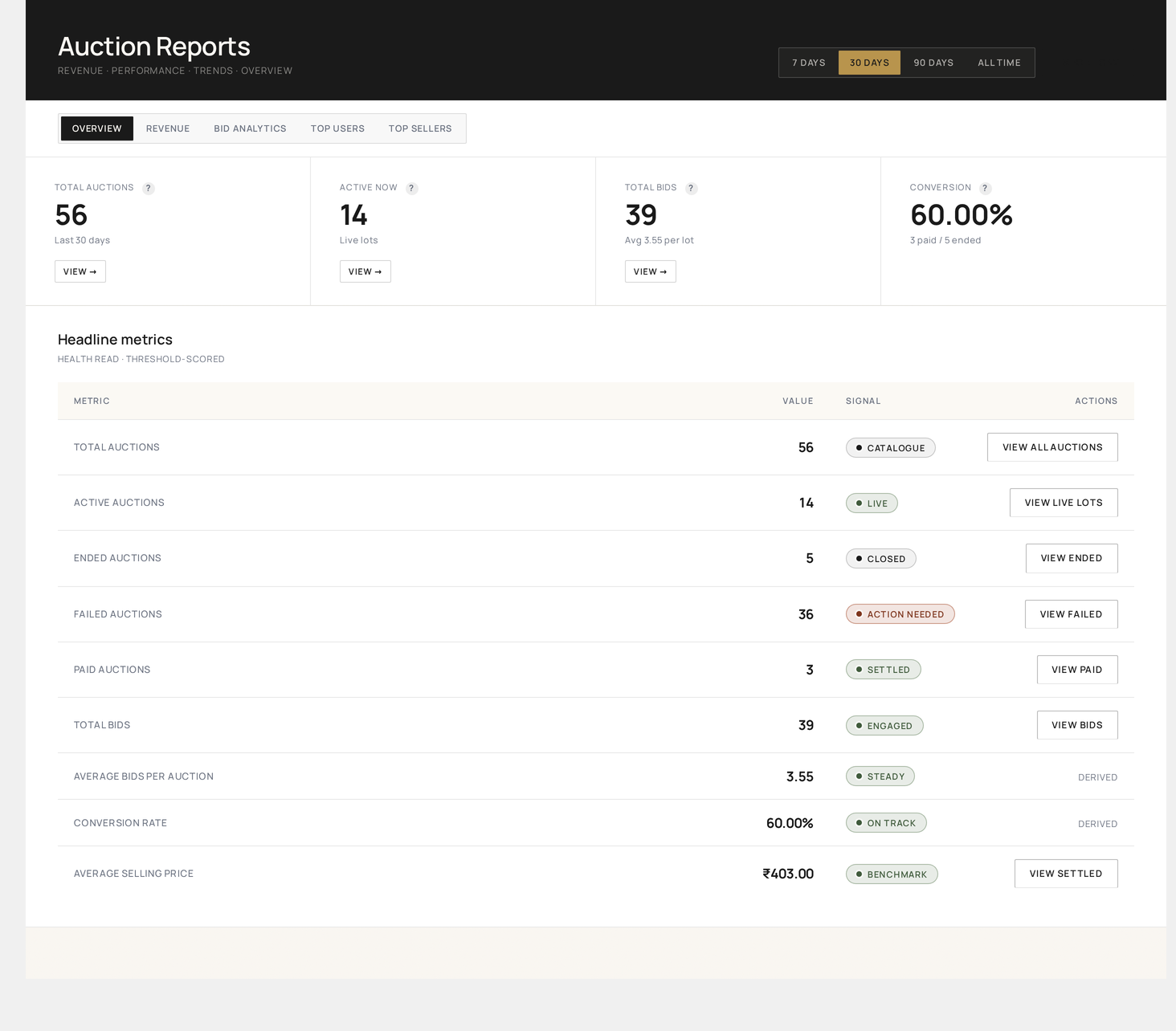
Reports → Overview — at-a-glance metrics across the selected date range with the tab strip (OVERVIEW · REVENUE · BID ANALYTICS · TOP USERS · TOP SELLERS) and 7 D / 30 D / 90 D / ALL range chips

Report views

ViewWhat it showsExport
RevenueDaily / weekly / monthly platform revenue, broken into settled vs feesCSV
By TypeRevenue split by auction typeCSV
By VendorMulti-vendor revenue / commission split (if applicable)CSV
By CategoryRevenue rolled up by WooCommerce product categoryCSV
Top BiddersAll-time and ranged top users by bid count + spendCSV
Top AuctionsMost-contested lots in the date rangeCSV
Conversion FunnelAuctions → Bidders → Winners → PaidCSV
Payment StatusPaid / overdue / unpaid winnersCSV

Revenue tab

Settled revenue against platform fees over the selected date range, with a daily series and a one-click CSV export. Use this view to answer "how much money came in this period?".
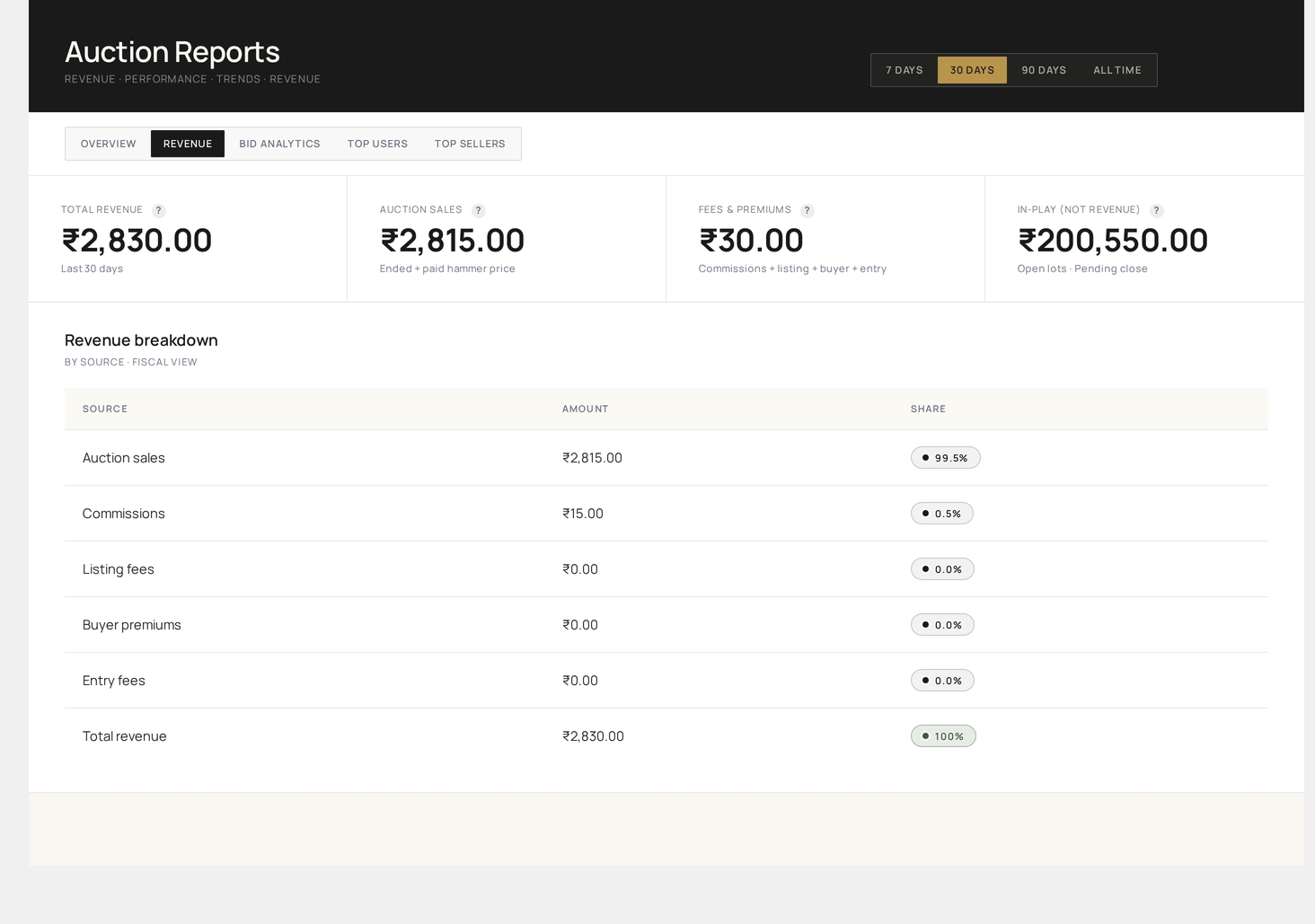
Reports → Revenue — settled revenue, fees split, daily series and CSV export

Bid Analytics tab

Bid volume, average bids per auction, hourly distribution and the share of bids placed by the proxy bidder. Use this to find the best end-times for your auctions and to spot bidding-pattern anomalies.
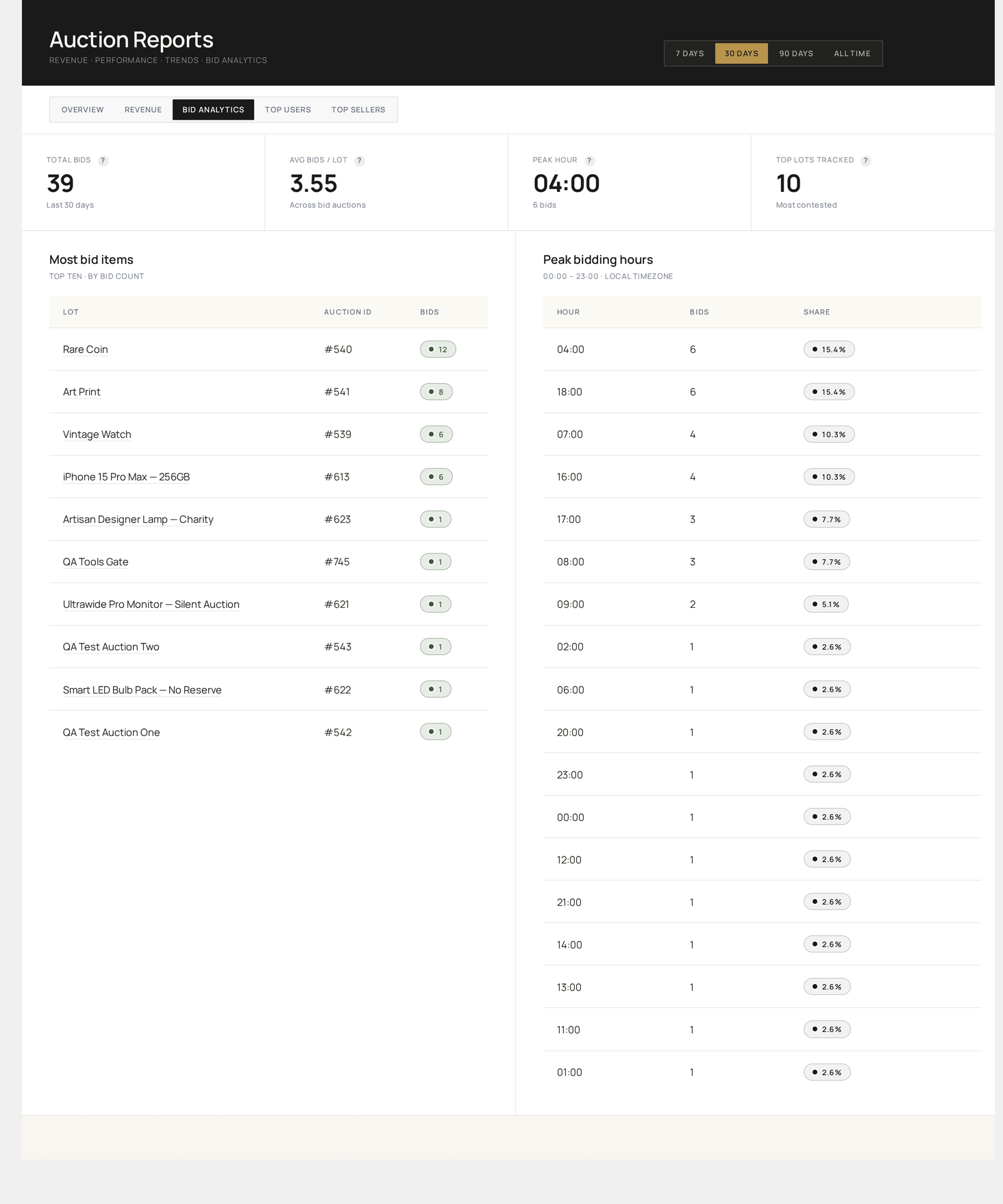
Reports → Bid Analytics — bid volume, average bids per auction, hourly distribution and proxy share

Top Users tab

Leaderboard of bidders ranked by activity and spend across the range, including their win rate and last-bid timestamp. Pair with the Audit Log for VIP-customer verification.
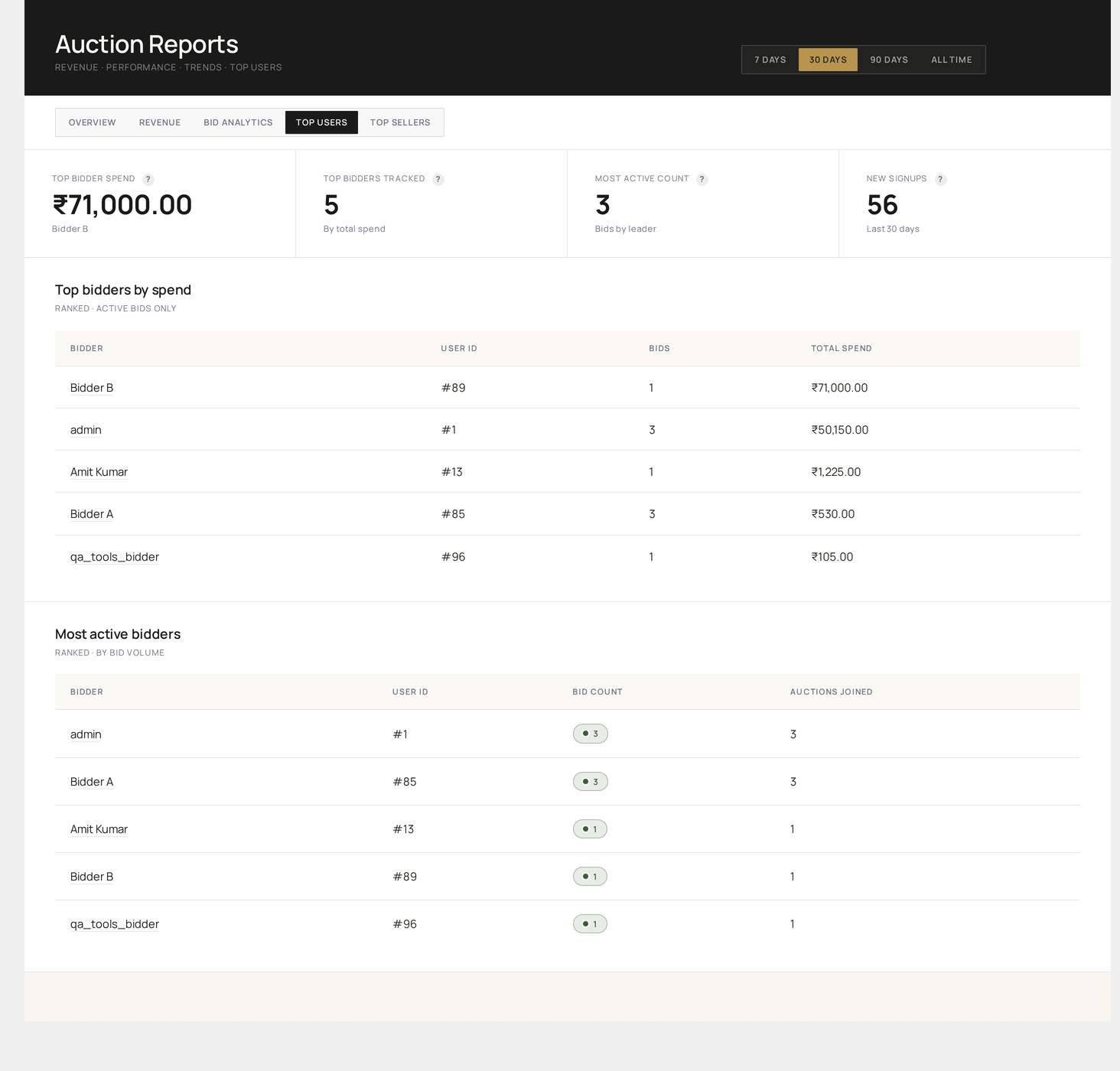
Reports → Top Users — leaderboard of bidders ranked by activity and spend across the date range

Top Sellers tab

Multi-vendor revenue split — gross sales per seller, commission earned, payout owed. Available only when a vendor plugin (WCFM / Dokan / WC Vendors / YITH) is active.

Reports → Top Sellers — multi-vendor revenue split with commission and gross sales per seller

Date range

Top-right of every view: 7 D / 30 D / 90 D / This Year / Custom.

Custom range opens a date picker; persisted via ?from=YYYY-MM-DD&to=YYYY-MM-DD.

Revenue model

The plugin distinguishes:

TermSource
Settled revenueSum of completed orders that originated from a winning auction bid
Platform feesListing fees, buyer's premium, late penalty, featured boost — written to wkafw_vendor_commissions
Total revenueSettled + Fees

Monetization → explains how each fee is configured.

Conversion funnel

Five stages, computed for the date range:

  1. Auctions Listed — count of auctions started in range
  2. Bidders — distinct user_id count in wkafw_bids for those auctions
  3. Winners — auctions with status = ended and a winner assigned
  4. Paid Winners — auctions with status = paid
  5. Linked Orders — count of WooCommerce orders that originated from a winning auction

Drop-off between any two stages is shown as a percentage. Useful for spotting:

  • High Auctions → Bidders drop = listings aren't compelling
  • High Winners → Paid drop = collection problem (use Auto-charge)

Payment status

Three buckets:

StatusMeaning
PaidOrder completed within wkafw_payment_deadline (default 48 hours)
OverduePast deadline, no order completion
UnpaidPast deadline + auto-relist triggered

Click a bucket to filter All Auctions to those rows.

CSV export

Each view has an Export → CSV button at the top right.

SizeBehavior
< 500 rowsStreams immediately
≥ 500 rowsQueued via Action Scheduler; you'll get a download link via email + an in-app notice when ready

CSV columns mirror the on-screen table.

Scheduling reports

Each view supports Schedule → Daily / Weekly / Monthly. The report runs at the chosen interval and emails the CSV to a list of recipients.

SettingWhere
RecipientsPer-report; comma-separated email list
TimeSite timezone, default 06:00
FormatCSV (XLSX optional)

Scheduled reports use the wkafw_process_scheduled_export Action Scheduler hook.

Performance

Every report is bounded and indexed. Even on databases with 1M+ bids, reports load in 1–3 seconds for any range. Vendor splits, bidder leaderboards, and conversion funnels all run as single dedicated queries, not row-by-row scans.

Custom reports

To add your own report:

Hooks & Filters →

Use cases

You want to...View
Tax-time revenue summaryRevenue → year-to-date → CSV
Spot-check best-selling categoryBy Category → 90 D
Identify VIP buyers for outreachTop Bidders → all-time → CSV
Detect a drop in listingsConversion Funnel → 30 D → check stage 1
Pay vendors monthlyBy Vendor → 30 D → CSV → import to your accounting
Prev
Bids
Next
Events