
Single Auction Page
The customer-facing page for any individual auction. Lives at the linked product's permalink (/product/{slug}/).
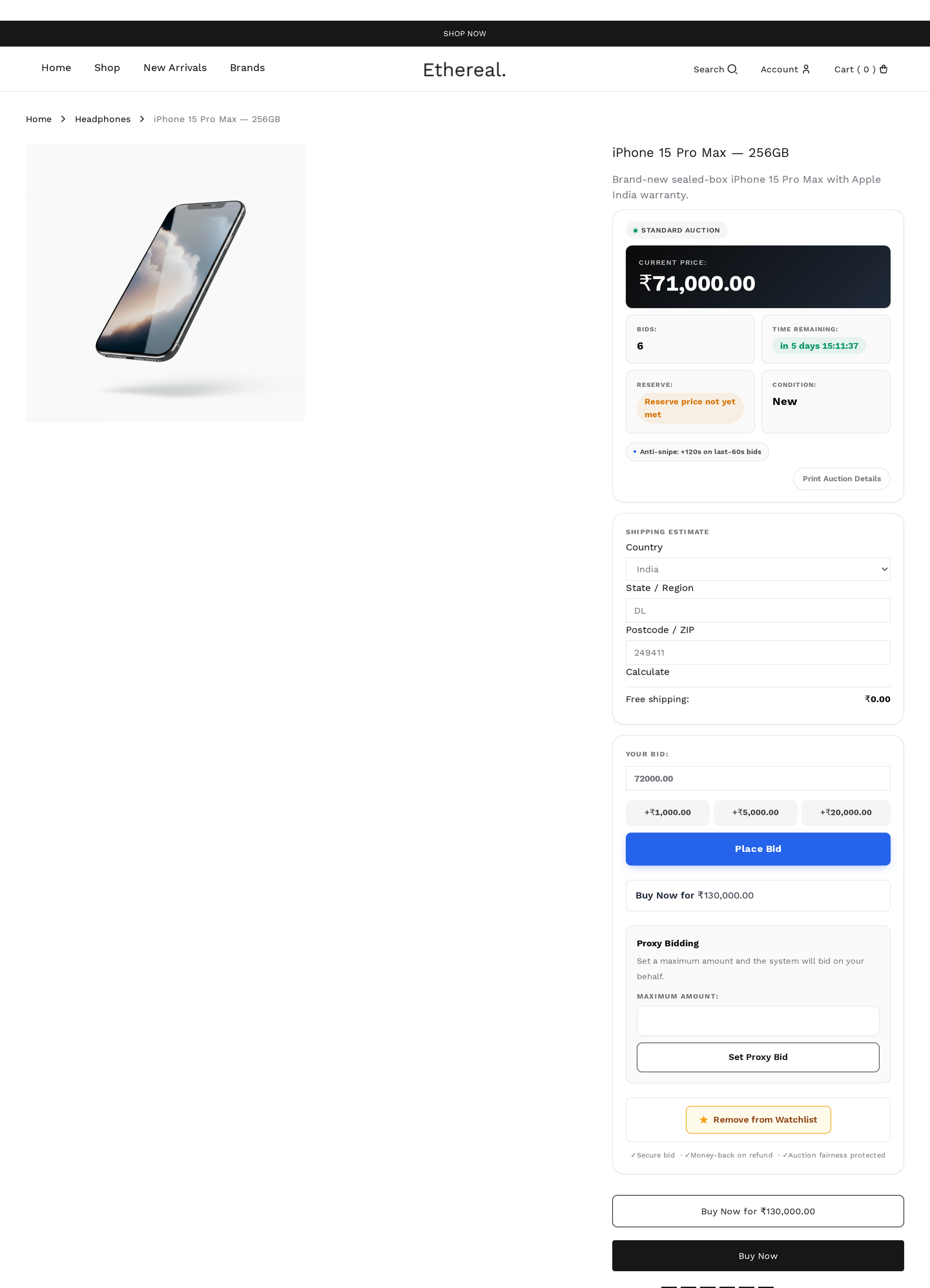
Components
A standard auction page renders:
- Image gallery
- Auction badge
- Title + auction type label
- Current price + bid count
- Countdown timer
- Reserve indicator
- Bid form
- Buy Now button (if set)
- Watchers count + Watch button
- Bid history
- Description
- Item condition
- Shipping estimator
- Comparison checkbox
- Contact seller
Gallery
Standard WooCommerce product gallery with multiple images, click-to-lightbox / full-screen, hover-zoom (configurable in Design Studio) and touch-swipe on mobile.
Badge
Displayed top-left of the gallery:
| Badge | When |
|---|---|
| Live | Auction is currently active |
| Ending Soon | Inside the urgency window you configured |
| New | Created within the last 24 hours |
| Hot | A burst of bids in the last hour above the hot-auction threshold |
| Featured | Admin-marked featured |
Multiple badges can stack. Customisable via Design Studio.
Title
Shows the product title (linked), the auction type label ("Standard auction" / "Reverse auction" / etc.) and the seller name.
Price
| Element | Shown as |
|---|---|
| Current price | The highest valid bid so far |
| Bid count | Total bids placed |
| Suggested next bid | Current price plus the configured increment |
The current price updates live via polling (no page reload).
Countdown
A real-time countdown to the auction end. The timer is colour-coded so urgency is visible at a glance:
| State | Colour | Threshold |
|---|---|---|
| Default | charcoal / dark | More than the yellow stop |
| Yellow | amber | Final hour (default) |
| Orange | orange | Final 10 minutes (default) |
| Red | red, pulsing | Final 2 minutes (default) |
Thresholds are configurable in Settings → General. The countdown re-syncs to server time every poll cycle to prevent client-clock drift.
Reserve indicator
Shows next to the current price when a reserve is set:
| Text | When |
|---|---|
| "Reserve not met" | Current price is below the reserve |
| "Reserve met ✓" (green) | Current price has reached or passed the reserve |
| (hidden) | No reserve was set |
Bid form
The interactive bidding control. Three sub-modes depending on auction type:
Standard / Reverse / Sealed
- Amount input
- Place Bid button
- Quick-bid buttons (+5%, +10%, +25%)
- Bid confirmation modal (if enabled)
Proxy
- Same as standard, plus an Auto-bid up to input for setting the maximum
- Toggle: "I want the system to auto-bid for me"
Penny
- Bid pack purchase widget (if no pack yet)
- Place 1 bid button (one click = one bid using one token)
- Pack-remaining counter
Logged-out users see the form replaced with a Sign in to bid button.
Buy Now
Optional "skip the auction" button next to the bid form. Adds the item to cart at the Buy Now price. Buy Now reference →
Watchers
Below the bid form:
| Element | Behaviour |
|---|---|
| Watchers count | "23 people watching" — appears once a minimum threshold is reached |
| Watch button | Toggles watch state for this customer |
Bid history
A scrollable list of every bid on this auction.
| Column | What it shows |
|---|---|
| Bidder | Display name (masked when site-wide masking is on) |
| Amount | The bid amount |
| Type | Manual / proxy / quick / buy-now |
| Time | Friendly relative time ("2 min ago") |
Display modes (configurable in Design Studio):
- Inline — visible by default
- Accordion — collapsed; click to expand
- Hidden — not shown publicly
Description
The standard WooCommerce product description.
Condition
Below the description:
Item condition: New / Like New / Used / Refurbished / For Parts
Set on the auction itself in Add / Edit Auction.
Shipping
When enabled, the customer enters a destination postcode / country and gets an estimated shipping cost based on your WooCommerce shipping zones. Useful for buyers calibrating their max bid.
Comparison
Checkbox: Add to compare. Adds this auction to the customer's compare list (max 3 lots). Comparison →
Contact seller
Button opens a modal with a subject and message field. The seller receives an email and an in-app badge. By default, messaging closes once the customer has placed a bid on the lot (prevents collusion). Customer overview → Messaging
Live updates
The page polls in the background:
- Every 30 seconds (configurable) under normal conditions
- Every 3 seconds in the last 2 minutes
- Polling pauses for dormant auctions (no bids in the last 30 minutes)
Refreshed on each poll: current price, bid count, time left, watchers count, "Hot" badge.
Live confetti
When the customer wins (auction closes with their bid leading), a confetti burst plays. Toggleable site-wide in Settings → General → Confetti on win.
Mobile
Single-column layout. Touch-friendly:
- Larger buttons (minimum 44 px tap targets)
- Sticky bid form at the bottom on scroll
- Slightly slower polling cadence to save battery