
API Keys
Admin UI to mint API keys for the wallet REST endpoints. Used by server-to-server integrations, BI tools, custom dashboards.
Want the feature overview?
See REST API for endpoint reference, authentication, request/response shapes, and rate limits.
Where
Wallet → Settings → API Keys.
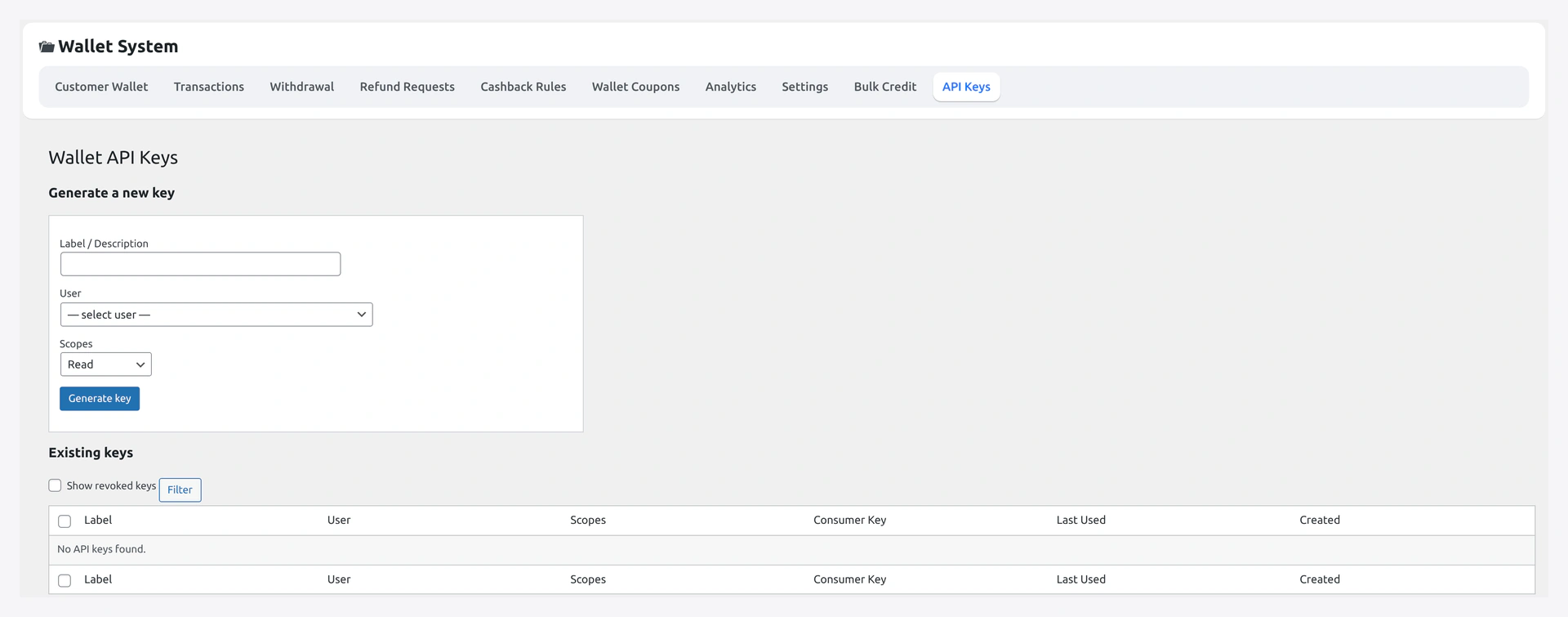
Step-by-step Setup
1. Add new key
Click Add new → opens the mint form.
2. Description
Human label. Use to remember what the key is for.
Examples:
Accounting export scriptSlack alert botMobile app v2BigQuery sync (read-only)
3. Scope
| Scope | Allows |
|---|---|
read | GET endpoints only — wallets, transactions, analytics |
write | POST / PUT — wallet credit / debit, KYC decisions, withdrawal approve / reject |
read_write | both |
Recommended: start with read. Bump to read_write only when the integration actually needs to mutate.
4. Owner user
Which WP user the key acts as. The key inherits the owner's capabilities.
For server-to-server, usually a dedicated service-account user with manage_woocommerce.
5. IP whitelist (optional)
CSV of IP addresses allowed to use the key. Caller IP must match.
Examples:
203.0.113.42(single IP)203.0.113.42, 198.51.100.10(multiple)
Leave blank to allow any IP.
6. Generate
Click Generate. Modal shows:
Consumer key:    ck_abc123def456...
Consumer secret: cs_xyz789uvw012...
Copy both immediately — secret is hashed at rest and won't show again.
7. Use the key
Pass via Basic Auth header on REST requests:
curl -u ck_abc123def456:cs_xyz789uvw012 \
  "https://yourstore.com/wp-json/wkwp-wallet/v1/wallets?per_page=20"
See REST API for endpoint details.
Manage Existing Keys
The list table shows:
| Column | Notes |
|---|---|
| Description | what you typed |
| Scope | read / write / read_write |
| Owner | WP user |
| Last used | timestamp + caller IP |
| Created | timestamp |
| Actions | Revoke / Delete |
Revoke
Stops the key working without deleting the row. Useful when you suspect compromise but want to keep the audit trail.
Delete
Permanently removes the key. Confirm with typed input.
Rotate
To rotate: Generate a new key with the same scope → update your integration to use it → revoke the old.
Common Combos
| Use case | Scope | IP whitelist |
|---|---|---|
| Read-only BI sync | read | your BI server IP |
| Mobile app | read_write | empty (mobile IPs vary) |
| Trusted internal script | read_write | server IP |
| Slack bot polling KPIs | read | Slack hook server IP |
Verify
Test the key with curl:
curl -u ck_xxx:cs_xxx \
  "https://yourstore.com/wp-json/wkwp-wallet/v1/wallets?per_page=5"
Expected: 200 with JSON. Errors:
| Status | Meaning |
|---|---|
401 invalid_credentials | Key wrong or revoked |
403 forbidden_caller_ip | IP not in whitelist |
403 kyc_required | The endpoint enforces KYC and the owner user lacks approved KYC |
429 too_many_requests | Rate-limit hit |
Rate Limits
| Scope | Default |
|---|---|
| Per IP | 60 / minute |
| Per consumer_key | 600 / minute |
| Burst (5-second window) | 30 |
For higher limits, mint multiple keys.
Security Best Practices
| Do | Don't |
|---|---|
| Use unique keys per integration | Share keys across teams |
| Set IP whitelist when possible | Leave empty if your caller IP is stable |
| Pick the narrowest scope that works | Default to read_write |
| Rotate every 90 days | Use the same key for years |
| Revoke unused keys | Just delete (loses audit) |
Troubleshooting
| Problem | Fix |
|---|---|
| Key always 401 | Check secret was copied correctly (no trailing whitespace) |
| 403 forbidden_caller_ip | Caller IP changed; update whitelist |
| Rate limit hit | Use multiple keys to spread load |
| Permission denied on POST | Owner user lacks manage_woocommerce; or scope is read |