
Wallet SystemWallet System
Buy Now
View Demo
  • Getting Started

    • Introduction
    • Quick Start
    • Features
    • Installation
    • First-Time Setup
    • Admin Tour
  • Wallet Core

    • Core Wallet
    • Wallet Payment Gateway
    • Recharge / Top-up
    • Wallet Transfer
    • My Wallet Page
    • Shortcodes
  • Earn & Reward

    • Cashback Engine
    • Referral Program
    • Multilevel Referral
    • Daily Login Reward
    • Invite Friends
    • Deposit / Top-up Bonus
  • Spend & Payout

    • Checkout Discount
    • Checkout Restriction
    • Withdrawal
    • PayPal Payout
    • Stripe Payout
    • Refund to Wallet
    • Buy Now Pay Later
  • Identity & Mobile

    • KYC
    • QR Code Payments
  • Wallet Central

    • Overview
    • Endpoint & Routing
    • CTA Discovery
    • Home Dashboard
    • Add Funds
    • Withdraw
    • Withdrawals List
    • Send Money
    • QR Pay
    • Payment Requests
    • Refer & Earn
    • Transactions
    • Settings
    • KYC Flow
    • Architecture
    • Tweaks & Responsive
    • Security
    • Admin Controls
  • Admin Tools

    • Admin Settings (index)
    • Bulk Credit / Debit
    • Analytics Dashboard
  • Settings Tabs

    • General
    • Recharge
    • Checkout
    • Withdrawal
    • Payout (PayPal/Stripe)
    • KYC
    • Cashback
    • Referral
    • Multilevel
    • BNPL
    • QR Pay
    • Notifications
    • Wallet Central
    • Integrations
    • API Keys
  • Notifications

    • Email Notifications
    • SMS Notifications
  • Developer

    • REST API
    • Filters & Hooks
  • Help

    • Troubleshooting
    • FAQ
    • Glossary
Support
Buy Now
View Demo
  • Getting Started

    • Introduction
    • Quick Start
    • Features
    • Installation
    • First-Time Setup
    • Admin Tour
  • Wallet Core

    • Core Wallet
    • Wallet Payment Gateway
    • Recharge / Top-up
    • Wallet Transfer
    • My Wallet Page
    • Shortcodes
  • Earn & Reward

    • Cashback Engine
    • Referral Program
    • Multilevel Referral
    • Daily Login Reward
    • Invite Friends
    • Deposit / Top-up Bonus
  • Spend & Payout

    • Checkout Discount
    • Checkout Restriction
    • Withdrawal
    • PayPal Payout
    • Stripe Payout
    • Refund to Wallet
    • Buy Now Pay Later
  • Identity & Mobile

    • KYC
    • QR Code Payments
  • Wallet Central

    • Overview
    • Endpoint & Routing
    • CTA Discovery
    • Home Dashboard
    • Add Funds
    • Withdraw
    • Withdrawals List
    • Send Money
    • QR Pay
    • Payment Requests
    • Refer & Earn
    • Transactions
    • Settings
    • KYC Flow
    • Architecture
    • Tweaks & Responsive
    • Security
    • Admin Controls
  • Admin Tools

    • Admin Settings (index)
    • Bulk Credit / Debit
    • Analytics Dashboard
  • Settings Tabs

    • General
    • Recharge
    • Checkout
    • Withdrawal
    • Payout (PayPal/Stripe)
    • KYC
    • Cashback
    • Referral
    • Multilevel
    • BNPL
    • QR Pay
    • Notifications
    • Wallet Central
    • Integrations
    • API Keys
  • Notifications

    • Email Notifications
    • SMS Notifications
  • Developer

    • REST API
    • Filters & Hooks
  • Help

    • Troubleshooting
    • FAQ
    • Glossary
Support
  • Getting Started

    • Introduction
    • Quick Start — Wallet Live in 5 Minutes
    • Features
    • Installation
    • First-Time Setup
    • Admin Tour
  • Wallet Core

    • Core Wallet
    • Wallet Payment Gateway
    • Recharge / Top-up
    • Wallet Transfer
    • My Wallet Page
    • Shortcodes
  • Earn & Reward

    • Cashback Engine
    • Referral Program
    • Multilevel Referral
    • Daily Login Reward
    • Invite Friends
    • Deposit / Top-up Bonus
  • Spend & Payout

    • Checkout Discount
    • Checkout Restriction
    • Withdrawal
    • PayPal Payout
    • Stripe Payout
    • Refund to Wallet
    • Buy Now Pay Later (BNPL)
  • Identity & Mobile

    • KYC (Know Your Customer)
    • QR Code Payments
  • Wallet Central

    • Wallet Central Overview
    • Endpoint & Routing
    • CTA Discovery
    • Home Dashboard
    • Add Funds
    • Withdraw
    • Withdrawals List + Detail
    • Send Money
    • QR Pay
    • Payment Requests
    • Refer & Earn
    • Transactions
    • Settings (customer)
    • KYC Flow
    • Architecture
    • Tweaks & Responsive
    • Security
    • Admin Controls
  • Admin Tools

    • Admin Settings
    • Bulk Credit / Debit
    • Analytics Dashboard
  • Settings Tabs

    • General Settings
    • Recharge Settings
    • Checkout Settings
    • Withdrawal Settings
    • Payout Settings (PayPal + Stripe)
    • KYC Settings
    • Cashback Settings
    • Referral Settings
    • Multilevel Settings
    • BNPL Settings
    • QR Pay Settings
    • Notifications Settings
    • Wallet Central Settings
    • Third-Party Integrations
    • API Keys
  • Notifications

    • Email Notifications
    • SMS Notifications
  • Developer

    • REST API
    • Filters & Hooks
  • Help

    • Troubleshooting
    • FAQ
    • Glossary

KYC Settings

Configure identity verification + which features require it.

Want the feature overview?

See KYC for the customer flow, status pills, admin review process, and privacy/GDPR notes.

Where

Wallet → Settings → KYC.
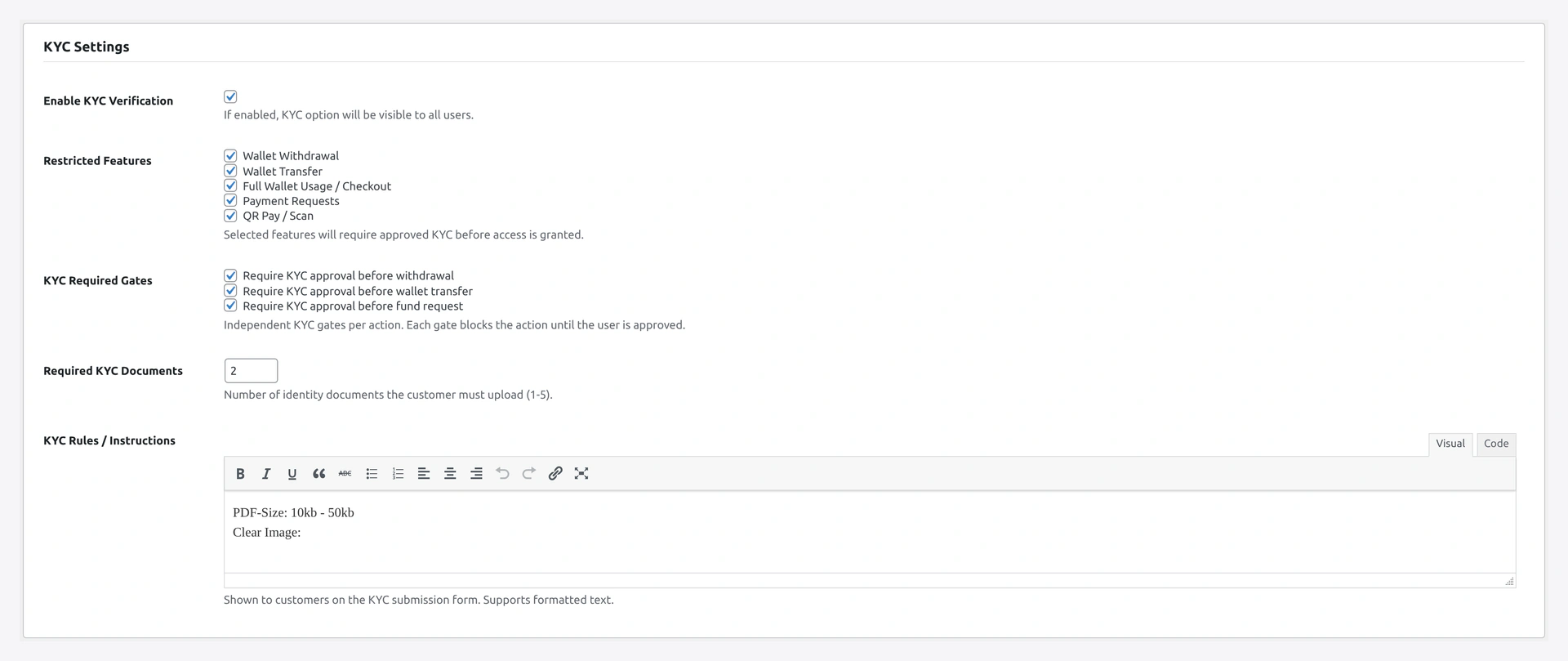
KYC Settings section — enable, max docs, allowed types, required features list

Step-by-step Setup

1. Enable

Master toggle. When OFF, the KYC view + modal aren't accessible. Customers see all features unrestricted.

Recommended: ON if you allow withdrawals or large transfers.

2. Max documents per user

Range 1-5. How many files a customer can upload per submission.

Use caseSuggested
Single ID1
ID + address proof2
Full KYC packet3-5

3. Allowed file types

MIME whitelist. Default: image/jpeg, image/png, image/webp, application/pdf.

Don't add application/octet-stream or executable types.

4. Max file size (MB)

Per-file cap. Default 5. Mobile photos can be large; allow at least 5. Don't exceed 20 to keep upload reliable.

5. Document type list

Dropdown options shown in the form. Default:

Passport
National ID
Driving Licence
Voter ID
Aadhaar

Edit this list to match your region's standard documents:

RegionTypical list
IndiaAadhaar, PAN, Passport, Driving Licence, Voter ID
USDriver Licence, State ID, Passport, SSN card
EUPassport, National ID, Driving Licence
SingaporeNRIC, Passport, Driving Licence

6. Requirement description

Rich text shown above the form on the KYC view. Tells customers what to upload.

Example:

Upload one government-issued photo ID:
- Passport (photo page)
- Driving licence (front + back)
- National ID

Documents must be:
- Clear and in colour
- Not edited or cropped
- Issued in your name
- Not expired

7. Required features

Tick which features need approved KYC. Server-side authoritative — UI gate is belt-and-braces.

FeatureWhen to gate
WithdrawalHighly recommended. Money leaving the platform
TransferRecommended. P2P payments are fraud-attractive
Wallet usage (checkout)Optional. Strict stores only
Refund requestOptional. Customer-side refund-to-wallet
QR payRecommended for the scan side

8. Per-action gates (advanced)

Belt-and-braces redundant guards:

ToggleEffect
Gate withdrawalExtra KYC check on withdrawal POST
Gate transferExtra KYC check on transfer AJAX
Gate fund_requestExtra KYC check on refund-request submission

Leave default OFF. The Required features list is sufficient.

9. Reviewer email

Who gets the "new KYC submitted" notification. Default: site admin email.

For multi-admin stores, use a shared inbox so any admin can review.

10. Save

Click Save changes.

Verify

As a test customer (not KYC-approved):

  1. Visit /my-account/my_wallet/ → KYC pill shows "VERIFY KYC"
  2. Click pill → modal opens with the form
  3. Upload a JPEG → submit
  4. Pill flips to "KYC UNDER REVIEW"
  5. Reviewer email arrives

As admin:

  1. Wallet → KYC Reviews → row visible
  2. Click row → side drawer with the document inline
  3. Approve → customer email fires
  4. Customer reload → pill flips to "✓ KYC VERIFIED"

Recommended Stack

GoalSettings
Light storeEnable ON, Required features: Withdrawal only, Max docs 1
Strict storeEnable ON, Required features: Withdrawal, Transfer, QR pay, Max docs 2
Regulated regionAbove + Wallet usage gated, full document list

Troubleshooting

ProblemFix
Modal doesn't openJS error in console; check theme conflicts on <dialog> polyfill
Upload rejects fileMIME or size cap hit
Customer feature still locked after admin approveStale cache — clear via Status Tools
Re-submission overwrites old docsExpected — single row per user, replaces on submit

Related

  • KYC (engine)
  • Withdrawal Settings
  • Wallet Central KYC Flow
Prev
Payout Settings (PayPal + Stripe)
Next
Cashback Settings