
Settings (customer)
Customer-facing settings panel — what they can change about their own wallet experience.
Different from admin settings
This is the customer-facing view. Admin-only settings live under WP admin → Wallet → Settings.
What Customers See
┌──────────────────────────────────────────────┐
│  H1: Settings                                │
│  Sub: Customise how your wallet behaves      │
├──────────────────────────────────────────────┤
│  Section: Auto-reload                        │
│   ☐ Enable auto-reload                       │
│   When balance < $___                       │
│   Top up by $___                            │
├──────────────────────────────────────────────┤
│  Section: Notifications                      │
│   ☐ Email me on credit                       │
│   ☐ Email me on debit                        │
│   ☐ Email me on low balance                  │
│   ☐ SMS me on transfer received              │
│   ☐ SMS me on withdrawal paid                │
├──────────────────────────────────────────────┤
│  Section: Security (danger zone)             │
│   ☐ Disable transfers (lock my account)      │
├──────────────────────────────────────────────┤
│  Section: Daily limits (view-only)           │
│   Daily transfer cap   $50,000  [progress]  │
│   Daily withdrawal cap $100,000 [progress]  │
│   Daily top-up cap     $50,000  [progress]  │
├──────────────────────────────────────────────┤
│  Section: Linked accounts                    │
│   Bank   ✓ HDFC ····5678  [ Edit ]          │
│   PayPal ✓ a***@example.com [ Edit ]        │
│   Stripe ⚠ Not connected   [ Onboard ]     │
├──────────────────────────────────────────────┤
│   [ Open admin settings ↗ ] (admin only)    │
└──────────────────────────────────────────────┘
Toggles save instantly via AJAX. Numeric inputs save 600ms after the last keystroke.
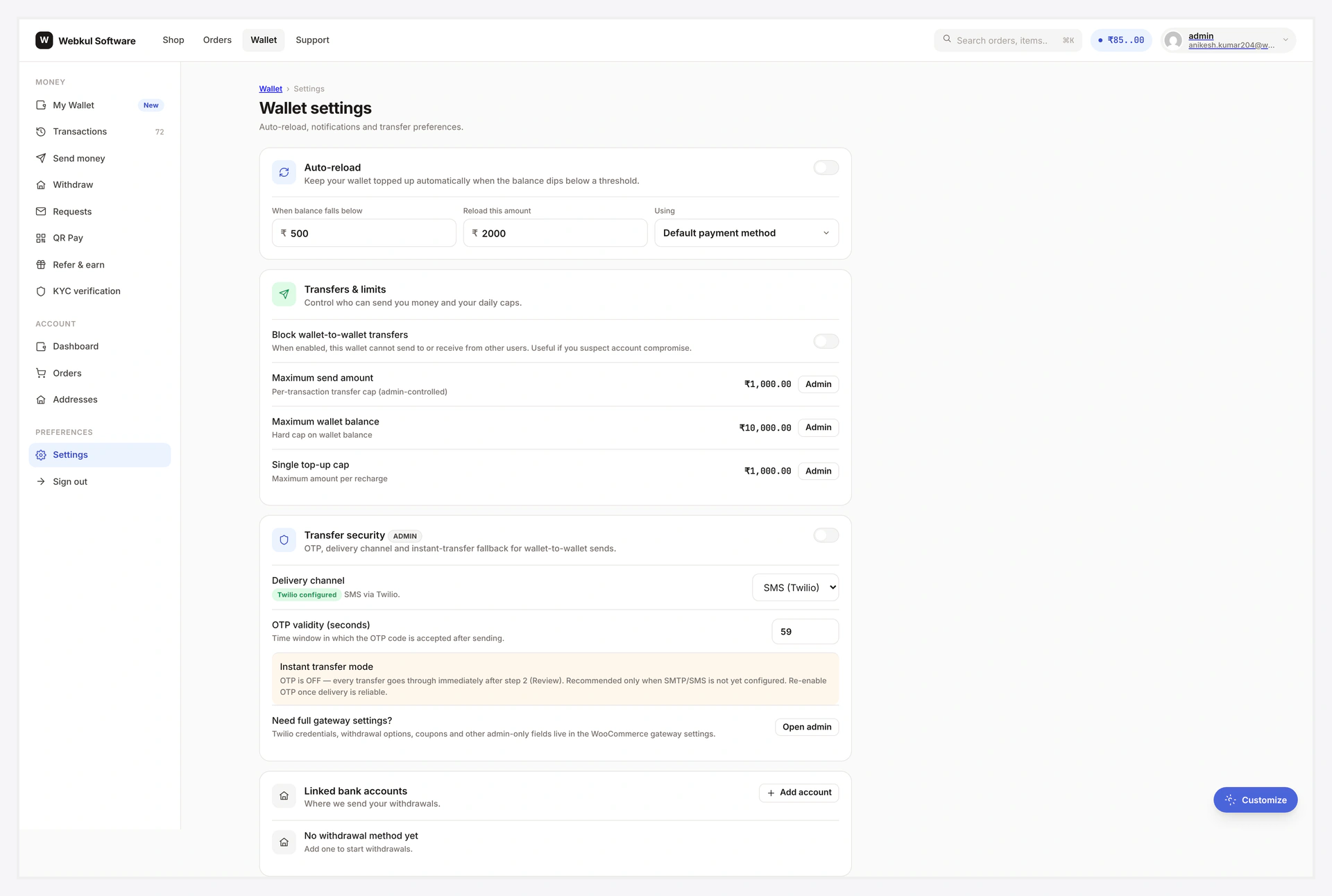
Auto-Reload
Topup the wallet automatically when balance drops below a threshold.
| Field | What |
|---|---|
| Enable | toggle on/off |
| Threshold | the balance value that triggers a topup |
| Topup amount | how much to add when triggered |
When enabled and balance crosses below threshold:
- Plugin fires the topup
- Uses customer's saved payment method (if any)
- Customer notified via email
Saved payment method needed
Auto-reload needs a saved payment method on the customer profile. Without one, the trigger fires but order creation fails — admin gets an admin notice.
Notifications Section
Per-event opt-in toggles. Customer overrides admin defaults.
| Toggle | What |
|---|---|
| Email on credit | confirmation when wallet credited |
| Email on debit | confirmation when wallet debited |
| Email on low balance | alert when balance crosses threshold |
| SMS on transfer received | SMS when receiving wallet from another customer |
| SMS on withdrawal paid | SMS when payout completes |
| Email on KYC change | every KYC status transition |
Security Section (danger zone)
Single toggle — Disable transfers. When ON:
- Send view shows "Transfers locked" card
- Approve action on incoming requests blocked
- All transfer-class POSTs server-side rejected
Useful for account recovery. Toggle OFF anytime.
Styled red so customer treats it as a destructive change.
Daily Limits (view-only)
Read from admin caps. Each row shows a progress bar — "$X used of $Y today".
Customer can't change these — admin-managed.
Linked Accounts
Status indicators for each payout method. Edit / Add buttons open inline modals or jump to relevant flows.
Admin Link
Only visible when current user has the WC admin capability. Single link → opens WP admin settings in a new tab.
Common Scenarios
Customer wants fewer emails
Turn off the toggles they don't care about. Plugin respects per-customer preferences over admin defaults.
Customer suspects account compromise
Toggle "Disable transfers" → ON immediately. Re-enable after fixing the underlying issue.
Customer hits daily transfer cap
Limits view shows the progress bar — they can see how much they've used.
Auto-reload doesn't trigger
Confirm they have a saved payment method on file. Without one, auto-reload can't actually charge.
When Something Goes Wrong
| Problem | Fix |
|---|---|
| Toggle resets on reload | Browser network tab will show 4xx — likely nonce expired (re-open page) |
| 400 invalid_value | Numeric input outside admin caps; lower it |
| "Open admin settings" never visible | Current user lacks WC admin capability |
For developers — hooks + custom toggles
Hooks
| Hook | Type | When |
|---|---|---|
wkwp_central_settings_sections | filter | mutate section list |
wkwp_central_settings_save_keys | filter | extend allowlist |
wkwp_central_settings_save_validate | filter | per-key validation override |
wkwp_central_settings_saved | action | after save |
Add a custom toggle
add_filter( 'wkwp_central_settings_save_keys', function( $keys ) {
    $keys[] = '_wkwp_notify_marketing_email';
    return $keys;
} );

add_filter( 'wkwp_central_settings_sections', function( $sections ) {
    $sections['marketing'] = [
        'title' => __( 'Marketing', 'mytheme' ),
        'rows'  => [
            [
                'type'  => 'toggle',
                'meta'  => '_wkwp_notify_marketing_email',
                'label' => __( 'Email me about wallet promos', 'mytheme' ),
            ],
        ],
    ];
    return $sections;
} );
Allowlist
The settings AJAX validates every key against a server-side allowlist. Unknown keys → 400 invalid_key. Stops customers from writing arbitrary user meta.
Related
- Send Money (uses transfer-locked toggle)
- Email Notifications
- SMS Notifications
- Admin Controls
- Security