
Tweaks & Responsive
Customer-side personalisation panel + how the layout adapts to different screen sizes.
The wallet-central shell is designed around the persistent left sidebar; tweaks override the hero look + accent + density:
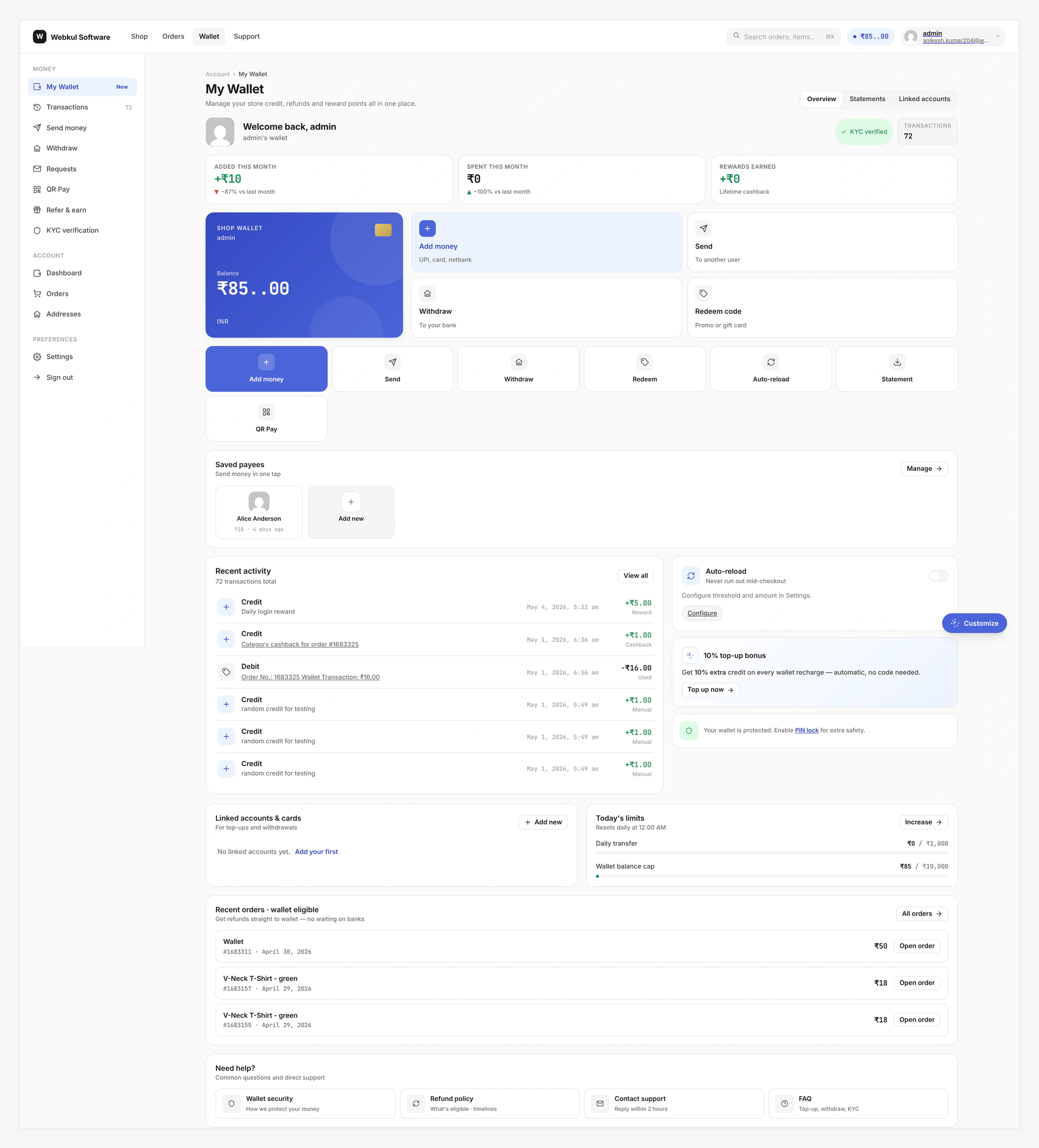
Tweaks Panel
Floating gear icon (bottom-right on desktop, top-right on mobile). Click → slides open.
┌───────────────────────────┐
│  ⚙  Tweaks                │
├───────────────────────────┤
│  Hero variant             │
│  ◯ A · Big number         │
│  ● B · Credit card        │
│  ◯ C · Wide bar           │
├───────────────────────────┤
│  Accent                   │
│  [violet][teal][rose]    │
│  [orange][slate][custom]  │
├───────────────────────────┤
│  Density                  │
│  ◯ Compact ● Cozy ◯ Comfy│
├───────────────────────────┤
│  [ Reset to defaults ]    │
└───────────────────────────┘
All preferences saved in browser localStorage (per-browser, per-customer). No server roundtrip.
Hero Variants
| Variant | Look |
|---|---|
| A · Big number | Centred huge balance + hide / show toggle, no decoration |
| B · Credit card (default) | Brand strip + masked wallet ID + balance + currency chip |
| C · Wide bar | Single-row strip, densest |
Default for new customers configurable in admin.
Accent Picker
Six swatches + custom hex picker. Cascades to action grid hover, CTA buttons, active sidebar item, status pills.
| Swatch | Hex |
|---|---|
| Violet (default) | #6f3fff |
| Teal | #14b8a6 |
| Rose | #f43f5e |
| Orange | #f97316 |
| Slate | #475569 |
| Custom | user-typed hex |
Density Toggle
| Mode | Padding scale |
|---|---|
| Compact | × 0.75 (densest) |
| Cozy (default) | × 1.0 |
| Comfortable | × 1.25 (roomiest) |
Reset to Defaults
Clears all Tweaks → next paint reverts to admin defaults. No reload.
Disable Tweaks Panel
Some stores don't want customer-side branding overrides. Disable globally:
Wallet → Settings → Wallet Central → Tweaks panel → OFF.
Or filter wkwp_central_tweaks_enable → false in code.
Responsive Breakpoints
| Viewport | Layout |
|---|---|
| ≥ 1440px (desktop wide) | Sidebar 240px + content max 1440px + right rail 320px |
| 1024–1439px | Sidebar collapses to icon rail (60px) + right rail folds below |
| 768–1023px (tablet) | Sidebar hidden, mobile menu hamburger top-bar visible, right rail folds below |
| 481–767px (mobile) | Single column, action grid 1 col, OTP cells 40px |
| ≤ 480px (small mobile) | Compressed paddings, share buttons stack, KPI strip 2-col grid |
Sidebar Behaviour
| Viewport | Mode |
|---|---|
| ≥ 1440 | Always visible, labelled |
| 1024–1439 | Icon rail (hover expands tooltip) |
| ≤ 1023 | Hidden, hamburger toggle |
OTP Cells
The 6-cell OTP entry shrinks at smaller viewports:
| Viewport | Cell size | Gap |
|---|---|---|
| ≥ 768 | 56×56 | 12 |
| 481–767 | 48×48 | 8 |
| ≤ 480 | 40×40 | 6 |
Tab Strip (mobile)
On mobile, sidebar's view links collapse into a horizontal scrolling tab strip. Active tab highlighted with accent. Swipe gestures supported.
Add ?print=1 to any view → strips chrome → only the content prints. Browser "Save as PDF" works the same way.
Dark Mode
Global toggle in the topbar. Uses OS preference as initial guess; localStorage override.
| Theme | Trigger |
|---|---|
| Light | default if OS prefers-color-scheme: light |
| Dark | default if OS prefers-color-scheme: dark |
| System | follows OS |
RTL
<html dir="rtl"> triggers RTL CSS rules — sidebar moves right, action grid mirrors, share buttons reorder. Tested with WPML + Polylang RTL languages.
Common Scenarios
Customer wants the densest layout
Tweaks → Hero variant A, Density Compact. Saves locally.
Brand-match the accent
Pick a swatch or type your brand hex. Cascades across the UI for that customer.
Force everyone to use default layout
Disable the Tweaks panel globally. Customers stuck with admin defaults.
When Something Goes Wrong
| Problem | Fix |
|---|---|
| Tweaks not persisting | localStorage blocked (private browsing); use a regular window |
| Sidebar collapses too early | Theme viewport meta missing |
| Dark mode doesn't apply | OS preference change without page reload — toggle theme manually |
| RTL layout broken | Theme overriding [dir="rtl"] rules; check specificity |
For developers — hooks + CSS variables
Hooks
| Hook | Type | When |
|---|---|---|
wkwp_central_tweaks_enable | filter | hide / show panel |
wkwp_central_tweaks_default_variant | filter | per-user default hero variant |
wkwp_central_tweaks_default_accent | filter | per-user default accent |
wkwp_central_tweaks_default_density | filter | per-user default density |
CSS variables
.wcc-root[data-density="compact"] {
  --wcc-pad-card: 12px;
  --wcc-gap:      8px;
}
.wcc-root[data-density="cozy"] {
  --wcc-pad-card: 20px;
  --wcc-gap:      14px;
}
.wcc-root[data-density="comfy"] {
  --wcc-pad-card: 28px;
  --wcc-gap:      20px;
}