
Bulk Credit / Debit
Mass-update many wallets at once. Two entry points: manual select for a few customers, CSV upload for hundreds or thousands.
What It Does
| For | Means |
|---|---|
| Admin | "Q4 bonus for 5000 customers" goes from spreadsheet to wallet credits in a few clicks. Audit trail per row |
| Customer | Their wallet gets credited (or debited). Standard credit / debit email fires unless you suppress for the batch |
Where It Lives
Wallet → Bulk Credit / Debit.
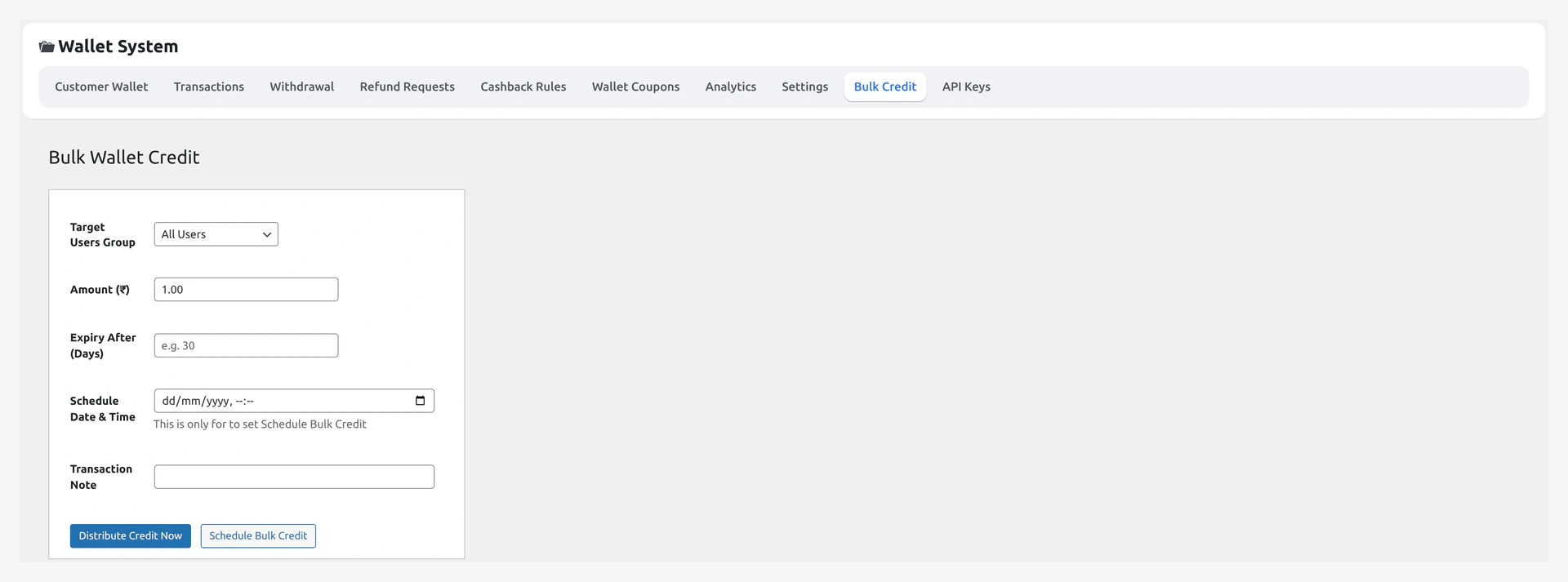
Manual Mode
Best for 1-100 customers.
| Field | What |
|---|---|
| Customers | search-and-select multiselect (email or username) |
| Operation | Credit / Debit |
| Amount | per-customer amount (uniform) |
| Note | shown in customer's activity feed |
| Reference tag | optional audit identifier |
Submit → each selected user gets one queued row. Background worker processes them in seconds.
CSV Mode
Best for 100+ customers.
CSV Format
email,amount,note,type
[email protected],500,New year bonus,credit
[email protected],250,New year bonus,credit
[email protected],100,Refund correction,debit
| Column | Required | Notes |
|---|---|---|
email | yes | matches WC customer's email (case-insensitive) |
amount | yes | positive number (sign comes from type) |
note | no | shown in the customer's activity |
type | no | credit (default) or debit |
reference | no | custom audit tag, e.g. Q4_BONUS_2026 |
currency | no | only honoured in multi-currency mode |
Upload Flow
- Drop CSV onto the upload area
- Plugin validates rows — invalid rows shown inline with reason (
unknown email,bad amount, etc.) - Click Confirm queue (N rows)
- Status panel appears, polls every 5 sec
Live Status
| Counter | Meaning |
|---|---|
| Pending | not yet processed |
| Processing | worker actively running |
| Done | completed successfully |
| Failed | errored — click to expand reason |
Suppress Per-Row Emails
For large batches you usually don't want 5000 individual emails firing.
Wallet → Settings → Notifications → Bulk operation suppress emails → ON.
Customer-side notifications resume after the batch completes. Send a single newsletter explaining the bonus instead.
Audit Trail
Every row writes one ledger entry tagged with:
- The batch ID
- Your admin reference (if you set one)
- The CSV note
Filter Wallet → Transactions by reference LIKE bulk% to audit any specific batch.
Idempotency
Re-uploading the same CSV after a partial failure won't double-credit. Rows already done are skipped via a per-row dedupe key.
Limits
| Limit | Default |
|---|---|
| Max rows per CSV | 10,000 |
| Max CSV size | 5 MB |
| Worker tick batch | 50 rows |
| Worker frequency | every 5 min |
For million-row migrations, hook into the worker batch-size filter or run via WP-CLI directly.
Common Scenarios
Q4 bonus to all VIP customers
Export VIP customer emails from your CRM as CSV → reformat to the email,amount,note,type shape → upload. All bonus credits land in seconds.
Migrate balances from another wallet plugin
Export old wallet balances → reformat → upload as credit rows with note Migration from <old plugin>. Done.
Apologise for an outage with $50 credit
Manual mode → select all affected customers → amount 50 → note Apology credit, outage of XX. Batch fires.
Correct a stuck balance for one customer
Don't use bulk for a single customer — open that user's profile → Wallet card → Credit / Debit field. One-click.
When Something Goes Wrong
| Problem | Fix |
|---|---|
Rows stuck on pending | Cron not firing — verify with wp cron event list; or hit "Process now" |
bad amount errors | Negative or non-numeric value — fix CSV |
| Customers spammed with emails | Toggle "Bulk suppress emails" ON before the next run |
| Performance: site slows during batch | Reduce worker batch size; raise the worker frequency |
For developers — hooks + WP-CLI
Hooks
| Hook | Type | When |
|---|---|---|
wkwp_wallet_bulk_queue_added | action | rows enqueued |
wkwp_wallet_bulk_row_processed | action | per-row success |
wkwp_wallet_bulk_row_failed | action | per-row failure |
wkwp_wallet_bulk_batch_size | filter | how many rows per tick |
wkwp_wallet_bulk_csv_validate_row | filter | extra per-row validation |
WP-CLI for million-row migrations
The plugin doesn't ship a first-class CLI command. Bypass the queue and call WKWP_Wallet_Core::credit() directly in chunks via your own script:
$wpdb = $GLOBALS['wpdb'];
$rows = $wpdb->get_results( "SELECT user_id, amount FROM legacy_wallet WHERE migrated = 0 LIMIT 1000" );
foreach ( $rows as $r ) {
    WKWP_Wallet_Core::credit( $r->user_id, $r->amount, [
        'reference' => 'migration:legacy',
        'note'      => 'Migrated from legacy wallet plugin',
    ] );
    $wpdb->update( 'legacy_wallet', [ 'migrated' => 1 ], [ 'user_id' => $r->user_id ] );
}