Wallet SystemWallet System
Buy Now
View Demo
  • Getting Started

    • Introduction
    • Quick Start
    • Features
    • Installation
    • First-Time Setup
    • Admin Tour
  • Wallet Core

    • Core Wallet
    • Wallet Payment Gateway
    • Recharge / Top-up
    • Wallet Transfer
    • My Wallet Page
    • Shortcodes
  • Earn & Reward

    • Cashback Engine
    • Referral Program
    • Multilevel Referral
    • Daily Login Reward
    • Invite Friends
    • Deposit / Top-up Bonus
  • Spend & Payout

    • Checkout Discount
    • Checkout Restriction
    • Withdrawal
    • PayPal Payout
    • Stripe Payout
    • Refund to Wallet
    • Buy Now Pay Later
  • Identity & Mobile

    • KYC
    • QR Code Payments
  • Wallet Central

    • Overview
    • Endpoint & Routing
    • CTA Discovery
    • Home Dashboard
    • Add Funds
    • Withdraw
    • Withdrawals List
    • Send Money
    • QR Pay
    • Payment Requests
    • Refer & Earn
    • Transactions
    • Settings
    • KYC Flow
    • Architecture
    • Tweaks & Responsive
    • Security
    • Admin Controls
  • Admin Tools

    • Admin Settings (index)
    • Bulk Credit / Debit
    • Analytics Dashboard
  • Settings Tabs

    • General
    • Recharge
    • Checkout
    • Withdrawal
    • Payout (PayPal/Stripe)
    • KYC
    • Cashback
    • Referral
    • Multilevel
    • BNPL
    • QR Pay
    • Notifications
    • Wallet Central
    • Integrations
    • API Keys
  • Notifications

    • Email Notifications
    • SMS Notifications
  • Developer

    • REST API
    • Filters & Hooks
  • Help

    • Troubleshooting
    • FAQ
    • Glossary
Support
Buy Now
View Demo
  • Getting Started

    • Introduction
    • Quick Start
    • Features
    • Installation
    • First-Time Setup
    • Admin Tour
  • Wallet Core

    • Core Wallet
    • Wallet Payment Gateway
    • Recharge / Top-up
    • Wallet Transfer
    • My Wallet Page
    • Shortcodes
  • Earn & Reward

    • Cashback Engine
    • Referral Program
    • Multilevel Referral
    • Daily Login Reward
    • Invite Friends
    • Deposit / Top-up Bonus
  • Spend & Payout

    • Checkout Discount
    • Checkout Restriction
    • Withdrawal
    • PayPal Payout
    • Stripe Payout
    • Refund to Wallet
    • Buy Now Pay Later
  • Identity & Mobile

    • KYC
    • QR Code Payments
  • Wallet Central

    • Overview
    • Endpoint & Routing
    • CTA Discovery
    • Home Dashboard
    • Add Funds
    • Withdraw
    • Withdrawals List
    • Send Money
    • QR Pay
    • Payment Requests
    • Refer & Earn
    • Transactions
    • Settings
    • KYC Flow
    • Architecture
    • Tweaks & Responsive
    • Security
    • Admin Controls
  • Admin Tools

    • Admin Settings (index)
    • Bulk Credit / Debit
    • Analytics Dashboard
  • Settings Tabs

    • General
    • Recharge
    • Checkout
    • Withdrawal
    • Payout (PayPal/Stripe)
    • KYC
    • Cashback
    • Referral
    • Multilevel
    • BNPL
    • QR Pay
    • Notifications
    • Wallet Central
    • Integrations
    • API Keys
  • Notifications

    • Email Notifications
    • SMS Notifications
  • Developer

    • REST API
    • Filters & Hooks
  • Help

    • Troubleshooting
    • FAQ
    • Glossary
Support
  • Getting Started

    • Introduction
    • Quick Start — Wallet Live in 5 Minutes
    • Features
    • Installation
    • First-Time Setup
    • Admin Tour
  • Wallet Core

    • Core Wallet
    • Wallet Payment Gateway
    • Recharge / Top-up
    • Wallet Transfer
    • My Wallet Page
    • Shortcodes
  • Earn & Reward

    • Cashback Engine
    • Referral Program
    • Multilevel Referral
    • Daily Login Reward
    • Invite Friends
    • Deposit / Top-up Bonus
  • Spend & Payout

    • Checkout Discount
    • Checkout Restriction
    • Withdrawal
    • PayPal Payout
    • Stripe Payout
    • Refund to Wallet
    • Buy Now Pay Later (BNPL)
  • Identity & Mobile

    • KYC (Know Your Customer)
    • QR Code Payments
  • Wallet Central

    • Wallet Central Overview
    • Endpoint & Routing
    • CTA Discovery
    • Home Dashboard
    • Add Funds
    • Withdraw
    • Withdrawals List + Detail
    • Send Money
    • QR Pay
    • Payment Requests
    • Refer & Earn
    • Transactions
    • Settings (customer)
    • KYC Flow
    • Architecture
    • Tweaks & Responsive
    • Security
    • Admin Controls
  • Admin Tools

    • Admin Settings
    • Bulk Credit / Debit
    • Analytics Dashboard
  • Settings Tabs

    • General Settings
    • Recharge Settings
    • Checkout Settings
    • Withdrawal Settings
    • Payout Settings (PayPal + Stripe)
    • KYC Settings
    • Cashback Settings
    • Referral Settings
    • Multilevel Settings
    • BNPL Settings
    • QR Pay Settings
    • Notifications Settings
    • Wallet Central Settings
    • Third-Party Integrations
    • API Keys
  • Notifications

    • Email Notifications
    • SMS Notifications
  • Developer

    • REST API
    • Filters & Hooks
  • Help

    • Troubleshooting
    • FAQ
    • Glossary

Refund to Wallet

Two flows. Both end in money landing back in the customer's wallet.

Setting up?

The customer-side request queue settings live on Wallet → Settings → Refund Requests — see the Admin Settings index. Wallet gateway "Refund back to wallet" toggle lives under Checkout Settings.

What It Does

ForMeans
CustomerRefunds arrive instantly as wallet credit instead of waiting on bank reversal. Or proactively request a refund-to-credit
AdminKeep the cash in-store. Customers spend the credit on the next order

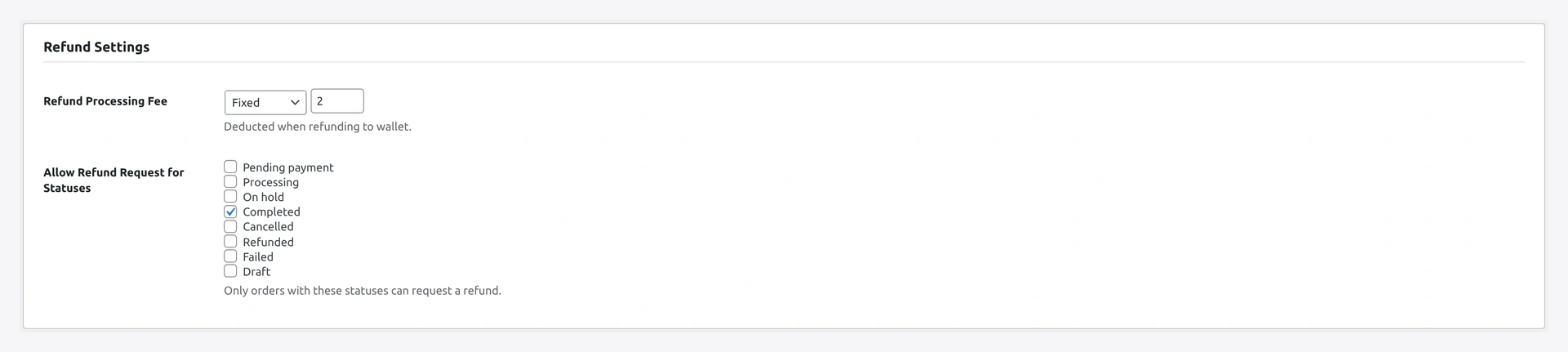
Refund Settings admin section — global toggle, default reason list, auto-credit

Two Modes

A. Admin-direct refund

Admin issues a WC refund on a wallet-paid order → wallet credited automatically.

Behaviour controlled by the wallet gateway's "Refund back to wallet" toggle:

  • ON (default) → wallet credited the refund amount when method was wallet
  • OFF → refund goes back to the original method (card, PayPal, etc.)

Override per-order on the order edit screen → side meta-box → "Force refund to wallet".

B. Customer-requested refund

Works on any order (wallet-paid or otherwise). Customer asks; admin approves or rejects.

How Customers See It (mode B)

  1. My Account → Orders → click an eligible order
  2. Request refund to wallet button
  3. Type amount + reason + optional note
  4. Submit → status pending

Admins review pending requests in Wallet → Refund Requests:
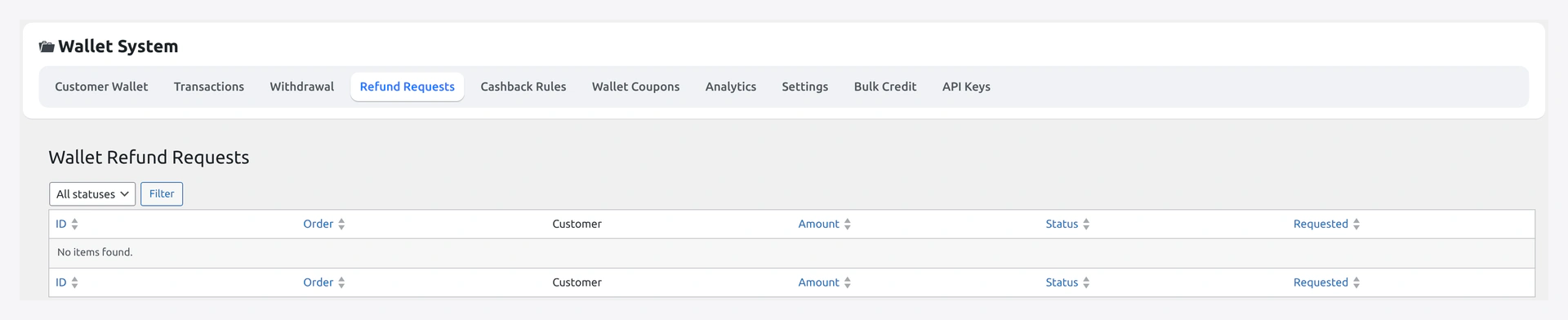
Refund Requests queue — pending customer-submitted refund requests with Approve / Reject

Refund credits show up in the customer's activity feed alongside everything else:
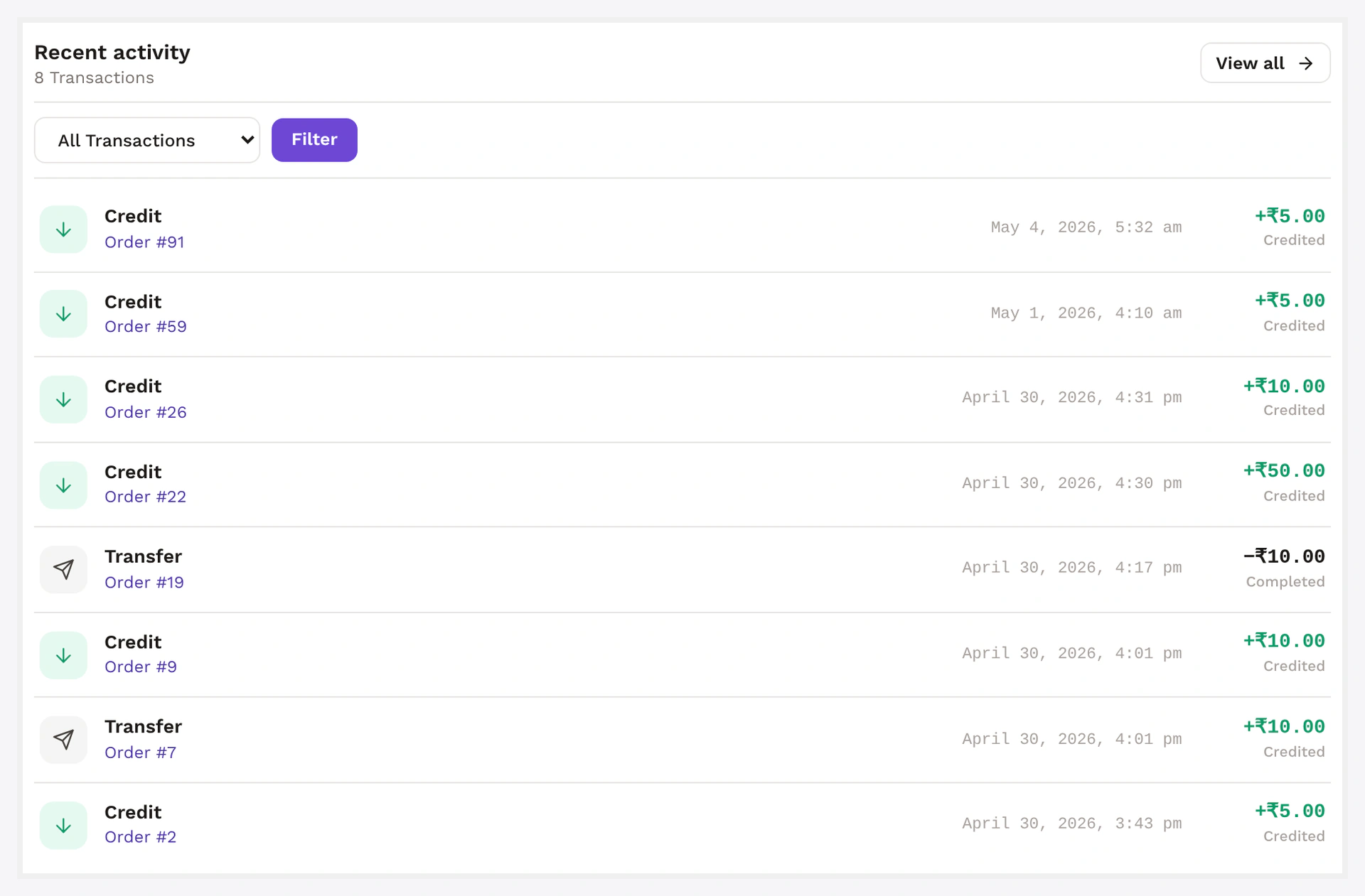
Recent activity card — refund rows iconised, dated, balance-after recorded

Eligible only when:

  • Order is in completed status
  • Within your refund window (default 14 days)
  • Not already refunded
  • Customer's KYC is approved (if you've gated it)

Admin Review (mode B)

Wallet → Refund Requests lists all rows.

Each pending row has a side drawer with:

  • Order details (line items, total, payment method)
  • Requested amount + reason + note
  • Customer wallet balance preview after credit

Approve flow:

  1. Admin confirms the amount (can edit downward — partial refund)
  2. Optional: tick "also create WC refund (origin payment method)" — splits the refund: half to original card, half to wallet
  3. Click Approve
  4. Wallet credited
  5. Customer email fires

Reject flow:

  1. Admin enters required note (shown to customer)
  2. Status flips to rejected
  3. Customer email fires

Setup

Wallet → Settings → Refund Requests

SettingDefaultWhat it does
EnableOFFglobal toggle
Refund window (days)14how long after order completion request is allowed
Max requests per order1usually one is enough
Reason requiredOFFforce customer to pick from damaged / wrong_item / not_as_described / other
Eligible statusescompletedonly completed orders allow a request

Status Pills

StatusMeaning
pendingsubmitted, awaiting admin
approvedwallet credited
rejectedadmin declined; admin note shown to customer

Common Scenarios

Customer's order arrived damaged

Customer submits a refund request from My Account with reason damaged. Admin approves; wallet credited; customer spends on a replacement.

Refund original card AND give credit (partial)

When approving the request, tick "also create WC refund". Plugin issues a partial WC refund + a partial wallet credit. Use for goodwill compensation.

Block customers from requesting refunds

Toggle "Enable" → OFF. Existing flow (admin-direct refund-to-wallet on wallet-paid orders) still works.

RMA Pro / Smart Refunder integration

When WooCommerce RMA Pro is detected, the bridge auto-routes RMA-approved refunds through wallet credit when the original payment was wallet. Toggle the bridge under Integrations Settings.

Cashback / Bonus Reversal

Approving a refund request does not automatically reverse cashback or top-up bonus from the original order. To do that, also issue a "Refund order" in WC admin — that's the trigger for cashback reversal logic.

If you want refund-request approval to also reverse cashback, see the dev section below for a 4-line hook.

When Something Goes Wrong

ProblemFix
Request button not visibleOrder status not eligible; outside refund window; KYC gate active
Wallet not credited on approveAmount was zero or negative — should not happen via UI; check for custom filters
Customer sees no emailWC mailer down; check WC → Status → Logs → emails
Cashback not reversed on approveExpected — see note above; hook into the action to bridge
For developers — hooks + cashback bridge

Hooks

HookTypeWhen
wkwp_refund_request_eligiblefiltergate visibility of the customer-side button
wkwp_refund_request_submittedactionnew request row written
wkwp_refund_request_approvedactionwallet credited
wkwp_refund_request_rejectedactionrejection email about to fire
wkwp_refund_to_wallet_amountfiltermutate amount on admin direct refund

Bridge approval into cashback reversal

add_action( 'wkwp_refund_request_approved', function( $request_id, $order_id ) {
    do_action( 'woocommerce_order_partially_refunded', $order_id, 0 );
} );

Triggers the standard WC refund hook — cashback engine reverses proportional credit.

Audit

Approved request writes one ledger row tagged refund_request:#<id>.

Related

  • Wallet Payment Gateway
  • Core Wallet
  • KYC
Prev
Stripe Payout
Next
Buy Now Pay Later (BNPL)