
Wallet SystemWallet System
Buy Now
View Demo
  • Getting Started

    • Introduction
    • Quick Start
    • Features
    • Installation
    • First-Time Setup
    • Admin Tour
  • Wallet Core

    • Core Wallet
    • Wallet Payment Gateway
    • Recharge / Top-up
    • Wallet Transfer
    • My Wallet Page
    • Shortcodes
  • Earn & Reward

    • Cashback Engine
    • Referral Program
    • Multilevel Referral
    • Daily Login Reward
    • Invite Friends
    • Deposit / Top-up Bonus
  • Spend & Payout

    • Checkout Discount
    • Checkout Restriction
    • Withdrawal
    • PayPal Payout
    • Stripe Payout
    • Refund to Wallet
    • Buy Now Pay Later
  • Identity & Mobile

    • KYC
    • QR Code Payments
  • Wallet Central

    • Overview
    • Endpoint & Routing
    • CTA Discovery
    • Home Dashboard
    • Add Funds
    • Withdraw
    • Withdrawals List
    • Send Money
    • QR Pay
    • Payment Requests
    • Refer & Earn
    • Transactions
    • Settings
    • KYC Flow
    • Architecture
    • Tweaks & Responsive
    • Security
    • Admin Controls
  • Admin Tools

    • Admin Settings (index)
    • Bulk Credit / Debit
    • Analytics Dashboard
  • Settings Tabs

    • General
    • Recharge
    • Checkout
    • Withdrawal
    • Payout (PayPal/Stripe)
    • KYC
    • Cashback
    • Referral
    • Multilevel
    • BNPL
    • QR Pay
    • Notifications
    • Wallet Central
    • Integrations
    • API Keys
  • Notifications

    • Email Notifications
    • SMS Notifications
  • Developer

    • REST API
    • Filters & Hooks
  • Help

    • Troubleshooting
    • FAQ
    • Glossary
Support
Buy Now
View Demo
  • Getting Started

    • Introduction
    • Quick Start
    • Features
    • Installation
    • First-Time Setup
    • Admin Tour
  • Wallet Core

    • Core Wallet
    • Wallet Payment Gateway
    • Recharge / Top-up
    • Wallet Transfer
    • My Wallet Page
    • Shortcodes
  • Earn & Reward

    • Cashback Engine
    • Referral Program
    • Multilevel Referral
    • Daily Login Reward
    • Invite Friends
    • Deposit / Top-up Bonus
  • Spend & Payout

    • Checkout Discount
    • Checkout Restriction
    • Withdrawal
    • PayPal Payout
    • Stripe Payout
    • Refund to Wallet
    • Buy Now Pay Later
  • Identity & Mobile

    • KYC
    • QR Code Payments
  • Wallet Central

    • Overview
    • Endpoint & Routing
    • CTA Discovery
    • Home Dashboard
    • Add Funds
    • Withdraw
    • Withdrawals List
    • Send Money
    • QR Pay
    • Payment Requests
    • Refer & Earn
    • Transactions
    • Settings
    • KYC Flow
    • Architecture
    • Tweaks & Responsive
    • Security
    • Admin Controls
  • Admin Tools

    • Admin Settings (index)
    • Bulk Credit / Debit
    • Analytics Dashboard
  • Settings Tabs

    • General
    • Recharge
    • Checkout
    • Withdrawal
    • Payout (PayPal/Stripe)
    • KYC
    • Cashback
    • Referral
    • Multilevel
    • BNPL
    • QR Pay
    • Notifications
    • Wallet Central
    • Integrations
    • API Keys
  • Notifications

    • Email Notifications
    • SMS Notifications
  • Developer

    • REST API
    • Filters & Hooks
  • Help

    • Troubleshooting
    • FAQ
    • Glossary
Support
  • Getting Started

    • Introduction
    • Quick Start — Wallet Live in 5 Minutes
    • Features
    • Installation
    • First-Time Setup
    • Admin Tour
  • Wallet Core

    • Core Wallet
    • Wallet Payment Gateway
    • Recharge / Top-up
    • Wallet Transfer
    • My Wallet Page
    • Shortcodes
  • Earn & Reward

    • Cashback Engine
    • Referral Program
    • Multilevel Referral
    • Daily Login Reward
    • Invite Friends
    • Deposit / Top-up Bonus
  • Spend & Payout

    • Checkout Discount
    • Checkout Restriction
    • Withdrawal
    • PayPal Payout
    • Stripe Payout
    • Refund to Wallet
    • Buy Now Pay Later (BNPL)
  • Identity & Mobile

    • KYC (Know Your Customer)
    • QR Code Payments
  • Wallet Central

    • Wallet Central Overview
    • Endpoint & Routing
    • CTA Discovery
    • Home Dashboard
    • Add Funds
    • Withdraw
    • Withdrawals List + Detail
    • Send Money
    • QR Pay
    • Payment Requests
    • Refer & Earn
    • Transactions
    • Settings (customer)
    • KYC Flow
    • Architecture
    • Tweaks & Responsive
    • Security
    • Admin Controls
  • Admin Tools

    • Admin Settings
    • Bulk Credit / Debit
    • Analytics Dashboard
  • Settings Tabs

    • General Settings
    • Recharge Settings
    • Checkout Settings
    • Withdrawal Settings
    • Payout Settings (PayPal + Stripe)
    • KYC Settings
    • Cashback Settings
    • Referral Settings
    • Multilevel Settings
    • BNPL Settings
    • QR Pay Settings
    • Notifications Settings
    • Wallet Central Settings
    • Third-Party Integrations
    • API Keys
  • Notifications

    • Email Notifications
    • SMS Notifications
  • Developer

    • REST API
    • Filters & Hooks
  • Help

    • Troubleshooting
    • FAQ
    • Glossary

Add Funds

The full top-up form at /wallet-central/add-to-wallet/. Customers add money to their wallet here.

What Customers See

┌──────────────────────────────────┐
│  H1: Add to wallet               │
│  Sub: Pick an amount or type     │
├──────────────────────────────────┤
│  Quick top-up chips (3×2)        │
│  ₹100  ₹500  ₹1000               │
│  ₹2500 ₹5000 ₹10000              │
├──────────────────────────────────┤
│  Custom amount  [   ₹___  ]      │
│  You'll pay     ₹X.XX            │
│  Bonus banner   "+5% extra"      │
├──────────────────────────────────┤
│  [ Add to Wallet ] (violet CTA)  │
└──────────────────────────────────┘
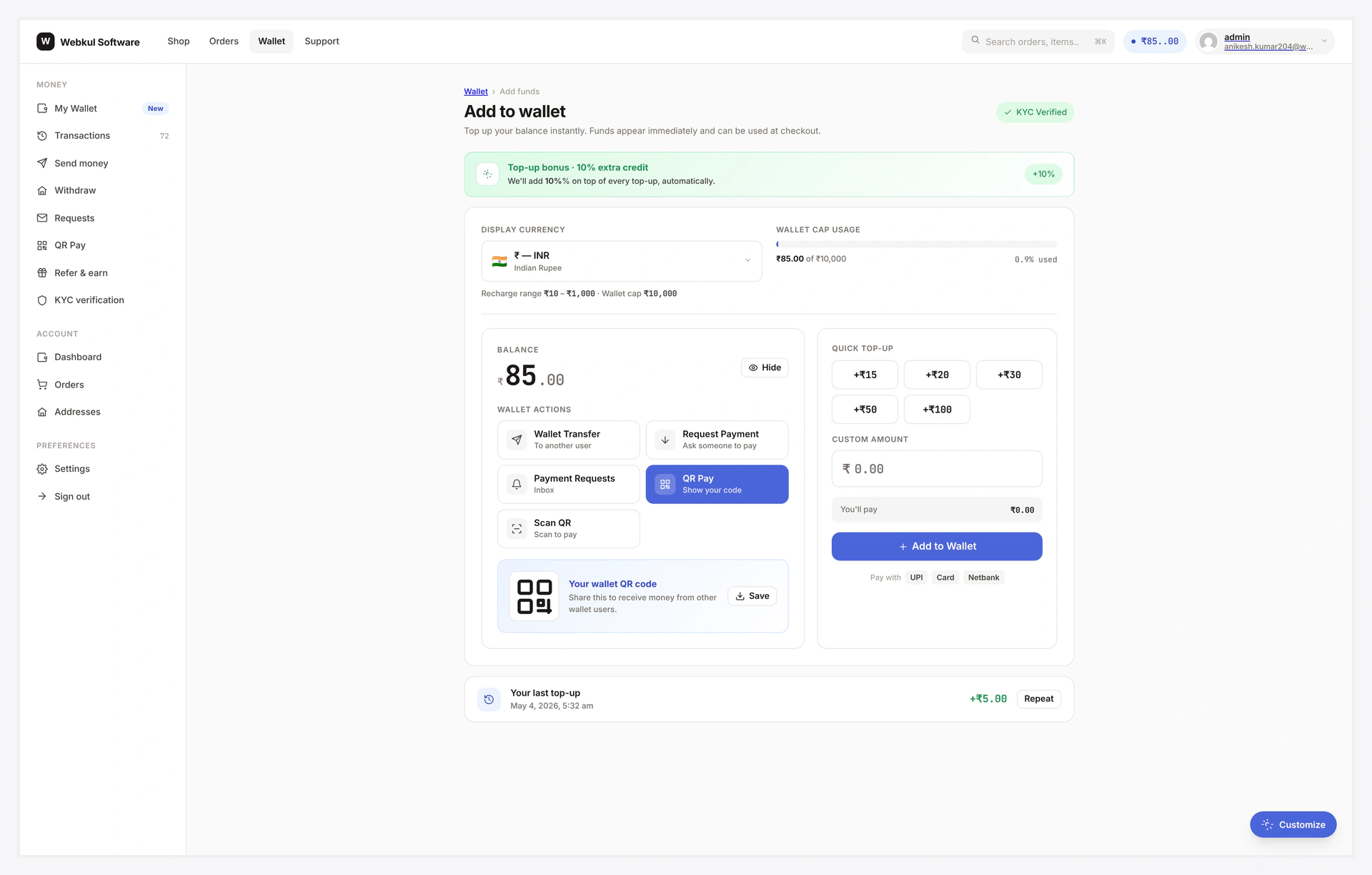
Add Funds — full layout at /wallet-central/add-to-wallet/

How It Works

  1. Pick a chip OR type a custom amount
  2. The "You'll pay" line updates instantly
  3. If a bonus is on, the green offer banner shows the live preview ("Pay ₹1000 and get ₹1050")
  4. Click Add to Wallet → redirected to standard WC checkout
  5. Pay normally with any payment gateway
  6. Order completes → wallet credited (with bonus if enabled)

Same engine as legacy

This form uses the same WooCommerce add-to-cart flow as the legacy My Wallet recharge — same business logic, different UI.
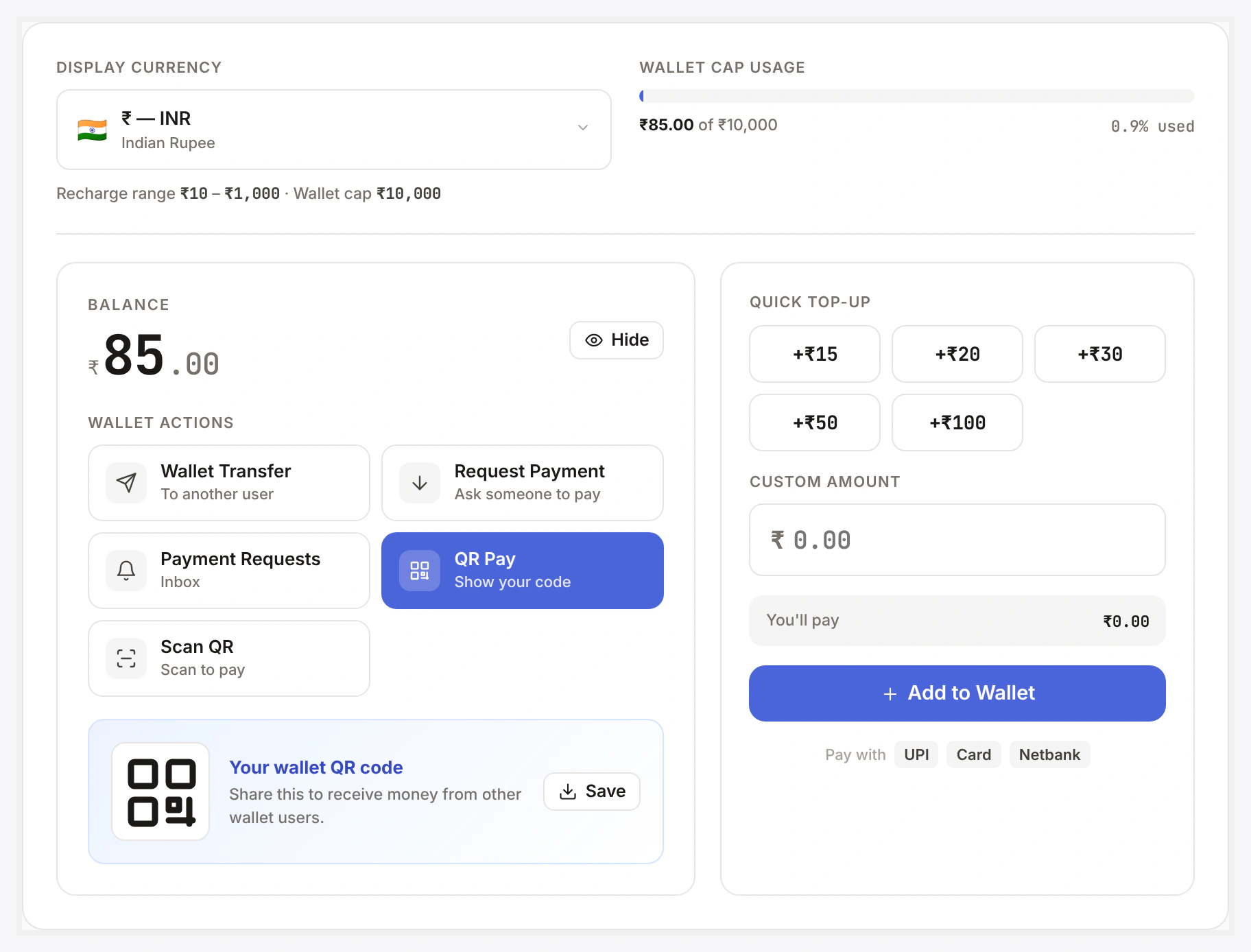
Add Funds form card — preset chips, custom amount, You'll-pay row, submit

Quick Chips

Configurable in Wallet → Settings → Recharge → Preset chips. Default 100, 500, 1000, 2500, 5000, 10000.

3×2 grid. Click → fills the custom amount input.

Custom Amount

ValidationSource
MinRecharge settings → Min top-up
MaxRecharge settings → Max per order
NumericRequired (step="0.01")

Below min or above max → JS alert blocks submit.

Bonus Preview

Green banner when bonus is enabled (admin → Recharge → Bonus enable):

💚 Offer: Get 5% Extra Credit on every Top-up! Pay ₹1000 and get ₹1050 in your wallet.

Updates live as the customer types. Hidden when bonus is off. See Deposit / Top-up Bonus.

Embed on a Custom Page

Drop the shortcode anywhere:

[wkwp_central_add_funds presets="50,100,200" min="50" max="500"]
AttributeNotes
presetscomma list of chip amounts
minmin top-up
maxmax per order
allow_customyes (default) or no
bonus_previewyes (default) or no

Common Scenarios

Customer typed ₹50 but min is ₹100

Validation blocks submit with a hint. Customer adjusts.

Customer wants UPI specifically

The Pay-with hint row at the bottom is cosmetic. Actual payment method is chosen at checkout — UPI, card, COD all work. Whatever gateways you have enabled.

Recharge product missing

Plugin shows admin notice "Recharge product missing — recreate via Status Tools". See Recharge / Top-up.

When Something Goes Wrong

ProblemFix
Bonus banner not showingBonus disabled OR amount below "Min top-up to qualify"
Custom amount input rejectedBelow admin min or above max — adjust limits in settings
KYC-locked walletIf KYC wallet_usage is gated, form replaced with "Verify KYC to top up" CTA
For developers — hooks

Hooks

HookTypeWhen
wkwp_central_add_funds_presetsfiltermutate chip list
wkwp_central_add_funds_intro_htmlfilterrewrite intro section
wkwp_central_add_funds_submit_urlfilterswap form action
wkwp_central_add_funds_after_submitactionanalytics hook

Related

  • Recharge / Top-up
  • Deposit / Top-up Bonus
  • Home Dashboard
Prev
Home Dashboard
Next
Withdraw