Wallet SystemWallet System
Buy Now
View Demo
  • Getting Started

    • Introduction
    • Quick Start
    • Features
    • Installation
    • First-Time Setup
    • Admin Tour
  • Wallet Core

    • Core Wallet
    • Wallet Payment Gateway
    • Recharge / Top-up
    • Wallet Transfer
    • My Wallet Page
    • Shortcodes
  • Earn & Reward

    • Cashback Engine
    • Referral Program
    • Multilevel Referral
    • Daily Login Reward
    • Invite Friends
    • Deposit / Top-up Bonus
  • Spend & Payout

    • Checkout Discount
    • Checkout Restriction
    • Withdrawal
    • PayPal Payout
    • Stripe Payout
    • Refund to Wallet
    • Buy Now Pay Later
  • Identity & Mobile

    • KYC
    • QR Code Payments
  • Wallet Central

    • Overview
    • Endpoint & Routing
    • CTA Discovery
    • Home Dashboard
    • Add Funds
    • Withdraw
    • Withdrawals List
    • Send Money
    • QR Pay
    • Payment Requests
    • Refer & Earn
    • Transactions
    • Settings
    • KYC Flow
    • Architecture
    • Tweaks & Responsive
    • Security
    • Admin Controls
  • Admin Tools

    • Admin Settings (index)
    • Bulk Credit / Debit
    • Analytics Dashboard
  • Settings Tabs

    • General
    • Recharge
    • Checkout
    • Withdrawal
    • Payout (PayPal/Stripe)
    • KYC
    • Cashback
    • Referral
    • Multilevel
    • BNPL
    • QR Pay
    • Notifications
    • Wallet Central
    • Integrations
    • API Keys
  • Notifications

    • Email Notifications
    • SMS Notifications
  • Developer

    • REST API
    • Filters & Hooks
  • Help

    • Troubleshooting
    • FAQ
    • Glossary
Support
Buy Now
View Demo
  • Getting Started

    • Introduction
    • Quick Start
    • Features
    • Installation
    • First-Time Setup
    • Admin Tour
  • Wallet Core

    • Core Wallet
    • Wallet Payment Gateway
    • Recharge / Top-up
    • Wallet Transfer
    • My Wallet Page
    • Shortcodes
  • Earn & Reward

    • Cashback Engine
    • Referral Program
    • Multilevel Referral
    • Daily Login Reward
    • Invite Friends
    • Deposit / Top-up Bonus
  • Spend & Payout

    • Checkout Discount
    • Checkout Restriction
    • Withdrawal
    • PayPal Payout
    • Stripe Payout
    • Refund to Wallet
    • Buy Now Pay Later
  • Identity & Mobile

    • KYC
    • QR Code Payments
  • Wallet Central

    • Overview
    • Endpoint & Routing
    • CTA Discovery
    • Home Dashboard
    • Add Funds
    • Withdraw
    • Withdrawals List
    • Send Money
    • QR Pay
    • Payment Requests
    • Refer & Earn
    • Transactions
    • Settings
    • KYC Flow
    • Architecture
    • Tweaks & Responsive
    • Security
    • Admin Controls
  • Admin Tools

    • Admin Settings (index)
    • Bulk Credit / Debit
    • Analytics Dashboard
  • Settings Tabs

    • General
    • Recharge
    • Checkout
    • Withdrawal
    • Payout (PayPal/Stripe)
    • KYC
    • Cashback
    • Referral
    • Multilevel
    • BNPL
    • QR Pay
    • Notifications
    • Wallet Central
    • Integrations
    • API Keys
  • Notifications

    • Email Notifications
    • SMS Notifications
  • Developer

    • REST API
    • Filters & Hooks
  • Help

    • Troubleshooting
    • FAQ
    • Glossary
Support
  • Getting Started

    • Introduction
    • Quick Start — Wallet Live in 5 Minutes
    • Features
    • Installation
    • First-Time Setup
    • Admin Tour
  • Wallet Core

    • Core Wallet
    • Wallet Payment Gateway
    • Recharge / Top-up
    • Wallet Transfer
    • My Wallet Page
    • Shortcodes
  • Earn & Reward

    • Cashback Engine
    • Referral Program
    • Multilevel Referral
    • Daily Login Reward
    • Invite Friends
    • Deposit / Top-up Bonus
  • Spend & Payout

    • Checkout Discount
    • Checkout Restriction
    • Withdrawal
    • PayPal Payout
    • Stripe Payout
    • Refund to Wallet
    • Buy Now Pay Later (BNPL)
  • Identity & Mobile

    • KYC (Know Your Customer)
    • QR Code Payments
  • Wallet Central

    • Wallet Central Overview
    • Endpoint & Routing
    • CTA Discovery
    • Home Dashboard
    • Add Funds
    • Withdraw
    • Withdrawals List + Detail
    • Send Money
    • QR Pay
    • Payment Requests
    • Refer & Earn
    • Transactions
    • Settings (customer)
    • KYC Flow
    • Architecture
    • Tweaks & Responsive
    • Security
    • Admin Controls
  • Admin Tools

    • Admin Settings
    • Bulk Credit / Debit
    • Analytics Dashboard
  • Settings Tabs

    • General Settings
    • Recharge Settings
    • Checkout Settings
    • Withdrawal Settings
    • Payout Settings (PayPal + Stripe)
    • KYC Settings
    • Cashback Settings
    • Referral Settings
    • Multilevel Settings
    • BNPL Settings
    • QR Pay Settings
    • Notifications Settings
    • Wallet Central Settings
    • Third-Party Integrations
    • API Keys
  • Notifications

    • Email Notifications
    • SMS Notifications
  • Developer

    • REST API
    • Filters & Hooks
  • Help

    • Troubleshooting
    • FAQ
    • Glossary

Wallet Transfer

Let registered customers send wallet money to each other. Two-factor verified by OTP — secure by default.

Setting up?

Configure transfer fees, daily caps, and Twilio SMS credentials under Notifications Settings (SMS section). KYC gating under KYC Settings.

What It Does

ForMeans
CustomerSend money to another customer's wallet. OTP confirms the move (SMS + email)
AdminConfigurable fee per transfer. Full audit log of every move. KYC-gateable

How Customers See It

  1. On the My Wallet page → click Send
  2. Pick recipient (autocomplete by email or username)
  3. Type amount + optional note
  4. Submit → OTP sent to email + SMS (if phone on file)
  5. Enter the 6-digit OTP
  6. Done — sender debited, recipient credited, both get confirmation
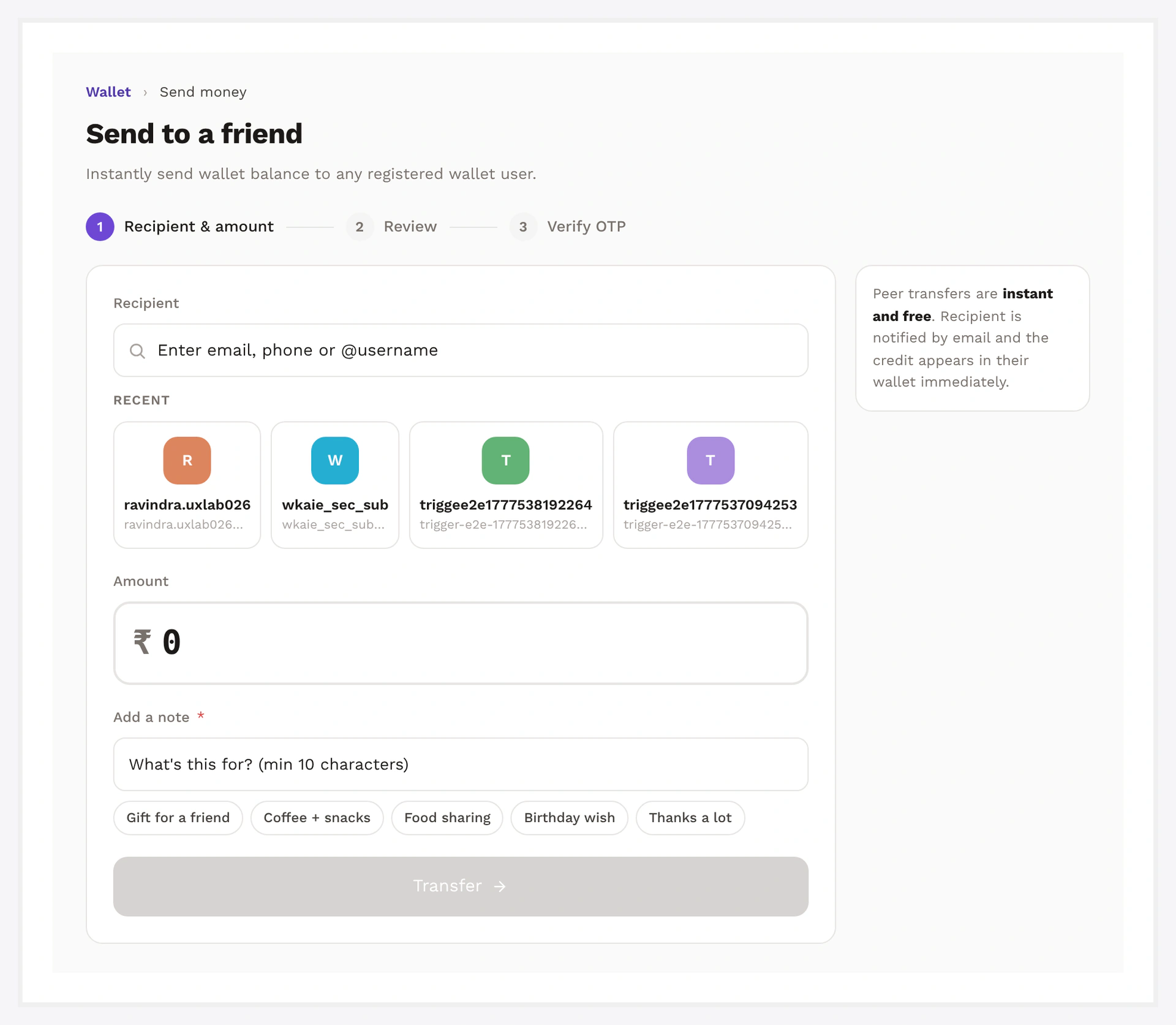
Wallet transfer page — full layout at /my-account/my_wallet/transfer/

Setup

Wallet → Settings → Transfer

SettingDefaultWhat it does
EnableOFFglobal toggle
Min amount1smallest transfer
Max amount per requestemptylargest single transfer
Daily capemptyper-user per-day limit
Fee typenonenone / fixed / percent
Fee amount0value when fee is fixed/percent
Who pays feesenderalways the sender; not configurable

The same Settings tab in admin contains the Transfer Fees section:

Transfer Fees admin section — type, amount, who-pays, daily cap

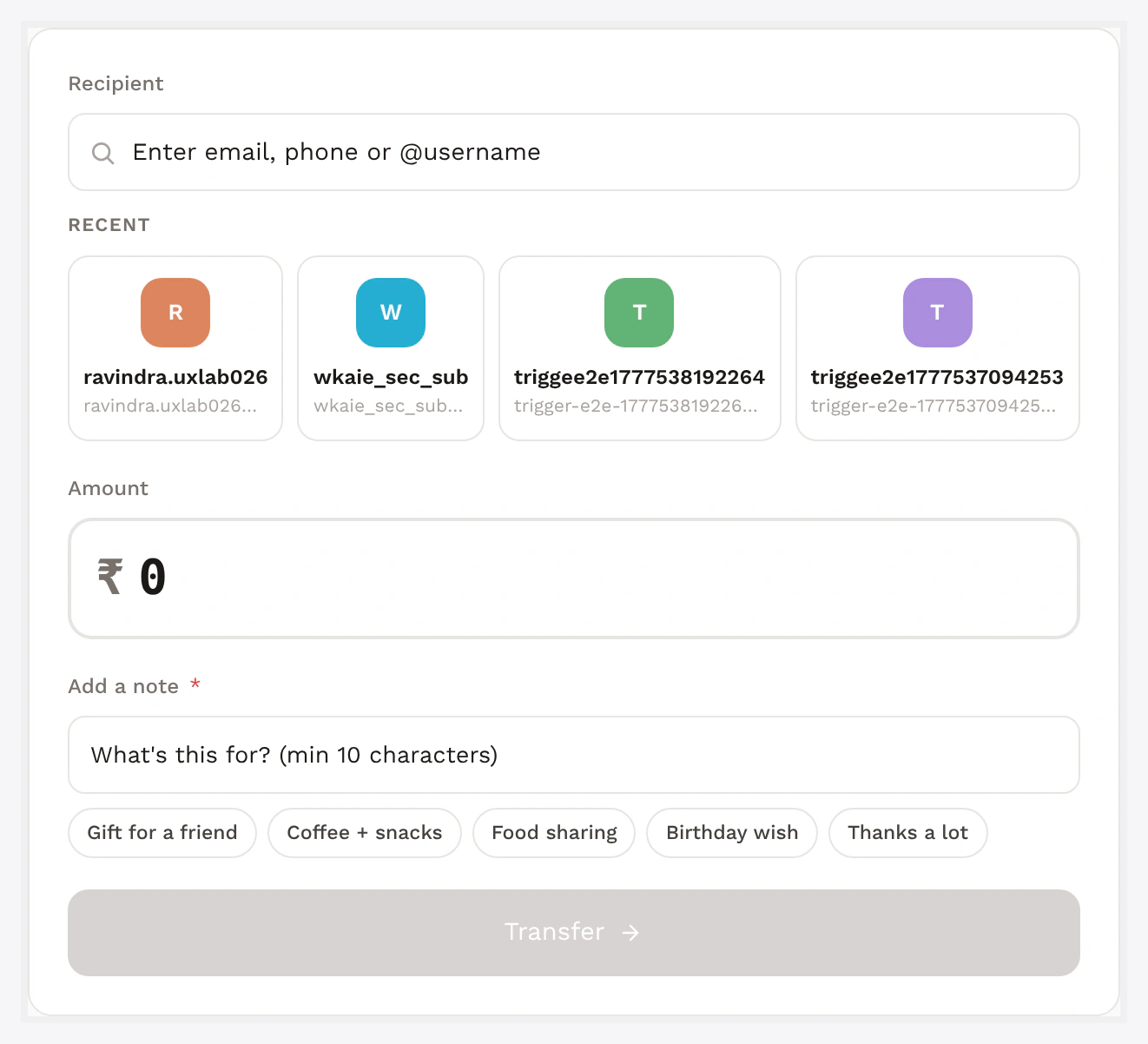
Transfer form — recipient picker, amount, note, submit

OTP Delivery

ChannelDefaultNotes
Emailalways sentuses your store's mailer
SMSsent if Twilio configured AND customer has phone on fileoptional but recommended

OTP is valid for 10 minutes. Customers can re-request after 30 seconds.

If Twilio fails for any reason (downtime, geo block), the email OTP still works — transfer flow never breaks because of an SMS issue.

See SMS Notifications for Twilio setup.
Transfer stepper / side panel — recent recipients and OTP step

KYC Gating

Add transfer to your KYC required-features list to require approved KYC before any transfer:

Wallet → Settings → KYC → Required features → ✓ Transfer

Customer with non-approved KYC sees a "Verify identity to send" card instead of the form. See KYC.

Lock a Customer From Transferring

Sometimes you want to block transfers for one specific customer (account recovery, fraud investigation) without disabling the feature site-wide:

Users → [user] → Wallet card → Lock transfers → writes the per-user lock flag.

Customer-side: the Send tile is disabled with a tooltip; server-side blocks any submitted form.

Customers Can Self-Lock Too

In /wallet-central/settings/ → Disable transfers (security) toggle. Useful if a customer suspects compromise. Toggleable back on anytime.

Transfer Fee

Configurable as fixed or percent of amount:

TypeResult
noneno fee, customer sends 100%
fixedflat amount, e.g. 2.50 per transfer
percent1 = 1% of transfer amount

Fee is debited from the sender's wallet at the same instant as the transfer amount. Fee row is logged separately for accounting.

Common Scenarios

Customer says OTP didn't arrive

  1. Check spam folder
  2. Confirm Twilio credentials in Wallet → Settings → Notifications → SMS
  3. Confirm customer has a phone number on file (Users → [user] → Phone)
  4. Email OTP should still arrive — if neither, check WC mailer config

Customer A sends to wrong recipient B

Transfers are atomic and final. Recover by manually debiting B + crediting A from their user profile Wallet cards (with audit notes).

Disable transfers store-wide

Toggle "Enable" → OFF in Transfer settings. Customer Send tile shows "Transfers are currently disabled."

When Something Goes Wrong

ProblemFix
OTP not receivedCheck spam; confirm Twilio creds; check Twilio console logs
Code expired10-min window — re-request
KYC requiredRecipient or sender lacks approved KYC and transfer is gated
Recipient invalidEmail / username not found among registered customers
Send tile greyed outKYC not approved OR transfer-locked flag set
For developers — REST endpoint, hooks, OTP storage

REST endpoint

POST /wp-json/wkwc_wallet/v1/verify_otp/{otp}
Headers:
  X-WP-Nonce: <nonce>
Body:
  recipient_id, amount, note

Response on success:

{
  "success": true,
  "transfer_id": 1234,
  "balance_after": 750.00
}

Errors: invalid_otp / expired_otp / insufficient_balance / kyc_required / recipient_invalid.

See REST API.

Atomic move

WKWP_Wallet_Transfer::verify_otp_and_send:

  1. Match OTP against payment-requests row
  2. Confirm not expired and not consumed
  3. DB transaction
  4. Debit sender amount + fee
  5. Credit recipient amount
  6. Insert two ledger rows linked by reference=transfer:#<request_id>
  7. Mark request consumed
  8. Commit
  9. Fire wkwp_wallet_transfer_completed

On any failure → rollback.

OTP storage

Bcrypt-hashed in wkwc_wallet_payment_requests (never stored plaintext). Verified via password_verify().

Hooks

HookTypeWhen
wkwp_wallet_transfer_otp_generatedactionOTP row written
wkwp_wallet_transfer_completedactionboth ledger rows written
wkwp_wallet_transfer_failedactionrollback
wkwp_wallet_transfer_feefiltermutate fee per transfer
wkwp_wallet_transfer_otp_template_smsfilteroverride SMS template

Related

  • KYC
  • SMS Notifications
  • Email Notifications
  • Wallet Central → Send Money
Prev
Recharge / Top-up
Next
My Wallet Page