
Wallet Central Settings
Configure the standalone /wallet-central/ experience.
Want the feature overview?
See Wallet Central Overview for what it does, surface map, and how it differs from the legacy My Wallet.
Where
Wallet → Settings → Wallet Central.
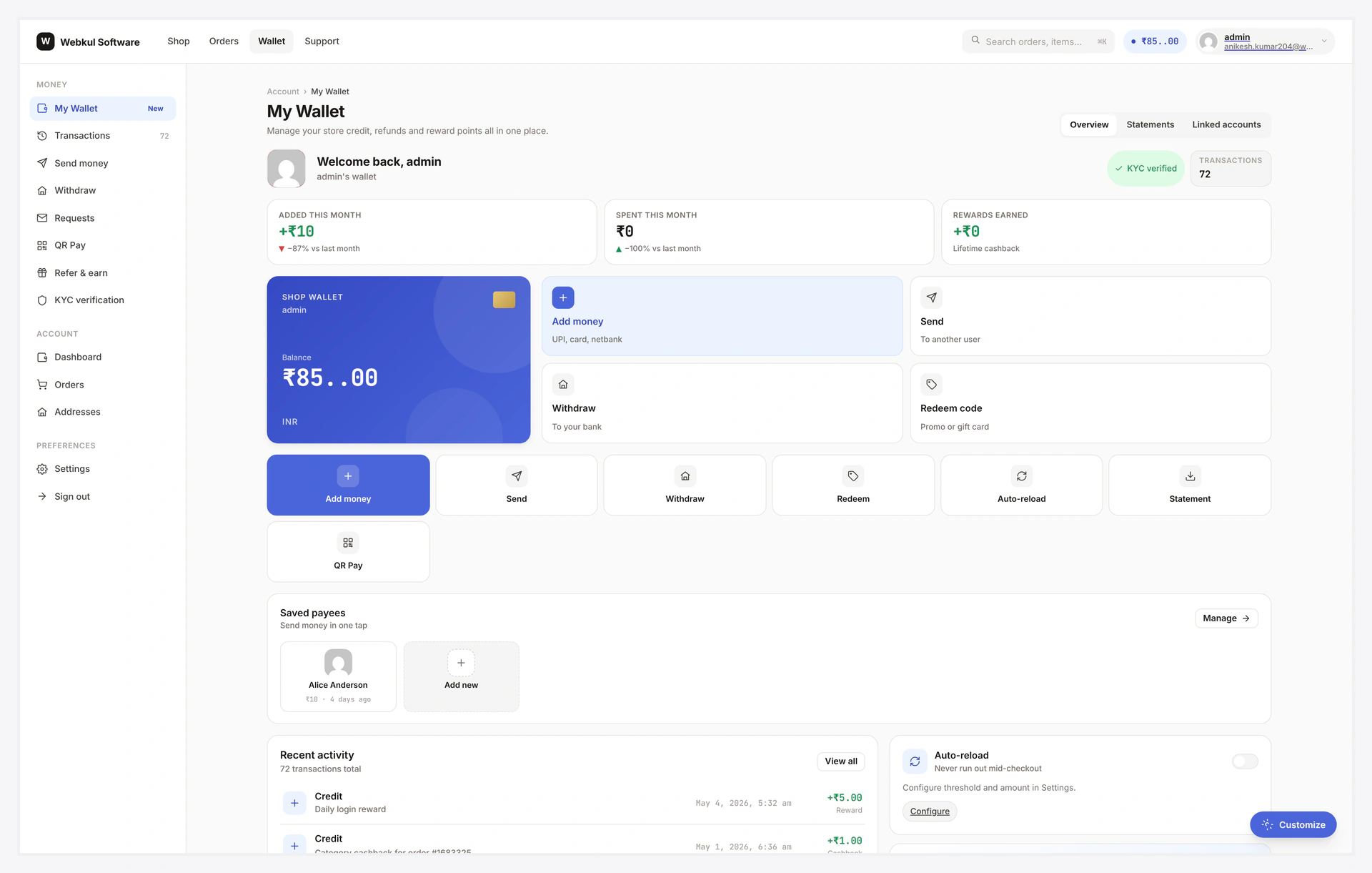
Settings live on the same Wallet → Settings tab; the resulting customer view:
Step-by-step Setup
1. Enable Wallet Central
Master toggle.
| Toggle | Effect |
|---|---|
| ON (default) | /wallet-central/ works; CTA banner shows on legacy My Wallet |
| OFF | Rewrite rules removed; /wallet-central/ 404s; CTA hidden |
When OFF, the wallet engine continues to work — legacy /my-account/my_wallet/ and admin pages unaffected.
2. Discovery banner (CTA)
The "Try the new Wallet Central" banner that appears above the legacy My Wallet hero.
| Field | Default | Notes |
|---|---|---|
| Enable | ON | shows banner on legacy My Wallet |
| Dismissable | ON | renders the × close button, persists per-customer |
| Eyebrow | New | small label above the title |
| Title | Try the new Wallet Central | main headline |
| Sub | description text | one-line marketing copy |
| Button label | Open Wallet Central | CTA button text |
Click Reset CTA dismissals to bump the dismissal version → all per-customer dismissals invalidated → everyone sees the banner again. Useful after a redesign.
3. UI defaults
Initial values for new customers' Tweaks panel:
| Field | Default | Range |
|---|---|---|
| Default hero variant | B | A (big number) / B (credit card) / C (wide bar) |
| Default density | cozy | compact / cozy / comfy |
| Default accent | #6f3fff | any hex |
| Tweaks panel enabled | ON | OFF hides the gear icon site-wide |
Customers can override via the Tweaks panel — values persist in their browser localStorage. Defaults only apply on first visit.
4. Right-rail cards
Toggle which cards appear in the home dashboard's right rail:
| Card | Default | Use |
|---|---|---|
| Pending Requests | ON | shows incoming payment requests |
| Saved Payees | ON | last 5 transfer recipients |
| Linked Accounts | ON | bank / PayPal / Stripe presence |
| Daily Limits | ON | progress bars for transfer / withdrawal / topup caps |
| Refundable Orders | ON | recent orders eligible for refund-to-wallet |
Turn off any card you don't want.
5. Navigation order
CSV of view slugs in sidebar order. Default matches the router's view list.
Example custom order:
home, transactions, send, withdraw, qr, referral, settings, kyc
Skipped views are hidden from the sidebar (still reachable by direct URL).
6. Help pills
Three pills at the bottom of every Wallet Central view. Default: FAQ / Support / Admin.
Override with custom links — e.g. "Live chat" → your chat widget URL.
| Field | Notes |
|---|---|
| Pill 1 label | text on the pill |
| Pill 1 URL | target |
| Pill 2 label | text |
| Pill 2 URL | target |
| Pill 3 label | text |
| Pill 3 URL | target |
7. Auto-reload (customer settings section toggle)
| Toggle | Effect |
|---|---|
| Section enabled | shows / hides the Auto-reload section in customer Settings |
| Min threshold | hard min the customer can set |
| Max top-up amount | hard max the auto-reload amount |
If you don't support saved-payment-method auto-reload, turn the section OFF.
8. Save
Click Save changes.
Verify
- Visit
/wallet-central/as a logged-in customer → sees the home dashboard - Visit
/my-account/my_wallet/→ sees the CTA banner above the hero - Click banner → lands at Wallet Central home
- Tweaks panel opens via the gear icon
- Right-rail cards match what you enabled
When You Should Disable Wallet Central
| Scenario | Disable? |
|---|---|
| You only want the legacy My Wallet experience | YES |
| You want both surfaces (default) | NO |
| You're A/B testing — only show to some customers | Use a filter (dev) |
Customer-Side Settings
Customers also have a settings panel at /wallet-central/settings/. They can:
- Toggle their own notification preferences
- Set auto-reload threshold
- Lock their own transfers (security)
See Wallet Central Settings (customer).
Common Combos
| Goal | Settings |
|---|---|
| Default rollout | Enable ON, CTA ON dismissable, all right-rail cards ON |
| Quiet rollout | Enable ON, CTA OFF (only customers who know the URL find it) |
| Strict / locked-down | Enable ON, CTA OFF, Tweaks OFF, custom navigation order |
| Wallet Central only | Enable ON, hide legacy via filter wkwp_my_wallet_decorator_skip |
Troubleshooting
| Problem | Fix |
|---|---|
/wallet-central/ 404s | Master enable OFF; OR permalinks need flush — Settings → Permalinks → Save |
| CTA banner never shows | Master enable OFF, OR CTA disabled, OR per-user dismissed |
| Tweaks panel missing | Disabled in admin, OR theme blocking the gear icon |
| Right-rail cards not visible | Viewport < 1024px (folded below content) OR all cards toggled OFF |