
Core Wallet
The base of the plugin. Every other feature — cashback, refund, withdrawal, transfer — moves money in and out of this layer.
Setting up?
Skip to General Settings for the step-by-step admin tab walkthrough (currency, low-balance threshold, daily login reward).
What It Does
| For | Means |
|---|---|
| Customer | A wallet balance attached to their account. Top up, spend at checkout, see every move on a clear activity feed |
| Admin | One source of truth for store credit, with a full audit trail and one-click manual adjust |
How Customers See It
Three places the balance shows up:
| Surface | Where |
|---|---|
| My Account → My Wallet | Full dashboard with hero card, top-up, send, withdraw |
| Wallet Central | Standalone full-screen experience at /wallet-central/ |
| Header / footer / page | Drop the [wkwp_wallet_balance] shortcode anywhere |
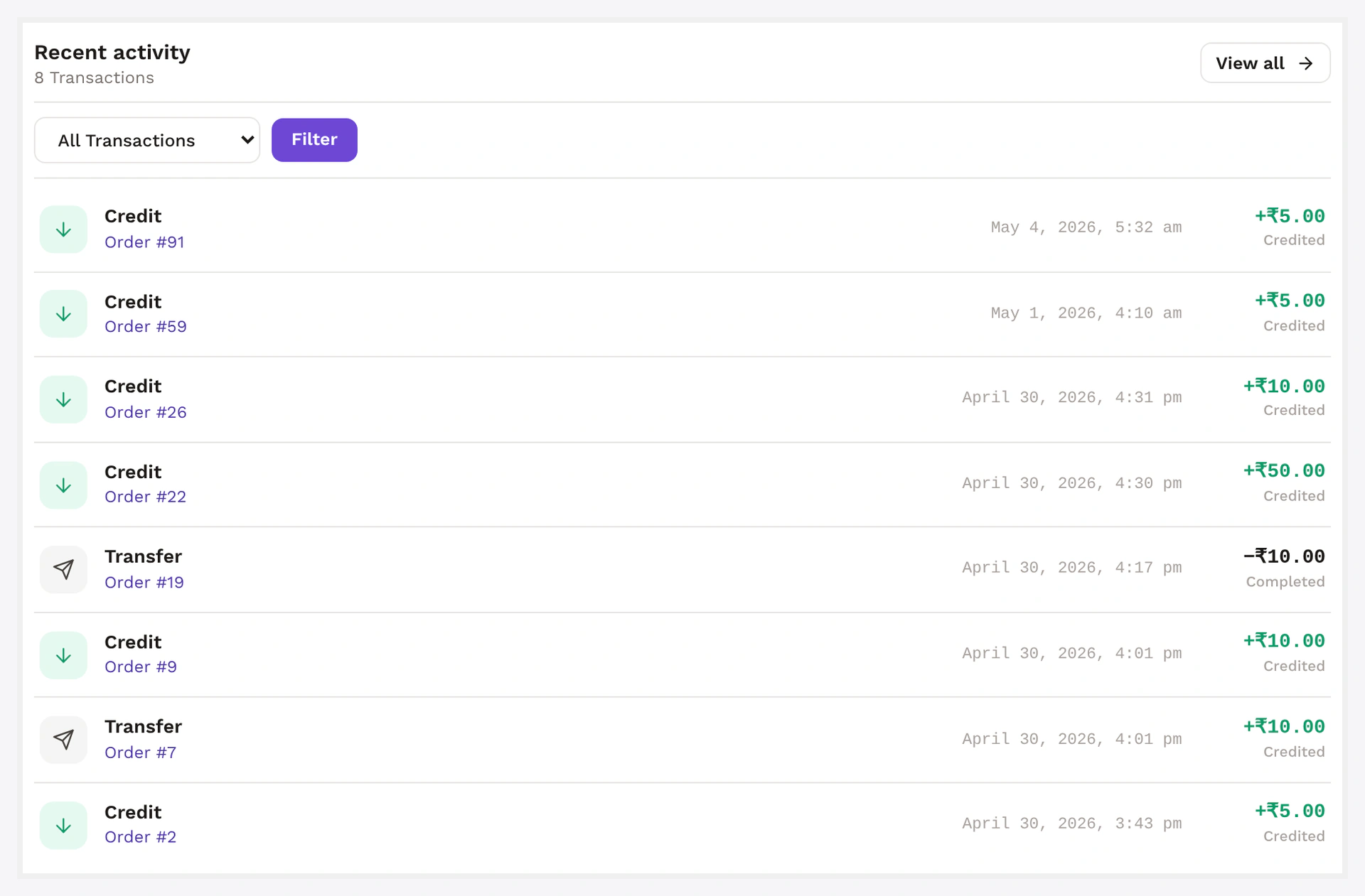
Every credit / debit also shows up in the customer's activity feed — type icon, amount, date, related order link.
The customer-facing balance hero, on My Wallet:

The full activity card on the same page:
How Admin Adjusts a Balance
Two entry points:
A. From the user list (fastest)
- Users → All Users → click the customer
- Scroll to the Wallet card
- Type an amount + a note in the Credit or Debit field
- Click Update Wallet
B. From any order
- Open the order edit screen
- Side meta-box Wallet → Manual adjust button
Both write a row to the audit trail tagged as a manual admin action.
Low-Balance Alert
When a customer's balance drops below the threshold you set, they get an automatic email.
| Setting | Default | Notes |
|---|---|---|
| Enable | ON | toggle off if you don't want alerts |
| Threshold | 100 | currency value |
One alert per drop
Customers don't get spammed. The alert fires only when balance crosses the threshold downward — debits that happen below the threshold don't re-fire it.
Multi-Currency
If you run a supported currency switcher plugin, each customer gets a balance per active currency. Switching currency in the front-end shows the matching balance.
Skip this in Wallet → Settings → General → Multi-currency mode if you want a single base-currency balance.
Settings
Wallet → Settings → General
| Setting | Default | What it does |
|---|---|---|
| Default currency | matches WC | base currency for new wallets |
| Show balance to customer | ON | hides the My Wallet UI when off |
| Allow negative balance | OFF | only relevant if BNPL is enabled |
| Low-balance threshold | 100 | fires alert below this |
| Wallet display name | Wallet | brand name (e.g. "Store Credit", "Coins") |
| Multi-currency mode | auto | only meaningful with a currency switcher plugin active |
Common Scenarios
Refund a customer to wallet (one-off)
Open the order → Refund → tick "Refund to wallet". Wallet credited the refund amount + email sent. See Refund to Wallet.
Give 100 customers a $50 bonus (bulk)
CSV upload via Wallet → Bulk Credit / Debit. Goes async — customer emails fire as each row processes. See Bulk Credit / Debit.
Customer claims their balance is wrong
- Open their user profile → Wallet card
- Look at Recent transactions in the same card — last 10 ledger rows
- Adjust manually if needed → audit row gets your admin name in the reference
When Something Goes Wrong
| Problem | Fix |
|---|---|
| Customer's balance doesn't reflect a recent change | Stale cache — Wallet → Status → Tools → Wallet → Clear cache |
| Manual adjust button missing | Current admin role lacks manage_woocommerce capability |
| Customer says balance "disappeared" | Likely a withdrawal request — debit happens at request time, not approval time. Reject the request to refund |
For developers — read & write the wallet programmatically
Storage
| Where | Key | Type |
|---|---|---|
| User meta | _wkwc_wallet_amount | decimal as string |
| User meta | _wkwc_wallet_amount_<currency> | per-currency balance (multi-currency mode) |
Only mutate through the public API — direct meta writes bypass the ledger and break analytics.
API
// Credit 250 to user with audit ref
WKWP_Wallet_Core::credit( $user_id, 250.00, [
    'order_id'  => $order->get_id(),
    'reference' => 'cashback:rule#12',
    'note'      => 'Cashback on order #' . $order->get_id(),
] );

// Debit 99.50
WKWP_Wallet_Core::debit( $user_id, 99.50, [
    'order_id'  => $order->get_id(),
    'reference' => 'gateway:wkwc_wallet',
    'note'      => 'Order #' . $order->get_id() . ' wallet payment',
] );
Both methods:
- Validate
amount > 0(throws on negative or zero) - Re-fetch live balance under DB lock
- Update user meta
- INSERT one ledger row + denorm history row
- Bust cache
- Fire
wkwp_wallet_balance_changed(+ legacywkwc_wallet_amount_updated) - Trigger low-balance email if threshold crossed
Selected hooks
| Hook | Type | When |
|---|---|---|
wkwp_wallet_balance_changed | action | after every credit / debit, args ($user_id, $amount, $type, $balance_after) |
wkwc_wallet_amount_updated | action | legacy alias |
wkwp_wallet_low_balance_alert | action | crosses threshold downward |
wkwp_wallet_credit_amount | filter | mutate amount before credit |
wkwp_wallet_debit_amount | filter | mutate amount before debit |
wkwp_wallet_history_label | filter | rename ledger types in history view |
Full list: Filters & Hooks.
REST
| Endpoint | Auth |
|---|---|
GET /wkwp-wallet/v1/wallets | admin |
GET /wkwp-wallet/v1/wallets/{user_id} | admin |
GET /wkwp-wallet/v1/transactions?user_id=&type=&from=&to= | admin |
See REST API.
Concurrency
DB row lock under SELECT ... FOR UPDATE. Tested under 100 concurrent ops per user without double-credit / double-debit.