
Wallet SystemWallet System
Buy Now
View Demo
  • Getting Started

    • Introduction
    • Quick Start
    • Features
    • Installation
    • First-Time Setup
    • Admin Tour
  • Wallet Core

    • Core Wallet
    • Wallet Payment Gateway
    • Recharge / Top-up
    • Wallet Transfer
    • My Wallet Page
    • Shortcodes
  • Earn & Reward

    • Cashback Engine
    • Referral Program
    • Multilevel Referral
    • Daily Login Reward
    • Invite Friends
    • Deposit / Top-up Bonus
  • Spend & Payout

    • Checkout Discount
    • Checkout Restriction
    • Withdrawal
    • PayPal Payout
    • Stripe Payout
    • Refund to Wallet
    • Buy Now Pay Later
  • Identity & Mobile

    • KYC
    • QR Code Payments
  • Wallet Central

    • Overview
    • Endpoint & Routing
    • CTA Discovery
    • Home Dashboard
    • Add Funds
    • Withdraw
    • Withdrawals List
    • Send Money
    • QR Pay
    • Payment Requests
    • Refer & Earn
    • Transactions
    • Settings
    • KYC Flow
    • Architecture
    • Tweaks & Responsive
    • Security
    • Admin Controls
  • Admin Tools

    • Admin Settings (index)
    • Bulk Credit / Debit
    • Analytics Dashboard
  • Settings Tabs

    • General
    • Recharge
    • Checkout
    • Withdrawal
    • Payout (PayPal/Stripe)
    • KYC
    • Cashback
    • Referral
    • Multilevel
    • BNPL
    • QR Pay
    • Notifications
    • Wallet Central
    • Integrations
    • API Keys
  • Notifications

    • Email Notifications
    • SMS Notifications
  • Developer

    • REST API
    • Filters & Hooks
  • Help

    • Troubleshooting
    • FAQ
    • Glossary
Support
Buy Now
View Demo
  • Getting Started

    • Introduction
    • Quick Start
    • Features
    • Installation
    • First-Time Setup
    • Admin Tour
  • Wallet Core

    • Core Wallet
    • Wallet Payment Gateway
    • Recharge / Top-up
    • Wallet Transfer
    • My Wallet Page
    • Shortcodes
  • Earn & Reward

    • Cashback Engine
    • Referral Program
    • Multilevel Referral
    • Daily Login Reward
    • Invite Friends
    • Deposit / Top-up Bonus
  • Spend & Payout

    • Checkout Discount
    • Checkout Restriction
    • Withdrawal
    • PayPal Payout
    • Stripe Payout
    • Refund to Wallet
    • Buy Now Pay Later
  • Identity & Mobile

    • KYC
    • QR Code Payments
  • Wallet Central

    • Overview
    • Endpoint & Routing
    • CTA Discovery
    • Home Dashboard
    • Add Funds
    • Withdraw
    • Withdrawals List
    • Send Money
    • QR Pay
    • Payment Requests
    • Refer & Earn
    • Transactions
    • Settings
    • KYC Flow
    • Architecture
    • Tweaks & Responsive
    • Security
    • Admin Controls
  • Admin Tools

    • Admin Settings (index)
    • Bulk Credit / Debit
    • Analytics Dashboard
  • Settings Tabs

    • General
    • Recharge
    • Checkout
    • Withdrawal
    • Payout (PayPal/Stripe)
    • KYC
    • Cashback
    • Referral
    • Multilevel
    • BNPL
    • QR Pay
    • Notifications
    • Wallet Central
    • Integrations
    • API Keys
  • Notifications

    • Email Notifications
    • SMS Notifications
  • Developer

    • REST API
    • Filters & Hooks
  • Help

    • Troubleshooting
    • FAQ
    • Glossary
Support
  • Getting Started

    • Introduction
    • Quick Start — Wallet Live in 5 Minutes
    • Features
    • Installation
    • First-Time Setup
    • Admin Tour
  • Wallet Core

    • Core Wallet
    • Wallet Payment Gateway
    • Recharge / Top-up
    • Wallet Transfer
    • My Wallet Page
    • Shortcodes
  • Earn & Reward

    • Cashback Engine
    • Referral Program
    • Multilevel Referral
    • Daily Login Reward
    • Invite Friends
    • Deposit / Top-up Bonus
  • Spend & Payout

    • Checkout Discount
    • Checkout Restriction
    • Withdrawal
    • PayPal Payout
    • Stripe Payout
    • Refund to Wallet
    • Buy Now Pay Later (BNPL)
  • Identity & Mobile

    • KYC (Know Your Customer)
    • QR Code Payments
  • Wallet Central

    • Wallet Central Overview
    • Endpoint & Routing
    • CTA Discovery
    • Home Dashboard
    • Add Funds
    • Withdraw
    • Withdrawals List + Detail
    • Send Money
    • QR Pay
    • Payment Requests
    • Refer & Earn
    • Transactions
    • Settings (customer)
    • KYC Flow
    • Architecture
    • Tweaks & Responsive
    • Security
    • Admin Controls
  • Admin Tools

    • Admin Settings
    • Bulk Credit / Debit
    • Analytics Dashboard
  • Settings Tabs

    • General Settings
    • Recharge Settings
    • Checkout Settings
    • Withdrawal Settings
    • Payout Settings (PayPal + Stripe)
    • KYC Settings
    • Cashback Settings
    • Referral Settings
    • Multilevel Settings
    • BNPL Settings
    • QR Pay Settings
    • Notifications Settings
    • Wallet Central Settings
    • Third-Party Integrations
    • API Keys
  • Notifications

    • Email Notifications
    • SMS Notifications
  • Developer

    • REST API
    • Filters & Hooks
  • Help

    • Troubleshooting
    • FAQ
    • Glossary

Cashback Settings

The Cashback engine is rule-based. Build any number of rules; engine picks the first matching by priority.

Want the feature overview?

See Cashback Engine for what cashback does, customer experience, refund reversal, and developer hooks.

Where

Wallet → Cashback Rules (CRUD UI, separate from main settings tabs).
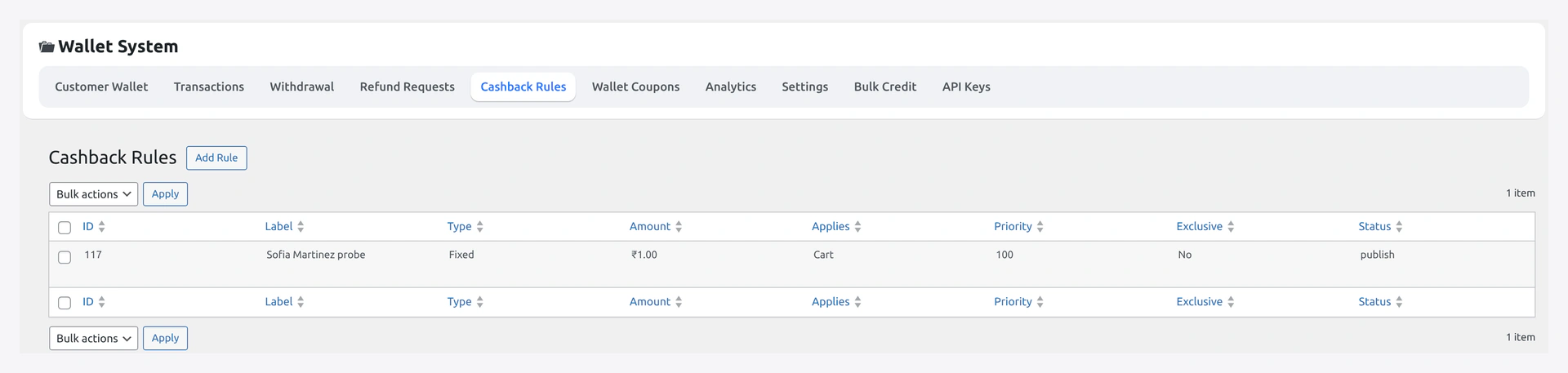
Cashback Rules list — priority, scope, type, status, edit / delete

The toggleable defaults for the engine live on Wallet → Settings → Cashback Settings:
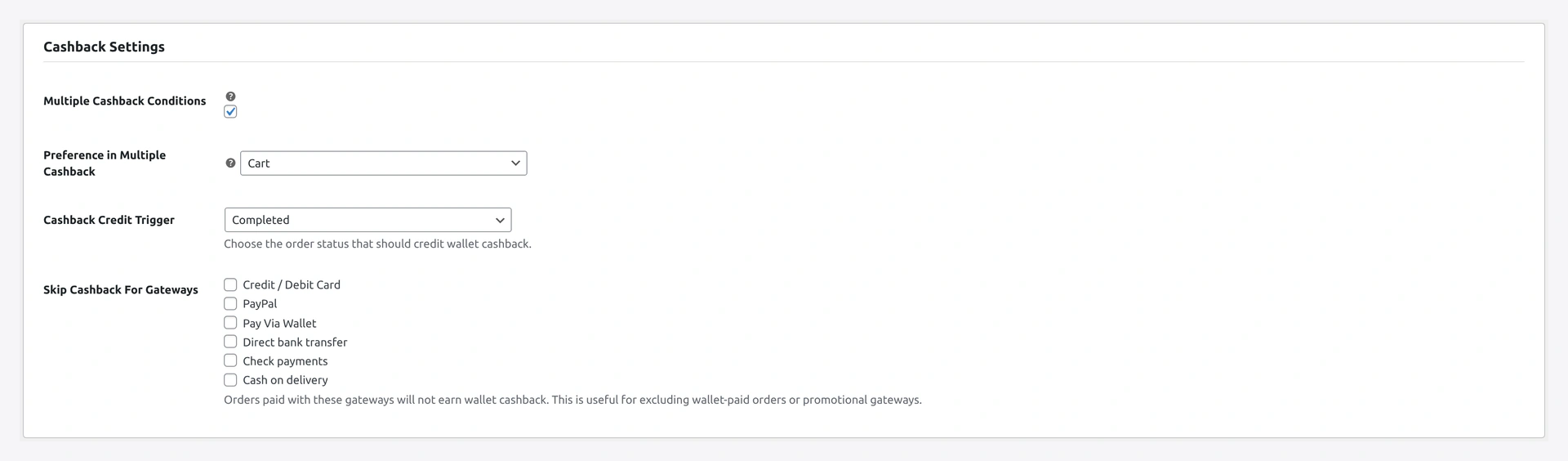
Cashback Settings section — global toggle, default cap, hooks toggles

Step-by-step Setup

1. Create a rule

Click Add new rule → opens the single-rule editor.

2. Name

Internal label. Also shown in the customer's activity feed:

Cashback +₹50  "Spring sale 5%"

Make it descriptive — Q4 Electronics 10% not Rule 1.

3. Active toggle

Rule fires only when ON. Useful to pause without deleting.

4. Scope

ScopeWhen to use
globalAny order
productSpecific SKUs only
categorySpecific WC categories only

5. Targets

Required for product / category scope. Multiselect picker.

6. Match

For multi-target rules:

MatchBehaviour
OR (default)Rule fires if any line item matches
ANDRule fires only if all line items match

OR is what most stores want.

7. Min order value

Cart total threshold for the rule to fire. Set 0 for no minimum.

8. Max order value

Optional ceiling. Useful for "5% on orders ₹500-₹5000 only".

9. Type

TypeAmount field
percentpercent of order subtotal (e.g. 5 = 5%)
fixedcurrency value (e.g. 50 = ₹50 flat)

10. Amount

The percent or currency value. See examples below.

11. Max cashback cap

Optional. "10% on Electronics, but never more than ₹1000 cashback per order."

12. Priority

Lower number runs first. First matching rule wins.

PriorityUse
5Time-boxed promotions (high-priority, run first)
10Default rules
20Catch-all fallback rules

13. Start / End date

Optional window. Rule only fires inside the dates. After end date, rule auto-skips.

14. Per-customer cap

Max times this specific rule can credit one customer.

Use caseCap
Welcome cashback (one-shot)1
Monthly12 (one per month roughly)
Unlimitedleave blank

15. Save

Click Save rule.

Common Setups

Flat 5% on everything

FieldValue
NameBaseline 5%
ActiveON
Scopeglobal
Min order value0
Typepercent
Amount5
Priority10

10% on Electronics, min ₹2000, capped ₹1000

FieldValue
NameElectronics 10%
Scopecategory
TargetsElectronics
Min order value2000
Typepercent
Amount10
Max cap1000
Priority8

Flat ₹50 on launch SKU

FieldValue
NameLaunch SKU bonus
Scopeproduct
TargetsLAUNCH-SKU-1
Typefixed
Amount50
Priority7

Limited-time double cashback

Two rules:

FieldRule A (baseline)Rule B (promo)
Priority105
Scopeglobalglobal
Typepercentpercent
Amount510
Start dateempty2026-04-01
End dateempty2026-04-30

During April, Rule B (lower priority = checked first) wins. After, only Rule A matches.

Welcome cashback for first order

FieldValue
NameFirst-order welcome
Scopeglobal
Typepercent
Amount15
Per-customer cap1
Priority5

Generous percent on the first order only.

Verify

As a test customer:

  1. Place a qualifying order
  2. Wait for completed status
  3. Wallet credited automatically
  4. Activity feed shows the cashback row with rule name

Important Behaviour

  • Engine awards one cashback per order (not stacked)
  • First matching rule by priority wins
  • To "stack" multiple percentages, build a single rule that combines them
  • Refunds reverse cashback proportionally

Reporting

Filter Wallet → Transactions by type = cashback. Sort by date / customer.

CSV export available for accounting reconciliation.

Troubleshooting

ProblemFix
Cashback not creditedRule active? Min met? Order in completed? Already credited?
Wrong rule firedCheck priority — lower number runs first
Cashback credited twiceShould not happen — guard meta on order
Want cashback on subtotal-with-taxUse wkwp_cashback_basis filter (dev)

Related

  • Cashback Engine
  • General Settings
  • Notifications Settings
Prev
KYC Settings
Next
Referral Settings