
KYC (Know Your Customer)
Identity verification with document upload, admin review, and per-feature gating. Required when operating in regulated regions or whenever the wallet handles non-trivial money movement.
Setting up?
Skip to KYC Settings for the step-by-step admin tab walkthrough (document caps, MIME types, required-feature toggles).
What It Does
| For | Means |
|---|---|
| Customer | Upload ID documents via a modal. Status shown as a clear pill (Verified / Under Review / Rejected) |
| Admin | Review queue with inline document preview. Approve / reject with a note. Per-feature gating decides what's locked behind approval |
How Customers See It
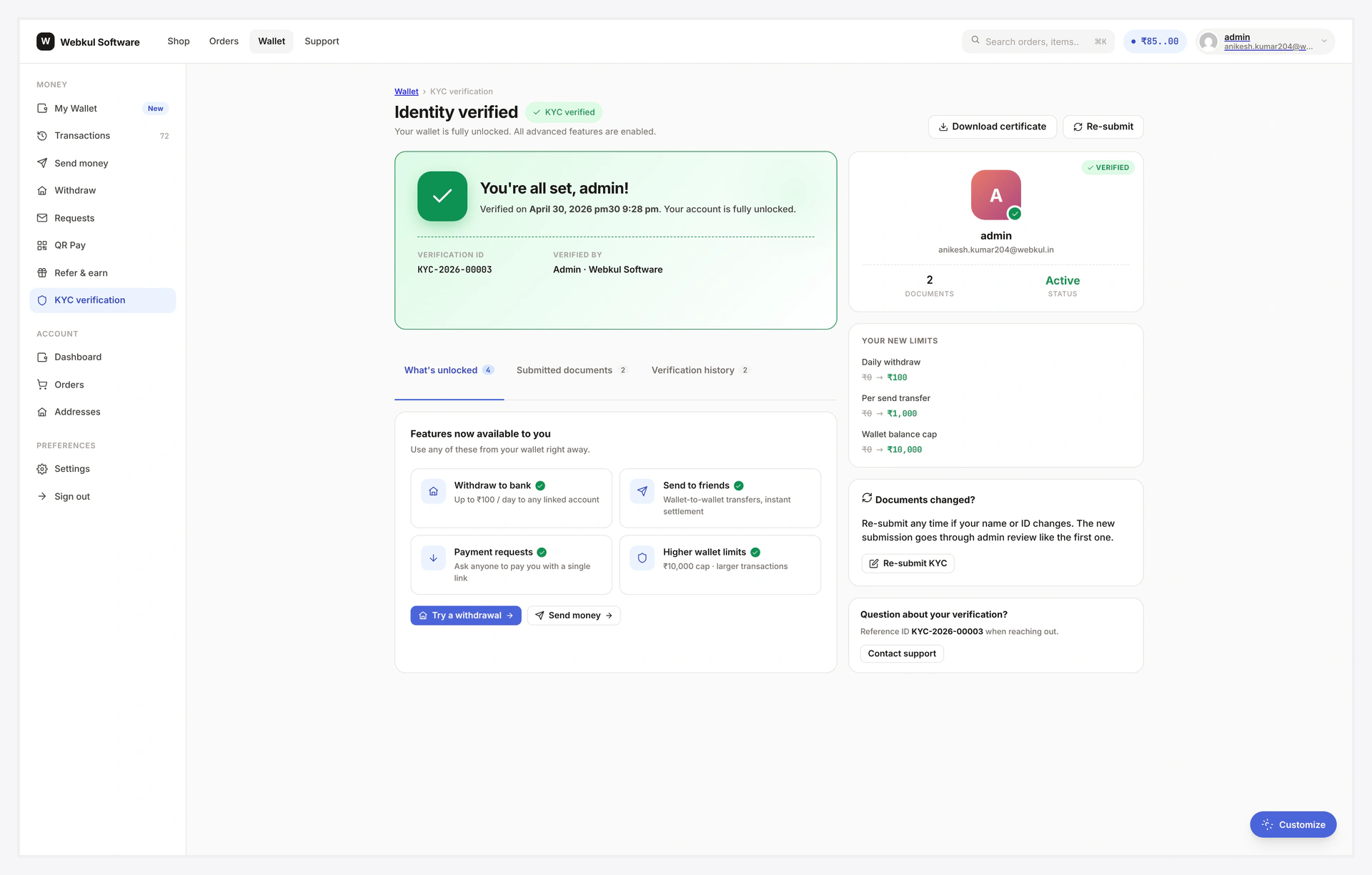
Status pill (always visible on My Wallet)
| Status | Pill | Meaning |
|---|---|---|
| Approved | green ✓ KYC VERIFIED | all features unlocked |
| Pending | amber KYC UNDER REVIEW | admin hasn't decided yet |
| Rejected | red RE-SUBMIT KYC | admin rejected; customer can fix and try again |
| Not submitted | grey ◯ VERIFY KYC | hasn't started yet |
The non-approved pills shimmer / pulse to draw attention.
Submission flow
- Click the pill → opens a modal with the form
- Fill: full name + document type + number + file uploads (up to N)
- Submit → modal flips to "Under review — we'll email you within 1 business day"
- Status pill flips to amber
If a customer tries to access a gated feature (e.g. withdrawal) without approved KYC, that feature shows a locked card with "Verify now" → opens the same modal.
Admin review
Wallet → KYC Reviews lists all submissions.
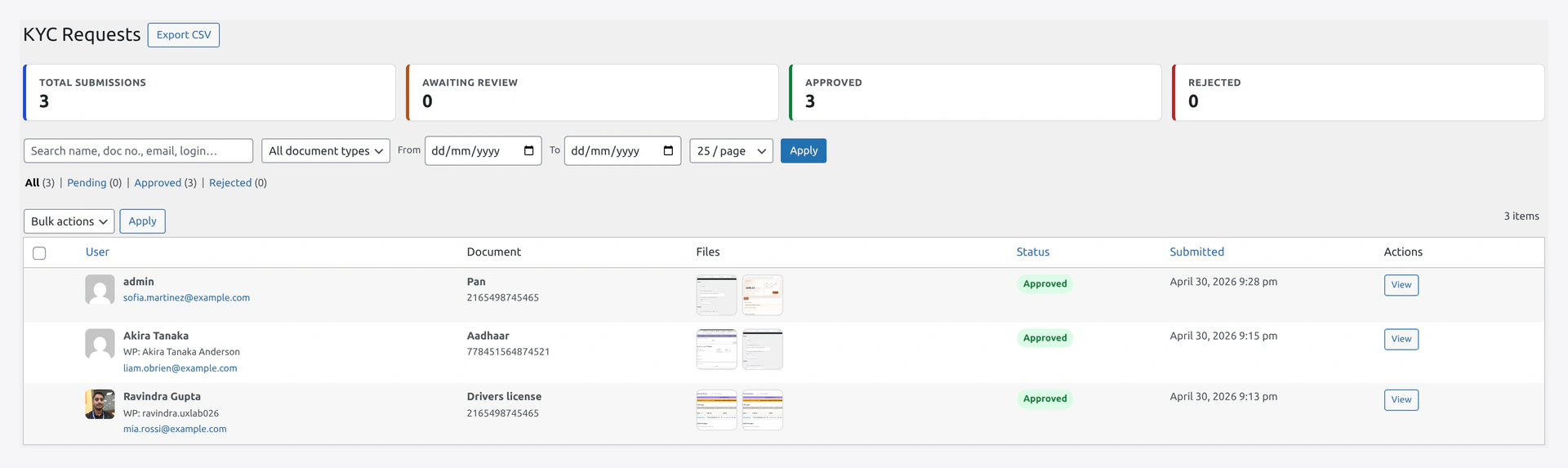
Click a row → side drawer:
- Personal details
- Each uploaded file (image inline, PDF in iframe viewer)
- Approve button
- Reject button (admin note required — shown to customer)
Setup
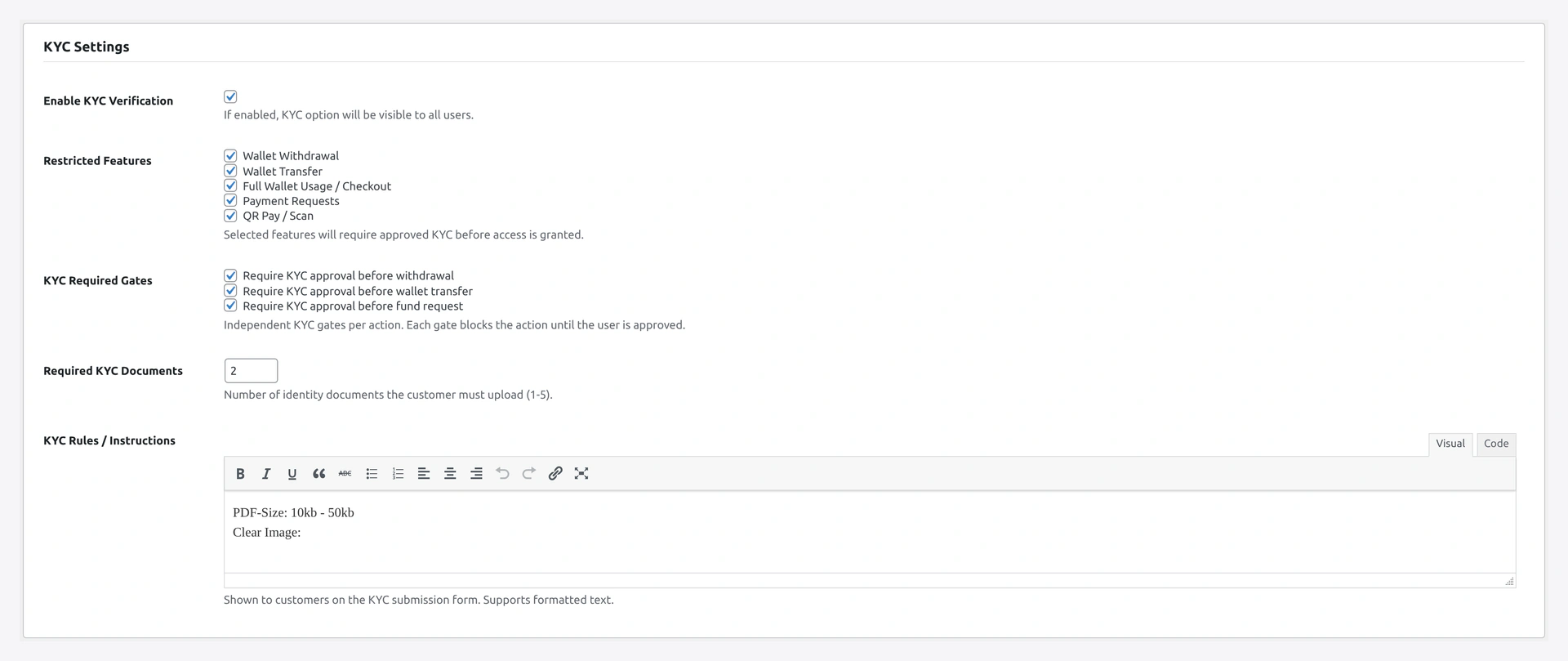
Wallet → Settings → KYC
| Setting | Default | What it does |
|---|---|---|
| Enable | OFF | global toggle |
| Max documents per user | 2 | 1-5; sets the upload limit |
| Allowed file types | jpeg, png, webp, pdf | MIME whitelist |
| Max file size (MB) | 5 | per-file cap |
| Document type list | Passport, National ID, Driving Licence, Voter ID, Aadhaar | dropdown options |
| Requirement description | empty | short customer-facing instructions shown above the form |
| Required features | empty | which features need approved KYC (see below) |
| Reviewer email | site admin | who gets new-submission notifications |
Per-Feature Gating
Tick which features need approved KYC:
| Feature | What it gates |
|---|---|
| Withdrawal | request submit + admin approve UI |
| Transfer | OTP request + verify |
| Wallet usage (checkout) | gateway visibility at checkout |
| Refund request | customer-side refund-to-wallet request |
| QR pay | QR scan-to-pay flow |
Common defaults:
- Light store — gate Withdrawal only
- Strict store — gate Withdrawal + Transfer + QR pay
- Regulated store — gate everything including Wallet usage
Common Scenarios
Customer uploaded blurry photo
Reject with note "Photo is blurry, please re-upload a clearer photo." Customer's status goes red with the note shown above the form. They re-submit; status flips back to amber.
Customer says "I'm verified but withdrawal still locked"
Stale cache. WC → Status → Tools → Wallet → Clear cache. Status will refresh next visit.
Block one specific customer despite approval
Admin → user profile → Wallet card → Lock transfers / Lock withdrawals. Per-user override beats KYC approval.
Migrate KYC status from another plugin
Bulk-set the user meta with WP-CLI:
wp user meta update <USER_ID> _wkwp_kyc_status approved
(Or use WP All Import for a CSV migration.)
Privacy & GDPR
- Documents stored outside the public uploads directory
- Direct URL access blocked via
.htaccess - Image proxies served via authenticated AJAX with capability check
- Personal data export plugin auto-includes wallet-kyc rows
- Personal data eraser plugin auto-deletes rows + files
When Something Goes Wrong
| Problem | Fix |
|---|---|
| Modal doesn't open | JS error in console; check theme conflicts on <dialog> polyfill |
| Upload rejects file | MIME / size cap; check Allowed file types and Max file size |
| Customer feature still locked after admin approve | Stale cache — clear Wallet cache via Status Tools |
| Re-submission overwrites old docs | Expected — single row per user, replaces on submit. Audit history is in admin notes |
For developers — hooks, gates, storage
Server-side enforcement
UI gates are belt-and-braces. Authoritative gates run server-side regardless of UI:
| Enforcer | Hook |
|---|---|
WKWP_Wallet_Withdrawal_KYC_Guard | rejects withdrawal POSTs at wp_loaded priority 5 |
check_user_kyc_access() | called from submodule AJAX handlers |
wkwc_wallet_show_method_on_checkout filter | hides wallet from checkout |
Even a manually-crafted curl request bypassing the UI hits the server-side check.
User meta
| Key | Value |
|---|---|
_wkwp_kyc_status | approved / pending / rejected |
_kyc_verified | legacy fallback (yes / no) |
Hooks
| Hook | Type | When |
|---|---|---|
wkwp_kyc_submit_validate | filter | reject submission with custom error |
wkwp_kyc_status_changed | action | every status transition |
wkwp_kyc_required_features | filter | mutate gated feature list per-user |
wkwp_kyc_document_check_mime | filter | accept extra MIME types |
wkwp_kyc_admin_email_recipients | filter | CC additional reviewers |
Status transitions
not_submitted → pending → approved
                       → rejected → re-submit → pending
admin re-open → pending
Each transition fires wkwp_kyc_status_changed, sends an email, and busts user-specific gate caches.