
QR Pay
Two modes — show your QR to receive (?mode=mine), or scan another's to pay (?mode=scan). Both at /wallet-central/qr/.
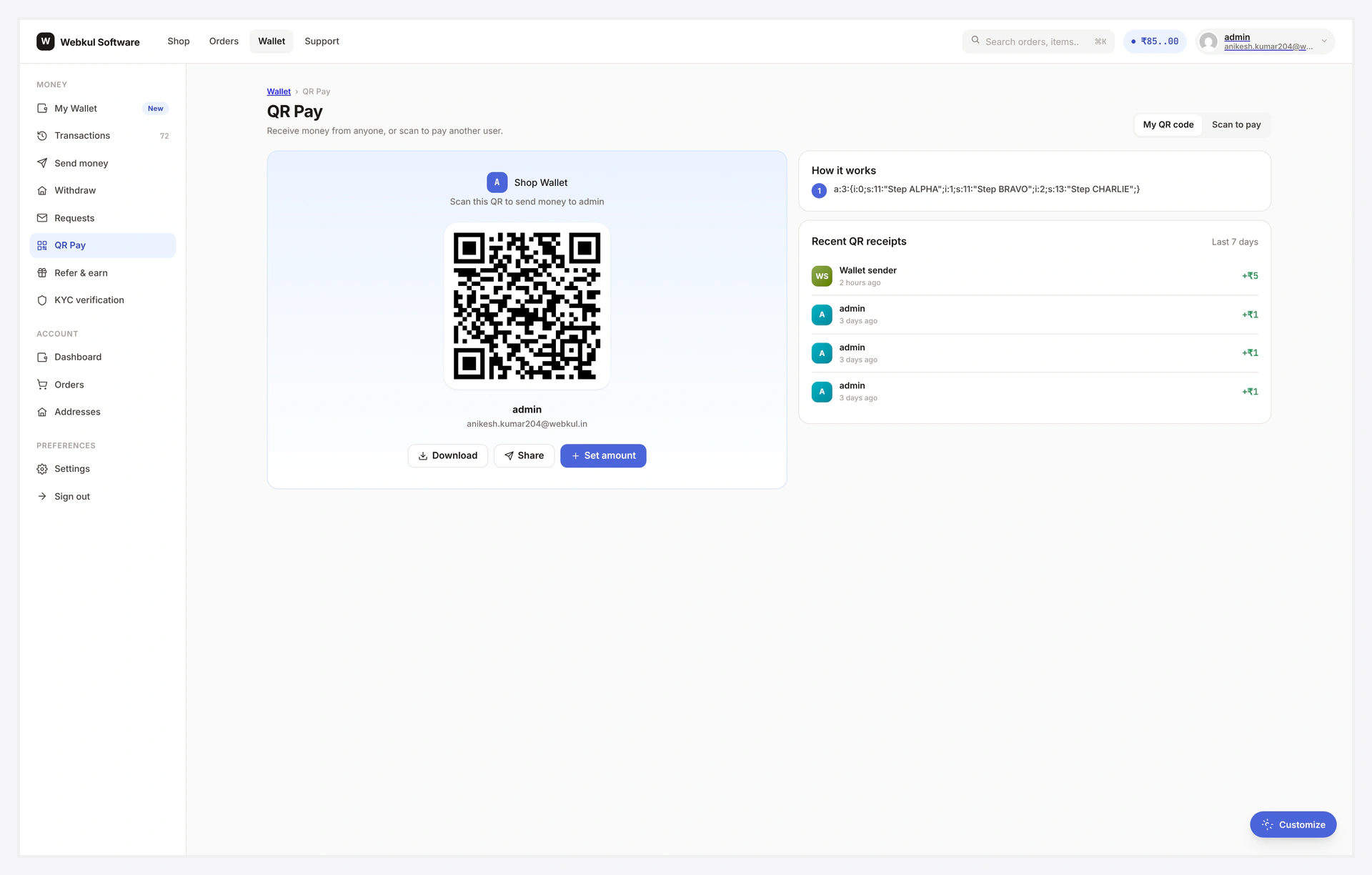
What Customers See
Mode: Mine (receive)
┌────────────────────────────────────────────┐
│  H1: My QR                                 │
│  Sub: Share to receive wallet              │
├────────────────────────────────────────────┤
│   ┌─────────────────────┐                  │
│   │     Gradient card   │                  │
│   │     ┌─────────┐     │                  │
│   │     │  QR    │      │                  │
│   │     │ image   │      │                  │
│   │     └─────────┘     │                  │
│   │     Wallet ID:      │                  │
│   │     WK-0000-••••-1234                  │
│   └─────────────────────┘                  │
├────────────────────────────────────────────┤
│  [ Download ] [ Share ] [ Set amount ]    │
├────────────────────────────────────────────┤
│  How it works                              │
│  1. Open the QR mode in your wallet         │
│  2. Show this code to the sender            │
│  3. Money lands instantly when they scan   │
└────────────────────────────────────────────┘
Mode: Scan (pay)
┌────────────────────────────────────────────┐
│  H1: Scan to pay                           │
│  Sub: Point camera at a wallet QR          │
├────────────────────────────────────────────┤
│  Dark scan frame                           │
│  with reticle + animated scan-line         │
├────────────────────────────────────────────┤
│  Or [ Upload QR image ]                    │
├────────────────────────────────────────────┤
│  After scan:                               │
│   Recipient: Alice ([email protected])     │
│   Amount    [ $__ ]  (or locked from QR)   │
│   Note      [_________________]            │
│   [ Send ]                                 │
└────────────────────────────────────────────┘
Receive Mode Actions
Download
PNG generated client-side. Customer can save as image, print, attach to a quote.
Share
Native device share sheet (WhatsApp / iMessage / Email). Falls back to "Copy link" if device doesn't support sharing files.
Set amount
Optional. Locks the QR to a specific amount — sender's scanner pre-fills + locks editing. Useful for "Pay $250 for product X" use cases.
Scan Mode Camera
html5-qrcode library requires:
- HTTPS
- Camera permission (granted on first prompt)
If camera denied → "Upload QR image" file input as fallback. Library decodes the image client-side.
OTP for Large Amounts
If admin set an OTP threshold (e.g. 5000), any scan-pay above that triggers an OTP confirmation step — same flow as Wallet Transfer.
KYC Gate
If admin requires KYC for QR pay, the scan mode shows a locked card. Receive mode is unaffected (no risk in being received).
Mobile Notes
| Browser | Behaviour |
|---|---|
| iOS Safari 16+ | works fully |
| iOS in-app browsers (Instagram, FB) | camera often denied → file fallback kicks in |
| Android Chrome | works |
| Embedded WebViews | needs camera permission grant from native code |
Common Scenarios
Customer prints QR for an event
Receive mode → Download → high-res PNG → printable.
Refresh QR after suspecting leak
Receive mode → "Refresh" button → new nonce → old QR images become invalid.
Pay a vendor at a pop-up stall
Scan mode → camera permission → point → submit. Done in seconds.
When Something Goes Wrong
| Problem | Fix |
|---|---|
| Camera denied | HTTPS required; iOS in-app forces fallback; use the upload option |
| Scan resolves but pay fails | Nonce expired (24h) — receiver regenerates QR |
| Pay button does nothing | JS error; check console; confirm scanner script loaded |
| OTP screen on small amounts | OTP threshold too low; raise it in admin settings |
For developers — payload + hooks
Payload format
wkwp:<wallet_id>:<nonce>:<sig>
| Part | Notes |
|---|---|
wallet_id | masked synthetic ID (e.g. WK00001234) — not the WP user_id |
nonce | random 12 chars, expires in 24h (rotating) |
sig | HMAC-SHA256 of wallet_id:nonce with site secret |
Hooks
| Hook | Type | When |
|---|---|---|
wkwp_central_qr_default_mode | filter | per-user default mode |
wkwp_central_qr_payload | filter | mutate encoded payload |
wkwp_central_qr_scan_decode | filter | post-decode hook |
wkwp_central_qr_pay_completed | action | scan-pay success |