
Wallet SystemWallet System
Buy Now
View Demo
  • Getting Started

    • Introduction
    • Quick Start
    • Features
    • Installation
    • First-Time Setup
    • Admin Tour
  • Wallet Core

    • Core Wallet
    • Wallet Payment Gateway
    • Recharge / Top-up
    • Wallet Transfer
    • My Wallet Page
    • Shortcodes
  • Earn & Reward

    • Cashback Engine
    • Referral Program
    • Multilevel Referral
    • Daily Login Reward
    • Invite Friends
    • Deposit / Top-up Bonus
  • Spend & Payout

    • Checkout Discount
    • Checkout Restriction
    • Withdrawal
    • PayPal Payout
    • Stripe Payout
    • Refund to Wallet
    • Buy Now Pay Later
  • Identity & Mobile

    • KYC
    • QR Code Payments
  • Wallet Central

    • Overview
    • Endpoint & Routing
    • CTA Discovery
    • Home Dashboard
    • Add Funds
    • Withdraw
    • Withdrawals List
    • Send Money
    • QR Pay
    • Payment Requests
    • Refer & Earn
    • Transactions
    • Settings
    • KYC Flow
    • Architecture
    • Tweaks & Responsive
    • Security
    • Admin Controls
  • Admin Tools

    • Admin Settings (index)
    • Bulk Credit / Debit
    • Analytics Dashboard
  • Settings Tabs

    • General
    • Recharge
    • Checkout
    • Withdrawal
    • Payout (PayPal/Stripe)
    • KYC
    • Cashback
    • Referral
    • Multilevel
    • BNPL
    • QR Pay
    • Notifications
    • Wallet Central
    • Integrations
    • API Keys
  • Notifications

    • Email Notifications
    • SMS Notifications
  • Developer

    • REST API
    • Filters & Hooks
  • Help

    • Troubleshooting
    • FAQ
    • Glossary
Support
Buy Now
View Demo
  • Getting Started

    • Introduction
    • Quick Start
    • Features
    • Installation
    • First-Time Setup
    • Admin Tour
  • Wallet Core

    • Core Wallet
    • Wallet Payment Gateway
    • Recharge / Top-up
    • Wallet Transfer
    • My Wallet Page
    • Shortcodes
  • Earn & Reward

    • Cashback Engine
    • Referral Program
    • Multilevel Referral
    • Daily Login Reward
    • Invite Friends
    • Deposit / Top-up Bonus
  • Spend & Payout

    • Checkout Discount
    • Checkout Restriction
    • Withdrawal
    • PayPal Payout
    • Stripe Payout
    • Refund to Wallet
    • Buy Now Pay Later
  • Identity & Mobile

    • KYC
    • QR Code Payments
  • Wallet Central

    • Overview
    • Endpoint & Routing
    • CTA Discovery
    • Home Dashboard
    • Add Funds
    • Withdraw
    • Withdrawals List
    • Send Money
    • QR Pay
    • Payment Requests
    • Refer & Earn
    • Transactions
    • Settings
    • KYC Flow
    • Architecture
    • Tweaks & Responsive
    • Security
    • Admin Controls
  • Admin Tools

    • Admin Settings (index)
    • Bulk Credit / Debit
    • Analytics Dashboard
  • Settings Tabs

    • General
    • Recharge
    • Checkout
    • Withdrawal
    • Payout (PayPal/Stripe)
    • KYC
    • Cashback
    • Referral
    • Multilevel
    • BNPL
    • QR Pay
    • Notifications
    • Wallet Central
    • Integrations
    • API Keys
  • Notifications

    • Email Notifications
    • SMS Notifications
  • Developer

    • REST API
    • Filters & Hooks
  • Help

    • Troubleshooting
    • FAQ
    • Glossary
Support
  • Getting Started

    • Introduction
    • Quick Start — Wallet Live in 5 Minutes
    • Features
    • Installation
    • First-Time Setup
    • Admin Tour
  • Wallet Core

    • Core Wallet
    • Wallet Payment Gateway
    • Recharge / Top-up
    • Wallet Transfer
    • My Wallet Page
    • Shortcodes
  • Earn & Reward

    • Cashback Engine
    • Referral Program
    • Multilevel Referral
    • Daily Login Reward
    • Invite Friends
    • Deposit / Top-up Bonus
  • Spend & Payout

    • Checkout Discount
    • Checkout Restriction
    • Withdrawal
    • PayPal Payout
    • Stripe Payout
    • Refund to Wallet
    • Buy Now Pay Later (BNPL)
  • Identity & Mobile

    • KYC (Know Your Customer)
    • QR Code Payments
  • Wallet Central

    • Wallet Central Overview
    • Endpoint & Routing
    • CTA Discovery
    • Home Dashboard
    • Add Funds
    • Withdraw
    • Withdrawals List + Detail
    • Send Money
    • QR Pay
    • Payment Requests
    • Refer & Earn
    • Transactions
    • Settings (customer)
    • KYC Flow
    • Architecture
    • Tweaks & Responsive
    • Security
    • Admin Controls
  • Admin Tools

    • Admin Settings
    • Bulk Credit / Debit
    • Analytics Dashboard
  • Settings Tabs

    • General Settings
    • Recharge Settings
    • Checkout Settings
    • Withdrawal Settings
    • Payout Settings (PayPal + Stripe)
    • KYC Settings
    • Cashback Settings
    • Referral Settings
    • Multilevel Settings
    • BNPL Settings
    • QR Pay Settings
    • Notifications Settings
    • Wallet Central Settings
    • Third-Party Integrations
    • API Keys
  • Notifications

    • Email Notifications
    • SMS Notifications
  • Developer

    • REST API
    • Filters & Hooks
  • Help

    • Troubleshooting
    • FAQ
    • Glossary

Recharge / Top-up

How customers add money to their wallet. Built on a special WooCommerce product called Recharge Your Wallet.

Setting up?

Skip to Recharge Settings for the step-by-step admin tab walkthrough (preset chips, min/max, auto-complete, bonus %).

What It Does

ForMeans
CustomerPick a preset amount or type a custom one → pay → wallet credited automatically when the order completes
AdminStandard WC checkout flow. Any payment gateway works (Stripe / PayPal / COD / etc.). One product handles all top-ups

How Customers See It

On /my-account/my_wallet/ (or /wallet-central/add-to-wallet/):

  1. Add money panel
  2. Pick a preset chip (₹100 / ₹500 / ₹1000 / ...) or type a custom amount
  3. See the live "You'll pay" total + bonus preview if active
  4. Click Add to Wallet → standard checkout
  5. Pay normally with any gateway
  6. Order completes → wallet credited (with bonus if enabled)
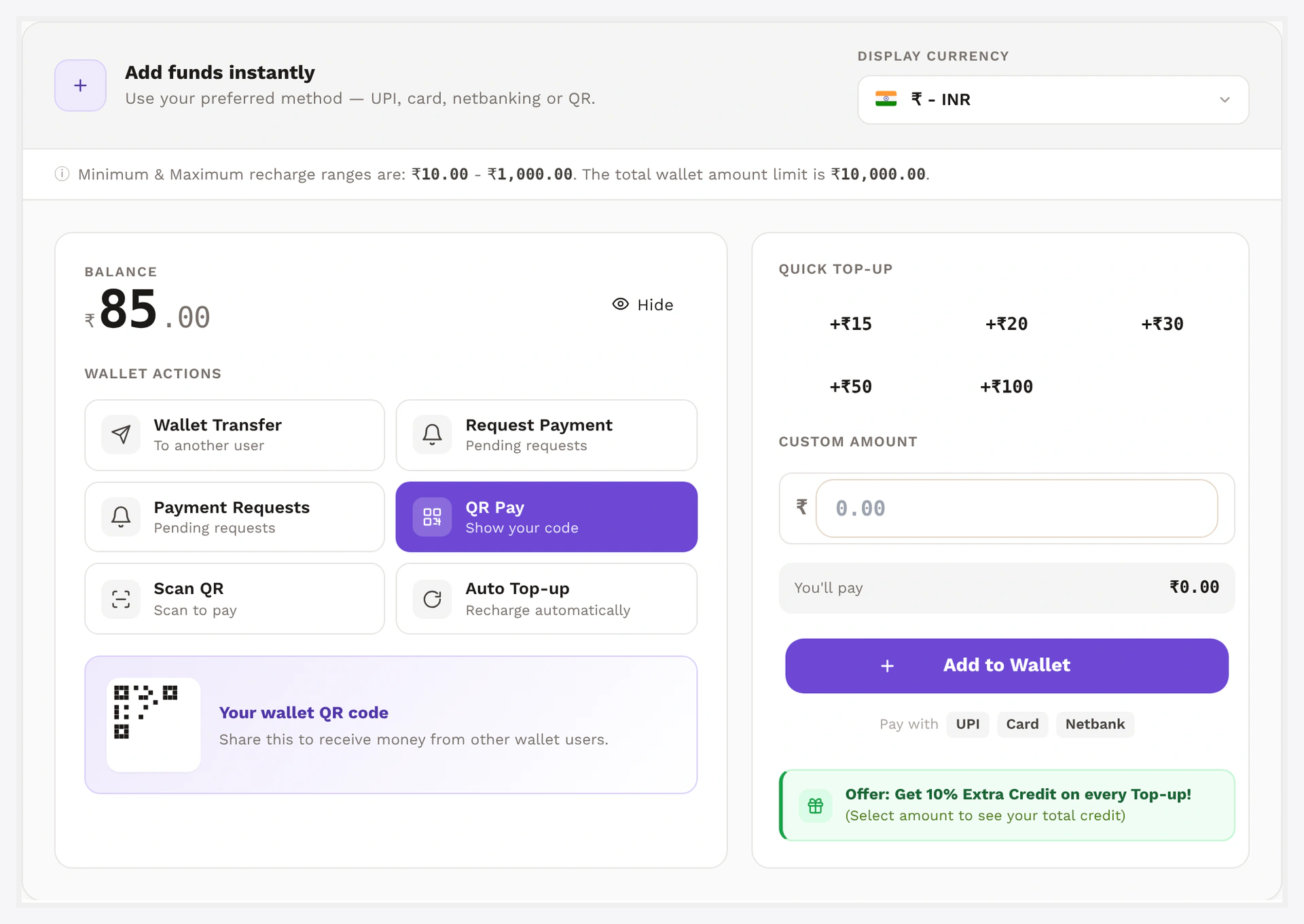
Recharge form on the legacy My Wallet page — preset chips, custom amount, submit

The Wallet Central version of the same form lives at /wallet-central/add-to-wallet/:
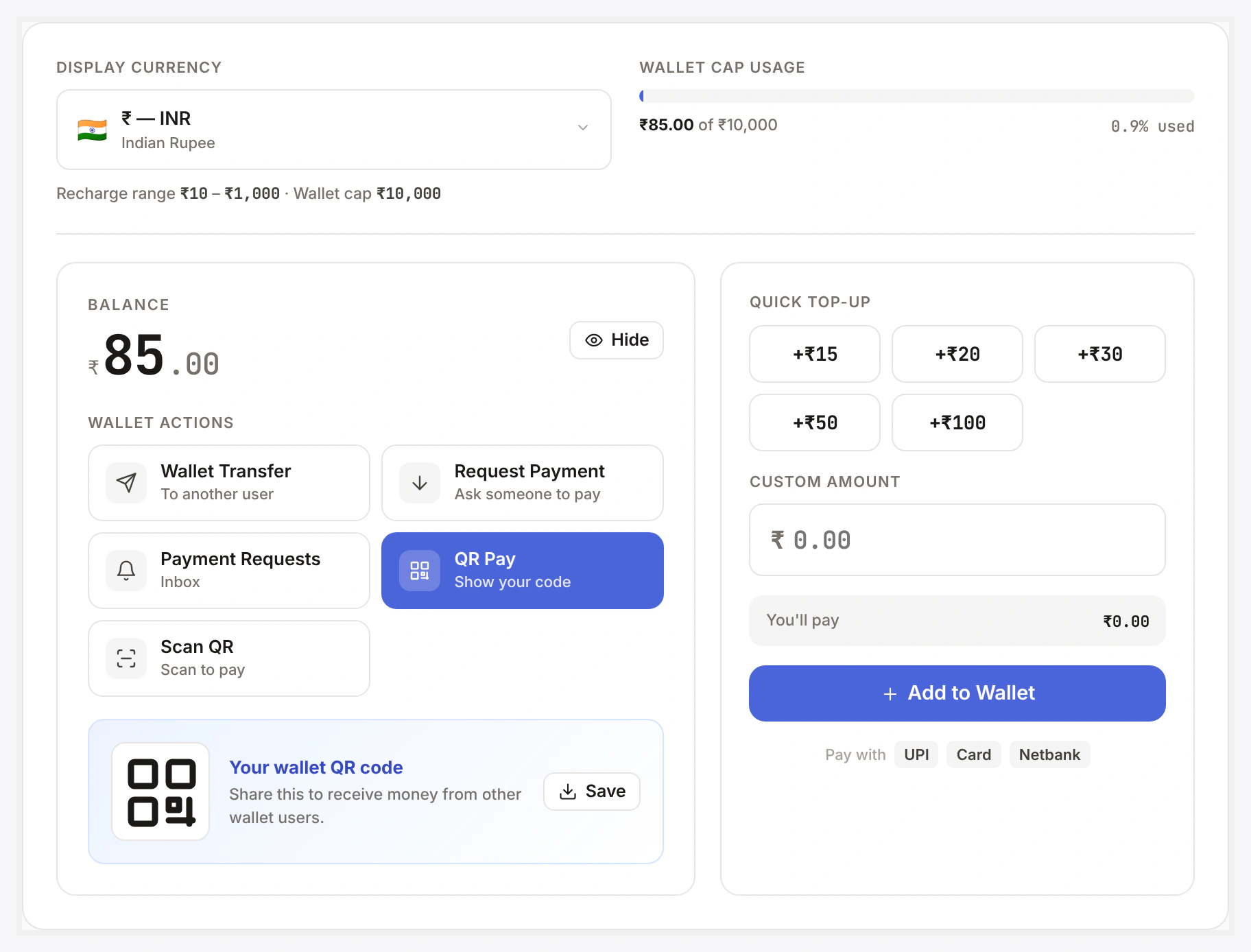
Recharge form on Wallet Central — same engine, modern UI

The Recharge Product

Auto-created when you activate the plugin: Recharge Your Wallet.

You can edit description, image, gallery, and SEO normally. Don't change the product type — it's what triggers the auto-credit.

If the product goes missing (rare): WooCommerce → Status → Tools → Wallet → Recreate recharge product.

Settings

Wallet → Settings → Recharge

SettingDefaultWhat it does
Preset chips100, 500, 1000, 2500, 5000the 6-grid of one-tap amounts
Min top-up50smallest amount allowed
Max per order25000largest single top-up
Allow custom amountONtoggle off to lock customers to presets
Auto-complete recharge ordersONflips orders to completed automatically when only recharge items
Bonus enableOFFthe optional +5% extra-credit promo
Bonus percent5the percentage when bonus is on

Auto-Complete

By default, an order containing only the recharge product flips to completed automatically — saves admin from manually approving a top-up before the credit lands.

If the cart mixes recharge with normal goods, auto-complete is skipped (you wouldn't want store credit issued before the goods ship).

Bonus

Optional. Set a percentage on top of every top-up.

The Add money panel shows a live preview:

💚 Offer: Get 5% Extra Credit on every Top-up! Pay ₹1000 and get ₹1050 in your wallet.

See Deposit / Top-up Bonus for the full feature.

Common Scenarios

Run a flash promo with double bonus

Enable bonus, set to 10 for the campaign window, change back to 5 after. Or use a small filter to time-box (see dev section in Deposit / Top-up Bonus).

Disable preset chips, force custom only

Set "Preset chips" to empty. Customer types any value within min/max.

Lock customers to preset only

Set "Allow custom amount" → OFF. Customer can only pick a chip.

Embed top-up form on a landing page

Drop the shortcode anywhere:

[wkwp_wallet_recharge presets="100,500,1000" min="50" max="10000"]

See Shortcodes.

Refund / Cancel a Recharge

ActionEffect on wallet
completed → refundedwallet debited the credited amount + bonus
Order cancellednothing — credit only applies on completed
Partial refundwallet debited the partial amount only

Reversal protection — never debits below zero. If BNPL is enabled and the customer's already spent the credit, the shortfall becomes a BNPL debt instead.

When Something Goes Wrong

ProblemFix
Recharge product missingStatus → Tools → Recreate recharge product
Order completed but balance not creditedRecharge product type was changed away from the wallet type — edit the product → set type back
Customer charged but order stuck on processingAuto-complete disabled, or cart had non-recharge items mixed in. Manually flip to completed
Custom amount input rejectedMin / max settings — check the Recharge tab
For developers — top-up + bonus internals

Auto-credit flow

Hooked on woocommerce_order_status_completed priority 10:

  1. Iterate order line items
  2. Skip non-recharge products
  3. Read the customer-typed amount from cart meta
  4. Compute total = amount × quantity (always 1 for top-ups)
  5. Apply bonus: credited = total × (1 + bonus_pct / 100) if bonus on and not already credited
  6. Call WKWP_Wallet_Core::credit()
  7. Mark _wkwp_topup_credited = yes order meta to guard against double credit
  8. Email customer (if Wallet credit notification on)

Hooks

HookTypeWhen
wkwp_wallet_topup_amountfiltermutate amount before credit
wkwp_wallet_topup_bonusfiltermutate bonus % per order
wkwp_wallet_topup_completedactionafter credit row written
wkwp_wallet_topup_reversedactionrefund / cancel reversal

Block editor

Each shortcode is also a Gutenberg block — no string typing needed.

Related

  • Core Wallet
  • Wallet Payment Gateway
  • Deposit / Top-up Bonus
  • My Wallet Page
  • Shortcodes
Prev
Wallet Payment Gateway
Next
Wallet Transfer