Wallet SystemWallet System
Buy Now
View Demo
  • Getting Started

    • Introduction
    • Quick Start
    • Features
    • Installation
    • First-Time Setup
    • Admin Tour
  • Wallet Core

    • Core Wallet
    • Wallet Payment Gateway
    • Recharge / Top-up
    • Wallet Transfer
    • My Wallet Page
    • Shortcodes
  • Earn & Reward

    • Cashback Engine
    • Referral Program
    • Multilevel Referral
    • Daily Login Reward
    • Invite Friends
    • Deposit / Top-up Bonus
  • Spend & Payout

    • Checkout Discount
    • Checkout Restriction
    • Withdrawal
    • PayPal Payout
    • Stripe Payout
    • Refund to Wallet
    • Buy Now Pay Later
  • Identity & Mobile

    • KYC
    • QR Code Payments
  • Wallet Central

    • Overview
    • Endpoint & Routing
    • CTA Discovery
    • Home Dashboard
    • Add Funds
    • Withdraw
    • Withdrawals List
    • Send Money
    • QR Pay
    • Payment Requests
    • Refer & Earn
    • Transactions
    • Settings
    • KYC Flow
    • Architecture
    • Tweaks & Responsive
    • Security
    • Admin Controls
  • Admin Tools

    • Admin Settings (index)
    • Bulk Credit / Debit
    • Analytics Dashboard
  • Settings Tabs

    • General
    • Recharge
    • Checkout
    • Withdrawal
    • Payout (PayPal/Stripe)
    • KYC
    • Cashback
    • Referral
    • Multilevel
    • BNPL
    • QR Pay
    • Notifications
    • Wallet Central
    • Integrations
    • API Keys
  • Notifications

    • Email Notifications
    • SMS Notifications
  • Developer

    • REST API
    • Filters & Hooks
  • Help

    • Troubleshooting
    • FAQ
    • Glossary
Support
Buy Now
View Demo
  • Getting Started

    • Introduction
    • Quick Start
    • Features
    • Installation
    • First-Time Setup
    • Admin Tour
  • Wallet Core

    • Core Wallet
    • Wallet Payment Gateway
    • Recharge / Top-up
    • Wallet Transfer
    • My Wallet Page
    • Shortcodes
  • Earn & Reward

    • Cashback Engine
    • Referral Program
    • Multilevel Referral
    • Daily Login Reward
    • Invite Friends
    • Deposit / Top-up Bonus
  • Spend & Payout

    • Checkout Discount
    • Checkout Restriction
    • Withdrawal
    • PayPal Payout
    • Stripe Payout
    • Refund to Wallet
    • Buy Now Pay Later
  • Identity & Mobile

    • KYC
    • QR Code Payments
  • Wallet Central

    • Overview
    • Endpoint & Routing
    • CTA Discovery
    • Home Dashboard
    • Add Funds
    • Withdraw
    • Withdrawals List
    • Send Money
    • QR Pay
    • Payment Requests
    • Refer & Earn
    • Transactions
    • Settings
    • KYC Flow
    • Architecture
    • Tweaks & Responsive
    • Security
    • Admin Controls
  • Admin Tools

    • Admin Settings (index)
    • Bulk Credit / Debit
    • Analytics Dashboard
  • Settings Tabs

    • General
    • Recharge
    • Checkout
    • Withdrawal
    • Payout (PayPal/Stripe)
    • KYC
    • Cashback
    • Referral
    • Multilevel
    • BNPL
    • QR Pay
    • Notifications
    • Wallet Central
    • Integrations
    • API Keys
  • Notifications

    • Email Notifications
    • SMS Notifications
  • Developer

    • REST API
    • Filters & Hooks
  • Help

    • Troubleshooting
    • FAQ
    • Glossary
Support
  • Getting Started

    • Introduction
    • Quick Start — Wallet Live in 5 Minutes
    • Features
    • Installation
    • First-Time Setup
    • Admin Tour
  • Wallet Core

    • Core Wallet
    • Wallet Payment Gateway
    • Recharge / Top-up
    • Wallet Transfer
    • My Wallet Page
    • Shortcodes
  • Earn & Reward

    • Cashback Engine
    • Referral Program
    • Multilevel Referral
    • Daily Login Reward
    • Invite Friends
    • Deposit / Top-up Bonus
  • Spend & Payout

    • Checkout Discount
    • Checkout Restriction
    • Withdrawal
    • PayPal Payout
    • Stripe Payout
    • Refund to Wallet
    • Buy Now Pay Later (BNPL)
  • Identity & Mobile

    • KYC (Know Your Customer)
    • QR Code Payments
  • Wallet Central

    • Wallet Central Overview
    • Endpoint & Routing
    • CTA Discovery
    • Home Dashboard
    • Add Funds
    • Withdraw
    • Withdrawals List + Detail
    • Send Money
    • QR Pay
    • Payment Requests
    • Refer & Earn
    • Transactions
    • Settings (customer)
    • KYC Flow
    • Architecture
    • Tweaks & Responsive
    • Security
    • Admin Controls
  • Admin Tools

    • Admin Settings
    • Bulk Credit / Debit
    • Analytics Dashboard
  • Settings Tabs

    • General Settings
    • Recharge Settings
    • Checkout Settings
    • Withdrawal Settings
    • Payout Settings (PayPal + Stripe)
    • KYC Settings
    • Cashback Settings
    • Referral Settings
    • Multilevel Settings
    • BNPL Settings
    • QR Pay Settings
    • Notifications Settings
    • Wallet Central Settings
    • Third-Party Integrations
    • API Keys
  • Notifications

    • Email Notifications
    • SMS Notifications
  • Developer

    • REST API
    • Filters & Hooks
  • Help

    • Troubleshooting
    • FAQ
    • Glossary

PayPal Payout

Pay out approved wallet withdrawals to a customer's PayPal email automatically.

Setting up?

Skip to Payout Settings → PayPal for the step-by-step credentials + webhook walkthrough.

What It Does

ForMeans
CustomerPicks "PayPal" as the withdrawal method, enters their PayPal email. Gets paid into PayPal once admin approves
AdminOne-click approve → plugin calls PayPal's Payouts API. No spreadsheet exports, no manual transfers

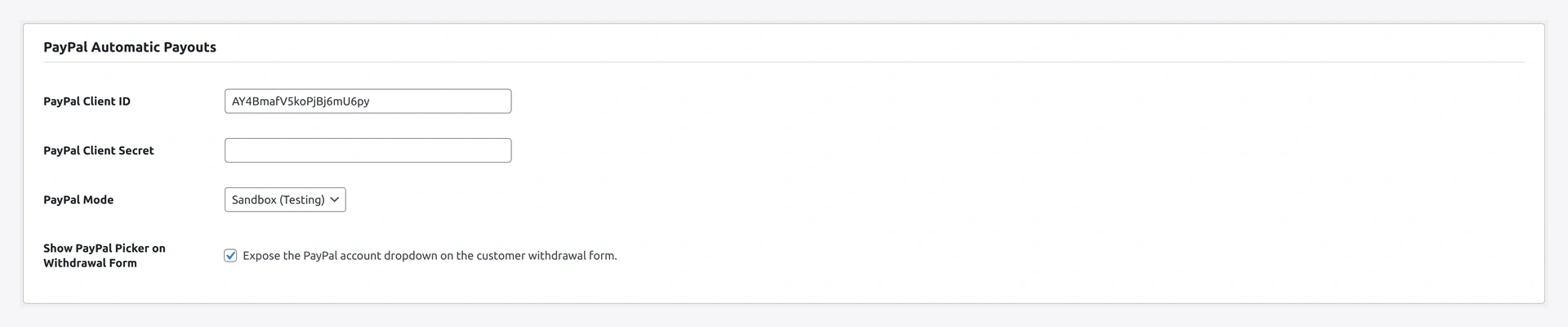
PayPal Automatic Payouts settings — client ID, secret, sandbox toggle, webhook

What You Need

  • A PayPal Business account
  • API credentials (Client ID + Secret) from your PayPal app
  • Webhook URL registered in your PayPal app (for status sync)

Setup

1. Get API credentials

  1. Log in to developer.paypal.com
  2. Apps & Credentials
  3. Create app (sandbox first, then live)
  4. Copy Client ID + Secret

2. Plugin settings

Wallet → Settings → Payout → PayPal

FieldNotes
Enabletoggle exposure on the withdrawal method radio
Modesandbox for testing / live for production
Sandbox Client IDfrom your sandbox app
Sandbox Secretfrom your sandbox app
Live Client IDfrom your live app
Live Secretfrom your live app
Currencybase currency for payouts
Sender batch prefixe.g. WK-WDRW- (helps reconcile in PayPal dashboard)
Webhook URLshown read-only — copy into PayPal app webhooks

3. Register the webhook

In your PayPal app settings → Webhooks → add the URL the plugin shows. Subscribe to:

  • PAYMENT.PAYOUTS-ITEM.SUCCEEDED
  • PAYMENT.PAYOUTS-ITEM.FAILED
  • PAYMENT.PAYOUTS-ITEM.REFUNDED
  • PAYMENT.PAYOUTS-ITEM.RETURNED
  • PAYMENT.PAYOUTS-ITEM.UNCLAIMED

PayPal will POST to that URL on each event — plugin auto-updates the matching withdrawal status.

How Approval Works

When admin clicks Approve on a PayPal-method withdrawal:

  1. Plugin calls PayPal Payouts with the customer's amount + email
  2. PayPal returns batch + item IDs (saved for reconciliation)
  3. Status flips pending → approved
  4. When PayPal webhook fires PAYMENT.PAYOUTS-ITEM.SUCCEEDED → status flips to paid
  5. On failure → status failed, admin can retry

Sandbox vs Live

ModeUse forCustomer email
sandboxdev / stagingsandbox personal accounts (created in developer dashboard)
liveproductionreal PayPal email of the customer

Mode mismatch

Sandbox creds with live mode (or vice versa) → "Authentication failed (invalid_client)" error. The plugin guards against the mistake by validating the token endpoint on save.

Currency

PayPal Payouts requires the payout currency to match the receiver's PayPal account, OR the sender's account must support cross-currency payouts.

If a mismatch happens:

  • PayPal returns RECEIVER_CURRENCY_MISMATCH or RECEIVER_UNREGISTERED
  • Plugin marks the row failed
  • Admin can reject → refund → ask customer to fix

Sender Balance Required

PayPal Payouts withdraw from your PayPal Business balance. Top up your PayPal account before approving large withdrawals — failure mode is INSUFFICIENT_FUNDS.

Reconciliation

The plugin tags every payout with the sender batch ID prefix you set. Easy to find a payout in your PayPal dashboard:

search PayPal dashboard for: WK-WDRW-

Or pull from the database:

SELECT id, amount, fee, JSON_EXTRACT(error, '$.payout_batch_id') AS paypal_batch
FROM wp_wkwc_wallet_withdrawal
WHERE status = 'paid' AND method = 'paypal'
  AND paid_at >= '2026-04-01';

When Something Goes Wrong

ProblemFix
Authentication failed (invalid_client)Sandbox creds in live mode, or vice versa. Re-check Mode toggle
RECEIVER_UNREGISTEREDCustomer has no PayPal account at that email. Reject + ask customer to update
INSUFFICIENT_FUNDSYour PayPal Business balance too low. Top up + retry from the row drawer
Webhook never firesURL not registered in PayPal app, OR firewall blocking PayPal's IPs
Status stuck on approvedWebhook URL wrong, or events not subscribed. Re-register events
For developers — hooks + reconciliation

Hooks

HookTypeWhen
wkwp_paypal_payout_request_bodyfiltermutate the JSON body before send
wkwp_paypal_payout_responseactionafter PayPal API response
wkwp_paypal_webhook_eventactionevery webhook event received

API call shape

POST /v1/payments/payouts
{
  "sender_batch_header": {
    "sender_batch_id": "WK-WDRW-<row_id>",
    "email_subject": "<subject>"
  },
  "items": [{
    "recipient_type": "EMAIL",
    "amount": { "value": "X.XX", "currency": "USD" },
    "receiver": "[email protected]",
    "note": "Withdrawal #<row_id>"
  }]
}

Response stored on the withdrawal row's metadata for reconciliation.

Related

  • Withdrawal
  • Stripe Payout
  • Admin Settings
Prev
Withdrawal
Next
Stripe Payout