
Wallet SystemWallet System
Buy Now
View Demo
  • Getting Started

    • Introduction
    • Quick Start
    • Features
    • Installation
    • First-Time Setup
    • Admin Tour
  • Wallet Core

    • Core Wallet
    • Wallet Payment Gateway
    • Recharge / Top-up
    • Wallet Transfer
    • My Wallet Page
    • Shortcodes
  • Earn & Reward

    • Cashback Engine
    • Referral Program
    • Multilevel Referral
    • Daily Login Reward
    • Invite Friends
    • Deposit / Top-up Bonus
  • Spend & Payout

    • Checkout Discount
    • Checkout Restriction
    • Withdrawal
    • PayPal Payout
    • Stripe Payout
    • Refund to Wallet
    • Buy Now Pay Later
  • Identity & Mobile

    • KYC
    • QR Code Payments
  • Wallet Central

    • Overview
    • Endpoint & Routing
    • CTA Discovery
    • Home Dashboard
    • Add Funds
    • Withdraw
    • Withdrawals List
    • Send Money
    • QR Pay
    • Payment Requests
    • Refer & Earn
    • Transactions
    • Settings
    • KYC Flow
    • Architecture
    • Tweaks & Responsive
    • Security
    • Admin Controls
  • Admin Tools

    • Admin Settings (index)
    • Bulk Credit / Debit
    • Analytics Dashboard
  • Settings Tabs

    • General
    • Recharge
    • Checkout
    • Withdrawal
    • Payout (PayPal/Stripe)
    • KYC
    • Cashback
    • Referral
    • Multilevel
    • BNPL
    • QR Pay
    • Notifications
    • Wallet Central
    • Integrations
    • API Keys
  • Notifications

    • Email Notifications
    • SMS Notifications
  • Developer

    • REST API
    • Filters & Hooks
  • Help

    • Troubleshooting
    • FAQ
    • Glossary
Support
Buy Now
View Demo
  • Getting Started

    • Introduction
    • Quick Start
    • Features
    • Installation
    • First-Time Setup
    • Admin Tour
  • Wallet Core

    • Core Wallet
    • Wallet Payment Gateway
    • Recharge / Top-up
    • Wallet Transfer
    • My Wallet Page
    • Shortcodes
  • Earn & Reward

    • Cashback Engine
    • Referral Program
    • Multilevel Referral
    • Daily Login Reward
    • Invite Friends
    • Deposit / Top-up Bonus
  • Spend & Payout

    • Checkout Discount
    • Checkout Restriction
    • Withdrawal
    • PayPal Payout
    • Stripe Payout
    • Refund to Wallet
    • Buy Now Pay Later
  • Identity & Mobile

    • KYC
    • QR Code Payments
  • Wallet Central

    • Overview
    • Endpoint & Routing
    • CTA Discovery
    • Home Dashboard
    • Add Funds
    • Withdraw
    • Withdrawals List
    • Send Money
    • QR Pay
    • Payment Requests
    • Refer & Earn
    • Transactions
    • Settings
    • KYC Flow
    • Architecture
    • Tweaks & Responsive
    • Security
    • Admin Controls
  • Admin Tools

    • Admin Settings (index)
    • Bulk Credit / Debit
    • Analytics Dashboard
  • Settings Tabs

    • General
    • Recharge
    • Checkout
    • Withdrawal
    • Payout (PayPal/Stripe)
    • KYC
    • Cashback
    • Referral
    • Multilevel
    • BNPL
    • QR Pay
    • Notifications
    • Wallet Central
    • Integrations
    • API Keys
  • Notifications

    • Email Notifications
    • SMS Notifications
  • Developer

    • REST API
    • Filters & Hooks
  • Help

    • Troubleshooting
    • FAQ
    • Glossary
Support
  • Getting Started

    • Introduction
    • Quick Start — Wallet Live in 5 Minutes
    • Features
    • Installation
    • First-Time Setup
    • Admin Tour
  • Wallet Core

    • Core Wallet
    • Wallet Payment Gateway
    • Recharge / Top-up
    • Wallet Transfer
    • My Wallet Page
    • Shortcodes
  • Earn & Reward

    • Cashback Engine
    • Referral Program
    • Multilevel Referral
    • Daily Login Reward
    • Invite Friends
    • Deposit / Top-up Bonus
  • Spend & Payout

    • Checkout Discount
    • Checkout Restriction
    • Withdrawal
    • PayPal Payout
    • Stripe Payout
    • Refund to Wallet
    • Buy Now Pay Later (BNPL)
  • Identity & Mobile

    • KYC (Know Your Customer)
    • QR Code Payments
  • Wallet Central

    • Wallet Central Overview
    • Endpoint & Routing
    • CTA Discovery
    • Home Dashboard
    • Add Funds
    • Withdraw
    • Withdrawals List + Detail
    • Send Money
    • QR Pay
    • Payment Requests
    • Refer & Earn
    • Transactions
    • Settings (customer)
    • KYC Flow
    • Architecture
    • Tweaks & Responsive
    • Security
    • Admin Controls
  • Admin Tools

    • Admin Settings
    • Bulk Credit / Debit
    • Analytics Dashboard
  • Settings Tabs

    • General Settings
    • Recharge Settings
    • Checkout Settings
    • Withdrawal Settings
    • Payout Settings (PayPal + Stripe)
    • KYC Settings
    • Cashback Settings
    • Referral Settings
    • Multilevel Settings
    • BNPL Settings
    • QR Pay Settings
    • Notifications Settings
    • Wallet Central Settings
    • Third-Party Integrations
    • API Keys
  • Notifications

    • Email Notifications
    • SMS Notifications
  • Developer

    • REST API
    • Filters & Hooks
  • Help

    • Troubleshooting
    • FAQ
    • Glossary

Installation

Requirements

  • WordPress 6.0+
  • WooCommerce 10.0+ (active)
  • PHP 7.4+ (8.3 tested)
  • MySQL 5.6+ / MariaDB 10.1+
  • php-mbstring, php-curl, php-gd enabled

What Activation Will Do

The plugin runs an installer on first activation. It:

  1. Creates 11 custom DB tables (ledger, history, withdrawals, KYC, referral, BNPL, etc.)
  2. Auto-creates the Recharge Your Wallet WooCommerce product (type wkwc_wallet)
  3. Registers the wallet payment gateway under WooCommerce → Settings → Payments
  4. Adds the My Wallet endpoint at /my-account/my_wallet/
  5. Boots the multi-version wk_caching loader and wkwc-addons admin hub
  6. Writes default option rows under wp_options

After activation, find the wallet under WooCommerce → Webkul Addons → Wallet → Customer Wallet:
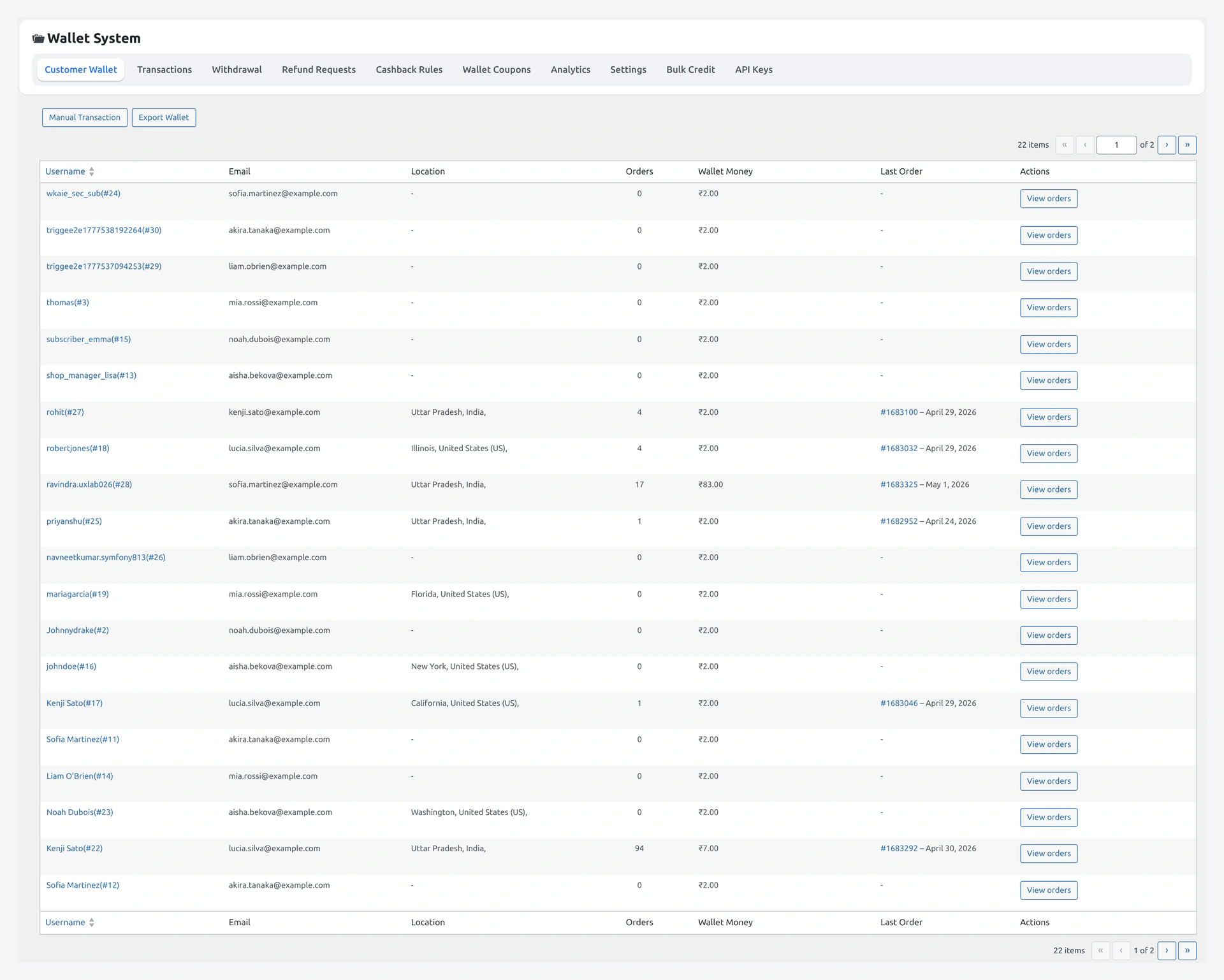
Customer Wallet hub — first thing you see after activating the plugin

Multisite

On a multisite network the installer fires per blog. If you network-activate, every site gets its own ledger tables. This is expected — wallet balances do not bridge across sites.

Method 1 — WordPress Admin (recommended)

  1. Download wp-wallet-system.zip from your Webkul account or the store
  2. Plugins → Add New → Upload Plugin
  3. Choose wp-wallet-system.zip
  4. Click Install Now
  5. Click Activate Plugin

You should land on the Wallet → Dashboard screen.

Method 2 — FTP / SFTP

  1. Unzip wp-wallet-system.zip locally
  2. Upload the wp-wallet-system folder to wp-content/plugins/
  3. Set permissions to 755 for folders and 644 for files
  4. Plugins → Installed Plugins → activate WooCommerce Wallet System

Method 3 — Composer (developer)

composer require webkul/wallet-system

If you self-host the package on a private Composer repo, point to it in composer.json:

{
  "repositories": [
    { "type": "vcs", "url": "[email protected]:webkul/wallet-system.git" }
  ]
}

Post-Activation Checks

Run through this list right after activation.

CheckWhereExpected
Tables createdphpMyAdmin or SHOW TABLES LIKE 'wp_wkwc_%'At least 11 wkwc_* / wkwp_* tables
Recharge product existsProducts → All ProductsRecharge Your Wallet (type Wallet Recharge)
Gateway registeredWooCommerce → Settings → PaymentsWallet row visible (toggle off by default)
My Wallet endpoint/my-account/my_wallet/ (logged in as customer)Wallet dashboard renders
Admin menusidebarWebkul Addons → Wallet with sub-pages

If any of these is missing → see Troubleshooting.

Permalink Refresh

The plugin adds the my_wallet WC endpoint. If it 404s, flush rewrite rules:

  1. Settings → Permalinks
  2. Click Save Changes (no edits needed — just re-saves the rules)

Disable Other Wallet / Refund / Gift Plugins

Run only one wallet plugin at a time. Common conflicts:

  • TeraWallet
  • Smart Coupons (refund-to-credit feature)
  • WooCommerce Smart Refunder
  • YITH WooCommerce Account Funds

Deactivate them before activating Wallet System. Migrate balances afterwards via Bulk Credit / Debit.

Server / Host Notes

HostNote
Cloudways / Kinsta / WP EngineOPcache reset triggers automatically on plugin activation
Shared hosting (Hostinger / Bluehost)wp-config.php WP_MEMORY_LIMIT should be at least 256M
NginxConfirm try_files $uri $uri/ /index.php?$args; is in the server block — the My Wallet endpoint depends on it
CloudflareBypass cache on /my-account/* (no Page Rule needed if Logged-in users bypass cache is on)

Updates

Updates ship through the bundled modules/wk-plugin-updates v1.5.4 module — supports both Webkul store license and Envato item key.

SourceField
Webkul storeLicense key under Wallet → License
Envato MarketplacePersonal Token + item ID

Once configured, Dashboard → Updates shows new versions. Auto-update is supported.

Uninstall

Deactivation does not drop the ledger tables — wallet balances are preserved if you reactivate later. To fully wipe:

  1. Deactivate the plugin
  2. Drop the wp_wkwc_* and wp_wkwp_* tables manually
  3. Delete the _wkwc_wallet_amount, _wkwp_* user meta rows
  4. Delete the plugin folder

Caution

There is no "delete data on uninstall" toggle. Drop the tables manually only if you are sure no customer balance is left unspent.

Next Steps

  • First-Time Setup — flip the right toggles
  • Admin Tour — walk every wallet admin screen
  • Quick Start — first end-to-end transaction
Prev
Features
Next
First-Time Setup