
Wallet SystemWallet System
Buy Now
View Demo
  • Getting Started

    • Introduction
    • Quick Start
    • Features
    • Installation
    • First-Time Setup
    • Admin Tour
  • Wallet Core

    • Core Wallet
    • Wallet Payment Gateway
    • Recharge / Top-up
    • Wallet Transfer
    • My Wallet Page
    • Shortcodes
  • Earn & Reward

    • Cashback Engine
    • Referral Program
    • Multilevel Referral
    • Daily Login Reward
    • Invite Friends
    • Deposit / Top-up Bonus
  • Spend & Payout

    • Checkout Discount
    • Checkout Restriction
    • Withdrawal
    • PayPal Payout
    • Stripe Payout
    • Refund to Wallet
    • Buy Now Pay Later
  • Identity & Mobile

    • KYC
    • QR Code Payments
  • Wallet Central

    • Overview
    • Endpoint & Routing
    • CTA Discovery
    • Home Dashboard
    • Add Funds
    • Withdraw
    • Withdrawals List
    • Send Money
    • QR Pay
    • Payment Requests
    • Refer & Earn
    • Transactions
    • Settings
    • KYC Flow
    • Architecture
    • Tweaks & Responsive
    • Security
    • Admin Controls
  • Admin Tools

    • Admin Settings (index)
    • Bulk Credit / Debit
    • Analytics Dashboard
  • Settings Tabs

    • General
    • Recharge
    • Checkout
    • Withdrawal
    • Payout (PayPal/Stripe)
    • KYC
    • Cashback
    • Referral
    • Multilevel
    • BNPL
    • QR Pay
    • Notifications
    • Wallet Central
    • Integrations
    • API Keys
  • Notifications

    • Email Notifications
    • SMS Notifications
  • Developer

    • REST API
    • Filters & Hooks
  • Help

    • Troubleshooting
    • FAQ
    • Glossary
Support
Buy Now
View Demo
  • Getting Started

    • Introduction
    • Quick Start
    • Features
    • Installation
    • First-Time Setup
    • Admin Tour
  • Wallet Core

    • Core Wallet
    • Wallet Payment Gateway
    • Recharge / Top-up
    • Wallet Transfer
    • My Wallet Page
    • Shortcodes
  • Earn & Reward

    • Cashback Engine
    • Referral Program
    • Multilevel Referral
    • Daily Login Reward
    • Invite Friends
    • Deposit / Top-up Bonus
  • Spend & Payout

    • Checkout Discount
    • Checkout Restriction
    • Withdrawal
    • PayPal Payout
    • Stripe Payout
    • Refund to Wallet
    • Buy Now Pay Later
  • Identity & Mobile

    • KYC
    • QR Code Payments
  • Wallet Central

    • Overview
    • Endpoint & Routing
    • CTA Discovery
    • Home Dashboard
    • Add Funds
    • Withdraw
    • Withdrawals List
    • Send Money
    • QR Pay
    • Payment Requests
    • Refer & Earn
    • Transactions
    • Settings
    • KYC Flow
    • Architecture
    • Tweaks & Responsive
    • Security
    • Admin Controls
  • Admin Tools

    • Admin Settings (index)
    • Bulk Credit / Debit
    • Analytics Dashboard
  • Settings Tabs

    • General
    • Recharge
    • Checkout
    • Withdrawal
    • Payout (PayPal/Stripe)
    • KYC
    • Cashback
    • Referral
    • Multilevel
    • BNPL
    • QR Pay
    • Notifications
    • Wallet Central
    • Integrations
    • API Keys
  • Notifications

    • Email Notifications
    • SMS Notifications
  • Developer

    • REST API
    • Filters & Hooks
  • Help

    • Troubleshooting
    • FAQ
    • Glossary
Support
  • Getting Started

    • Introduction
    • Quick Start — Wallet Live in 5 Minutes
    • Features
    • Installation
    • First-Time Setup
    • Admin Tour
  • Wallet Core

    • Core Wallet
    • Wallet Payment Gateway
    • Recharge / Top-up
    • Wallet Transfer
    • My Wallet Page
    • Shortcodes
  • Earn & Reward

    • Cashback Engine
    • Referral Program
    • Multilevel Referral
    • Daily Login Reward
    • Invite Friends
    • Deposit / Top-up Bonus
  • Spend & Payout

    • Checkout Discount
    • Checkout Restriction
    • Withdrawal
    • PayPal Payout
    • Stripe Payout
    • Refund to Wallet
    • Buy Now Pay Later (BNPL)
  • Identity & Mobile

    • KYC (Know Your Customer)
    • QR Code Payments
  • Wallet Central

    • Wallet Central Overview
    • Endpoint & Routing
    • CTA Discovery
    • Home Dashboard
    • Add Funds
    • Withdraw
    • Withdrawals List + Detail
    • Send Money
    • QR Pay
    • Payment Requests
    • Refer & Earn
    • Transactions
    • Settings (customer)
    • KYC Flow
    • Architecture
    • Tweaks & Responsive
    • Security
    • Admin Controls
  • Admin Tools

    • Admin Settings
    • Bulk Credit / Debit
    • Analytics Dashboard
  • Settings Tabs

    • General Settings
    • Recharge Settings
    • Checkout Settings
    • Withdrawal Settings
    • Payout Settings (PayPal + Stripe)
    • KYC Settings
    • Cashback Settings
    • Referral Settings
    • Multilevel Settings
    • BNPL Settings
    • QR Pay Settings
    • Notifications Settings
    • Wallet Central Settings
    • Third-Party Integrations
    • API Keys
  • Notifications

    • Email Notifications
    • SMS Notifications
  • Developer

    • REST API
    • Filters & Hooks
  • Help

    • Troubleshooting
    • FAQ
    • Glossary

Home Dashboard

The default landing page at /wallet-central/. Designed like a banking app — balance hero, quick actions, recent activity at a glance.

What It Does

ForMeans
CustomerSingle screen for everything wallet — balance, top up, send, withdraw, scan QR, recent activity
AdminConfigurable hero, density, side-rail cards. Customers can also customise via the Tweaks panel

What Customers See

┌──────────────────────────────────────────────────────────┐
│  Sidebar       │  KPIs strip (4 cards)                  │
│                ├────────────────────────────────────────┤
│  Wallet        │  Hero (balance + masked wallet ID)     │
│  Transactions  ├────────────────────────────────────────┤
│  Send          │  Action grid 2×2  │ Quick top-up       │
│  Withdraw      │  [Add money]      │ [Preset chips]     │
│  QR            │  [Send] [Withdraw]│ [Custom amount]    │
│  Refer & earn  │  [Redeem]         │ [Add to Wallet]    │
│  Settings      ├───────────────────┼────────────────────┤
│  KYC           │  Recent activity  │ Pending requests   │
│                │                   │ Saved payees       │
│                │                   │ Linked accounts    │
│                │                   │ Daily limits       │
│                │                   │ Refundable orders  │
│                │  Help strip                            │
└──────────────────────────────────────────────────────────┘
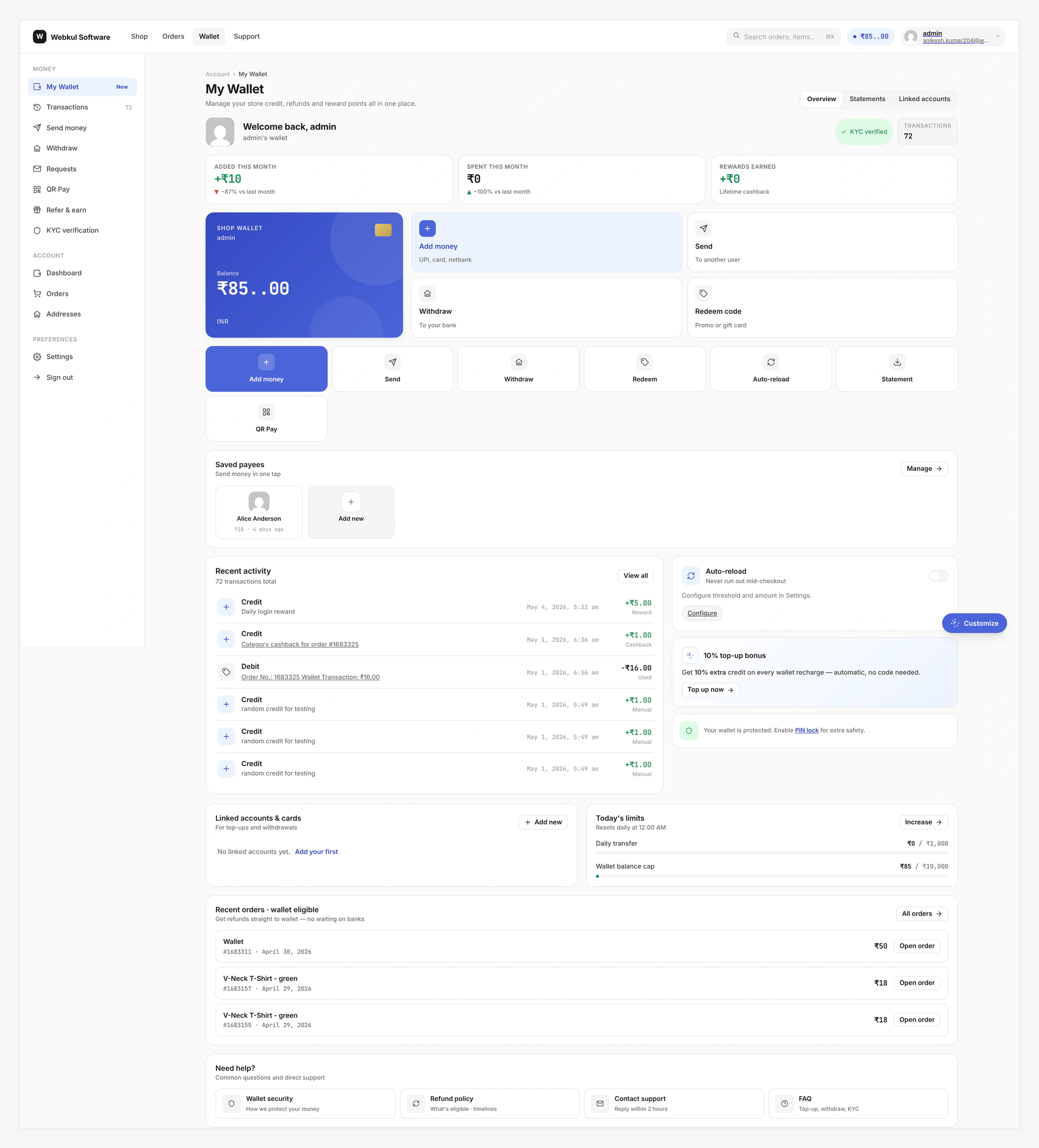
Wallet Central home — full landing page at /wallet-central/

The top header — breadcrumb, title, and segmented tabs (Overview / Statements / Linked accounts):

Wallet Central header — breadcrumb, page title, segmented tabs

The greeting card — avatar, welcome line, KYC pill, transactions stat:

Greeting card — avatar, welcome, KYC pill, transactions count

KPIs Strip

Four cards at the top:

CardWhat it shows
BalanceCurrent wallet balance
30-day creditedAll money flowing in over the window
30-day debitedAll money flowing out
Pending requestsIncoming + sent payment requests waiting

Click any card → drills into the relevant view.

KPIs strip — Balance / 30-day credited / 30-day debited / Pending

Hero Variants

Customers can switch the hero look via the Tweaks panel:

VariantLook
A · Big numberCentred huge balance + hide / show toggle, no decoration
B · Credit card (default)Brand strip + masked wallet ID + balance + currency chip — modern fintech
C · Wide barSingle-row strip with balance + KPIs inline — densest

Persisted in browser localStorage.

Hero card (default variant B) — brand strip, balance, masked wallet ID, currency chip

Action Grid

Four big buttons:

TileGoes toLocked when
Add moneyAdd Funds viewalways available
SendSend Money viewKYC required + not approved, OR transfer-locked
WithdrawWithdraw viewKYC required + not approved
QR PayQR Pay viewKYC required + not approved

Locked tiles show dimmed with a "KYC" pill — clicking still navigates so the customer sees the locked card with "Verify KYC" CTA.

Action grid — Add money, Send, Withdraw, QR Pay

Quick Top-up Panel

Mini Add Funds form right on the home view. Preset chips + custom amount + Submit. Same flow as the full Add Funds view, just inline.

Recent Activity

Top 10 ledger rows with iconised type, amount, date, related order link. "View all" → full Transactions.

Filter chips: All / Credit / Debit / Refund / Transfer.
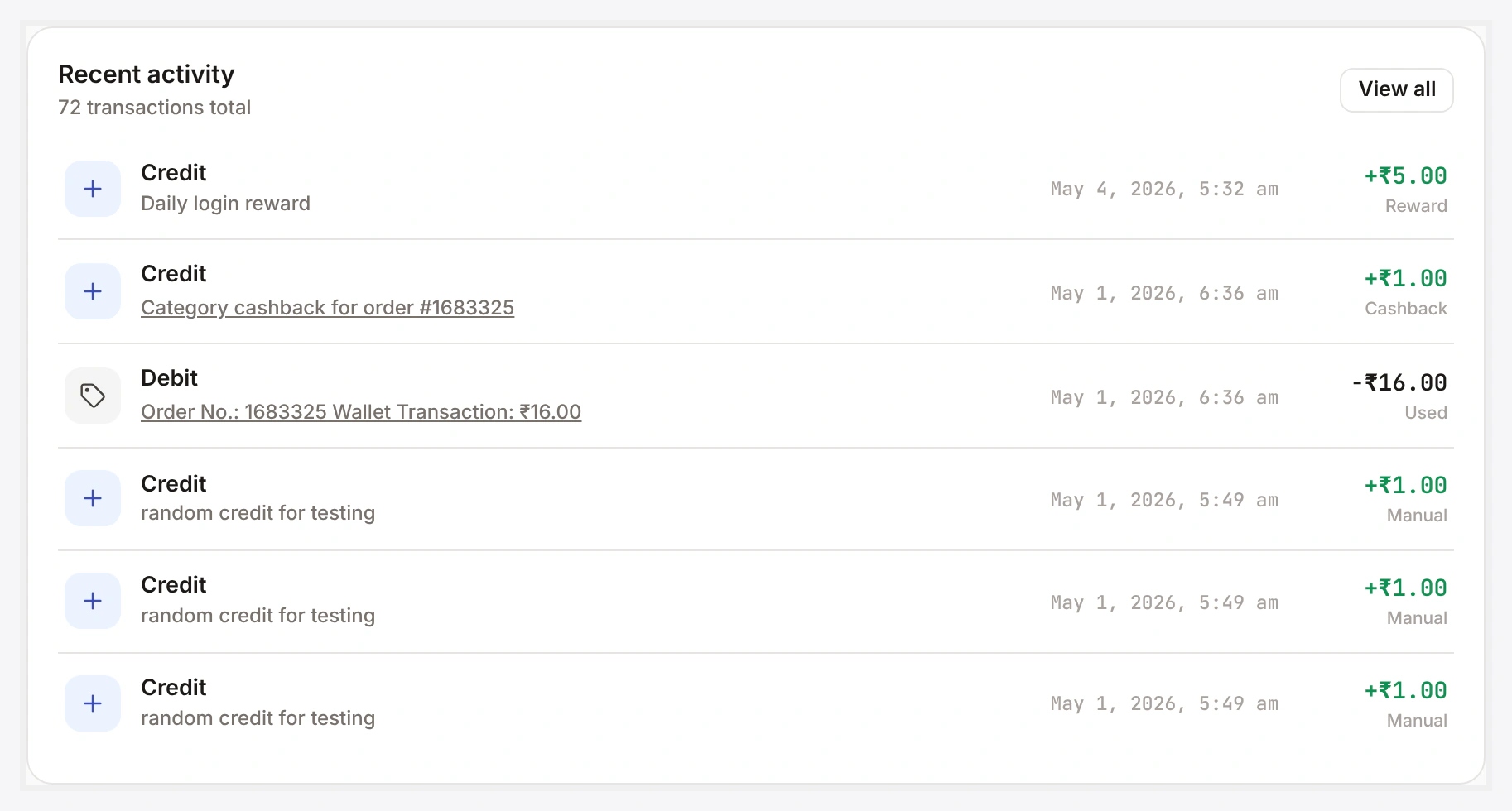
Recent activity card — title, view-all, filter chips, transaction rows

Right-Rail Cards

On wider viewports, a stacked column on the right with:

Pending Requests

Up to 5 incoming pending payment requests with Approve / Decline inline buttons. See Payment Requests.

Saved Payees

Last 5 transfer recipients. Tap to pre-fill Send form.

Linked Accounts

Bank / PayPal / Stripe presence indicator. Click → edit.

Daily Limits

Progress bars showing today's transfer / withdrawal / top-up usage against admin caps.

Refundable Orders

Last 5 completed orders eligible for refund-to-wallet request. Inline "Request refund" button.
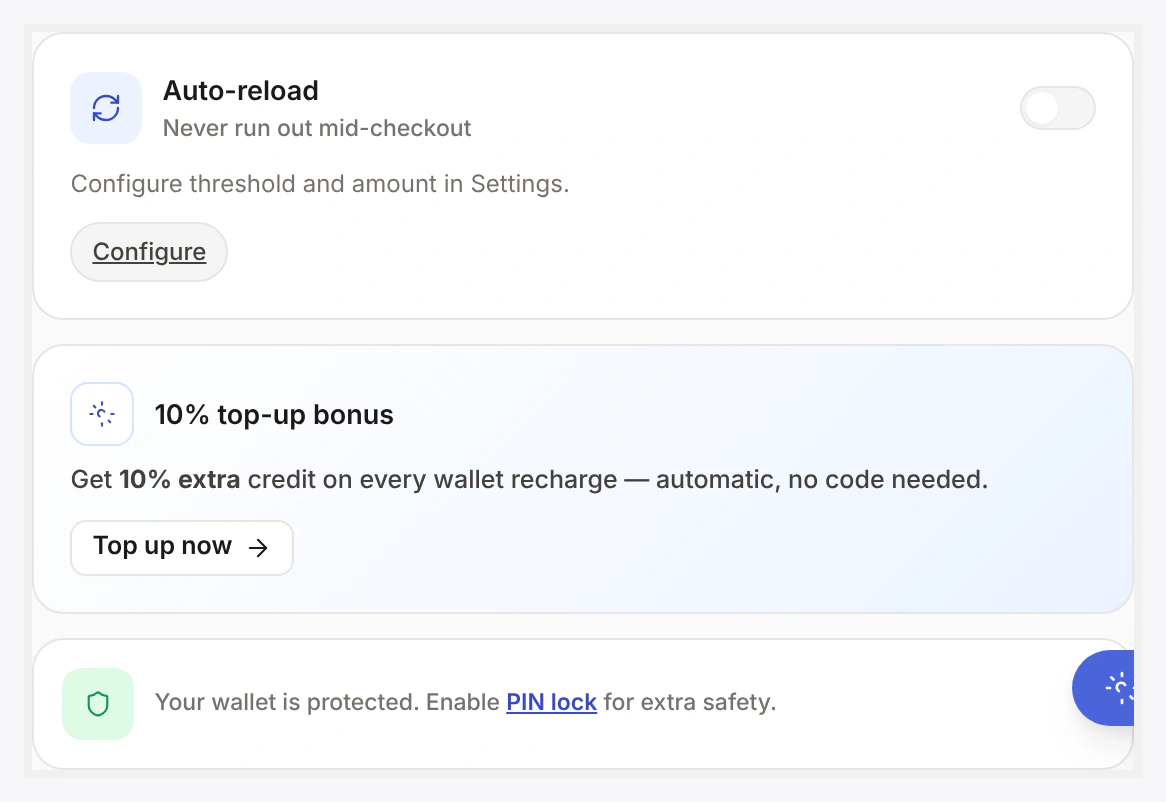
Right-rail stack — pending requests, saved payees, linked accounts, daily limits, refundable orders

Help Strip

Bottom of the view:

PillTarget
FAQopens the FAQ inline
Supportexternal — your support URL
Admin(admin only) WC settings page in new tab

Common Scenarios

Customer wants to do everything from one screen

Default home view already has all main actions on one screen. They never need to leave for top-up / send / withdraw / scan.

Hide the right rail entirely

Each side-rail card has an admin toggle. Or hide the rail wholesale via a one-line filter (see dev section).

Add a custom KPI card

Use the KPI filter to inject your own card (see dev section).

When Something Goes Wrong

ProblemFix
Balance shows stale valueStale cache — Wallet → Status → Tools → Wallet → Clear cache
Action tile dimmed unexpectedlyKYC required and not approved, or feature disabled in admin
Right rail missing on mobileExpected — collapses below content on viewports < 1024px
For developers — hooks

Hooks

HookTypeWhen
wkwp_central_home_kpi_cardsfiltermutate KPI list
wkwp_central_home_hero_variant_defaultfilterper-user default variant
wkwp_central_home_action_tilesfiltermutate action grid
wkwp_central_home_right_rail_cardsfiltermutate side-rail card order / visibility

Hide right rail

add_filter( 'wkwp_central_home_right_rail_cards', '__return_empty_array' );

Custom KPI card

add_filter( 'wkwp_central_home_kpi_cards', function( $cards ) {
    $cards[] = [
        'label' => 'Avg topup',
        'value' => wc_price( 250 ),
        'href'  => WKWP_Central_Router::url( 'transactions', [ 'type' => 'credit' ] ),
    ];
    return $cards;
} );

Related

  • Add Funds
  • Transactions
  • Tweaks & Responsive
Prev
CTA Discovery
Next
Add Funds
