
Wallet SystemWallet System
Buy Now
View Demo
  • Getting Started

    • Introduction
    • Quick Start
    • Features
    • Installation
    • First-Time Setup
    • Admin Tour
  • Wallet Core

    • Core Wallet
    • Wallet Payment Gateway
    • Recharge / Top-up
    • Wallet Transfer
    • My Wallet Page
    • Shortcodes
  • Earn & Reward

    • Cashback Engine
    • Referral Program
    • Multilevel Referral
    • Daily Login Reward
    • Invite Friends
    • Deposit / Top-up Bonus
  • Spend & Payout

    • Checkout Discount
    • Checkout Restriction
    • Withdrawal
    • PayPal Payout
    • Stripe Payout
    • Refund to Wallet
    • Buy Now Pay Later
  • Identity & Mobile

    • KYC
    • QR Code Payments
  • Wallet Central

    • Overview
    • Endpoint & Routing
    • CTA Discovery
    • Home Dashboard
    • Add Funds
    • Withdraw
    • Withdrawals List
    • Send Money
    • QR Pay
    • Payment Requests
    • Refer & Earn
    • Transactions
    • Settings
    • KYC Flow
    • Architecture
    • Tweaks & Responsive
    • Security
    • Admin Controls
  • Admin Tools

    • Admin Settings (index)
    • Bulk Credit / Debit
    • Analytics Dashboard
  • Settings Tabs

    • General
    • Recharge
    • Checkout
    • Withdrawal
    • Payout (PayPal/Stripe)
    • KYC
    • Cashback
    • Referral
    • Multilevel
    • BNPL
    • QR Pay
    • Notifications
    • Wallet Central
    • Integrations
    • API Keys
  • Notifications

    • Email Notifications
    • SMS Notifications
  • Developer

    • REST API
    • Filters & Hooks
  • Help

    • Troubleshooting
    • FAQ
    • Glossary
Support
Buy Now
View Demo
  • Getting Started

    • Introduction
    • Quick Start
    • Features
    • Installation
    • First-Time Setup
    • Admin Tour
  • Wallet Core

    • Core Wallet
    • Wallet Payment Gateway
    • Recharge / Top-up
    • Wallet Transfer
    • My Wallet Page
    • Shortcodes
  • Earn & Reward

    • Cashback Engine
    • Referral Program
    • Multilevel Referral
    • Daily Login Reward
    • Invite Friends
    • Deposit / Top-up Bonus
  • Spend & Payout

    • Checkout Discount
    • Checkout Restriction
    • Withdrawal
    • PayPal Payout
    • Stripe Payout
    • Refund to Wallet
    • Buy Now Pay Later
  • Identity & Mobile

    • KYC
    • QR Code Payments
  • Wallet Central

    • Overview
    • Endpoint & Routing
    • CTA Discovery
    • Home Dashboard
    • Add Funds
    • Withdraw
    • Withdrawals List
    • Send Money
    • QR Pay
    • Payment Requests
    • Refer & Earn
    • Transactions
    • Settings
    • KYC Flow
    • Architecture
    • Tweaks & Responsive
    • Security
    • Admin Controls
  • Admin Tools

    • Admin Settings (index)
    • Bulk Credit / Debit
    • Analytics Dashboard
  • Settings Tabs

    • General
    • Recharge
    • Checkout
    • Withdrawal
    • Payout (PayPal/Stripe)
    • KYC
    • Cashback
    • Referral
    • Multilevel
    • BNPL
    • QR Pay
    • Notifications
    • Wallet Central
    • Integrations
    • API Keys
  • Notifications

    • Email Notifications
    • SMS Notifications
  • Developer

    • REST API
    • Filters & Hooks
  • Help

    • Troubleshooting
    • FAQ
    • Glossary
Support
  • Getting Started

    • Introduction
    • Quick Start — Wallet Live in 5 Minutes
    • Features
    • Installation
    • First-Time Setup
    • Admin Tour
  • Wallet Core

    • Core Wallet
    • Wallet Payment Gateway
    • Recharge / Top-up
    • Wallet Transfer
    • My Wallet Page
    • Shortcodes
  • Earn & Reward

    • Cashback Engine
    • Referral Program
    • Multilevel Referral
    • Daily Login Reward
    • Invite Friends
    • Deposit / Top-up Bonus
  • Spend & Payout

    • Checkout Discount
    • Checkout Restriction
    • Withdrawal
    • PayPal Payout
    • Stripe Payout
    • Refund to Wallet
    • Buy Now Pay Later (BNPL)
  • Identity & Mobile

    • KYC (Know Your Customer)
    • QR Code Payments
  • Wallet Central

    • Wallet Central Overview
    • Endpoint & Routing
    • CTA Discovery
    • Home Dashboard
    • Add Funds
    • Withdraw
    • Withdrawals List + Detail
    • Send Money
    • QR Pay
    • Payment Requests
    • Refer & Earn
    • Transactions
    • Settings (customer)
    • KYC Flow
    • Architecture
    • Tweaks & Responsive
    • Security
    • Admin Controls
  • Admin Tools

    • Admin Settings
    • Bulk Credit / Debit
    • Analytics Dashboard
  • Settings Tabs

    • General Settings
    • Recharge Settings
    • Checkout Settings
    • Withdrawal Settings
    • Payout Settings (PayPal + Stripe)
    • KYC Settings
    • Cashback Settings
    • Referral Settings
    • Multilevel Settings
    • BNPL Settings
    • QR Pay Settings
    • Notifications Settings
    • Wallet Central Settings
    • Third-Party Integrations
    • API Keys
  • Notifications

    • Email Notifications
    • SMS Notifications
  • Developer

    • REST API
    • Filters & Hooks
  • Help

    • Troubleshooting
    • FAQ
    • Glossary

Withdrawals List + Detail

The customer's own withdrawal history.

What Customers See

For comparison, the customer's request-new-withdrawal flow lives at /wallet-central/withdraw/:
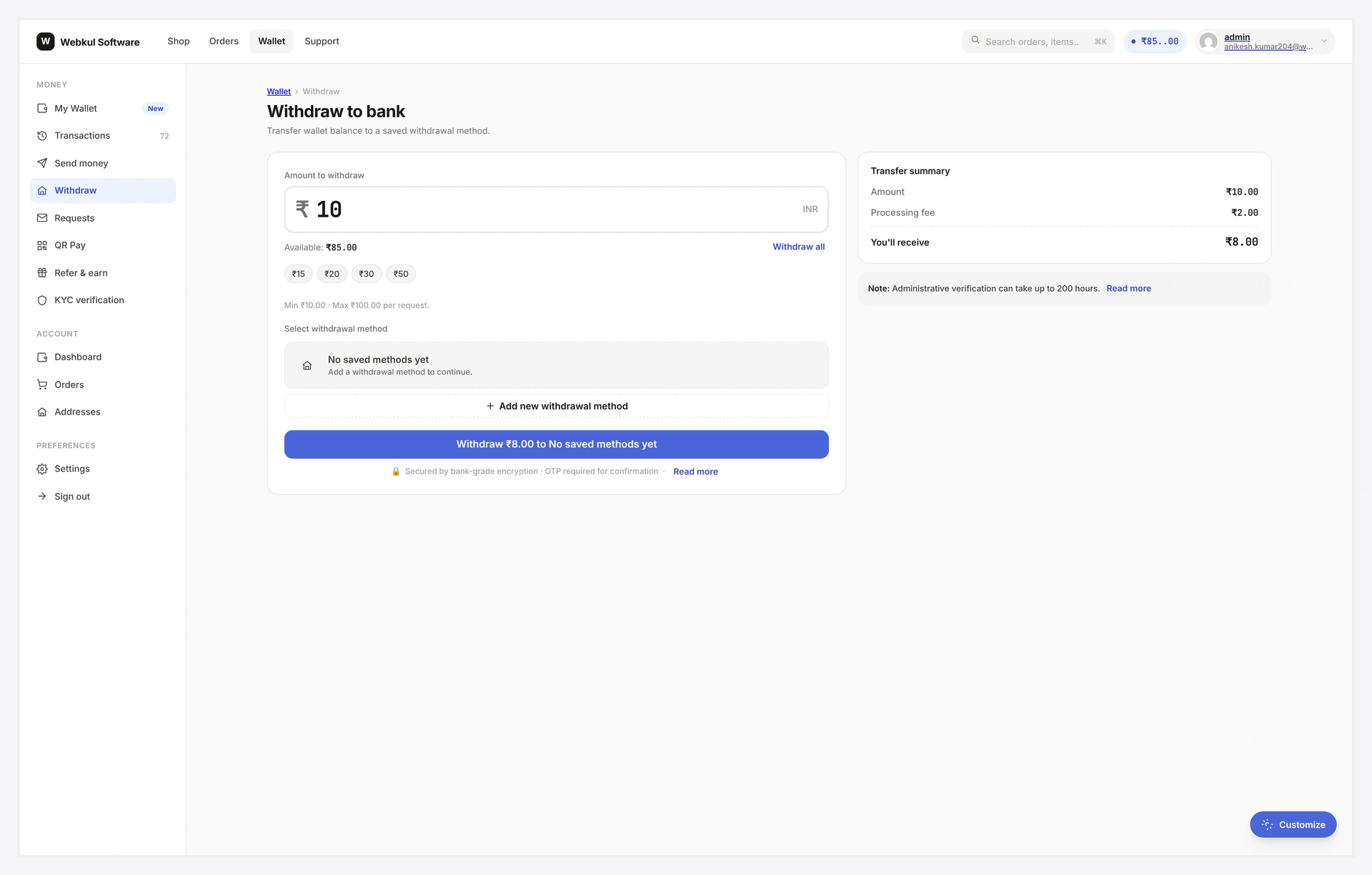
Wallet Central Withdraw — full layout with sidebar, request form, summary

List view (/wallet-central/withdrawals/)

┌─────────────────────────────────────────────────────┐
│  H1: Withdrawal requests                            │
│  Sub: All your past + pending withdrawals           │
├─────────────────────────────────────────────────────┤
│  Filter chips: All / Pending / Approved / Paid /    │
│                Rejected / Failed                     │
├─────────────────────────────────────────────────────┤
│  Row    method-icon  ₹500 → ₹475      bank          │
│         submitted 2026-04-22                        │
│         [pending pill]                              │
├─────────────────────────────────────────────────────┤
│  Row    method-icon  ₹2000 → ₹1950    paypal        │
│         submitted 2026-04-19                        │
│         [paid pill]                                 │
├─────────────────────────────────────────────────────┤
│  Pagination Prev / Next                             │
└─────────────────────────────────────────────────────┘

Each row shows: method icon → gross → net → method label → submitted date → status pill.

Click any row → opens the detail page.

Detail view (/wallet-central/withdrawals/view/{id}/)

┌─────────────────────────────────────────────────────┐
│  Breadcrumb: Withdrawals ›› #123                    │
│  H1: Withdrawal #123                                 │
│  [paid pill]                                        │
├─────────────────────────────────────────────────────┤
│  Method     Bank transfer                           │
│  Gross      ₹2000.00                                │
│  Fee (2.5%) ₹50.00                                  │
│  Net paid   ₹1950.00                                │
│  Submitted  2026-04-19 14:23                        │
│  Approved   2026-04-19 18:01                        │
│  Paid       2026-04-20 09:14                        │
├─────────────────────────────────────────────────────┤
│  Method details                                     │
│  Account: Acme Co · 1234·5678                       │
│  IFSC: HDFC0000123                                  │
├─────────────────────────────────────────────────────┤
│  Notes                                              │
│  Admin: "Funds released, please check email."       │
└─────────────────────────────────────────────────────┘

Sensitive details (bank account, PayPal email) are partially masked.

Status Pills

StatusColorMeaning
pendingamberawaiting admin
approvedblueadmin OK, payout queued or in hold
paidgreenpayout API succeeded or admin marked paid
rejectedredadmin declined; balance refunded
failedred stripedpayout API errored, admin can retry

Filter Chips

Top of list. Each chip shows count: Pending (1) Approved (2) Paid (8).

Click any chip → URL updates with the filter, list refilters server-side.

Self-Cancel

If status = pending, a Cancel request button appears on the detail page. Click → status flips to rejected, wallet refunded, email sent.

Disabled once admin approves — pre-approval only.

Re-Submit

If status = rejected or failed, a Submit again button → pre-fills the Withdraw form with the same amount + method.

Pagination

Default 10 rows per page. Prev / Next at the bottom.

Empty State

"No withdrawal requests yet. [ Withdraw now ]"

CTA jumps to the Withdraw form.

Authorization

Detail view 403s if the row doesn't belong to the requesting customer. Safe to share / link — others get an access-denied page.

Common Scenarios

"Where's my money?"

Detail view shows the timeline: submitted → approved → paid. If status paid, share the reference ID with the customer for their bank to trace.

Customer wants to cancel a request

Pre-approval — Cancel button on detail. After approval, customer must contact support.

Bulk re-submit failed requests

No bulk action — each row's Submit again button restarts the flow individually.

When Something Goes Wrong

ProblemFix
Detail page shows listURL pattern needs /withdrawals/view/{id}/ exactly
403 on own rowEnsure logged in as the row owner
Cancel button missingCancel option disabled in admin OR row already approved
Status pill colour wrongCustom CSS overriding pill styles
For developers — hooks

Hooks

HookTypeWhen
wkwp_central_withdrawals_list_queryfiltermutate the list query
wkwp_central_withdrawals_list_columnsfiltermutate column layout
wkwp_central_withdrawal_detail_payloadfiltermutate detail-view data
wkwp_central_withdrawal_cancelledactionself-cancel happened
wkwp_central_withdrawal_detail_maskfilterper-field masking override

Related

  • Withdraw
  • Withdrawal (engine)
  • Endpoint & Routing
Prev
Withdraw
Next
Send Money