
Payout Settings (PayPal + Stripe)
Where you put your PayPal + Stripe credentials so admin-approved withdrawals can pay out automatically.
Want the feature overview?
See PayPal Payout and Stripe Payout for the API call shape, sandbox vs live, and reconciliation queries.
Where
Wallet → Settings → Payout.
Two sub-sections: PayPal and Stripe.
PayPal
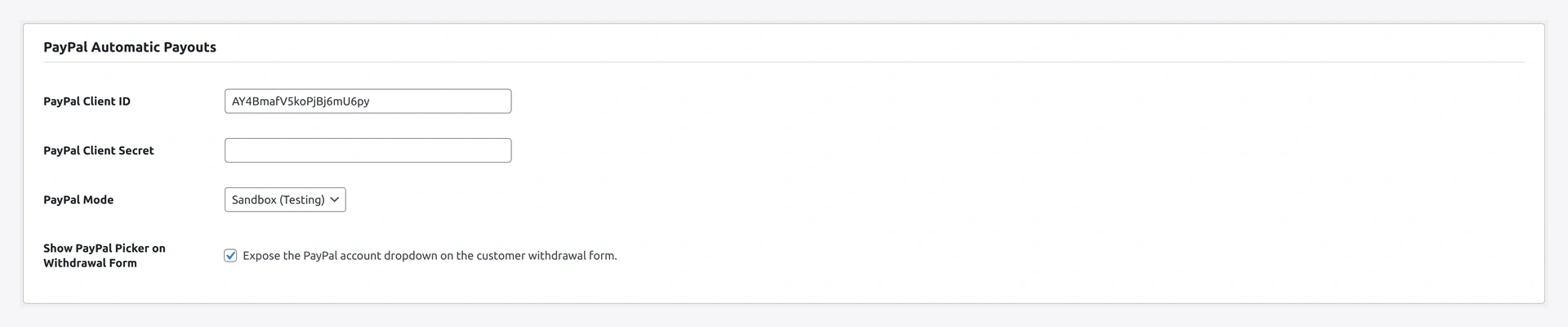
The Stripe Automatic Payouts section sits right below it on the same Settings tab:

What you need
- A PayPal Business account
- API credentials (Client ID + Secret) from your PayPal app
- Webhook URL registered in your PayPal app (for status sync)
Step-by-step Setup
1. Get API credentials
- Log in to developer.paypal.com
- Apps & Credentials
- Click Create App (sandbox first, then live separately)
- Copy Client ID + Secret
2. Plugin fields
| Field | Notes |
|---|---|
| Enable | toggle exposure on the withdrawal method radio |
| Mode | sandbox for testing / live for production |
| Sandbox Client ID | from your sandbox app |
| Sandbox Secret | from your sandbox app |
| Live Client ID | from your live app |
| Live Secret | from your live app |
| Currency | base currency for payouts (must match PayPal account) |
| Sender batch prefix | e.g. WK-WDRW- (helps reconcile) |
| Email subject (to recipient) | from PayPal — overrideable |
| Webhook URL | shown read-only — copy into PayPal app webhooks |
3. Register webhook in PayPal
In your PayPal app:
- Scroll to Webhooks
- Add the webhook URL the plugin shows (
/wp-json/wkwc_wallet/v1/paypal_webhook) - Subscribe to events:
PAYMENT.PAYOUTS-ITEM.SUCCEEDEDPAYMENT.PAYOUTS-ITEM.FAILEDPAYMENT.PAYOUTS-ITEM.REFUNDEDPAYMENT.PAYOUTS-ITEM.RETURNEDPAYMENT.PAYOUTS-ITEM.UNCLAIMED
PayPal POSTs to that URL on each event → plugin updates the matching withdrawal status.
4. Test in sandbox
- Use sandbox credentials + Mode =
sandbox - Approve a test withdrawal via admin
- Confirm webhook arrives → status flips
approved→paid - Switch to live keys when ready
5. Save
Click Save changes.
Sandbox vs Live
| Mode | Use for | Customer email |
|---|---|---|
sandbox | dev / staging | sandbox personal accounts (in developer dashboard) |
live | production | real PayPal email |
Mode mismatch
Sandbox creds with live mode (or vice versa) → "Authentication failed (invalid_client)". Plugin guards against the mistake by validating the token endpoint on save.
Sender Balance Required
PayPal Payouts withdraw from your PayPal Business balance. Top up your PayPal account before approving large withdrawals — failure mode is INSUFFICIENT_FUNDS.
Stripe
What you need
- Stripe account with Connect enabled
- Your Connect platform application live
- API secret keys (test + live)
Step-by-step Setup
1. Plugin fields
| Field | Notes |
|---|---|
| Enable | toggle exposure on withdrawal method radio |
| Mode | test for staging / live for production |
| Test Secret Key | sk_test_... |
| Live Secret Key | sk_live_... |
| Currency | base currency (sent in lower-case to Stripe) |
| Description prefix | for the Stripe transfer description |
| Auto-fetch onboarding link | when ON, generates onboarding URL when needed |
2. Customer Connect account
The plugin needs the customer's acct_xxx ID to know where to send. Two ways:
A. Auto-fetch onboarding (recommended)
Enable the toggle. When a customer requests their first Stripe withdrawal:
- Plugin creates an Express Connect account
- Saves the account ID
- Generates a Stripe-hosted onboarding URL
- Redirects customer to complete onboarding
Future withdrawals just work.
B. Bring-your-own
If you collect Stripe Connect IDs via another plugin or custom code, set user meta _wkwp_stripe_account_id from that source's hook. Wallet plugin reads from the same key.
3. Webhooks (optional)
Transfers are immediate so webhooks aren't strictly needed. Optionally subscribe to:
transfer.createdtransfer.failedtransfer.reversed
Webhook URL shown in plugin settings. Set the signing secret on the same tab.
4. Test in test mode
- Use test keys + Mode =
test - Onboard a Stripe test connected account
- Approve a test withdrawal
- Confirm Stripe transfer ID appears on the withdrawal row
- Switch to live keys when ready
5. Save
Click Save changes.
Currency Conversion
Plugin auto-converts to Stripe's smallest currency unit:
| Currency | Multiplier |
|---|---|
| USD, EUR, GBP, etc. | × 100 (cents) |
| JPY, KRW, VND | × 1 (zero-decimal) |
| BHD, KWD, OMR | × 1000 (three-decimal) |
Override via filter for unusual currencies.
Verify Both
- Set up PayPal sandbox and Stripe test
- Enable both methods in Withdrawal Settings
- As test customer → submit
100withdrawal via PayPal → admin approves → confirm sandbox PayPal account credited - Repeat for Stripe → confirm test transfer in Stripe dashboard
- Switch all to live mode
Common Combos
| Goal | Setup |
|---|---|
| PayPal-only store | PayPal live, Stripe disabled |
| Stripe-only store | Stripe live, PayPal disabled |
| Both options | Both live, customer picks at withdrawal |
| Bank-only fallback | Both disabled — admin manually transfers off-platform |
Reconciliation
Both providers tag transfers with the withdrawal row ID. Easy to reconcile per row in your accounting.
PayPal: search dashboard for WK-WDRW- prefix (or your custom prefix).
Stripe: transfer ID tr_xxx is searchable.
Troubleshooting
PayPal
| Problem | Fix |
|---|---|
Authentication failed (invalid_client) | Sandbox creds in live mode, or vice versa |
RECEIVER_UNREGISTERED | Customer has no PayPal account at that email |
INSUFFICIENT_FUNDS | Your PayPal Business balance too low |
| Webhook never fires | URL not registered in PayPal app, OR firewall blocking PayPal IPs |
Stripe
| Problem | Fix |
|---|---|
account_invalid | Customer's Stripe account closed; reject + refund |
transfers_not_allowed | Connect onboarding incomplete; resend onboarding link |
balance_insufficient | Top up your platform Stripe balance |
currency_mismatch | Customer's Stripe profile currency ≠ payout currency |