
Welcome to WP Wallet System
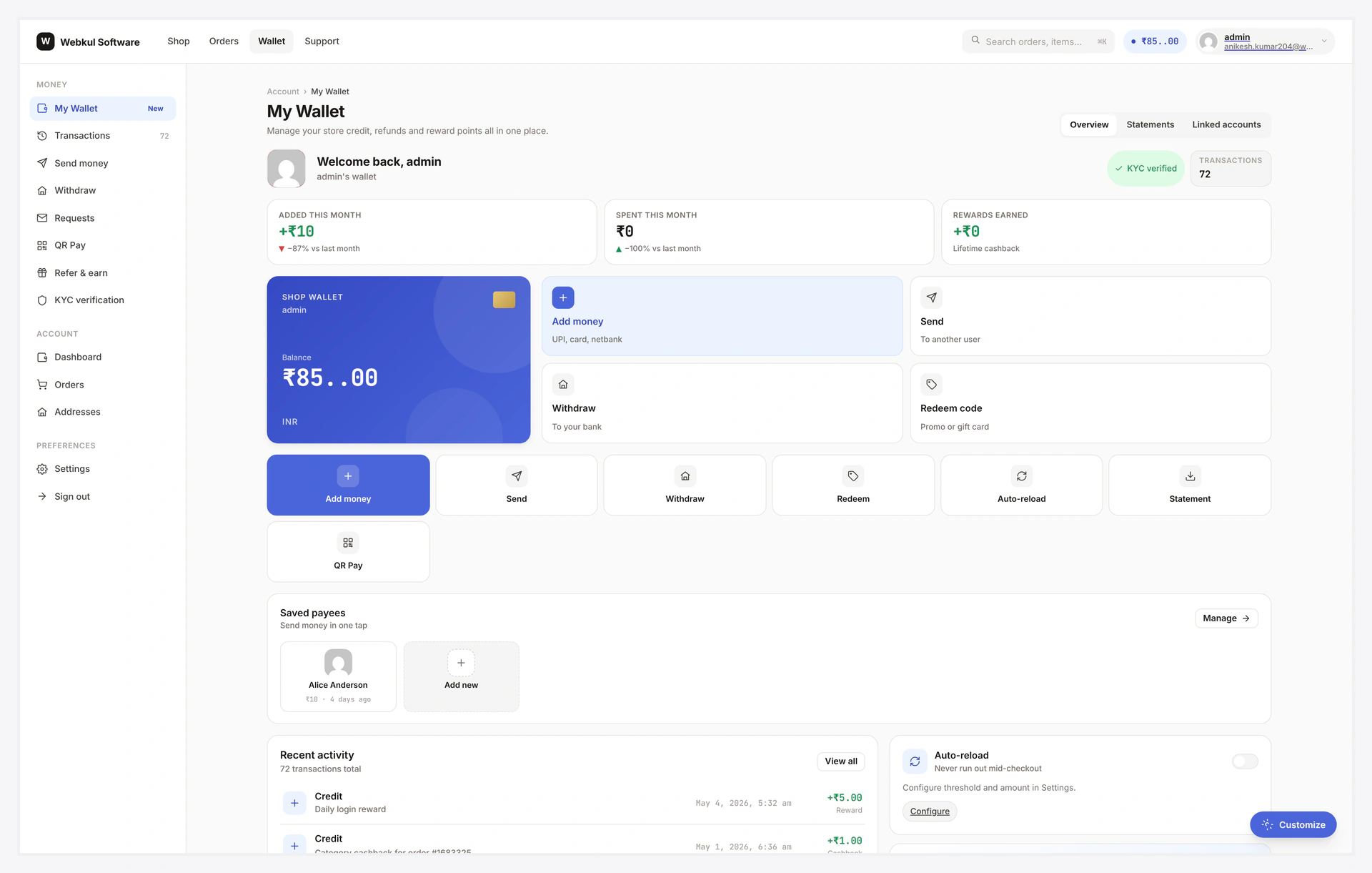
Give every WooCommerce customer a real prepaid wallet — top up, pay, refund, transfer, withdraw, earn cashback, redeem referrals, even checkout on credit. One plugin. Thirty-four feature areas. Zero monthly fees.
Store credit is more than a refund tool. Done right it shortens checkout, lifts repeat purchase, runs your loyalty programme, and replaces three other plugins (gift card, refund manager, referral). WP Wallet System ships every flow a real fintech-style wallet needs — ledger, gateway, KYC, BNPL, payouts, multi-level rewards — under one admin and one ledger.
What makes it different:
- Real ledger — every credit / debit / refund / transfer logged in
wkwc_wallet_transactions - Wallet payment gateway — pay full or partial order, split with any other gateway
- Recharge product — auto-created
wkwc_walletproduct, custom + preset top-up amounts - User-to-user transfer — OTP verified (SMS + Email), Twilio integration, transfer fee
- Cashback engine — per-product / per-category / order-total rules, % or fixed
- Withdrawal — admin approve, bank / PayPal / Stripe payout, hold period, CSV export
- Refund-to-wallet — convert WooCommerce refunds into instant credit
- BNPL — let eligible customers checkout on wallet credit, repay later
- KYC — modal upload, admin review, per-feature gating (withdrawal / transfer / checkout)
- Referral — unique alpha codes, 7-day cookie attribution, multi-level chains, promo multiplier
- QR pay — per-user QR receive, html5-qrcode scanner, AJAX transfer
- Bulk credit / debit — CSV upload, async queued processing
- Analytics — admin REST endpoints, summary + chart, cached
- HPOS + WPML + Multisite — modern WC, translations, network ready
You do not need to write code. Everything lives under WooCommerce → Webkul Addons → Wallet.
Who Is This Plugin For?
| You are... | This plugin helps you... |
|---|---|
| Store Owner | Refund to wallet instead of card — keeps the money inside the store |
| Marketplace | Pay vendors via wallet, settle with PayPal / Stripe payouts |
| Subscription Store | Auto-charge renewals against wallet balance, no card decline risk |
| Loyalty Programme | Cashback on every order — % or fixed, by product or category |
| Referral Programme | Multi-level commission chain, promo multiplier windows, alpha codes |
| BNPL Pilot | Approved customers checkout on credit, repay over N days |
| Regulated Region | KYC modal blocks withdrawal / transfer until ID approved |
| Mobile-First Store | Customer scans QR to pay another customer or vendor |
What Can This Plugin Do?
| Job | How It Helps |
|---|---|
| Replace store credit | Wallet balance with a real ledger, audit trail, manual adjust |
| Replace refund-to-card | One click — refund goes back as wallet credit |
| Replace gift cards | Recharge product covers all top-up flows + bonus % |
| Replace cashback plugin | Rule engine fires on woocommerce_order_status_completed |
| Replace referral plugin | Alpha codes, cookie attribution, multilevel chain |
| Replace withdrawal flow | Bank / PayPal / Stripe payout with admin approve gate |
| Add BNPL pilot | Eligibility by user + cart total, debt tracking, fee on unpaid |
| Add KYC | Modal upload, admin review, gates withdrawal / transfer / checkout |
How It Works
Customer adds money → Wallet credited → Pays at checkout → Wallet debited
        ↑                    ↑                                    ↓
   Recharge product   Cashback / refund / referral        Withdrawal request
                                                                  ↓
                                                    PayPal / Stripe / Bank payout
- Top up — customer buys the
wkwc_walletrecharge product (custom or preset amount, optional bonus %) - Order completes — wallet auto-credited via
woocommerce_order_status_completed - Spend — wallet payment gateway debits balance at checkout (full or split)
- Earn — cashback / referral / daily-login / refund credits flow back in
- Cash out — KYC-approved customer requests withdrawal → admin payout
- Audit — every move logged in
wkwc_wallet_transactionsledger table
Where Everything Lives in Your Admin
After activation look under WooCommerce → Webkul Addons for the wallet hub.
Admin pages (action queues + reports)
| Admin page | What you do here | Feature page |
|---|---|---|
| Wallet → Dashboard | KPI overview + quick links to pending queues | Admin Tour |
| Wallet → Transactions | View / filter / CSV-export the full ledger | Core Wallet |
| Wallet → Withdrawals | Approve / reject pending withdrawal requests | Withdrawal |
| Wallet → Refund Requests | Approve / reject customer refund-to-wallet requests | Refund to Wallet |
| Wallet → Cashback Rules | CRUD UI for cashback rules | Cashback Engine |
| Wallet → KYC Reviews | Approve / reject customer KYC submissions | KYC |
| Wallet → Bulk Credit / Debit | Mass-update wallets via CSV or manual select | Bulk Credit / Debit |
| Wallet → Analytics | KPIs + 30-day charts + CSV export | Analytics |
Settings tabs (each one its own setup page)
Wallet → Settings opens a tabbed screen. Every tab has a dedicated step-by-step setup page:
| Tab | Setup page | Feature page |
|---|---|---|
| General | General Settings | Core Wallet |
| Recharge | Recharge Settings | Recharge / Top-up |
| Checkout (gateway + discount + restriction) | Checkout Settings | Wallet Payment Gateway |
| Withdrawal | Withdrawal Settings | Withdrawal |
| Payout (PayPal + Stripe) | Payout Settings | PayPal / Stripe |
| KYC | KYC Settings | KYC |
| Cashback | Cashback Settings | Cashback Engine |
| Referral | Referral Settings | Referral Program |
| Multilevel | Multilevel Settings | Multilevel Referral |
| BNPL | BNPL Settings | Buy Now Pay Later |
| QR Pay | QR Pay Settings | QR Code Payments |
| Notifications (Email + SMS) | Notifications Settings | Email / SMS |
| Wallet Central | Wallet Central Settings | Wallet Central Overview |
| Third-Party Integrations | Integrations | — |
| API Keys | API Keys | REST API |
Full settings index: Admin Settings.
Customer side
| Surface | URL |
|---|---|
| Legacy My Wallet (decorator UI) | /my-account/my_wallet/ |
| Wallet Central (standalone) | /wallet-central/ |
The 6 Things That Make This Plugin Different
| # | Feature | Why It Matters |
|---|---|---|
| 1 | Real ledger table | Every move is a row in wkwc_wallet_transactions — auditable, exportable |
| 2 | Three payouts native | Wallet gateway + PayPal Mass Payments + Stripe transfers, not just one |
| 3 | Per-feature KYC gating | Block withdrawal but allow transfer — or any combination |
| 4 | Multi-level referral | 1-10 ancestry levels, per-level %, optional promo multiplier window |
| 5 | BNPL | Eligible users checkout with wallet even at zero balance |
| 6 | Refund-to-wallet | Customer requests refund → admin one-click → wallet credit |
Quick Navigation
Getting Started
| Step | Page | What You Do |
|---|---|---|
| 1 | Quick Start | 5-minute end-to-end test (top up + spend) |
| 2 | Installation | Upload the ZIP, activate |
| 3 | First-Time Setup | 8-step checklist with links to each settings page |
| 4 | Admin Settings (index) | Every settings tab → its own dedicated setup page |
| 5 | Admin Tour | Walk through every wallet admin page |
Navigating the docs
Two kinds of pages for every feature:
- Feature page (e.g. Withdrawal) — what it does, how customer sees it, status states, dev hooks
- Setup page (e.g. Withdrawal Settings) — step-by-step admin tab walkthrough, common combos, troubleshooting
Each page links to its pair. Use the Setup page when filling in admin fields, the Feature page when learning what the feature does.
Wallet Core
- Core Wallet — balance, ledger, manual adjust
- Wallet Payment Gateway — pay full or split
- Recharge / Top-up — recharge product, presets, custom amount
- Wallet Transfer — user-to-user with OTP
- My Wallet Page — customer dashboard tour
- Shortcodes —
[wkwp_*]reference
Earn & Reward
- Cashback Engine — per-product / per-category / order-total rules
- Referral Program — alpha codes + cookie + first-order coupon
- Multilevel Referral — 1-10 level chain commission
- Daily Login Reward — credit on first login per day
- Invite Friends — email-invite shortcode
- Deposit / Top-up Bonus — % bonus on every recharge
Spend & Payout
- Checkout Discount — fee/percent off when paying with wallet
- Checkout Restriction — per-product wallet-block + sale-item lock
- Withdrawal — request → admin approve → payout
- PayPal Payout — Mass Payments API
- Stripe Payout — Connect transfers
- Refund to Wallet — customer queue + admin approve
- Buy Now Pay Later — checkout on credit, repay over N days
Identity & Mobile
- KYC — modal upload, per-feature gating
- QR Code Payments — receive QR + html5-qrcode scanner
Admin Tools
- Admin Settings — every settings tab explained
- Bulk Credit / Debit — CSV upload + queue
- Analytics Dashboard — summary KPIs + 30-day chart
Developer
- REST API — wallets, transactions, OTP, analytics
- Filters & Hooks — full action / filter list
Help
- Troubleshooting — fixes for common errors
- FAQ — quick answers
- Glossary — plain-English terms
First time setting up a wallet store?
Start with Quick Start. Five minutes to live wallet + recharge.
Already have store credit / refund manager / referral plugin installed?
Wallet System replaces all three. Deactivate the others first, then bulk-credit existing balances via Bulk Credit / Debit.